AV Access Docking Station KVM Switch 1 Laptop & 2 Desktop PCs, Dual 4K@60Hz Monitors, EDID Emulation, 100W USB-C Charging, Gigabit Ethernet,High Refresh Rates,Ideal for Gaming, Office & Creative Work
  •  
  • $219.99 
  • $229.99
  • Free 30-day Returns
  • Ships from China.
    Price alert
    Shop it at NeweggBusiness.

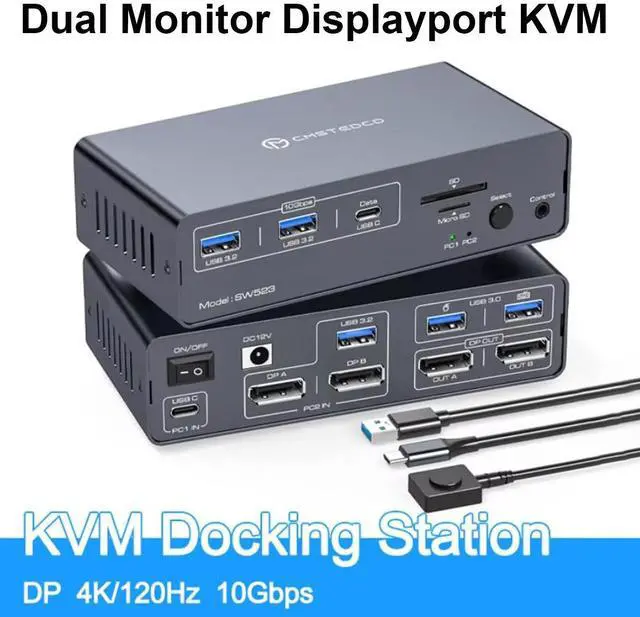
    AUTYUE DP KVM Docking Station 4K120Hz, USB C KVM Switch 2 Monitors 2 PCs Displayport Dual Monitor KVM Switch for Laptop and Desktop PC Share 13-in-1 Dock, 10Gbps USB 3.2 and USB-C data transfer Ports

    Limited time offer, ends 01/10 By Shenzhen Qiuyiyue Store

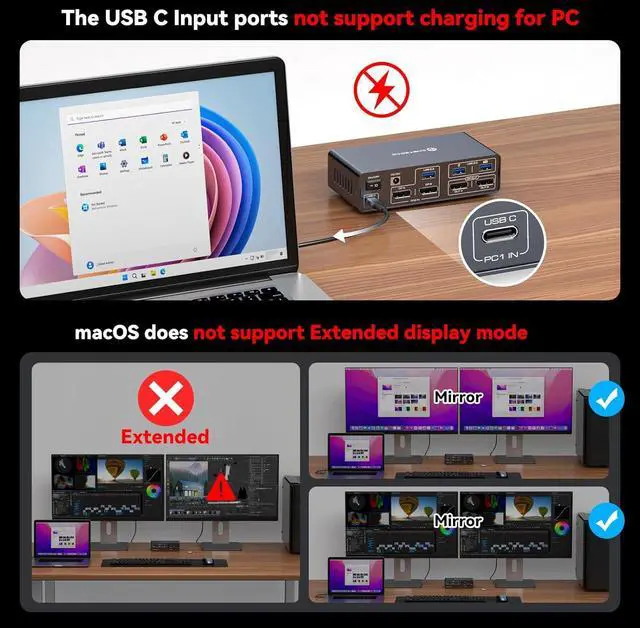
    • Read Before Purchase: 1. Only copy mode is supported for Macbook or Mac OS; 2. The USBC port connected to the computer on our switch is not equipped with the function of charging (no PD function) 3. Pls do not use DP cables longer than 9ft and lower than
    +
    +
    Overview
    Specs
    Reviews
    avatar

    Any questions? Our AI beta will help you find out quickly.

    DP KVM Docking Station 4K120Hz, USB C KVM Switch 2 Monitors 2 PCs Displayport Dual Monitor KVM Switc
    USB C dual monitor docking station


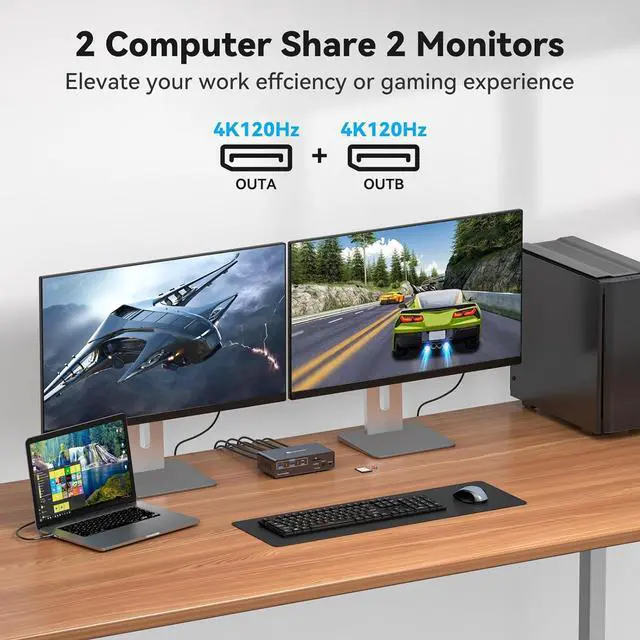
    USB C laptop and desktop computer share a 13-in-1 multi-port docking station; it can share two monitors, a mouse and a keyboard, seamlessly switch between a working laptop and a personal computer to improve efficiency.

    USB C laptop and desktop computer share a 13-in-1 multi-port docking station; it can share two monit
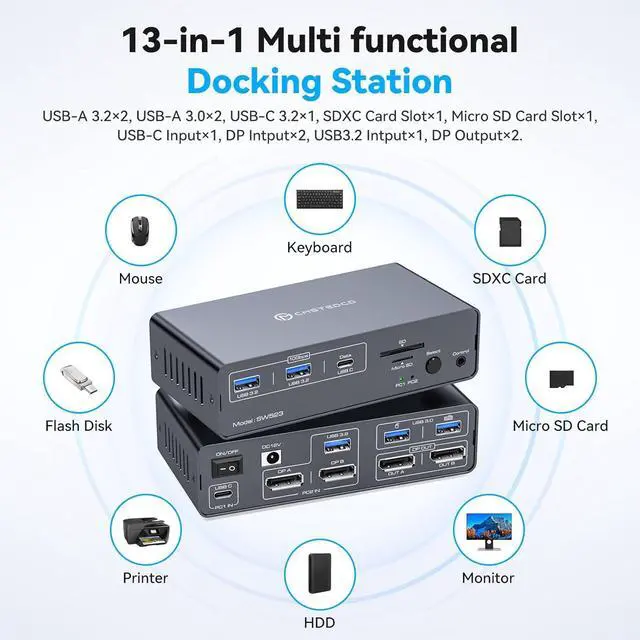
    13-in-1 Multi-Function Docking Station:


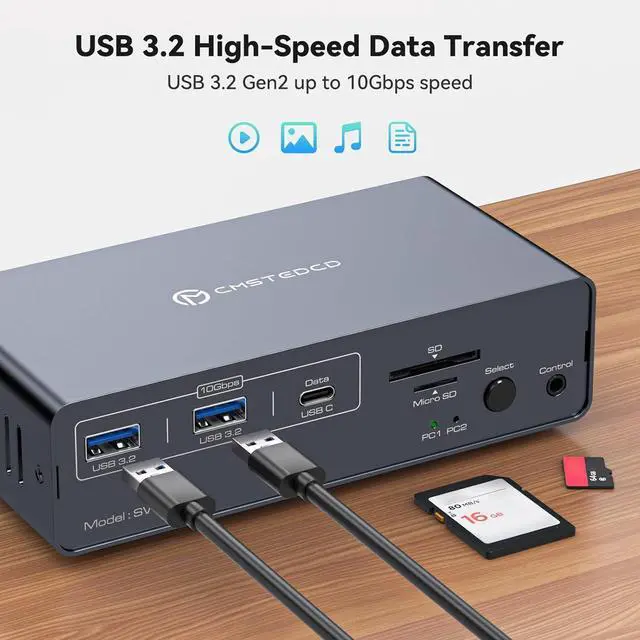
    The KVM Docking Station's multi-functional port combination greatly simplifies complex tasks. USB 3.0 ports are used for mice and keyboards; 10Gbps USB 3.2 and USB-C data transfer ports on the front panel are used for more high-speed USB devices; and the SD Card Slot and Micro SD Card Slot provide a faster method of data transfer. 


    Note: USB-C port on the front panel only supports data transfer only, PD charging and video transfer are not supported.

    13-in-1 Multi-Function Docking Station:
    Dual Mode Docking Station:

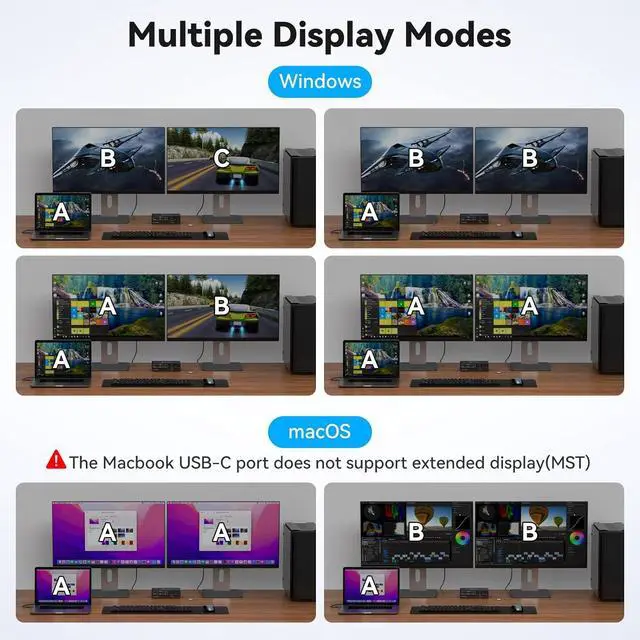
    This docking station supports dual monitor resolutions up to 4K120Hz with crisp, vibrant colours for an amazing visual experience. Dual-screen docking and dual-screen mirroring modes are supported; a feature that dramatically improves productivity for professionals who rely on multiple screens for multitasking, graphic design, video editing, or data analysis. Note: MacOS only supports mirroring mode.

    Dual Mode Docking Station:
    Dual Mode Docking Station:
    2 Switching Mode:

    Press the select button on the docking station to switch, use the desktop docking button to switch, place the docking station underneath the desktop or outside the workspace for a cleaner desktop. Supports easy switching between entertainment and work modes, allowing you to maximise your productivity without compromising your gaming experience.

    2 Switching Mode:

    Note: Keyboard shortcuts (hotkeys) are not supported.


    Product parameters:

    1) 1 USBC + two DP1.4 + 1 USB3.2 input, 2 DP1.4 output + 2 USB3.0 + 2 USB3.2 + 1 USBC+SD card+TF card

    2) Maximum USB transmission rate of 10Gbps, DP 4K120 (requires support from computer and monitor)

    3) Support key and external line control switching

    4) Working voltage DC12V1.5A, equipped with USBC-C data cable 12V1.5A power adapter

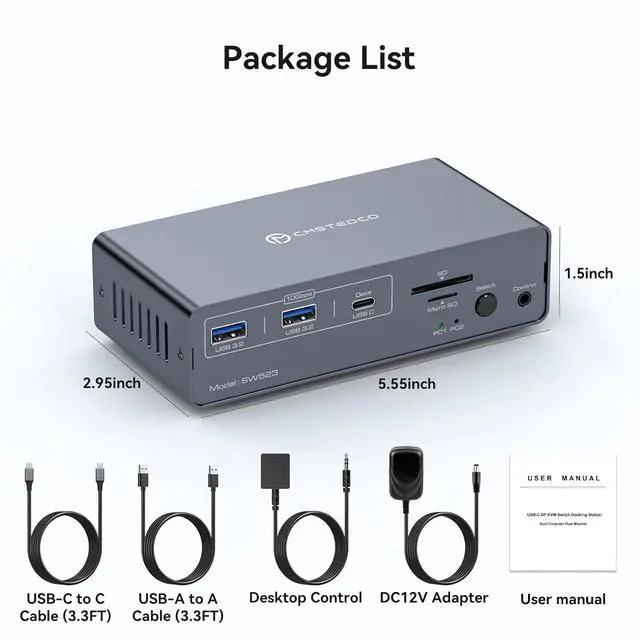
    5) L141xW75xH38mm


    Packing list:

    Machine *1

    Cowhide box *1

    Neck card *1

    USBC-C Data Cable *1

    USBA-A Data Cable *1

    12V1.5A power adapter *1

    External wiring control *1

    Instructions *1

    USB C Dual Monitor Docking Station: USB C Dual Monitor Docking Station for Laptops and
    Desktop PCs: Share two monitors, a mouse and a keyboard, switch seamlessly between your work laptop and PC, save space, keep your desktop tidy, no need to plug and unplug power repeatedly, improve work efficiency.
    Note: The computer's USB-C port needs to support Thunderbolt 3 or higher.

    Dual Mode Docking Station: This docking station supports dual monitor resolutions up to 4K120Hz with crisp, vibrant colours for an amazing visual experience. Dual-screen docking and dual-screen mirroring modes are supported; a feature that dramatically improves productivity for professionals who rely on multiple screens for multitasking, graphic design, video editing, or data analysis.
    Note: MacOS only supports mirroring mode.

    13-in-1 Multi-Function Docking Station: The KVM Docking Station's multi-functional port combination greatly simplifies complex tasks. USB 3.0 ports are used for mice and keyboards; 10Gbps USB 3.2 and USB-C data transfer ports on the front panel are used for more high-speed USB devices; and the SD Card Slot and Micro SD Card Slot provide a faster method of data transfer.
    Note: USB-C port on the front panel only supports data transfer only, PD charging and video transfer are not supported.

    2 Switching Mode: Press the select button on the docking station to switch, use the desktop docking button to switch, place the docking station underneath the desktop or outside the workspace for a cleaner desktop. Supports easy switching between entertainment and work modes, allowing you to maximise your productivity without compromising your gaming experience.

    Note: Keyboard shortcuts (hotkeys) are not supported.

    Product parameters:

    1) 1 USBC + two DP 1.4 + 1 USB 3.2 input, 2 DP 1.4 output + 2 USB 3.0 + 2 USB 3.2 + 1 USBC+SD card+TF card

    2) Maximum USB transmission rate of 10Gbps, DP 4K120 (requires support from computer and monitor)

    3) Support key and external line control switching

    4) Working voltage DC12V 1.5A, equipped with USBC-C data cable 12V 1.5A power adapter

    5) L141xW75xH38mm


    Packing list:
    Machine *1
    Cowhide box *1
    Neck card *1
    USBC-C Data Cable *1
    USBA-A Data Cable *1
    12V 1.5A power adapter *1
    External wiring control *1
    Instructions *1

    Warranty & Returns

    Warranty, Returns, And Additional Information

    Warranty

    • Please contact the Seller directly for warranty information. Warranty information may also be found on the Manufacturer's website.
    • CONTACT

    Return Policies

    Manufacturer Contact Info

    LOADING...