



• $139.99
  • Free 30-day Returns
  • Ships from China.
    Price alert
    Shop it at NeweggBusiness.

    AUTYUE KVM Switch 3 Monitors 2 Computers with Audio Microphone, HDMI + 2 DisplayPort Triple Monitor KVM Switches Support 4K@60Hz for 2 Computer Share 3 Display and 4 USB 3.0 Devices, with Wired Remote

    Limited time offer, ends 03/21 By Shenzhen Qiuyiyue Store

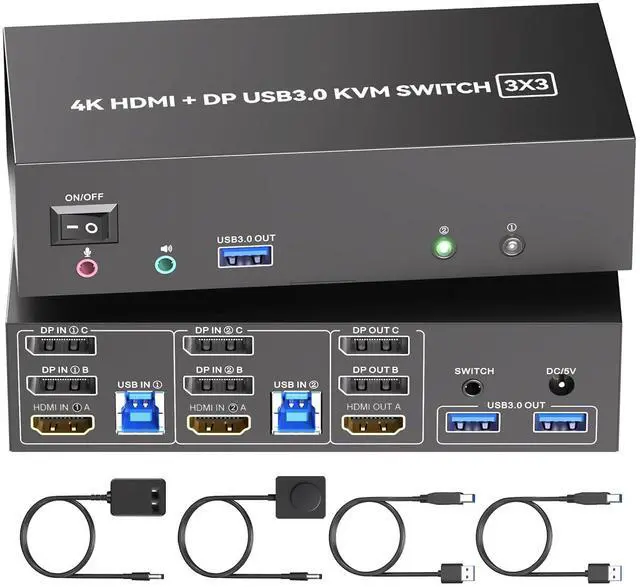
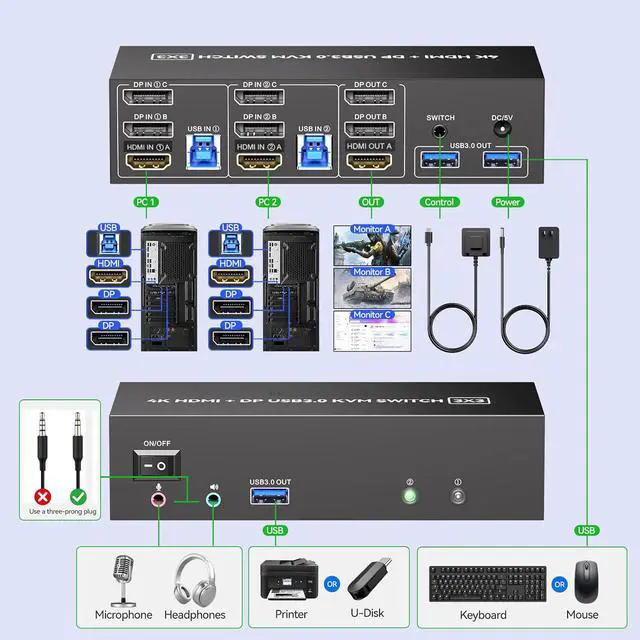
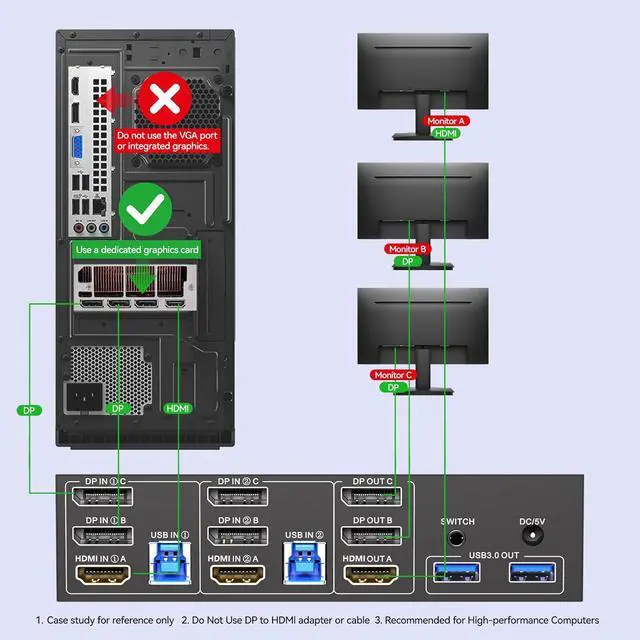
    • KVM Switch 3 Monitors 2 Computers: This KVM switch is designed for 2 computers share 3 monitors. Each computer needs 2 DisplayPort port + 1 HDMI port, please make sure that your computer has these type of ports.
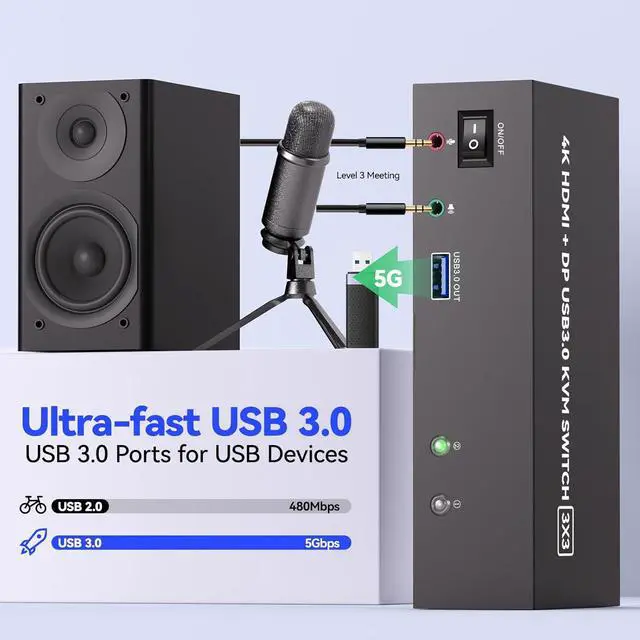
    • 3 Monitors KVM Switch With Audio: This kvm switch desigh with audio port for audio device connected. 4 USB 3.0 ports for usb devices connected, such as USB Hub, printer, etc. USB 3.0 transmission is more stable and fast. Supports ultra-fast data transfer speeds up to 5Gbps.Note: Please connect the provided USB cable to your computers to make the USB devices work properly.
    • Support 4K@60Hz: Triple Monitor KVM Switch Supports a maximum of 4K@60Hz(3840*2160) ultra HD image quality. To reach the max resolution, please ensure your connected devices, monitor, cables all all support the resolution.
    • Support 2 Switching Mode: HDMI + DisplayPort KVM switch support physical button and wired control. You can press the button on the panel or use the wired remote to switch the computers. LED light indicates which computer is running.
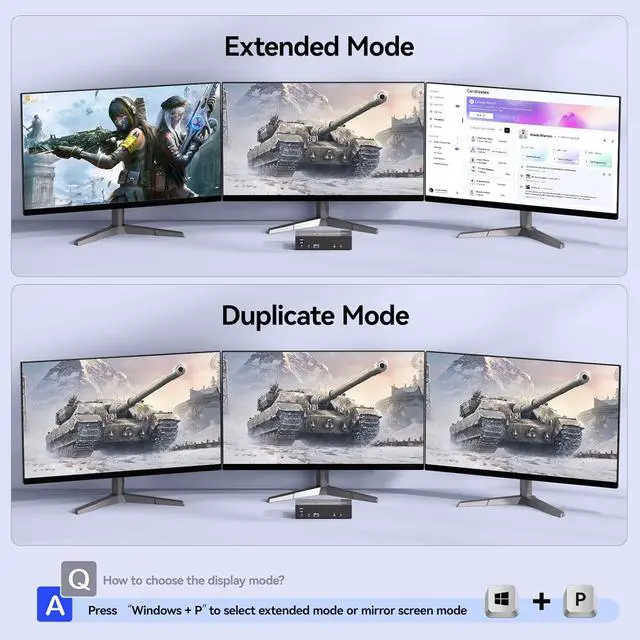
    • Supports duplicate and extend display modes: KVM Switch support extended, mirrored and splicing wall display. Support many kinds of input devices, such as PC, Laptop, Ap-p-le TV, PS3/PS4, Xbox, Raspberry Pi, DVR and most operating systems, such as Windows, Mac OS, Chrome OS, Linux, etc.
    • External 12V Power Port & Power Switch: The kvm switch is equipped with a 12V power port for high power USB devices and a separate power switch.
    +
    +
    Overview
    Specs
    Reviews
    avatar

    Any questions? Our AI beta will help you find out quickly.

    KVM Switch 3 Monitors 2 Computers with Audio Microphone, HDMI + 2 DisplayPort Triple Monitor KVM Swi


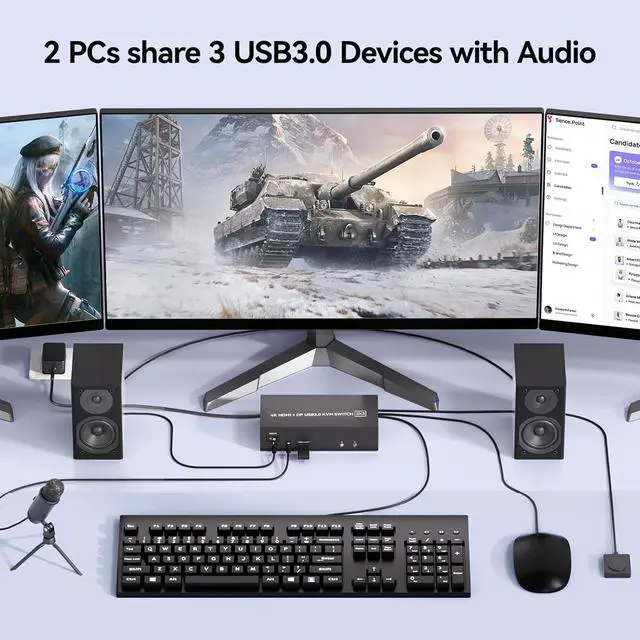
    This 2 Displayport + 1 HDMI triple monitor KVM switch is perfect for 2 computers to share 3 monitors and 4 USB 3.0 devices.

    This 2 Displayport + 1 HDMI triple monitor KVM switch is perfect for 2 computers to share 3 monitors


    To make 3 monitors working, each computer will need 1 HDMI cable + 2 DP cables + 1 USB cable connection. Please buy good HDMI and DP cable yourself, if HDMI cable and DP cable is not good enough, the screen will flicker or unstable.

    To make 3 monitors working, each computer will need 1 HDMI cable + 2 DP cables + 1 USB cable connect


    This kvm switch supports extended mode (three screens display different contents), and duplicate mode (the three screens display the same contents)

    This kvm switch supports extended mode (three screens display different contents), and duplicate mod


    This 3 monitors kvm switch desigh with audio port for audio device connected. USB 3.0 transmission is more stable and fast. Supports ultra-fast data transfer speeds up to 5Gbps. 


    Note: Please connect the provided USB cable to your computers to make the USB devices work properly.

    This 3 monitors kvm switch desigh with audio port for audio device connected. USB 3.0 transmission i


    HDMI + 2 DisplayPort 3 monitors KVM switch support physical button and wired control. You can press the button on the panel or use the wired remote to switch the computers. LED light indicates which computer is running.

    HDMI + DisplayPort 3 monitors KVM switch support physical button and wired control. You can press th
    HDMI + DisplayPort 3 monitors KVM switch support physical button and wired control. You can press th
    HDMI + DisplayPort 3 monitors KVM switch support physical button and wired control. You can press th
    HDMI + DisplayPort 3 monitors KVM switch support physical button and wired control. You can press th
    HDMI + DisplayPort 3 monitors KVM switch support physical button and wired control. You can press th
    HDMI + DisplayPort 3 monitors KVM switch support physical button and wired control. You can press th
    Features
    1. KVM Switch 3 Monitors 2 ComputersThis 3 monitors KVM switch is designed for 2 computers share 3 monitors. Each computer needs 2 DisplayPort port + 1 HDMI port, please make sure that your computer has these type of ports.
    2. 3 Monitors KVM Switch With AudioThis 3 monitors kvm switch desigh with audio port for audio device connected. 4 USB 3.0 ports for usb devices connected, such as USB Hub, hard driver, printer, scaner, etc. USB 3.0 transmission is more stable and fast. Supports ultra-fast data transfer speeds up to 5Gbps. : Please connect the provided USB cable to your computers to make the USB devices work properly.
    3. 3 Monitors KVM Switch Support 4K@60HzTriple Monitor KVM Switch Supports a maximum of 4K@60Hz(3840*2160) ultra HD image quality. To reach the max resolution, please ensure your connected devices, monitor, cables all all support the resolution.
    4. 3 Monitors kvm Switch Support 2 Switching ModeHDMI + DisplayPort KVM switch support physical button and wired control. You can press the button on the panel or use the wired remote to switch the computers. LED light indicates which computer is running.
    5. Supports duplicate and extend display modes2 Computers 3 Monitors KVM Switch Displayport support extended, mirrored and splicing wall display. Support many kinds of input devices, such as PC, Laptop, A-p-p-l-e TV, PS3/PS4, Xbox, Raspberry Pi, DVR and most operating systems, such as Windows, Mac OS, Chrome OS, Linux, etc. Suitable for multimedia classrooms, business meeting rooms, and gaming setups.
    6. External 12V Power Port & Power SwitchThe 2 computers 3 monitors kvm switch is equipped with a 12V power port for high power USB devices and a separate power switch. Simply press the power switch to restart the 3 monitor KVM when signal re-recognition is needed, eliminating the hassle of repetitive plug and unplug actions.


    Warranty & Returns

    Warranty, Returns, And Additional Information

    Warranty

    • Please contact the Seller directly for warranty information. Warranty information may also be found on the Manufacturer's website.
    • CONTACT

    Return Policies

    Manufacturer Contact Info

    LOADING...