• $219.99
  • Free 30-day Returns
  • Ships from China.
    Price alert
    Shop it at NeweggBusiness.

    AUTYUE KVM Switch 2 Monitors 3 Computers, 16-in-1 KVM Docking Station 4K@120Hz for M1/M2/M3/M4 with Ethernet EDID, USB 3.0/USB C Thunderbolt 3/4/5 in, 2 HDMI Out Extended/Mirrored Mode for Windows Mac

    Limited time offer, ends 08/08 By Shenzhen Qiuyiyue Store

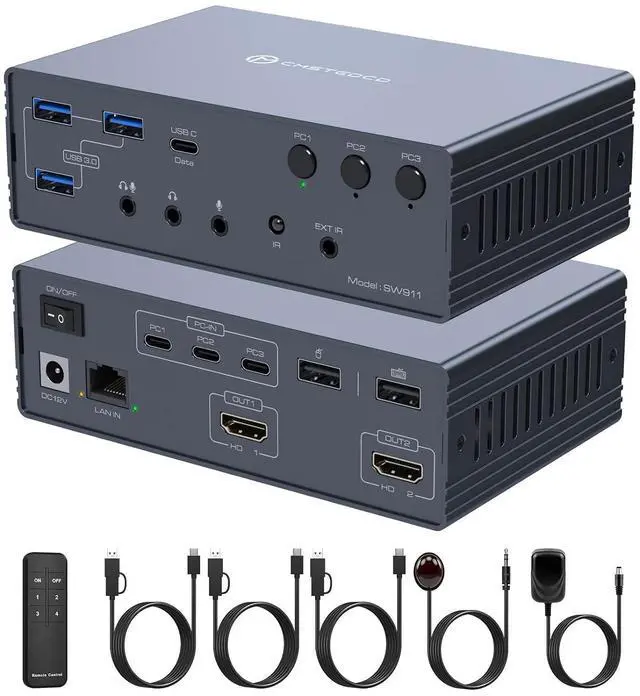
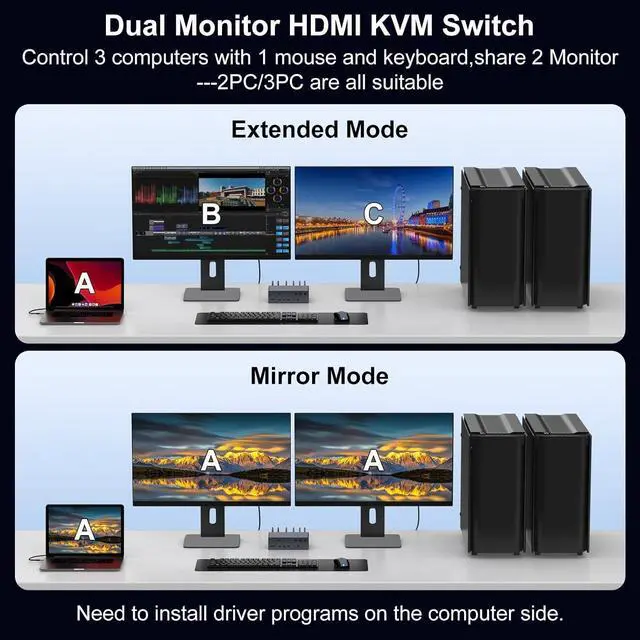
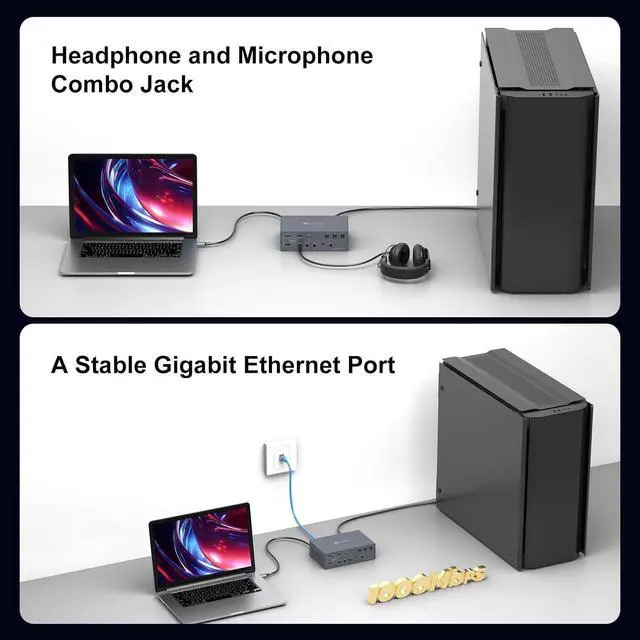
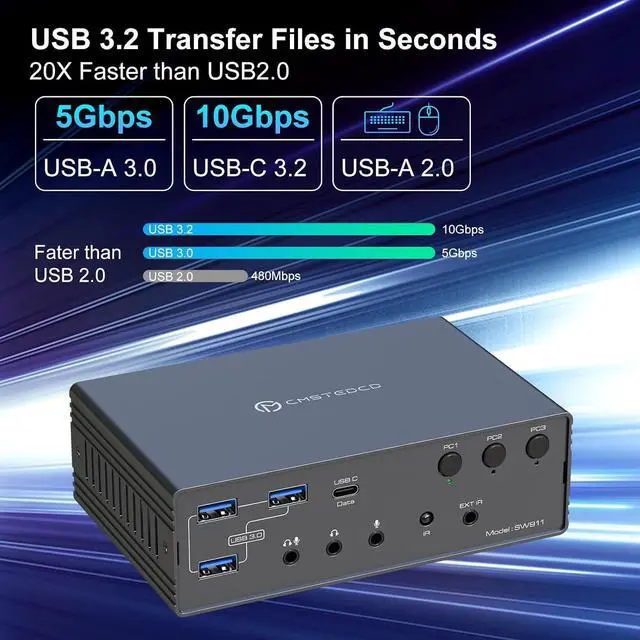
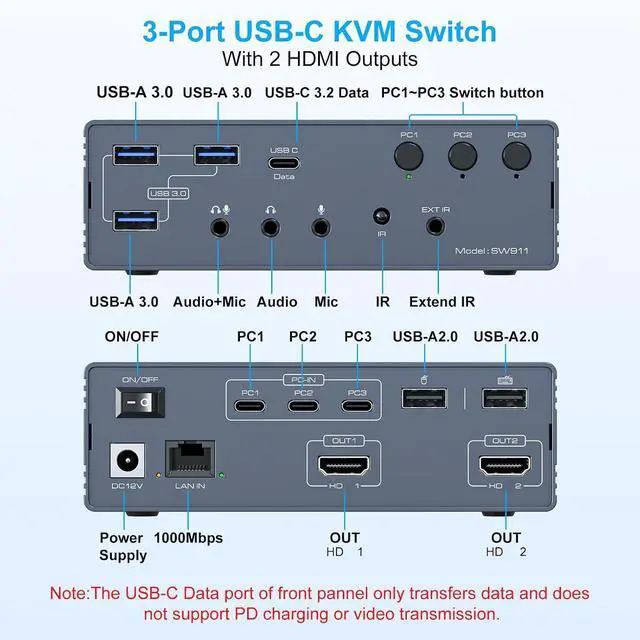
    • Kvm Switch 2 Monitors 3 Computers: This KVM docking station supports seamlessly connect 3 computers (USB 3.0/Thunderbolt) to 2 HD-MI displays, supporting mirror or extended mode. Share 1 keyboard/mouse, 3 USB 3.0 ports, 1 USB-C 3.2 port, Gigabit Ethernet, and 3.5mm audio jack to enhance workflow efficiency and save desk space.
    • Mirroring and Extended Display for MAC: The Special designed KVM switch for Mac supports dual screen extended mode and mirroring mode, enable dual screen extended mode under macOS. (compatible with MacBook Air/Pro, and Mac Mini models featuring M1/M2/M3/M4 chips) Also Supporting macOS, Windows, Chrome OS, Linux, and Android (with corresponding drivers available for download)
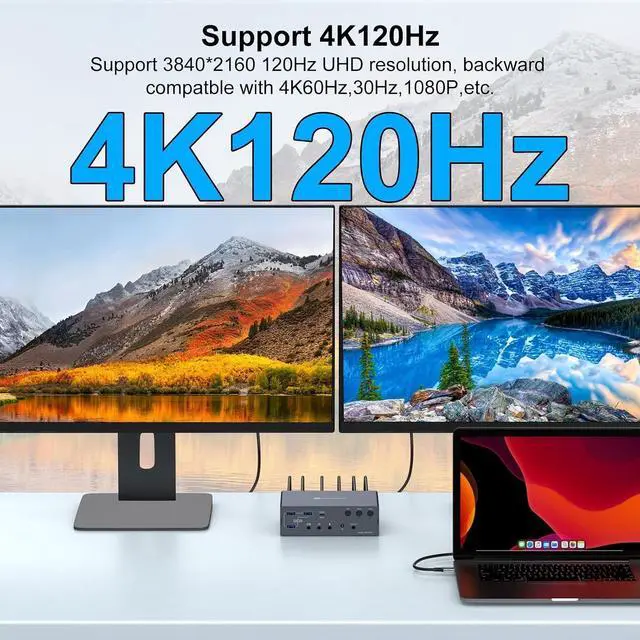
    • Plug & Play + Dual 4K@120Hz Display: Supports dual monitor with 2 dedicated HD-MI outputs, which can support up to 4K@120Hz simultaneous. To utilise 4K@120Hz, ensure both your HD-MI cable & monitor & PC support 4K@120Hz
    • Important Notice: 1. Driver Required: Install the "Displaylink driver" (refer to the manual) for proper functionality; 2. USB 3.0+: Require a USB 3.0 or higher port for connection; 3. No PD FAST Charging: This device does not support laptop power delivery. 4. System Requirements: Recommended: CPU Intel i7 or above, and 16GB RAM to ensure optimal performance
    • Supports 2 Switching Modes: 1. Remote Switching Use the remote control to switch computers. 2. Button Switching Press the PC1 - PC3 buttons on the docking station for instant, direct switching
    +
    +
    Overview
    Specs
    Reviews
    avatar

    Any questions? Our AI mode will help you find out quickly.

    KVM Switch 2 Monitors 3 Computers, 16-in-1 KVM Docking Station 4K@120Hz for M1/M2/M3/M4 with Etherne
    KVM Switch 2 Monitors 3 Computers, 16-in-1 KVM Docking Station 4K@120Hz for M1/M2/M3/M4 with Etherne
    KVM Switch 2 Monitors 3 Computers, 16-in-1 KVM Docking Station 4K@120Hz for M1/M2/M3/M4 with Etherne
    KVM Switch 2 Monitors 3 Computers, 16-in-1 KVM Docking Station 4K@120Hz for M1/M2/M3/M4 with Etherne
    KVM Switch 2 Monitors 3 Computers, 16-in-1 KVM Docking Station 4K@120Hz for M1/M2/M3/M4 with Etherne
    KVM Switch 2 Monitors 3 Computers, 16-in-1 KVM Docking Station 4K@120Hz for M1/M2/M3/M4 with Etherne
    KVM Switch 2 Monitors 3 Computers, 16-in-1 KVM Docking Station 4K@120Hz for M1/M2/M3/M4 with Etherne

    Important Notice

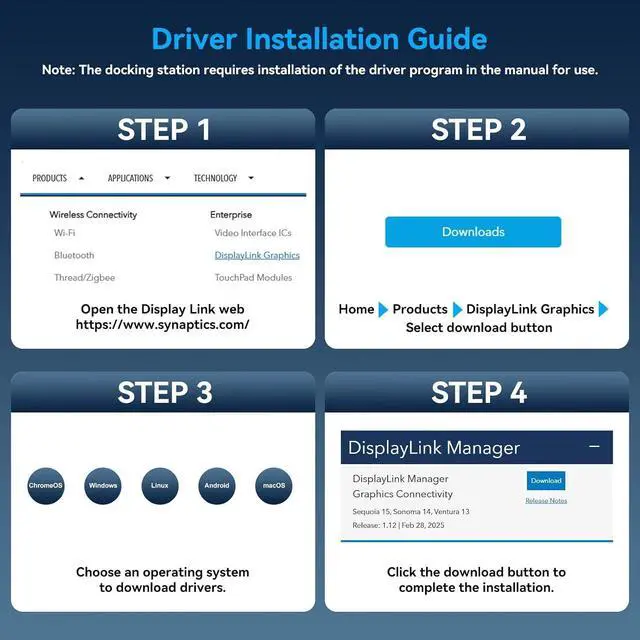
    1. Driver Required: Install the "Displaylink driver" (refer to the manual) for proper functionality; 

    2. USB 3.0+: Require a USB 3.0 or higher port for connection; 

    3. No PD FAST Charging: This device does not support laptop power delivery. 

    4. System Requirements: Recommended: CPU I-n-t-el i7 or above, and >= 16GB RAM to ensure optimal performance 

    Package
    Features
    1. Kvm Switch 2 Monitors 3 ComputersThis USB A/C docking station supports seamlessly connect 3 computers (USB 3.0/Thunderbolt) to 2 HD-MI displays, supporting mirror or extended mode. Share 1 keyboard/mouse, 3 USB 3.0 ports, 1 USB-C 3.2 port, Gigabit Ethernet, and 3.5mm audio jack to enhance workflow efficiency and save desk space
    2. Mirroring and Extended Display for MACThe Special designed KVM switch for Mac supports dual screen extended mode and mirroring mode, enable dual screen extended mode under macOS. (compatible with MacBook Air/Pro, and Mac Mini models featuring M1/M2/M3/M4 chips) Also Supporting macOS, Windows, Chrome OS, Linux, and Android (with corresponding drivers available for download)
    3. Plug & Play + Dual 4K@120Hz DisplayThis KVM switch docking station supports dual monitor with 2 dedicated HD-MI outputs, which can support up to 4K@120Hz simultaneous. To utilise 4K@120Hz, ensure both your HD-MI cable & monitor & PC support 4K@120Hz
    4. USB C Docking Station Supports 2 Switching Modes 1. Remote Switching Use the remote control to switch computers. Connecting via a wired infrared cable, aim the remote at the infrared receiver to switch devices remotely. 2. Button Switching Press the PC1 - PC3 buttons on the docking station for instant, direct switching


    Important Notice

    1. Driver Required: Install the "Displaylink driver" (refer to the manual) for proper functionality;

    2. USB 3.0+: Require a USB 3.0 or higher port for connection;

    3. No PD FAST Charging: This device does not support laptop power delivery.

    4. System Requirements: Recommended: CPU I-n-tel i7 or above, and 16GB RAM to ensure optimal performance


    Warranty & Returns

    Warranty, Returns, And Additional Information

    Warranty

    • Please contact the Seller directly for warranty information. Warranty information may also be found on the Manufacturer's website.
    • CONTACT

    Return Policies

    Manufacturer Contact Info

    LOADING...