AUTYUE 4K@120Hz Mac Docking Station KVM Switch for 2 Laptops 2 Monitors, Thunderbolt Dock KVM Switch with 2 USB-C MST Ports, 1G Ethernet, Headphone and Microphone Port Supports Extended/Mirrored Mode
Limited time offer, ends 08/08 By Shenzhen Qiuyiyue Store
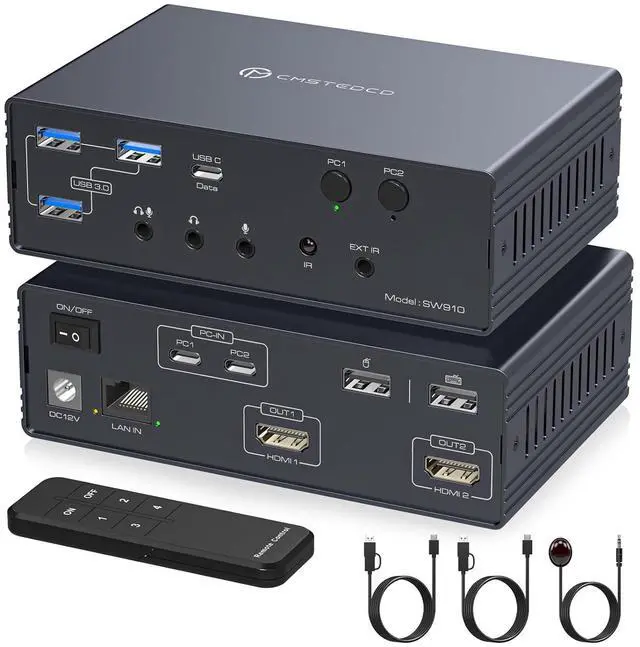
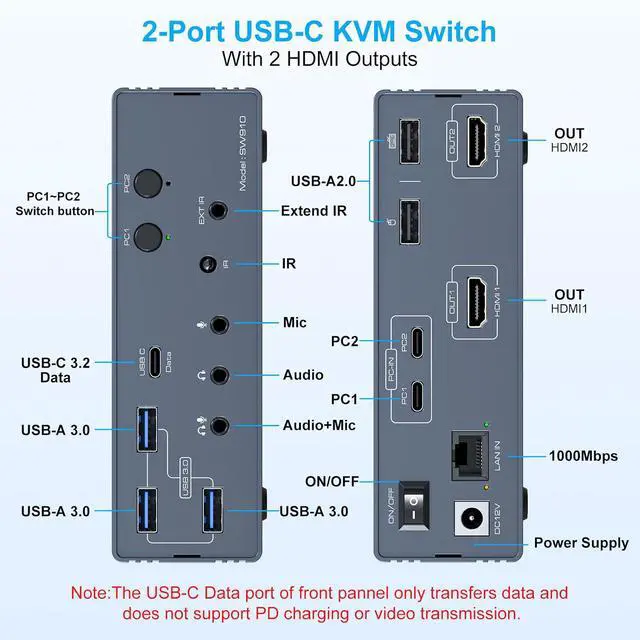
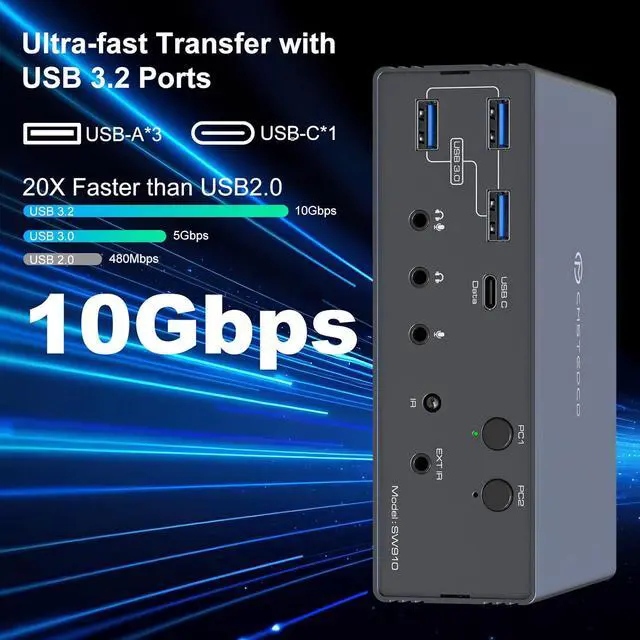
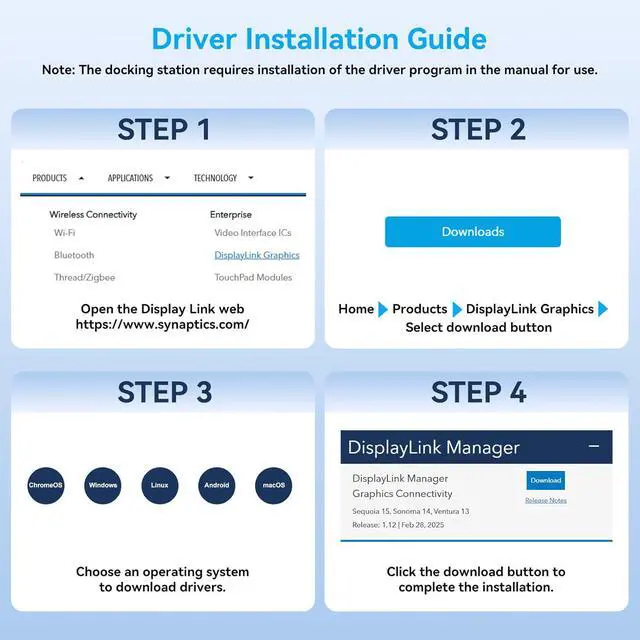
KVM switch docking station: This USB C KVM switch docking station mirrors or extends the screen output of 2 computers with USB 3.0 or Thunderbolt ports to 2 HD-MI monitors. You can control both computers with just one keyboard, one mouse and the 2 screens. Equipped with a USB 3.2 port (10Gbps), USB 3.0 ports, Gigabit Ethernet and a combined audio/microphone jack, replaces all port ports of laptops for a tidy, professional server room configuration. Note: For proper operation, installation of driver is required. Detailed installation instructions can be found in the product manual.
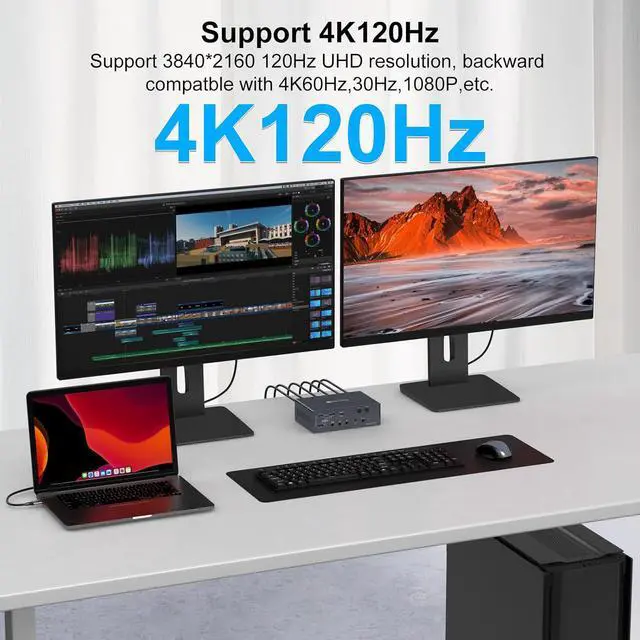
Dual 4K 120Hz output: This KVM switch supports the connection of 2 computers to 2 monitors via HD-MI and offers an extremely smooth 4K resolution with 120Hz on both displays. Backwards compatible with 4K@60Hz, 1080p@60Hz and 720p.
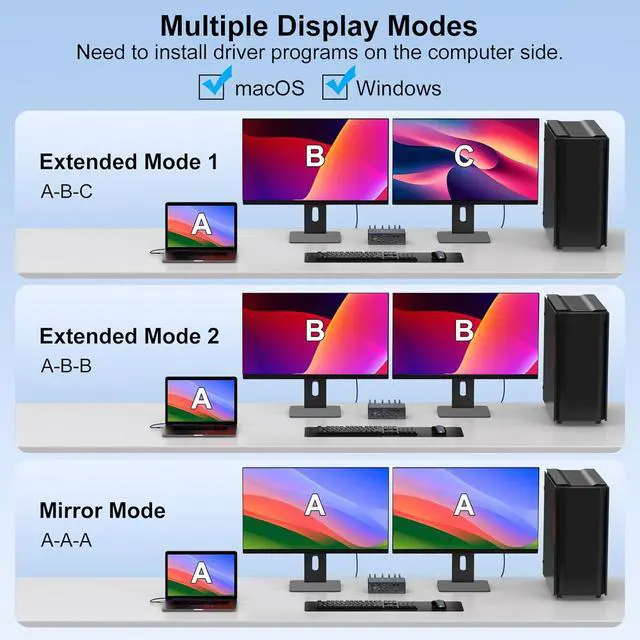
Supports mirroring and extended display for Mac: This kvm switch for two screens breaks the technical limit of macOS and thus supports the extended display mode. It offers true advanced mode for MacBook models with M1, M2, M3 or M4 chips, and delivers stunning image output at up to 3840x2160@120Hz to boost the productivity of Mac users.
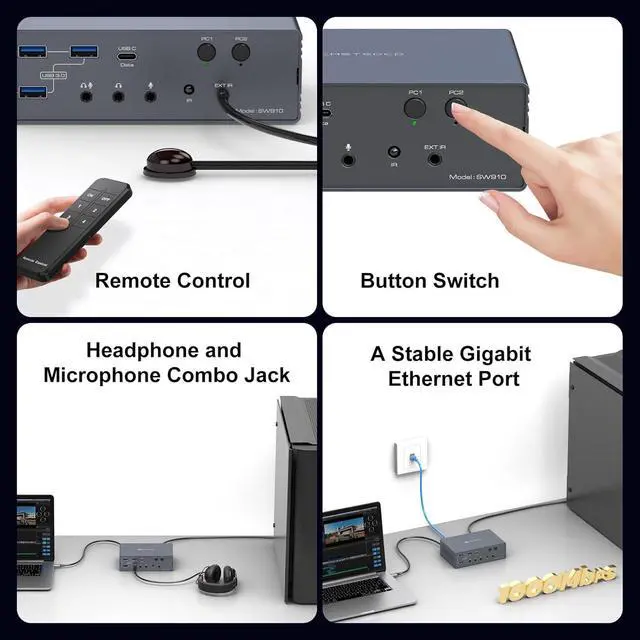
Remote or button switching: Remote switching: connect the included IR extension cable to the "EXT IR" port of the product. Point the remote control at the extension cable and press the button to switch. Button switching: simply press the PC1 or PC2 button directly on the hub to switch. Note: Hotkey switching is not supported.
+
+
Overview
Specs
Reviews
Any questions? Our AI mode will help you find out quickly.
Try me now
Features
KVM switch docking station: This USB C KVM switch docking station mirrors or extends the screen output of two computers with USB 3.0 or Thunderbolt ports to two HD-MI monitors. You can control both computers with just one keyboard, one mouse and the two screens. Equipped with a USB 3.2 port (10Gbps), USB 3.0 ports, Gigabit Ethernet and a combined audio/microphone jack, replaces all port ports of laptops for a tidy, professional server room configuration. Note: For proper operation, installation of driver is required. Detailed installation instructions can be found in the product manual (English language not guaranteed)
Dual 4K 120Hz output: This kvm switch docking station 2 pc 2 monitors supports the connection of two computers to two monitors via HD-MI and offers an extremely smooth 4K resolution with 120 Hz on both displays - ideal for demanding tasks such as video editing, CAD, trading or games with high frame rate. Backwards compatible with 4K@60Hz, 1080p@60Hz and 720p, it delivers stunning images, whether from game consoles or immersive movies at high frame rate. Note: To use 4K@120Hz, both your HD-MI cable and monitor must support this specification. The device requires a USB 3.0 port or higher quality port as input source
Supports mirroring and extended display for Mac: This kvm switch docking station 2 PC 2 monitors HD-MI for two screens breaks the technical limit of macOS and thus supports the extended display mode. It offers true advanced mode for MacBook models with M1, M2, M3 or M4 chips, and delivers stunning image output at up to 3840x2160@120Hz to boost the productivity of Mac users. Note: This device does not support charging (Power Delivery) of laptops. Operation takes up system resources of the computer. A CPU from I-n-t-el C-o-re i7 / A-M-D R-yz-en 7 or comparable and at least 16 GB memory are recommended
Remote or button switching: the kvm docking station for two laptops for two screens supports two switching modes. Remote switching: connect the included IR extension cable to the "EXT IR" port of the product. Point the remote control at the extension cable and press the button to switch. This allows the hub to be positioned outside your immediate workspace. Button switching: simply press the PC1 or PC2 button directly on the hub to switch. Note: Hotkey switching is not supported
Wide compatibility: This Thunderbolt docking station for portable computers with two monitors is seamlessly compatible with Windows, macOS (including the real extension mode), Linux and Chrome OS. The connection is easy via Thunderbolt 3/4, USB-C or USB-A 3.0 (or higher). Two high-quality cables are included (USB-A / USB-C to USB-C cable), which provides maximum flexibility when connecting to your devices
Learn more about the AUTYUE SW910
Model
Series
KVM Docking Station
Model
SW910
Details
Type
KVM Switch 2 Laptops 2 Monitors
PC Connectors
USB C in, HD-MI Out
Computer Connections
2 Ports
Monitor Connections
2 Ports
Video Resolution
4K@120Hz
PC Selection
Push Buttons
Monitors Supported
HDMI, HDMI
LED Indicators
Yes
Features
Audio Features
Offers audio and microphone switching
Power Features
Come with DC 12V Power Adapter
USB Features
with USB support
Application
This USB C KVM switch docking station mirrors or extends the screen output of two computers with USB 3.0 or Thunderbolt ports to two HD-MI monitors.
Dimensions & Weight
Dimensions
14.1 x 6.8 x 3.8 centimetres
Weight
Equipped with a USB 3.2 port (10Gbps), USB 3.0 ports, Gigabit Ethernet and a combined audio/microphone jack, replaces all port ports of laptops for a tidy, professional server room configuration.
Package Contents
Package Contents
1 x KVM Switch, 3 x USB Cable, 1 x IR Remote, 1 x IR extension cable, 1 x Power Adapter, 1 x User Manual
Additional Information
First Listed on Newegg
July 30, 2026
Customer Reviews of the AUTYUE SW910
There are no reviews yet.
Do you own this product?
Warranty & Returns
Warranty, Returns, And Additional Information
Warranty
Please contact the Seller directly for warranty information. Warranty information may also be found on the Manufacturer's website.