
  • $159.99
  • Free 30-day Returns
  • Ships from China.
    Price alert
    Shop it at NeweggBusiness.

    AUTYUE KVM Switch 3 Monitors 2 Computers 8K@60Hz 4K@144Hz, Triple Monitor HD-MI + 2 DP KVM Switch for 2 Computers Share 3 Displays and 4 USB 3.0 Device,with Wired Remote,USB Cable & 12V Power Adapter

    Limited time offer, ends 08/15 By Shenzhen Qiuyiyue Store

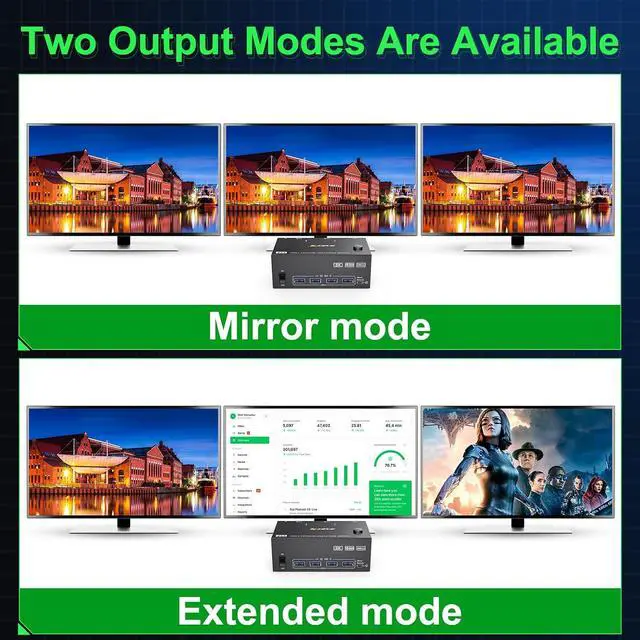
    • Triple Monitor KVM Switch: This 3 monitor KVM switch allows 2 computers to share 3 monitors and 4 USB 3.0 ports (for wired/wireless keyboard,mouse,U disk, etc.). Support mirror and extended display modes. Please Note: mirror mode can output 3 identical screens and extended mode can output 3 different screens.
    • Ultra HD 8K: KVM Switch 3 Monitor Support resolution up to 8K@60Hz/ 4K@144Hz and backward compatible with lower resolution. Please use DP1.4 and HD-MI2.1 cables to connect this KVM Switch.
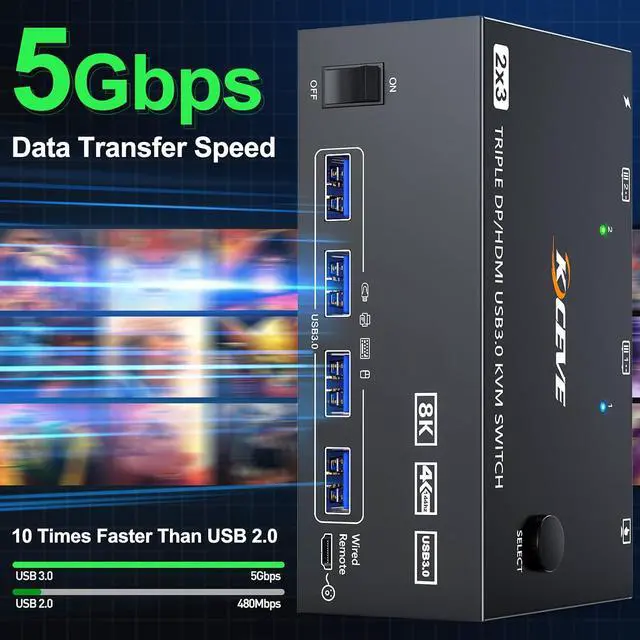
    • with 4 USB 3.0 Ports: KVM switch with 4 integrated USB 3.0 ports,supports ultra-fast 5Gbps data transmission,.Backward compatibility with USB 2.0/1.1.
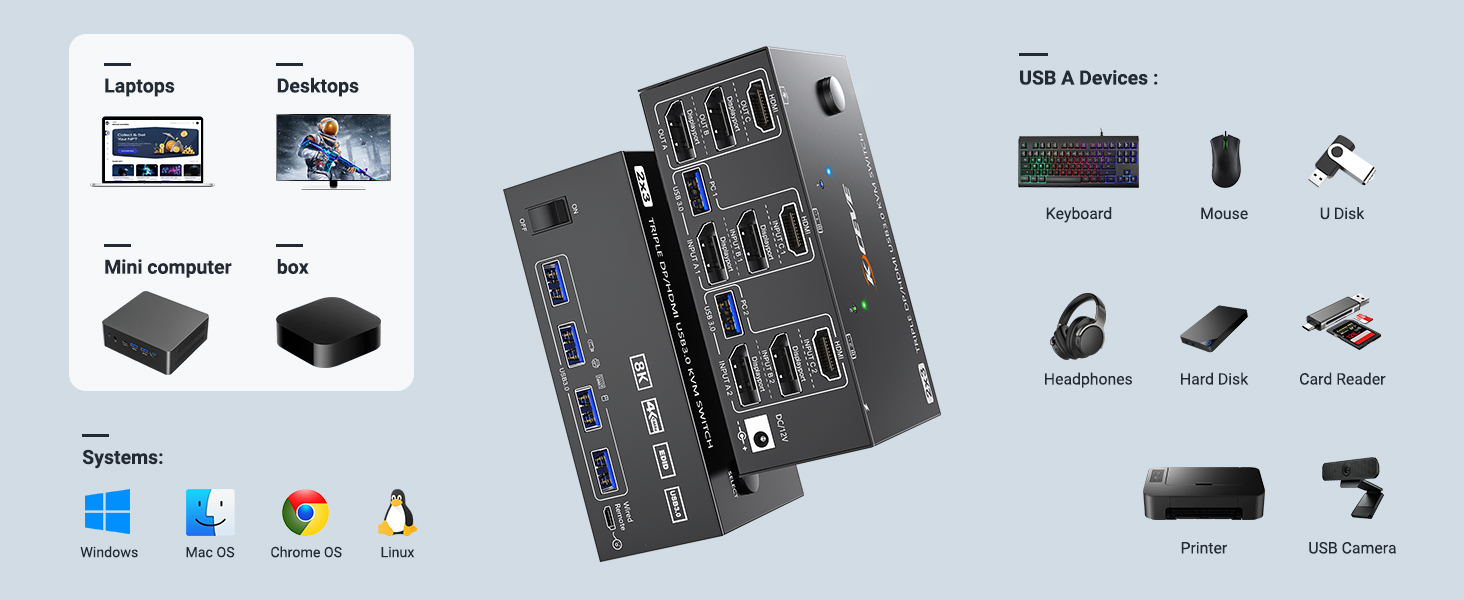
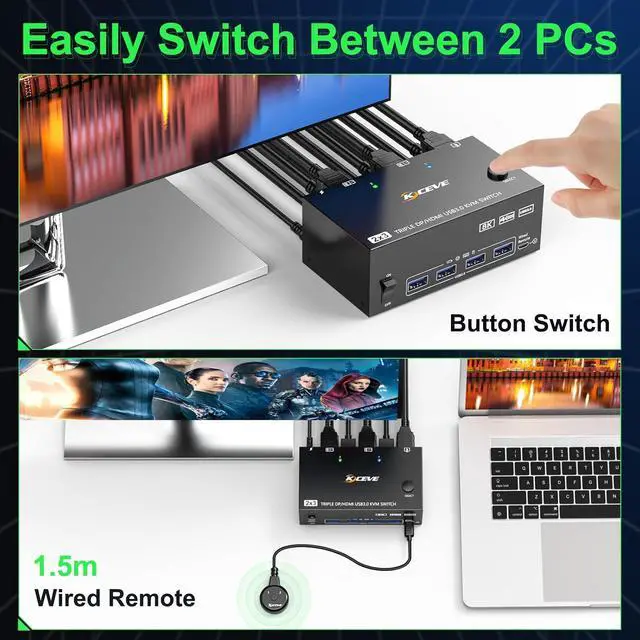
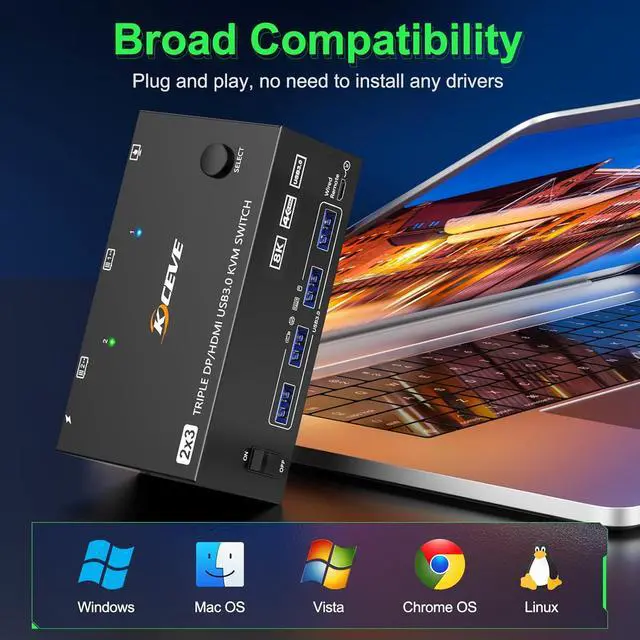
    • Compatibility & 2 Switch Mode: KVM switch driver-free for Windows, Mac, Linux and most other major OS. Support desktop and laptop.it is widely applied for home,Office,Game,etc..You can press the button on the panel or use the wired remote (included) to switch the computers.Two color LED indicate the active computer.
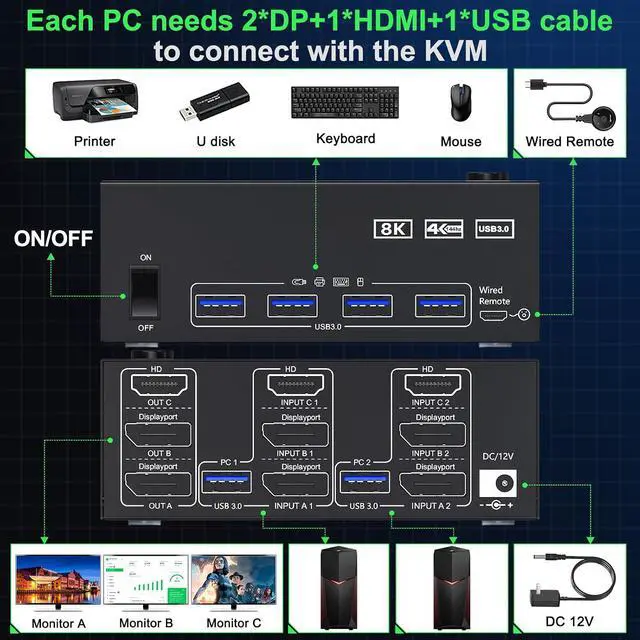
    • Note: Each PC needs 1* HDMI + 2* DP + 1* USB Cable be connected to get triple screens display properly. Adapters will be needed if your PC does not have 2*DP+1*HDMI ports. This USB3.0 KVM Switch supports converters and docking stations. Converters: such as DP to HDMI, USB C to DP/HDMI adapter; USB C Docking station for laptop need to support extended output (triple monitor or dual monitor output).
    • Package included: 1x 3 Monitors KVM switch,2x USB 3.0 Cable, 12V Power Adapter, 1x Wired Remote, 1x User's Manual.
    +
    +
    Overview
    Specs
    Reviews
    avatar

    Any questions? Our AI mode will help you find out quickly.

    Triple Monitors KVM Switch -- 2 Computers Share 3 Monitors and 4 USB Devices

    3 Monitors KVM Switch -- 2 Computers Share 3 Monitors and 4 USB Devices


    Supports mirror mode and extended mode output
    Supports mirror mode and extended mode output
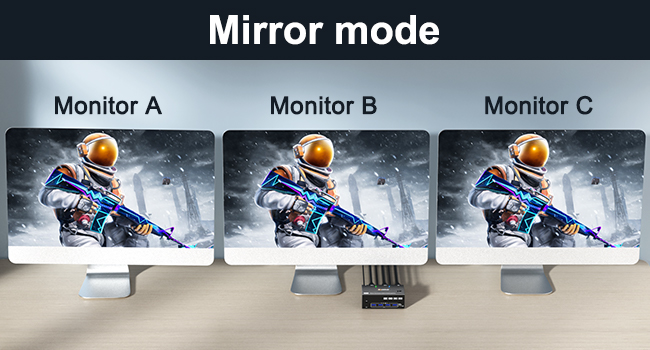
    Mirror mode: 3 monitors output the same screen


    How to set the mirror mode

    Windows OS: Press the shortcut key "WIN+P" and then select "mirror" below;

    Mac OS: Select [A-p-p-l-e Icon] [System Preferences], click [Display] [Arrange], and then check [Mirror Display];
    Mirror mode: 3 monitors output the same screen
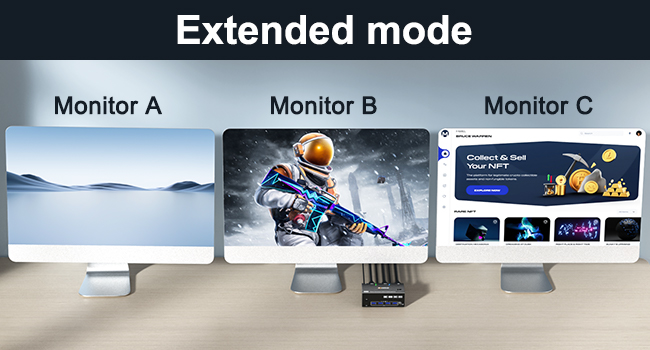
    Extended mode: 3 monitors output different screens


    How to set the extended mode

    Windows OS: Press the shortcut key "WIN+P" and then select "Extension" below;

    Mac OS: When [Mirror Display] is unchecked, "Extended Mode" can be achieved.

    Extended mode: 3 monitors output different screens
    Connection steps:


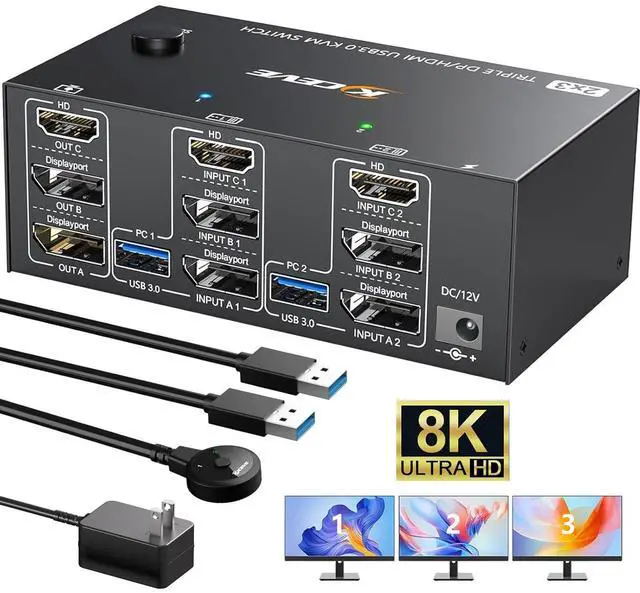
    Step 1. Connect 2*DP cables+1*HDMI+1*USB-A cable between PC 1 and KVM (INPUT A1, INPUT B1, INPUT C1, USB 3.0).

    Step 2. Connect 2*DP cables+1*HDMI+1*USB-A cable between PC 2 and KVM (INPUT A2, INPUT B2, INPUT C2, USB 3.0).

    Step 3. Connect 2*DP+1*HDMI cables between the KVM (OUT A, OUT B, OUT C) and your 3 monitors.

    Step 4. Connect the DC12V power adapter.

    Step 5. Insert your USB devices(keyboard mouse and U disk) into the USB port on the KVM.

    Connection steps:
    Connection steps:
    Connection steps:
    Connection steps:
    Connection steps:
    Connection steps:
    Connection steps:

    Advantages:

    • 2 computers share 4 peripheral USB devices (keyboard mouse,printer, USB drive, etc) and 3 monitors.
    • KVM triple monitors support extended and mirror display.
    • Support wired or wireless keyboard and mouse.
    • Cross support most major OS including Windows, Linux, Mac OS.
    • Switching modes: Button switch and wired remote (1.5m),switch between 2 computers just need 2-4 seconds, fast and convenient.
    • 1*HDMI+2* Displayport KVM Switch : HD-MI support resolution up to 8K@60Hz/4K@60Hz;Displayport support resolution up to 8K@30Hz/4K@144Hz.

    NOTE:

    1. Macbook Air and Macbook pro13 with M1 and M2 chips do not support expanded 3-screen output.
    2. Before purchasing this 3 monitor KVM switch, please make sure that connecting your computer directly to 3 monitors can work normally,Otherwise, the KVM will not be available.
    3. Not supporting EDID emulation.
    Attention

    Input Tip: 

    2*DP+1*HD-MI+1*USB (for PC 1,PC 2). Desktop: The graphics card is required to have at least 2*DP+1*HD-MI ports;Laptop: It is required to be able to expand at least 2*DP+1*HD-MI ports (for use with a USB C docking station) 

    Output Tip: 

    2*DP+1*HD-MI+4*USB 3.0 (for 3 monitor and peripheral USB devices).It is recommended to use 2*DP monitor + 1 HD-MI monitor, supporting DP to HD-MI cable or converter. 

    Resolution

    HD-MI: up to 8K@60Hz; Displayport: up to 8K@30Hz,The final resolution also depends on your computer, monitor and the version and length of DP and HD-MI cables 

    About Power Supply: 

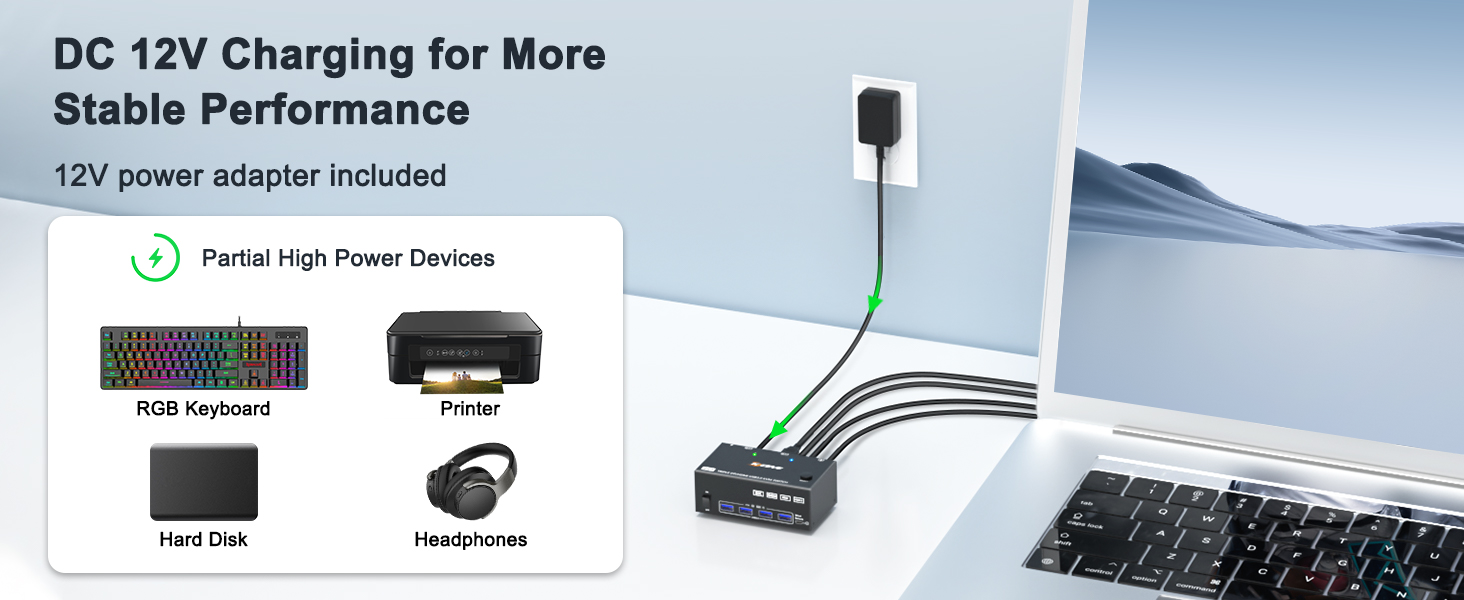
    KVM switch can be powered by USB cables connected to the 2 computers. Using the equipped DC12V power adapter can effectively solve the problem of insufficient power supply caused by connecting high-power USB devices. 

    Important Note 

    The use of 3 monitors KVM switch will be affected by cables. If the cable version is lower or the cable is too long, the monitor will not work. It is recommended to use HD-MI2.0 and DP1.4 version cables to connect the KVM, and the length of a single cable should not exceed 1.5m. 

    Package Content:

    1x Triple Monitor KVM Switch, 2x USB 3.0 Cable, 1x Power Adapter, 1x Wired Remote, 1x User's Manual.1 year warr-anty, including replacement with new products 

    Features
    1. Triple Monitor KVM Switch This 3 monitor KVM switch allows 2 computers to share 3 monitors and 4 USB 3.0 ports (for wired/wireless keyboard,mouse,U disk, etc.). Support mirror and extended display modes. : mirror mode can output three identical screens and extended mode can output three different screens.
    2. KVM Switch 3 Monitors KVM Switch 3 Monitor Support resolution up to 8K@60Hz/ 4K@144Hz and backward compatible with lower resolution. Please use DP1.4 and HD-MI2.1 cables to connect this 2 computers 3 monitors KVM Switch.
    3. DHMI Displayport KVM Switch . KVM switch 2 computers 3 monitors with 4 integrated USB 3.0 ports,supports ultra-fast 5Gbps data transmission,.Backward compatibility with USB 2.0/1.1
    4. & The KVM switch triple monitor driver-free for Windows, Mac, Linux and most other major OS. Support desktop and laptop.it is widely applied for home,Office,Game,etc..You can press the button on the panel or use the wired remote(included) to switch the computers.Two color LED indicate the active computer.
    5. : *-+*+* be connected to get triple screens display properly. Adapters will be needed if your PC does not have 2*DP+1*HD-MI ports. This USB3.0 KVM Switch supports converters and docking stations.:such as DP to HD-MI, USB C to DP/HD-MI adapter; need to support extended output (triple monitor or dual monitor output).
    6. KVM switch triple monitor , , , 2 , , . Note: INPUT A1/A2 is output by OUT A, INPUT B1/B2 is output by OUT B, and INPUT C1/C2 is output by OUT C. Cross output is not supported.
    7. :1x 3 Monitors KVM switch,2x USB 3.0 Cable, 12V Power Adapter, 1x Wired Remote, 1x User's Manual. 12 months war-ranty, any questions about the 3 monitor KVM switch, we provide complete after-sales (including technical support and replacement)


    Warranty & Returns

    Warranty, Returns, And Additional Information

    Warranty

    • Please contact the Seller directly for warranty information. Warranty information may also be found on the Manufacturer's website.
    • CONTACT

    Return Policies

    Manufacturer Contact Info

    LOADING...