• $129.99
  • Free 30-day Returns
  • Ships from China.
    Price alert
    Shop it at NeweggBusiness.

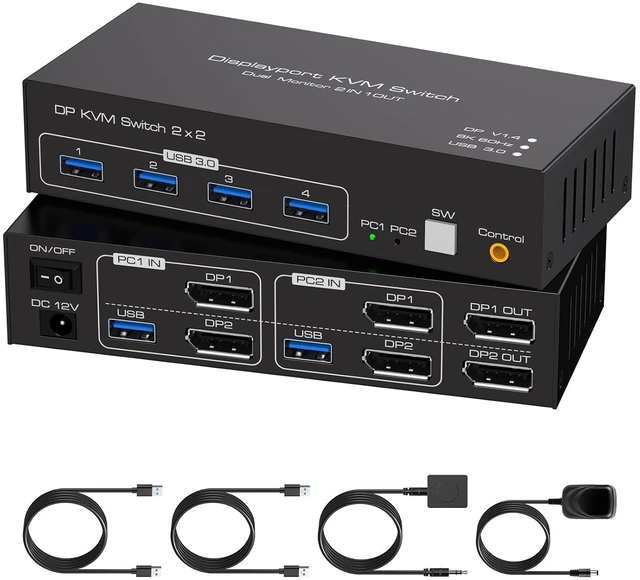
    AUTYUE 2 Port Displayport KVM Switch 2 Monitors 2 Computers 8K60Hz KVM Switch Dual Monitor with USB 3.0 Ports Sharing Mouse Keyboard Support Extended/Mirror Modes with USB Cables & Desktop Controller

    Limited time offer, ends 09/26 By Shenzhen Qiuyiyue Store

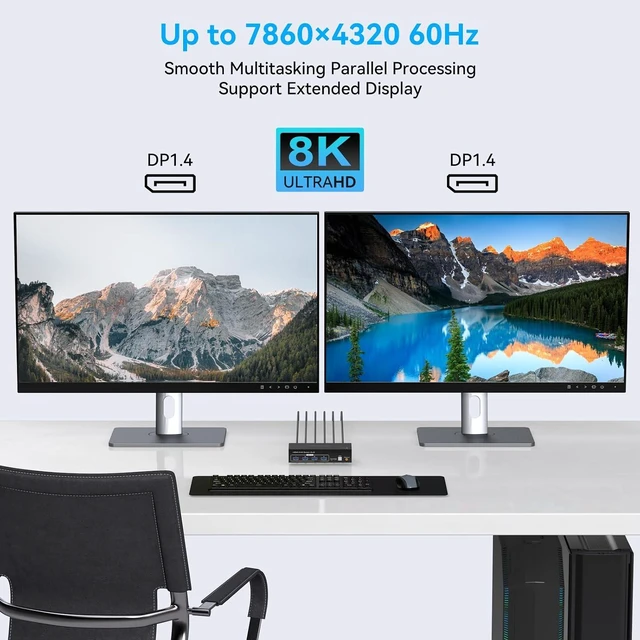
    • Ultra-high-definition 8K image quality: This kvm switch supports the resolution and refresh rate up to 8K60Hz/4K120Hz, and has lower resolutions such as backwards compatibility 2K, 1080P and 720P.
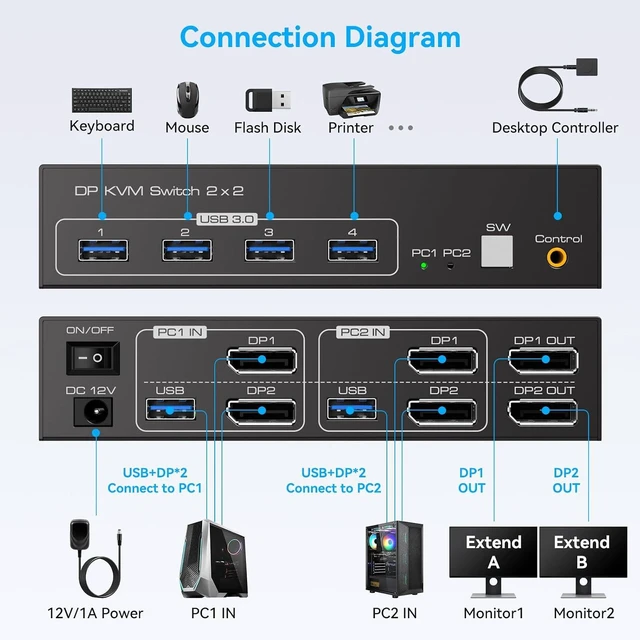
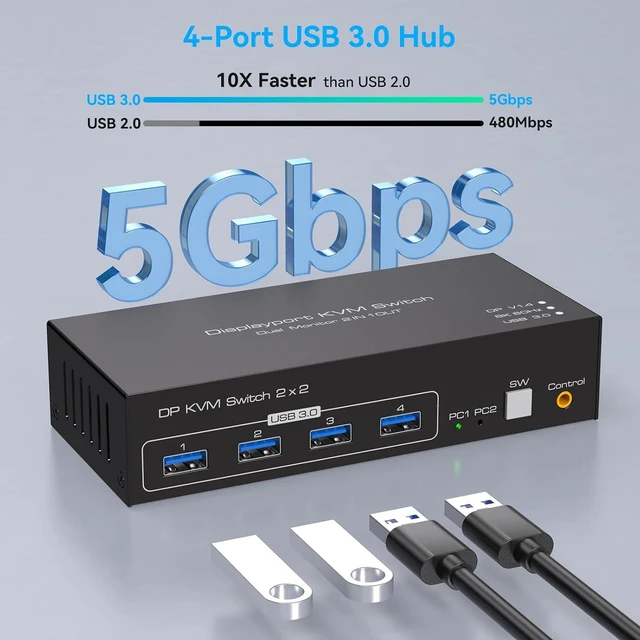
    • One set of keyboard and mouse controls 2 computers: Equipped with 4 USB 3.0 high-speed interfaces, which can control 2 computers through the same set of keyboard and mouse and share 2 DP monitors at the same time. It can also share printers, USB drives and other USB peripherals synchronously, which greatly simplifies the switching operation of multiple devices and effectively improves the work efficiency of dual-screen office and creative design.
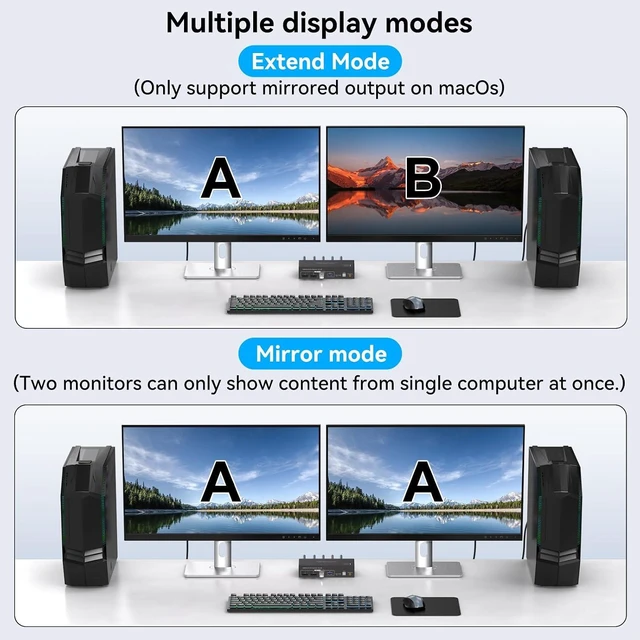
    • Mirror and Extended Mode: Supports mirror (copy) and extended dual display modes. Open the extended mode, you can drag and drop the application window to another screen freely, releasing more operation space and easily coping with multi-tasking office; In mirror mode, the 2 screens output exactly the same picture, which is very suitable for PPT demonstration, work display and other scenes. (Note: The computer itself is required to support multi-monitor output. )
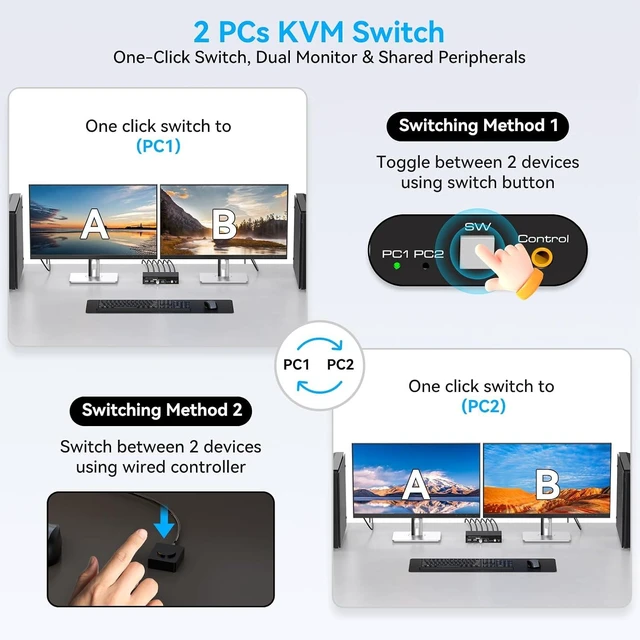
    • Two switching modes: This kvm switch can be switched by buttons or desktop controller. Key Switching: You can switch the signal source by pressing "SW" on the panel. Desktop controller switching: Connect the attached desktop controller to the KVM switch, and the signal source can be switched through the controller. (Note: The LED indicator indicates the active signal source.)
    +
    +
    Overview
    Specs
    Reviews
    avatar

    Any questions? Our AI mode will help you find out quickly.

    2 Port Displayport KVM Switch 2 Monitors 2 Computers 8K60Hz KVM Switch Dual Monitor with USB 3.0 Por
    2 Port Displayport KVM Switch 2 Monitors 2 Computers 8K60Hz KVM Switch Dual Monitor with USB 3.0 Por
    2 Port Displayport KVM Switch 2 Monitors 2 Computers 8K60Hz KVM Switch Dual Monitor with USB 3.0 Por
    2 Port Displayport KVM Switch 2 Monitors 2 Computers 8K60Hz KVM Switch Dual Monitor with USB 3.0 Por
    2 Port Displayport KVM Switch 2 Monitors 2 Computers 8K60Hz KVM Switch Dual Monitor with USB 3.0 Por
    2 Port Displayport KVM Switch 2 Monitors 2 Computers 8K60Hz KVM Switch Dual Monitor with USB 3.0 Por
    2 Port Displayport KVM Switch 2 Monitors 2 Computers 8K60Hz KVM Switch Dual Monitor with USB 3.0 Por
    2 Port Displayport KVM Switch 2 Monitors 2 Computers 8K60Hz KVM Switch Dual Monitor with USB 3.0 Por
    2 Port Displayport KVM Switch 2 Monitors 2 Computers 8K60Hz KVM Switch Dual Monitor with USB 3.0 Por
    Features
    1. Ultra-high-definition 8K image quality This dual monitor kvm switch supports the resolution and refresh rate up to 8K60Hz/4K120Hz, and the color transition is exquisite and natural, and the picture is transparent and fault-free, which restores the real image details to you, and has lower resolutions such as backwards compatibility 2K, 1080P and 720P. (Note: In order to get the best display effect, please ensure that your host, monitor and cable all need to support 8K60 Hz, and the DP cable needs to be equipped by itself. )
    2. One set of keyboard and mouse controls two computers This 2 in 2 out KVM switch is equipped with four USB 3.0 high-speed interfaces, which can control two computers through the same set of keyboard and mouse and share two DP monitors at the same time. It can also share printers, USB drives and other USB peripherals synchronously, which greatly simplifies the switching operation of multiple devices and effectively improves the work efficiency of dual-screen office and creative design.
    3. Mirror and Extended Mode This KVM Switch 2 Computers 2 Monitores supports mirror (copy) and extended dual display modes. Open the extended mode, you can drag and drop the application window to another screen freely, releasing more operation space and easily coping with multi-tasking office; In mirror mode, the two screens output exactly the same picture, which is very suitable for PPT demonstration, work display and other scenes. (Note: The computer itself is required to support multi-monitor output. )
    4. 5Gbps high-speed USB 3.0 port This KVM switch dual monitors is equipped with four USB 3.0 ports, which can be connected to printers, scanners, USB flash drives, mobile hard disks and other peripherals. Its data transmission speed is as high as 5Gbps, which is 10 times that of USB 2.0, with no delay and no performance attenuation, and backwards compatibility USB 2.0/1.1/1.0 and so on.
    5. Two switching modes This displayport kvm switch can be switched by buttons or desktop controller. Key Switching: You can switch the signal source by pressing "SW" on the panel. Desktop controller switching: Connect the attached desktop controller to the KVM switch, and the signal source can be switched through the controller. (Note: The LED indicator indicates the active signal source. You can observe the LED indicator to see the active signal source. )
    6. Plug-and-play, stable operation This KVM Switch 2 monitors is plug-and-play, without drivers and complicated settings. Equipped with a metal shell, it has good heat dissipation and durability. At the same time, it is equipped with a 12V/1A power adapter, which can provide stable current and ensure the stable operation of the equipment.
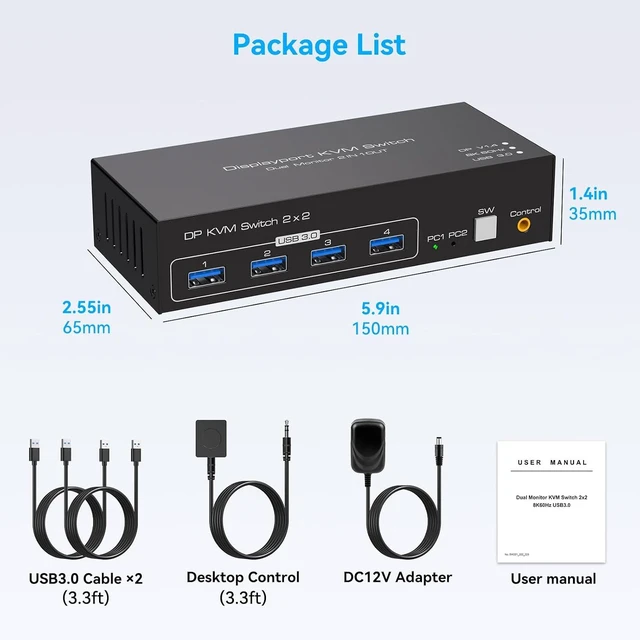
    7. Packing List and After-sales Service The package contains KVM switch ×1, USB 3.0 cable ×2, DC 12V power adapter ×1, external wire control ×1 and user manual ×1. If you have any questions, please feel free to contact us, and we will wholeheartedly provide professional after-sales support.


    Warranty & Returns

    Warranty, Returns, And Additional Information

    Warranty

    • Please contact the Seller directly for warranty information. Warranty information may also be found on the Manufacturer's website.
    • CONTACT

    Return Policies

    Manufacturer Contact Info

    LOADING...