• $119.99
  • Free 30-day Returns
  • Ships from China.
    Price alert
    Shop it at NeweggBusiness.

    AUTYUE USB C HDMI Displayport KVM Switch for 1 Laptop & 1 Desktop PC Share 2 Monitors, 4K@60Hz Dual Monitors Type C HDMI + Displayport KVM Switches with 100W PD for 1 PC 1 Laptop Share Mouse Keyboard

    Limited time offer, ends 09/26 By Shenzhen Qiuyiyue Store

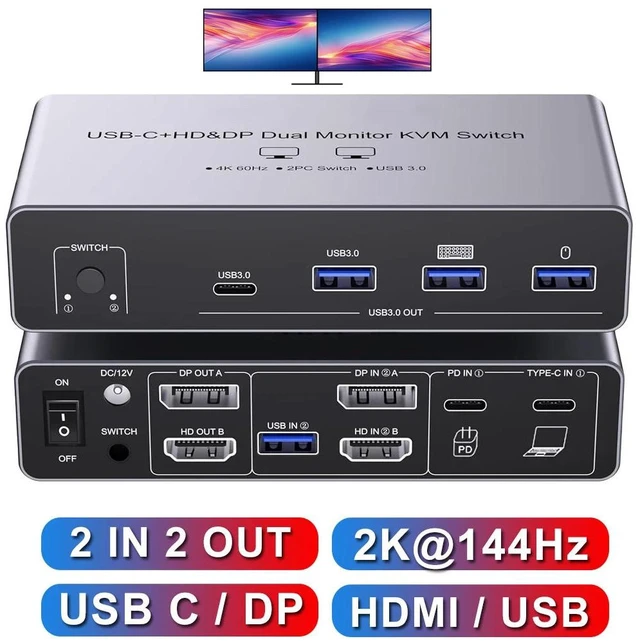
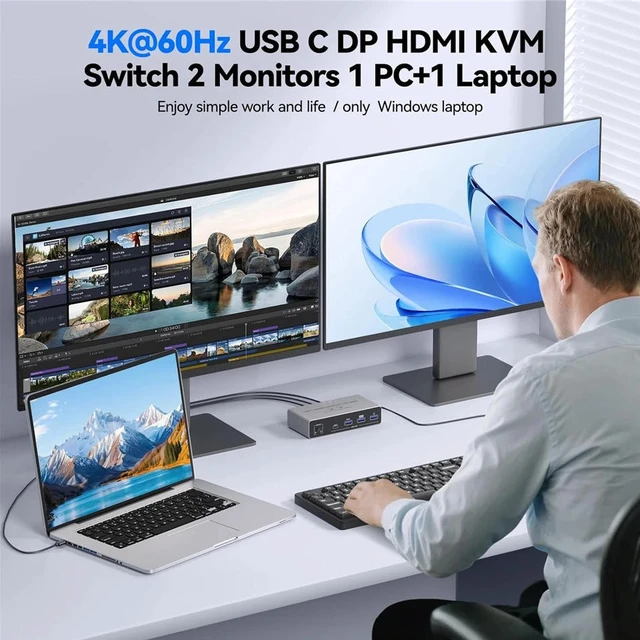
    • KVM Switch 2 Monitors for 1 PC 1 Laptop: This KVM switch connects 2 computers(1 laptop+1 desktop) sharing 2 monitors and 4 USB3.0 devices.By efficiently utilizing 2 monitors, you can easily multitask while saving workspace.
    • 4K Ultra-HD Visual Quality: Our dual-monitor KVM switch support delivers stunning 4K@60Hz visuals, with crystal-clear details on your monitors. It works seamlessly with HDCP 2.3, which allowing watch protected content without interruptions. Its flexible for many display needs, supporting 4K@60Hz/30Hz, 3440x1440@100/120Hz,2K@120/144Hz,1080P@120/144Hz etc. Note: Please use high-quality HD-MI 2.1/USB C cables to achieve 4K@60Hz performance.
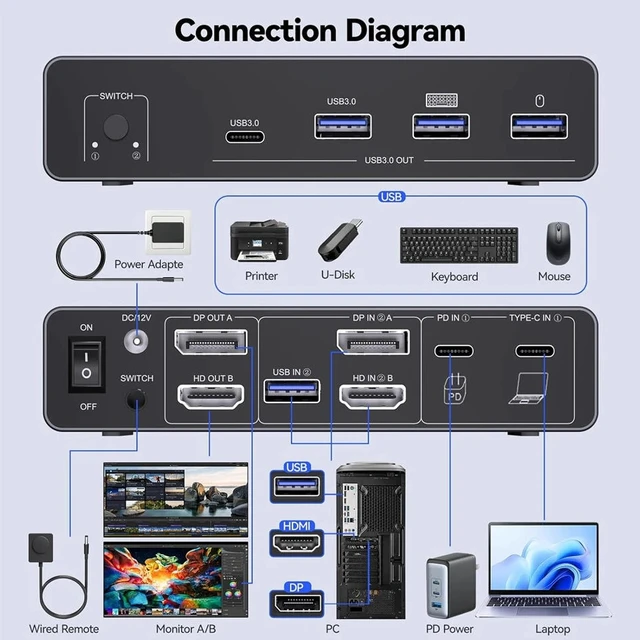
    • KVM Switch USB C with MST: With the MST feature, connect just 1 Type-C cable from your laptop to this KVM switch USB C to expand to 2 different displays, For the desktop PC, connect it using 1 HDMI + 1 DisplayPort + 1 USB 3.0 cable to the KVM Switch, This KVM Switch complies with HDMI 2.1, DisplayPort 1.4, Type-C 3.1, and USB 3.0 standards.NOTE:Mac computers only support mirroring screens.
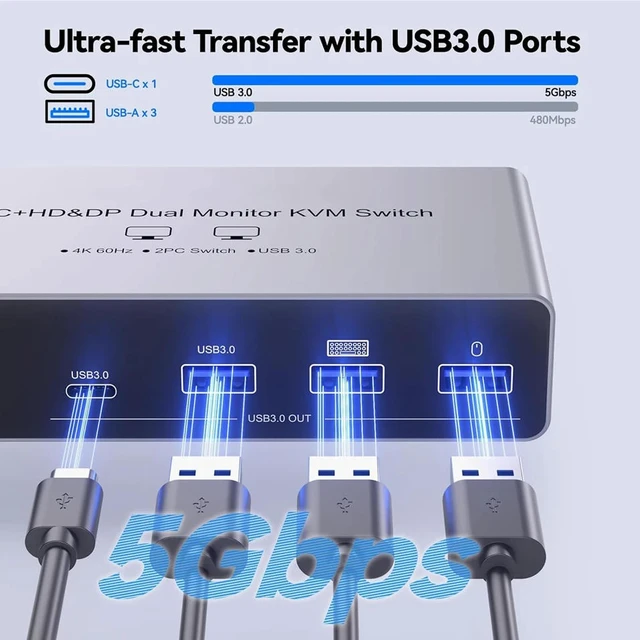
    • 4 USB3.0 Ports: Equipped with one USB C and 3 USB 3.0 ports, with a transfer speed of up to 5Gbps, which is 10x faster than USB2.0. Enable 2 computers to share USB devices, such as a mouse, keyboard, USB flash drive, camera, etc.
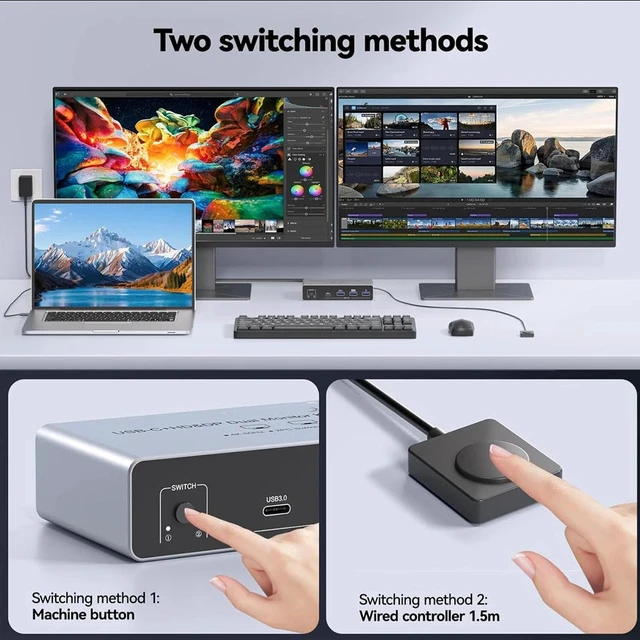
    • Two Switching Methods: Plug and play, easy installation, no driver required, two switching methods are provided: press the selection button on the KVM to switch; use the desktop extension button to switch.
    +
    +
    Overview
    Specs
    Reviews
    avatar

    Any questions? Our AI mode will help you find out quickly.

    USB C HDMI Displayport KVM Switch for 1 Laptop & 1 Desktop PC Share 2 Monitors, 4K@60Hz Dual Monitor


    USB C HDMI DP KVM Switch for 1 Laptop and 1 Desktop


    Plug and Play: Easily connect and switch between two laptops, giving you access to full functionality without the hassle of plugging and unplugging.

    USB C HDMI DP KVM Switch for 1 Laptop and 1 Desktop  Plug and Play: Easily connect and switch betwee
    Powerful 11-in-1 docking station from Navceker offers unparalleled versatility, effortlessly connect

    Powerful 11-in-1 docking station offers unparalleled versatility, effortlessly connecting multiple peripherals to your PCs for a streamlined home workstation setup.

    Includes 2x USB 3.0 ports for keyboard and mouse

    1 x USB 3.0, 1 x USB-C 5 Gbps data port, connect more USB devices

    1 x HDMI 2.1 & 1 x Displayport 1.4 outputs, to ensure 2 display stable transfer
     

    100 W Power Delivery

     it provides 100W power to charge the signal source, ensuring uninterrupted operation during long working hours

    Powerful 11-in-1 docking station from Navceker offers unparalleled versatility, effortlessly connect
    Powerful 11-in-1 docking station from Navceker offers unparalleled versatility, effortlessly connect


    4 x 5 Gbps USB 3.0 & USB C Data Transfer

    Supports Connecting your USB 3.0 /USB 2.0 port device such as Mechanical Keyboard, Bluetooth Mouse,Scanner,USB driver,3D Printer,USB Camera

    4 x 5 Gbps USB 3.0 & USB C Data Transfer  Supports Connecting your USB 3.0 /USB 2.0 port device such


    ONE BUTTON TO SWITCH

    1. Wired Remote Control lets you hide the extension under your desk or out of your workspace, saving space and keeping your desktop tidy.

    2. Simply press the button on the front of the docking station to switch.

    ONE BUTTON TO SWITCH  1. Wired Remote Control lets you hide the extension under your desk or out of
    ONE BUTTON TO SWITCH  1. Wired Remote Control lets you hide the extension under your desk or out of


    Notes:

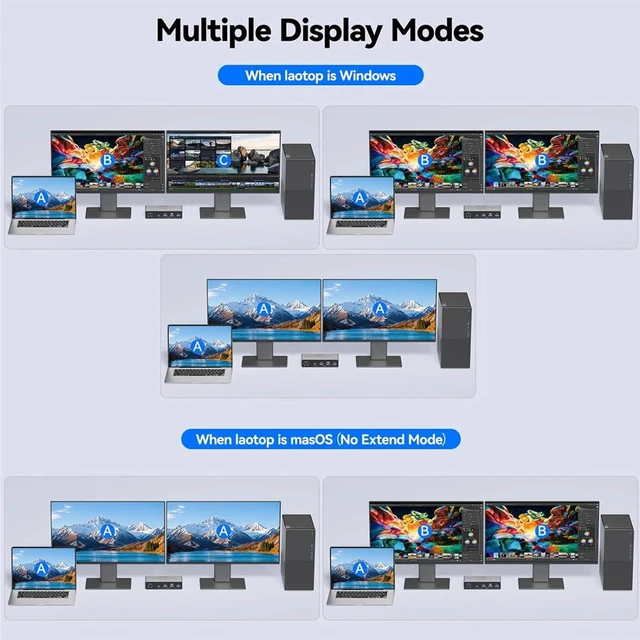
    1. In Windows system, HDMI docking station supports MST and SST modes. If you are using macOS on your computer, the hdmi DP ports can only display two identical images.

    2. The USB-C devices must support Power Delivery, Display Port Alt Mode functionality. It's normal for the screen to go black when switching between two host devices.

    3. For stable screen mirroring, the 5Gbps USB-C port only transfers data and does not support PD charging or video transfer.

    Notes:  1. In Windows system, HDMI docking station supports MST and SST modes. If you are using macO
    USB C KVM Switch HDMI DP 2 PC 2 Monitor 4K 60Hz KVM Switch USB 3.0 Type C 2K 144Hz 100W PD for Laptop MacBook 2 Computers Dual Monitors


    Description:

    The 4K 60Hz USB C + HDMI +DP KVM Switch allows you to share one USB keyboard, USB mouse,4x USB 3.0 device, and HDMI +DP monitor to control 2 Macbook,computers, laptops, game consoles.

    It is designed for multitask with two computers at your necessary, increasing productivity in the office or at home ; You can switch between 2 computers using a manual switch located on the top of the KVM unit.


    Features:


    USB C KVM Switch 4K/1080P@60Hz,USB C HDMI DP Dual Monitor KVM Switch for PC /Laptop Sharing 2 Monitor and 4 USB3.0 Devices, 100W PD


    1. KVM Switch 2 Monitors for 1 PC 1 LaptopThis HDMI DP 2 monitors KVM switch connects 2 computers(1 laptop+1 desktop) sharing 2 monitors and 4 USB3.0 devices.By efficiently utilizing 2 monitors, you can easily multitask while saving workspace.
    2. 4K Ultra-HD Visual QualityOur dual-monitor KVM switch support delivers stunning 4K@60Hz visuals, with crystal-clear details on your monitors. It works seamlessly with HDCP 2.3, which allowing watch protected content without interruptions. Its flexible for many display needs, supporting 4K@60Hz/30Hz, 3440x1440@100/120Hz,2K@120/144Hz,1080P@120/144Hz etc. Note: Please use high-quality HDMI 2.1/USB C cables to achieve 4K@60Hz performance.
    3. KVM Switch USB C with MSTWith the MST feature, connect just one Type-C cable from your laptop to this KVM switch USB C to expand to two different displays, For the desktop PC, connect it using 1 HDMI + 1 DisplayPort + 1 USB 3.0 cable to the KVM Switch desktop laptop This Dual monitor KVM Switch USB C complies with HDMI 2.1, DisplayPort 1.4, Type-C 3.1, and USB 3.0 standards.NOTE:Mac computers only support mirroring screens.
    4. 4 USB3.0 PortsThe 4K@60Hz USB-C HDMI DP KVM switch is equipped with one USB C and three USB 3.0 ports, with a transfer speed of up to 5Gbps, which is 10x faster than USB2.0. Enable 2 computers to share USB devices, such as a mouse, keyboard, USB flash drive, camera, etc.
    5. Support 100W PD Fast ChargingThe USB C HDMI DP KVM Switch is designed with a PD charging port, which can provide enough power for your laptop during use. Please note: The actual power charged to the laptop is 80W, because the KVM itself and the cable will produce some power loss.
    6. Two Switching MethodsPlug and play, easy installation, no driver required, two switching methods are provided: press the selection button on the KVM to switch; use the desktop extension button to switch, the KVM Switch can be placed under the desktop or outside the workspace to make the desktop more concise. Note: Keyboard shortcuts (hot keys) are not supported for switching
    7. Extension Mode and Copy ModeUSB-C KVM Switch 2 Monitors 2 Computers supports extension mode and copy mode for Windows laptops and desktops.Note: Only support mirrored output on macOS. Plug and play, easy installation, no driver required.
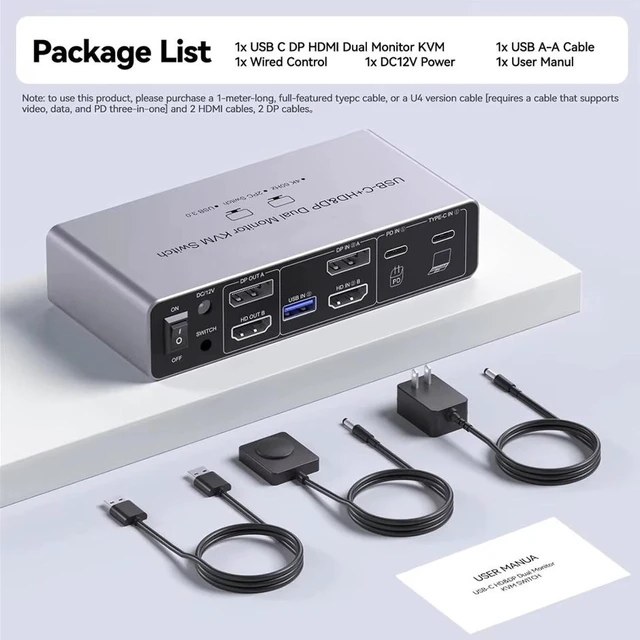
    8. Packing List 1* USB C HDMI DP KVM Switch, 1* USB3.0 cable, 1*DC12V power adapter, 1*wired controller, 1*user manual.


    Package contents

    1 x USB C HDMI DP KVM Switch

    1 x USB Gen 2 Cable(Type C to Type C)

    1 x USB 3.0 Cable

    1 x 12V/1A Power Adapter

    1 x Wired Remote Control

    1 x User Manual


    Warranty & Returns

    Warranty, Returns, And Additional Information

    Warranty

    • Please contact the Seller directly for warranty information. Warranty information may also be found on the Manufacturer's website.
    • CONTACT

    Return Policies

    Manufacturer Contact Info

    LOADING...