• $189.99
  • Free 30-day Returns
  • Ships from China.
    Price alert
    Shop it at NeweggBusiness.

    AUTYUE 4K@60Hz KVM Switch 2 Monitors 1 Laptop 1 Desktop, USB C Docking Station KVM Switch for 1 Desktop 1 Laptop sharing 2 Monitors Keyboard Mouse, 100W PD Charging Function, Power Adapter+ Controller

    Limited time offer, ends 11/14 By Shenzhen Qiuyiyue Store

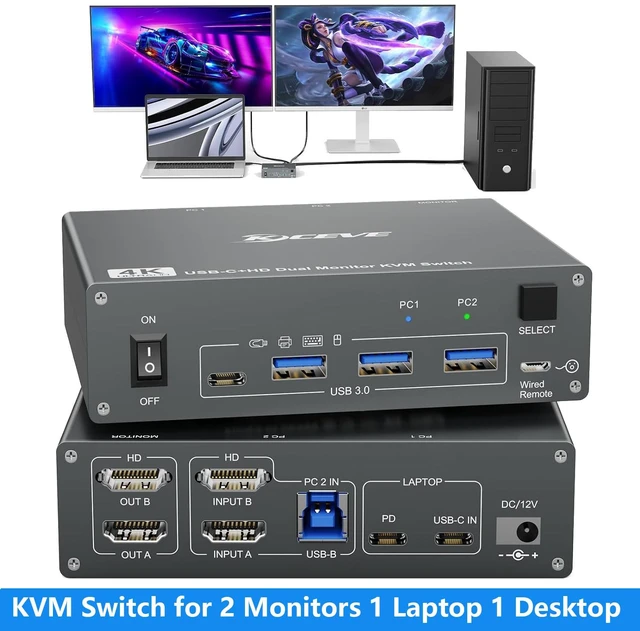
    • USB-C Dock + Dual Monitor KVM for Laptop & Desktop: Combine your USB-C laptop and desktop PC into one streamlined workstation. This KVM switch integrates a USB-C docking station, dual HDMI ports output, 3-port USB 3.0 +1 USB-C hub and laptop charging into one device. Switch between your work laptop and desktop while sharing the same 2 monitors, keyboard, mouse and USB devices.
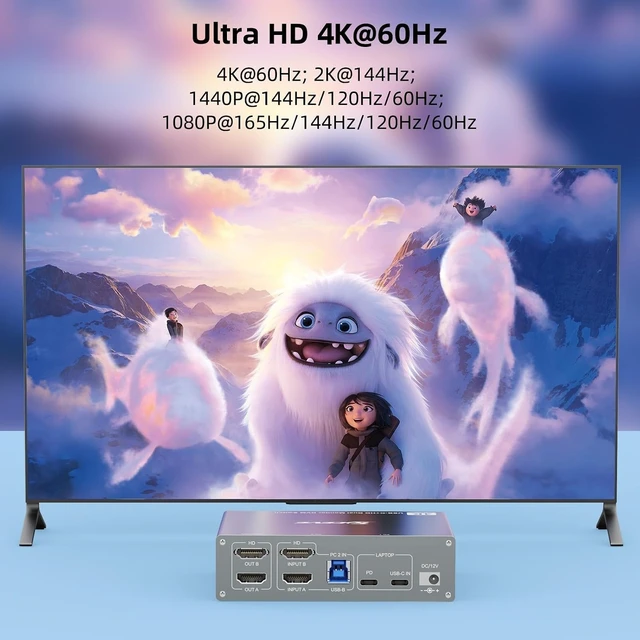
    • 4K@60Hz: Enjoy up to dual 4K@60Hz output for sharp text, detailed spreadsheets, coding, content creation and everyday multitasking. Also supports 2K@120Hz, 2560×1440@120Hz/60Hz and 1080P@144Hz/120Hz.
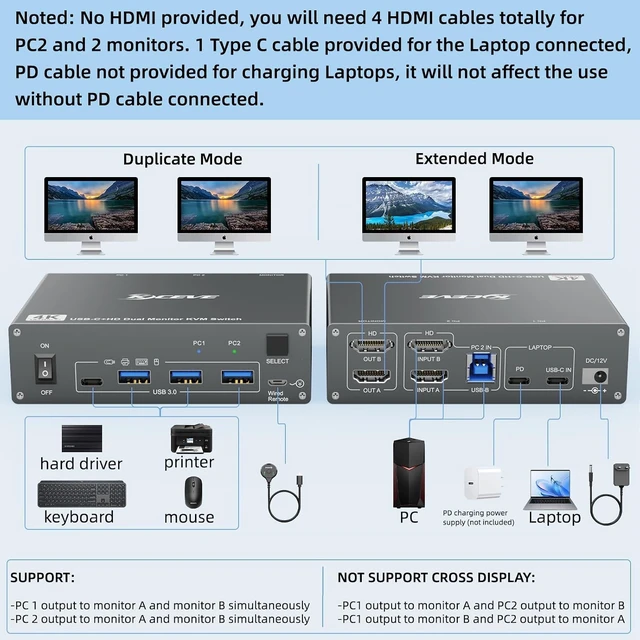
    • 3× USB 3.0 + 1× USB-C- Up to 5Gbps Data Transfer: Share your essential USB devices between 1 laptop and 1 desktop through 3 USB 3.0 ports and 1 USB-C port. Connect a keyboard, mouse, USB flash drive, printer, and other peripherals, with data transfer speeds up to 5Gbps for fast file transfers and a more efficient workstation.
    • 100W PD: The dedicated USB-C PD port supports up to 100W power input, allowing your laptop to stay charged while video, USB data and peripherals run through the same docking connection. Due to normal conversion and transmission loss, actual charging power to the laptop is typically about 7385W and may vary by charger, cable and laptop model.
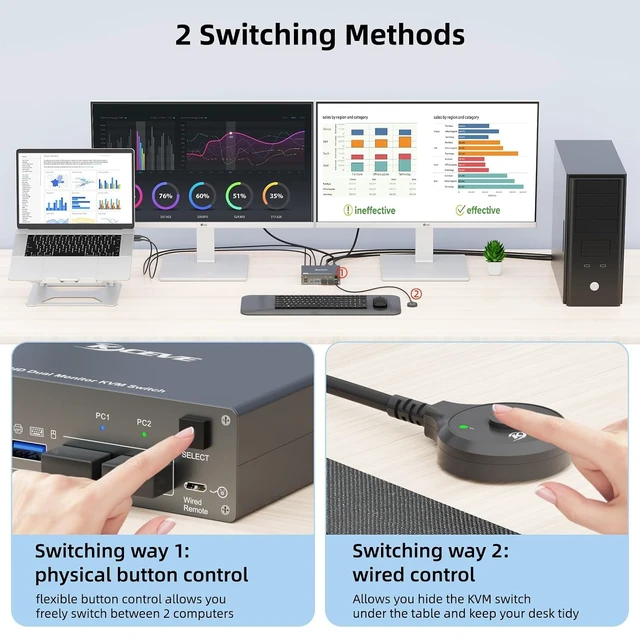
    • Two Ways to Switch: Move between your laptop and desktop with the front-panel switch button or place the included wired controller within easy reach on your desk. LED indicators clearly show which computer is currently active.
    +
    +
    Overview
    Specs
    Reviews

    Any questions? Ask CelesteSM will help you find out quickly.

    4K@60Hz KVM Switch 2 Monitors 1 Laptop 1 Desktop, USB C Docking Station KVM Switch for 1 Desktop 1 L
    4K@60Hz KVM Switch 2 Monitors 1 Laptop 1 Desktop, USB C Docking Station KVM Switch for 1 Desktop 1 L
    4K@60Hz KVM Switch 2 Monitors 1 Laptop 1 Desktop, USB C Docking Station KVM Switch for 1 Desktop 1 L
    4K@60Hz KVM Switch 2 Monitors 1 Laptop 1 Desktop, USB C Docking Station KVM Switch for 1 Desktop 1 L
    4K@60Hz KVM Switch 2 Monitors 1 Laptop 1 Desktop, USB C Docking Station KVM Switch for 1 Desktop 1 L
    4K@60Hz KVM Switch 2 Monitors 1 Laptop 1 Desktop, USB C Docking Station KVM Switch for 1 Desktop 1 L
    4K@60Hz KVM Switch 2 Monitors 1 Laptop 1 Desktop, USB C Docking Station KVM Switch for 1 Desktop 1 L
    4K@60Hz KVM Switch 2 Monitors 1 Laptop 1 Desktop, USB C Docking Station KVM Switch for 1 Desktop 1 L
    4K@60Hz KVM Switch 2 Monitors 1 Laptop 1 Desktop, USB C Docking Station KVM Switch for 1 Desktop 1 L
    4K@60Hz KVM Switch 2 Monitors 1 Laptop 1 Desktop, USB C Docking Station KVM Switch for 1 Desktop 1 L
    4K@60Hz KVM Switch 2 Monitors 1 Laptop 1 Desktop, USB C Docking Station KVM Switch for 1 Desktop 1 L
    Features
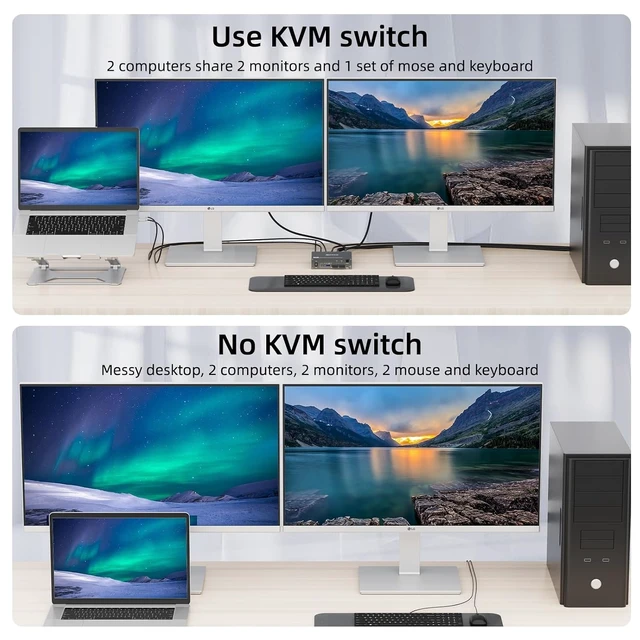
    1. USB-C Dock + Dual Monitor KVM One Desk for Laptop & Desktop Combine your USB-C laptop and desktop PC into one streamlined workstation. This 1 laptop 1 desktop 2-monitor KVM switch integrates a USB-C docking station, dual HDMI ports output, 3-port USB 3.0 +1 USB-C hub and laptop charging into one device. Switch between your work laptop and desktop while sharing the same 2 monitors, keyboard, mouse and USB deviceswithout constantly reconnecting cables or duplicating peripherals.
    2. Dual 4K@60Hz HDMI Built for Productive Dual-Screen Workflows Enjoy up to dual 4K@60Hz output for sharp text, detailed spreadsheets, coding, content creation and everyday multitasking. Also supports 2K@120Hz, 2560×1440@120Hz/60Hz and 1080P@144Hz/120Hz, depending on the connected computer, monitors and cables. Whether you're switching between work and personal computers or managing a dual-screen office setup, both displays stay connected to one shared workspace.
    3. 3× USB 3.0 + 1× USB-C Up to 5Gbps Data Transfer Share your essential USB devices between 1 laptop and 1 desktop through three USB 3.0 ports and one USB-C port. Connect a keyboard, mouse, USB flash drive, printer, external storage and other peripherals, with data transfer speeds up to 5Gbps for fast file transfers and a more efficient workstation. For power-demanding devices such as external hard drives or capture cards, connect the included 12V/1A power adapter for stable performance.
    4. 100W PD Input Charge Your USB-C Laptop While Connected The dedicated USB-C PD port supports up to 100W power input, allowing your laptop to stay charged while video, USB data and peripherals run through the same docking connection. Due to normal conversion and transmission loss, actual charging power to the laptop is typically about 7385W and may vary by charger, cable and laptop model. A USB-C PD charger is NOT included unless otherwise specified.
    5. Two Ways to Switch Button or Wired Desktop Controller Move between your laptop and desktop with the front-panel switch button or place the included wired controller within easy reach on your desk. LED indicators clearly show which computer is currently active. No need to reach behind your monitors or repeatedly unplug devicesone switch transfers your displays and shared USB peripherals to the selected computer.
    6. Please Check Your USB-C Port Before Purchase For the laptop side to support video, USB data and charging through one USB-C connection, the laptop's USB-C port must support DP Alt Mode. The desktop side requires 2 HDMI connections + 1 USB connection to the KVM. Please confirm that both your laptop and desktop can provide the required video outputs before purchase.
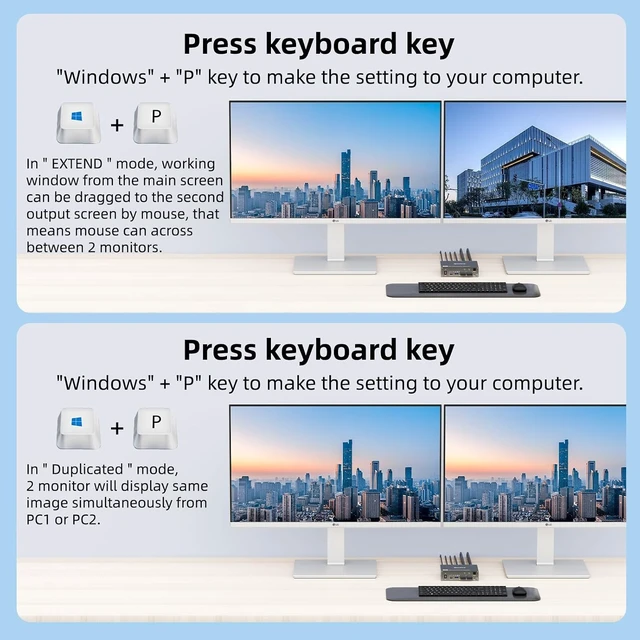
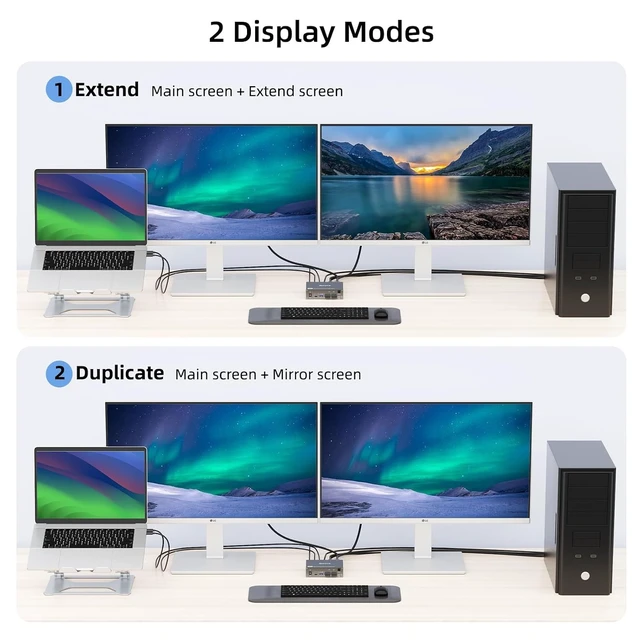
    7. MacOS & Dell Compatibility Notes This 2 monitors KVM works with Windows, macOS, Linux and ChromeOS, but display behavior may vary by operating system and computer hardware. Because macOS does not support MST in the same way as Windows, compatible Macs cannot use this device to create two independent extended external desktops through MST; the two external displays may mirror each other depending on the Mac model and configuration.
    8. Some Dell laptops use proprietary adapter identification and may display a slow-charging or low-power warning even while the laptop is charging normally. If needed, the warning can be disabled through Dell BIOS adapter-warning settings or Windows USB notification settings. Charging performance depends on the laptop, PD charger and cable used.


    Warranty & Returns

    Warranty, Returns, And Additional Information

    Warranty

    • Please contact the Seller directly for warranty information. Warranty information may also be found on the Manufacturer's website.
    • CONTACT

    Return Policies

    Manufacturer Contact Info

    LOADING...