• $249.99
  • Free 30-day Returns
  • Ships from China.
    Price alert
    Shop it at NeweggBusiness.

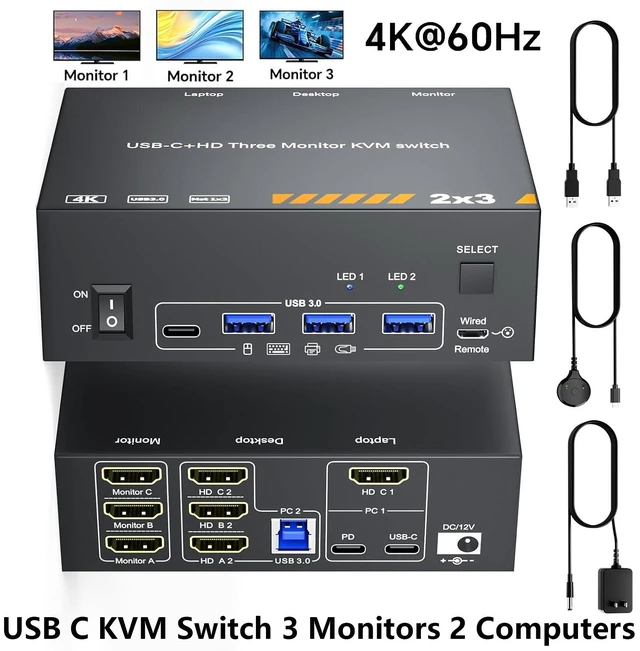
    AUTYUE KVM Switch 3 Monitors MST 1 Laptop 1 Desktop, Triple Monitors USB C HDMI KVM Switch for Laptop with 100W PD Charging, 3 Monitors Sharing Keyboard, Mouse&Printer, with Power Adapter+Controller

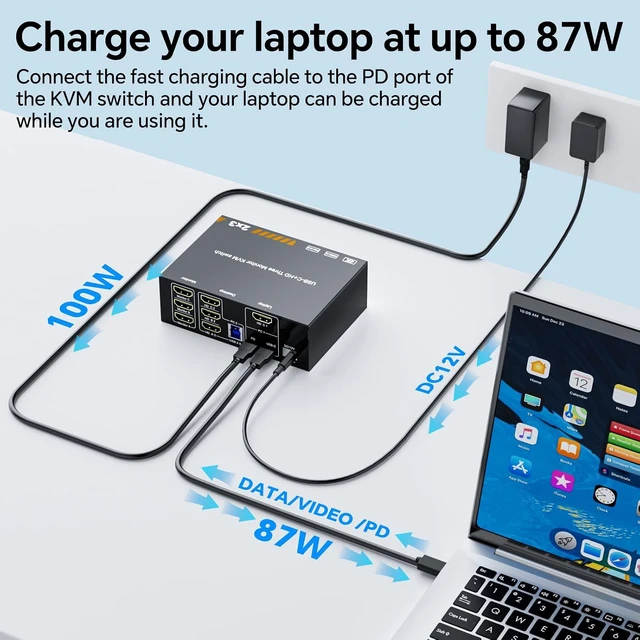
    • HDMI USB-C MST KVM Switch 3 Monitors: This is a perfect KVM switch for USB-C laptops and HDMI monitors. In copy mode, the main screen can be mirrored to the second output screen. In extend mode, the window can be dragged from the main screen to the second screen. Extend mode only work for windows system, not work for Mac M1/M2/M3/M4, etc.
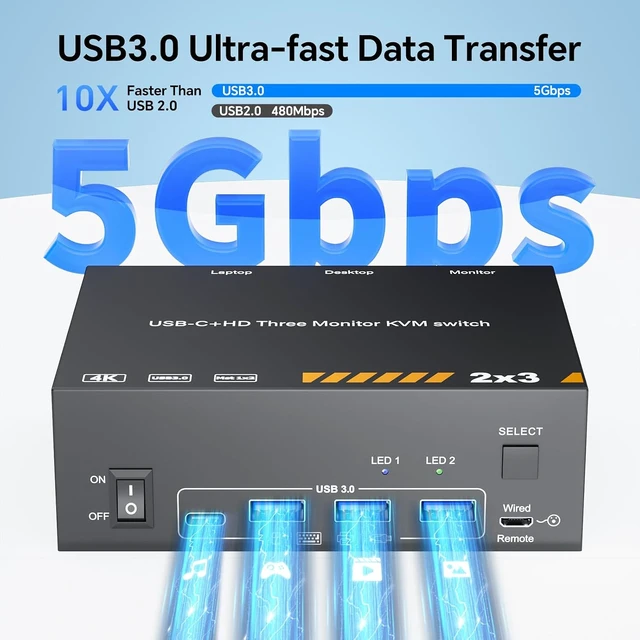
    • 5Gbps and 4K@60Hz : This MST USB-C KVM switch with 3 USB-A and 1 USB-C ports supports connecting keyboards, mice, printers, and other USB devices. Supports ultra-fast data transfer up to 5Gbps. Supports resolutions up to 4K@60Hz and is backward compatible with 2K@120Hz, 2560 x 1440@120Hz/60Hz, and 1920 x 1080@144Hz/120Hz, etc.
    • Effortless Multitasking & a Clutter-Free Setup: No more wasting time swapping cables! This KVM switch lets you manage multiple devices from a single central hub-no repeated unplugging and reinserting required.
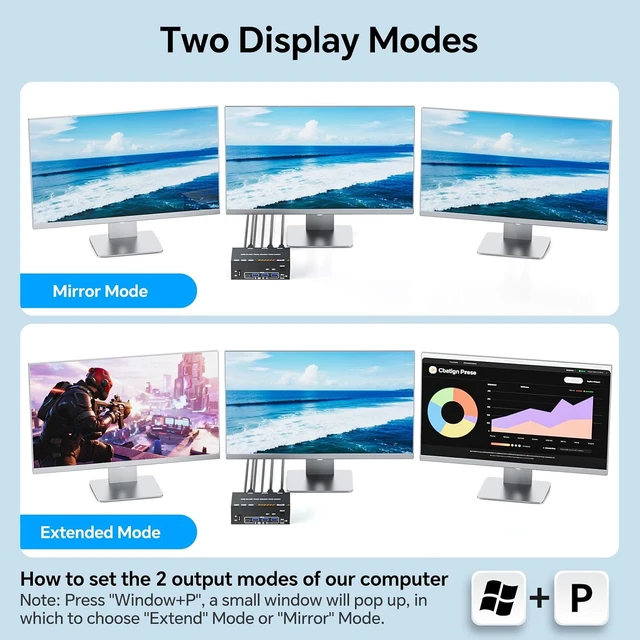
    • 2 Display Modes: Extended Mode: Transform 3 screens into your ultimate multitasking workspace-ideal for editing documents, coding, all at the same time. Duplicate Mode: Use the HDMI switching function to seamlessly sync content across all displays-great for presentations, classroom settings, with everyone in the room.
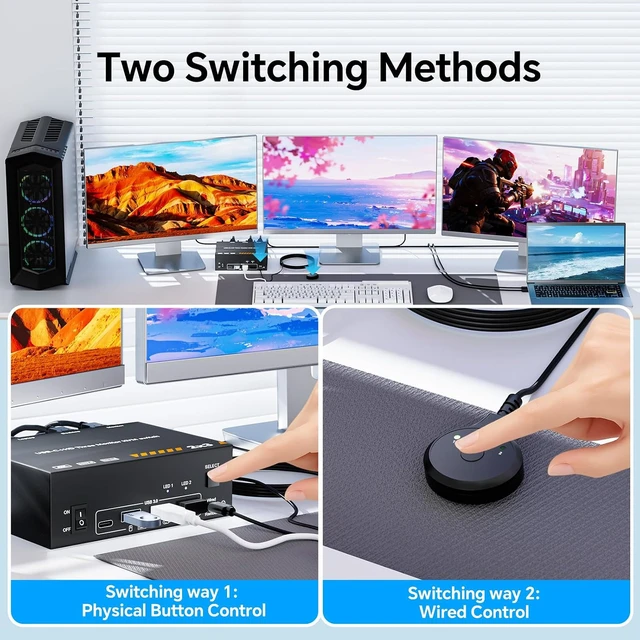
    • Smooth Host Switching: Switching is perhaps 3 seconds, allowing you to effortlessly toggle between your desktop and USB-C Thunderbolt laptop with multiple monitors connected.The speed is ideal for daily office use, yet not recommended for competitive gaming scenarios.
    +
    +
    Overview
    Specs
    Reviews

    Any questions? Ask CelesteSM will help you find out quickly.

    KVM Switch 3 Monitors MST 1 Laptop 1 Desktop, Triple Monitors USB C HDMI KVM Switch
    KVM Switch 3 Monitors MST 1 Laptop 1 Desktop, Triple Monitors USB C HDMI KVM Switch
    KVM Switch 3 Monitors MST 1 Laptop 1 Desktop, Triple Monitors USB C HDMI KVM Switch
    KVM Switch 3 Monitors MST 1 Laptop 1 Desktop, Triple Monitors USB C HDMI KVM Switch
    KVM Switch 3 Monitors MST 1 Laptop 1 Desktop, Triple Monitors USB C HDMI KVM Switch
    KVM Switch 3 Monitors MST 1 Laptop 1 Desktop, Triple Monitors USB C HDMI KVM Switch
    KVM Switch 3 Monitors MST 1 Laptop 1 Desktop, Triple Monitors USB C HDMI KVM Switch
    Features
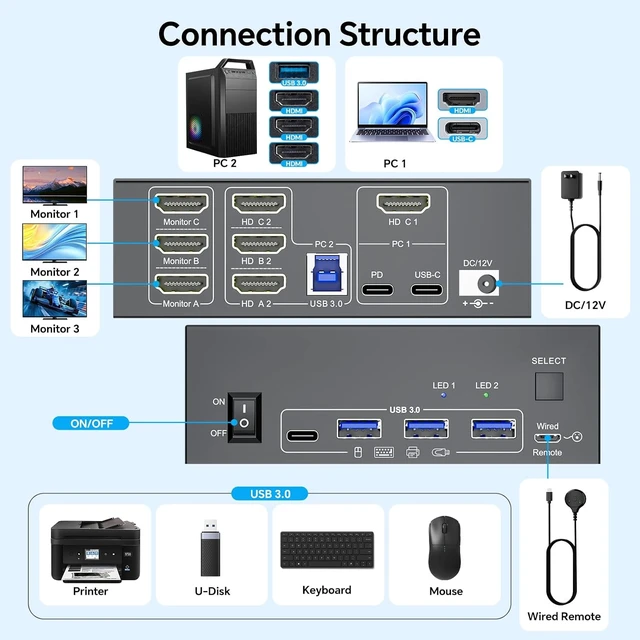
    1. HDMI USB-C MST KVM Switch 3 MonitorsThis is a perfect 3 monitor KVM switch for USB-C laptops and HDMI monitors. In copy mode, the main screen can be mirrored to the second output screen. In extend mode, the window can be dragged from the main screen to the second screen. Extend mode only work for windows system, not work for Mac M1/M2/M3/M4, etc.
    2. 5 Gbps and 4K@60Hz KVM USB-C Switch This MST USB-C KVM switch with 3 USB-A and 1 USB-C ports supports connecting keyboards, mice, printers, scanners, and other USB devices. Supports ultra-fast data transfer up to 5 Gbps. Supports resolutions up to 4K@60Hz and is backward compatible with 2K@120Hz, 2560 x 1440@120Hz/60Hz, and 1920 x 1080@144Hz/120Hz, etc.
    3. Effortless Multitasking & a Clutter-Free SetupNo more wasting time swapping cables! This 2-PC KVM switch lets you manage multiple devices from a single central hubno repeated unplugging and reinserting required. Its the perfect choice for busy workstations, technical setups, or home entertainment centers.
    4. 2 Display Modes for All NeedsExtended Mode: Transform 3 screens into your ultimate multitasking workspaceideal for editing documents, coding, and monitoring data all at the same time. Duplicate Mode: Use the HDMI switching function to seamlessly sync content across all displaysgreat for presentations, classroom settings, or sharing movies with everyone in the room.
    5. Smooth Host Switching Switching is perhaps 3 seconds, allowing you to effortlessly toggle between your desktop and USB-C Thunderbolt laptop with multiple monitors connected.The speed is ideal for daily office use, yet not recommended for competitive gaming scenarios.
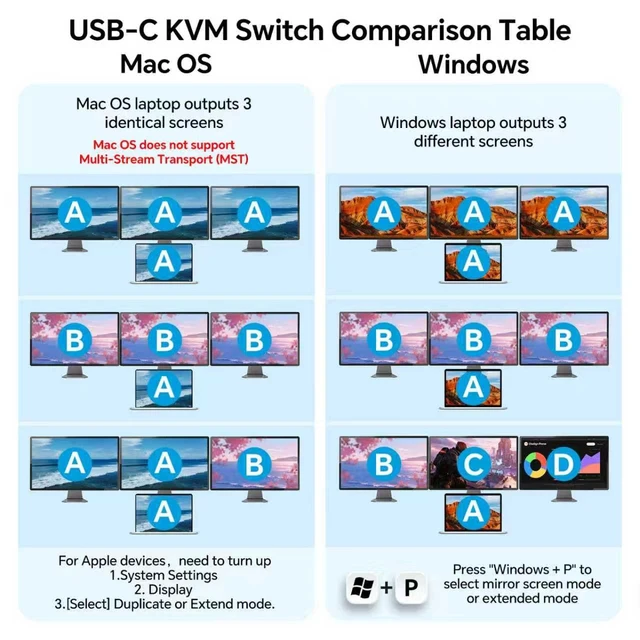
    6. NOTE: 1. Your device's USB-C interface must support Thunderbolt 3 or later 2. Windows supports extended mode ABC with three different displays. Mac computers do not support extended mode, only copy mode. 3. The laptop must have USB-C and HDMI ports. 4. If screen flickering occurs, please turn off the device or use a USB-C cable with at least 20G.


    Warranty & Returns

    Warranty, Returns, And Additional Information

    Warranty

    • Please contact the Seller directly for warranty information. Warranty information may also be found on the Manufacturer's website.
    • CONTACT

    Return Policies

    Manufacturer Contact Info

    LOADING...