• $279.99
  • Free 30-day Returns
  • Ships from China.
    Price alert
    Shop it at NeweggBusiness.

    AUTYUE KVM Switch 2 Monitors 4 Computers Displayport + HDMI EDID Emulation Audio RS232, 4K@60Hz KVM Switch 4 PC Share Dual Monitor & 4 USB 3.0 Peripherals, with Wired Remote,12V Adapter, 4 USB Cables

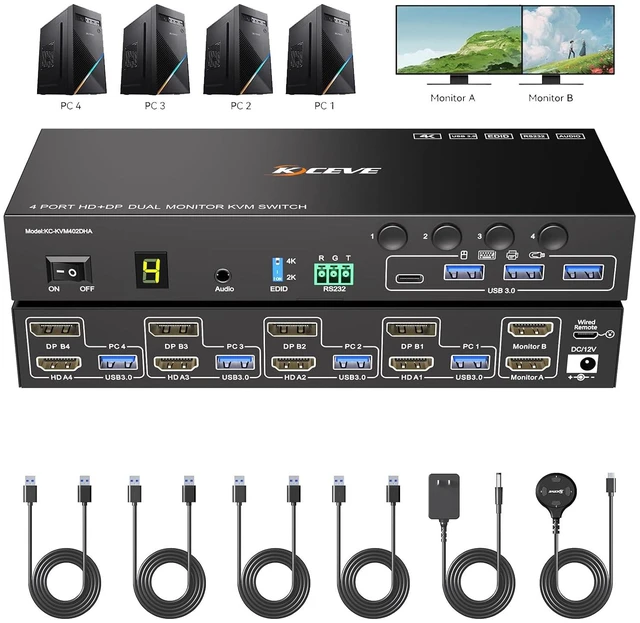
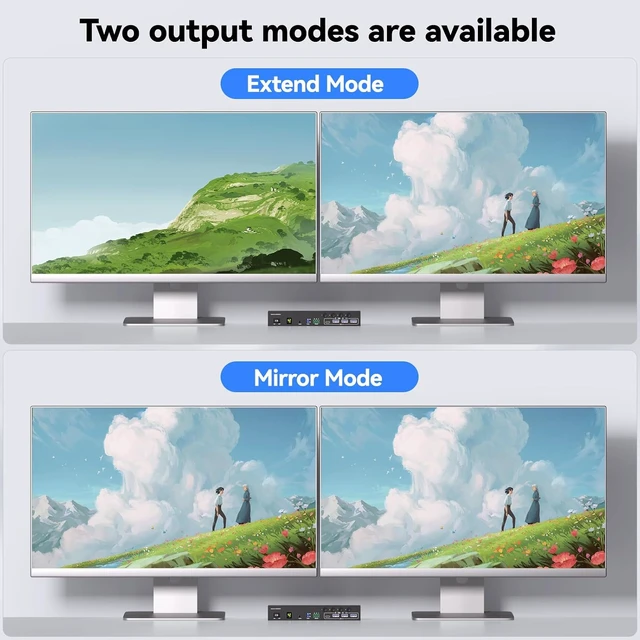
    • KVM Switch 4 Computers 2 Monitors: This 4 ports HDMI+DP KVM switch allows 4 PC to share 2 external monitors and 4 USB 3.0 peripherals. Support expanded mode and mirror mode.Note: Each PC must have 1*HDMI+1 DP ports.
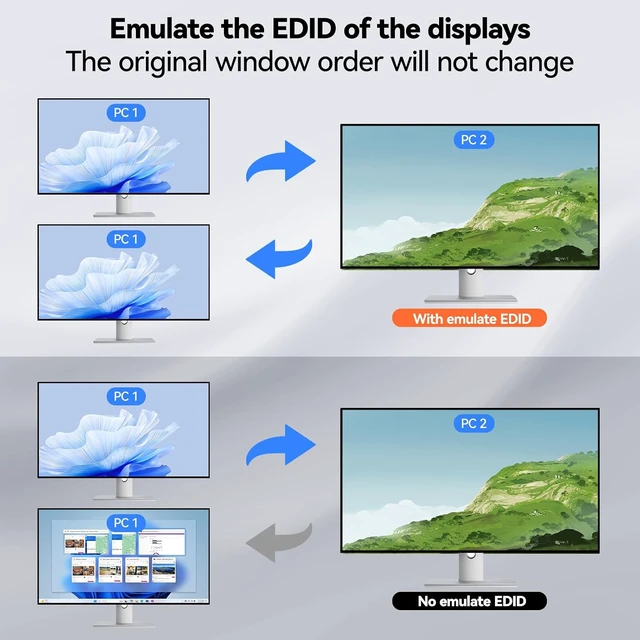
    • EDID Emulator: The KVM Switch can emulates monitor EDID and saves display resolution & refresh rate. EDID Functions:1) Screen Lock: When switching among 4 computers, windows retain their original positions,no need to rearrange layouts like with other KVM switches.2) Auto-detects and applies optimal display resolution. Ideal for dual-monitor setups. This is definitely the most useful feature for users who are using 2 monitors.
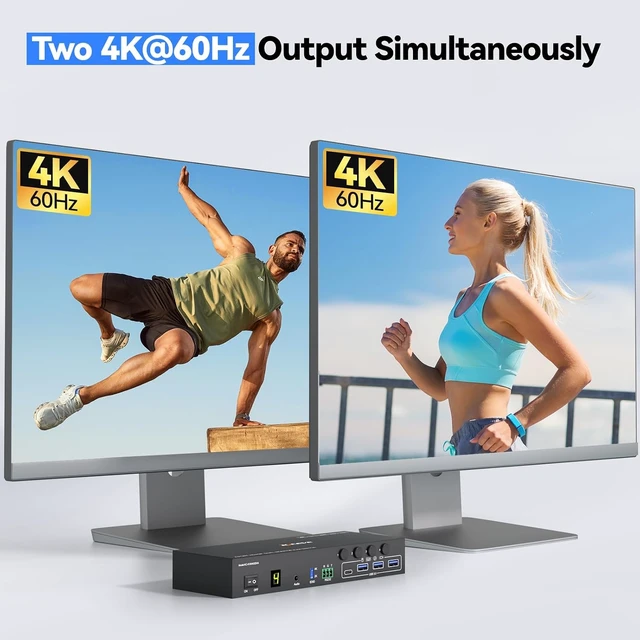
    • Ultra HD 4K@60Hz: This KVM switch supports simultaneous dual 4K@60Hz output, enhancing image clarity and color saturation for an amazing visual experience. Backward compatible with 4K@30Hz, 2560×1440@120Hz and lower resolutions.
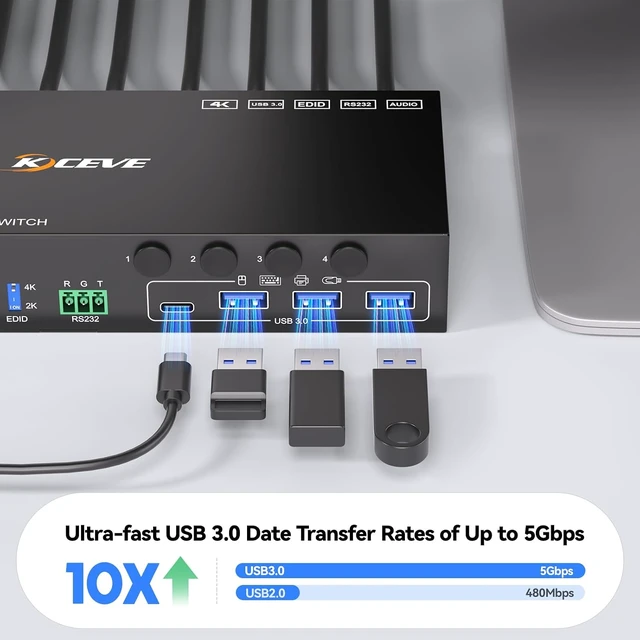
    • with 4 USB 3.0 Ports: KVM Switch features 4 USB 3.0 Ports for keyboard, mouse & USB peripherals. 5Gbps data transfer for fast file sharing, backward compatible with USB 2.0/1.1.
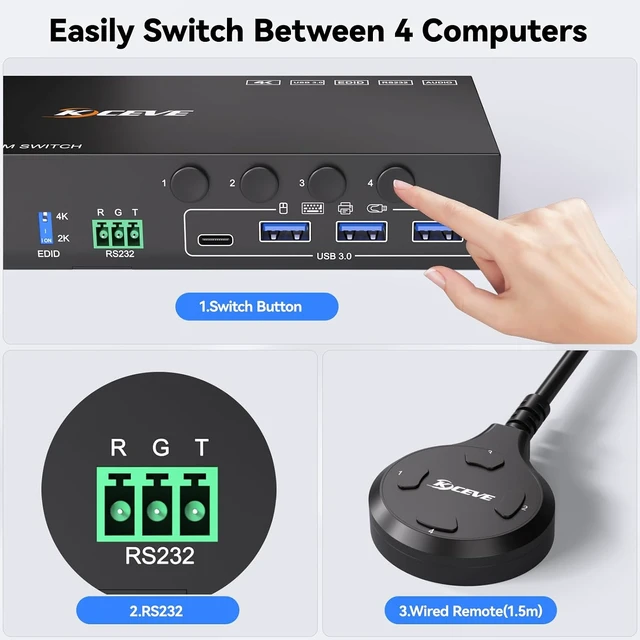
    • 3 Switching Mode: Supports three switching modes: panel buttons, wired remote and RS232. Panel buttons (1-4 corresponding to 4 PCs), wired remote (length: 1.5m) and RS232 (please use at baud rate: 115200).
    • Great Compatibility: Plug & Play, Driver-Free 4 computers 2 monitors switch Compatible with Windows, Mac OS, Linux, Chrome OS. KVM switch work with PCs, Laptops, Mini Boxes; ideal for home, office,server rooms.
    +
    +
    Overview
    Specs
    Reviews

    Any questions? Ask CelesteSM will help you find out quickly.

    KVM Switch 2 Monitors 4 Computers Displayport + HDMI EDID Emulation Audio RS232, 4K@60Hz KVM Switch


    This 4 port HDMI displayport KVM switch lets you connect up to 4 computers at the same time, while sharing 2 monitors and 4 USB peripherals.

    This 4 port HDMI displayport KVM switch lets you connect up to 4 computers at the same time, while s


    Support Two 4K@60Hz Output Simultaneously, mirror Mode for screen duplication and extended Mode for multi-monitor expansion.

    Support Two 4K@60Hz Output Simultaneously, mirror Mode for screen duplication and extended Mode for
    Support Two 4K@60Hz Output Simultaneously, mirror Mode for screen duplication and extended Mode for


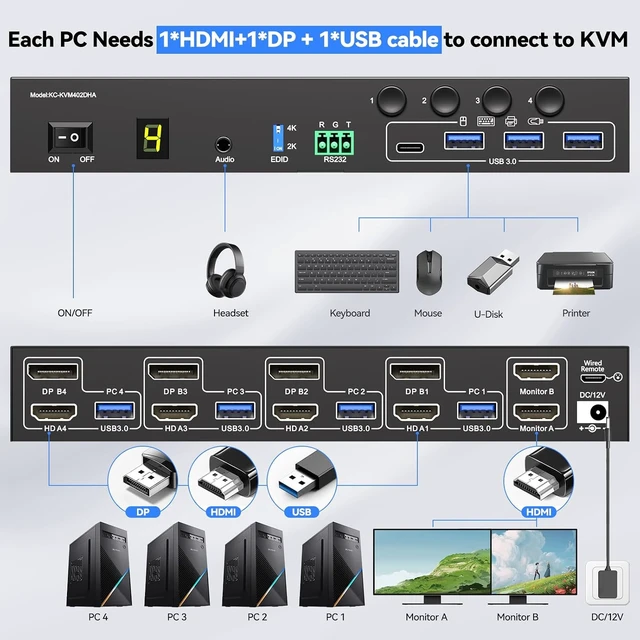
    Each PC requires 1 HDMI+1 DP+1 USB cable to connect to the KVM switch. HDMI/DP connection to ensure 2 monitors works, while the USB cable acts as the data channel between your USB peripherals and computers.

    Each PC requires 1 HDMI+1 DP+1 USB cable to connect to the KVM switch. HDMI/DP connection to ensure
    Each PC requires 1 HDMI+1 DP+1 USB cable to connect to the KVM switch. HDMI/DP connection to ensure
    Each PC requires 1 HDMI+1 DP+1 USB cable to connect to the KVM switch. HDMI/DP connection to ensure


    EDID Emulation -- Maintains window positioning during source switching. Toggle the EDID emulation feature ON or OFF per your needs.

    EDID Emulation -- Maintains window positioning during source switching. Toggle the EDID emulation fe
    EDID Emulation -- Maintains window positioning during source switching. Toggle the EDID emulation fe

    This 4 computers 2 monitors KVM switch features 3 switching modes: 

    1. Panel buttons (1-4 for 4 PCs) ; 2. wired remote (1.5m); 3. RS232 (baud rate: 115200 )

    This 4 computers 2 monitors KVM switch features 3 switching modes: 1. Panel buttons (1-4 for 4 PCs)


    With 4 USB 3.0 ports for keybaord, mouse, U disk, support ultra-fast data transfer up to 5Gbps

    With 4 USB 3.0 ports for keybaord, mouse, U disk, support ultra-fast data transfer up to 5Gbps
    With 4 USB 3.0 ports for keybaord, mouse, U disk, support ultra-fast data transfer up to 5Gbps
    Features
    1. KVM Switch 4 Computers 2 Monitors This 4 ports HDMI+DP KVM switch allows 4 PC to share 2 external monitors and 4 USB 3.0 peripherals. Support expanded mode and mirror mode.Note: Each PC must have 1*HDMI+1 DP ports
    2. EDID Emulator 4 ports 2 Monitors KVM Switch can emulates monitor EDID and saves display resolution & refresh rate. EDID Functions:1) Screen Lock: When switching among 4 computers, windows retain their original positions,no need to rearrange layouts like with other KVM switches.2) Auto-detects and applies optimal display resolution. Ideal for dual-monitor setups. This is definitely the most useful feature for users who are using 2 monitors.
    3. Ultra HD 4K@60Hz This HDMI Displayport KVM switch supports simultaneous dual 4K@60Hz output, enhancing image clarity and color saturation for an amazing visual experience. Backward compatible with 4K@30Hz, 2560×1440@120Hz and lower resolutions.
    4. KVM Switch with 4 USB 3.0 Ports 2 monitors 4 computers KVM Switch features 4 USB 3.0 Ports for keyboard, mouse & USB peripherals. 5Gbps data transfer for fast file sharing, backward compatible with USB 2.0/1.1.
    5. 3 Switching ModeThis 4 port displayport HDMI dual monitor KVM switch supports three switching modes: panel buttons, wired remote and RS232. Panel buttons (1-4 corresponding to 4 PCs), wired remote (length: 1.5m) and RS232 (please use at baud rate: 115200).
    6. Great CompatibilityPlug & Play, Driver-Free 4 computers 2 monitors switch Compatible with Windows, Mac OS, Linux, Chrome OS. KVM switch 2 monitors 4 computers work with PCs, Laptops, Mini Boxes; ideal for home, office,server rooms.
    7. Important NotePlease make sure to connect the included 12V/2A power adapter to supply power to the 4 computers 2 monitors KVM switch. displayport/HDMI cables not included.
    8. What you will Get1 year war-ranty for this 4 port HDMI displayport KVM Switch. :1*KVM switch; 4*USB 3.0 Cable(1.5M); 1*Wired Remote(1.5M); 1*Power adapter and 1*User Manual.


    Warranty & Returns

    Warranty, Returns, And Additional Information

    Warranty

    • Please contact the Seller directly for warranty information. Warranty information may also be found on the Manufacturer's website.
    • CONTACT

    Return Policies

    Manufacturer Contact Info

    LOADING...