Your Browsing History
- Free 30-day Returns
$228.00
Meet Your Seller
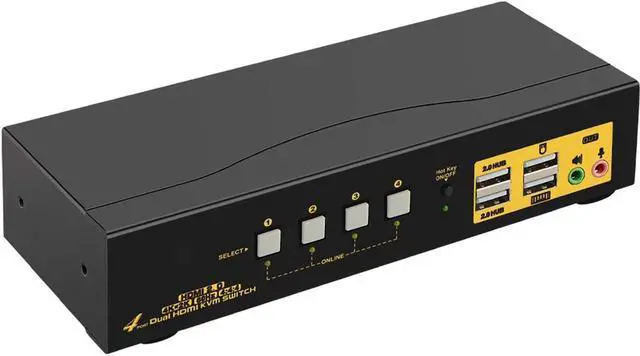
HDMI KVM Switch 4 Port Dual Monitor 4K 60Hz, 4x2 PC Monitor Keyboard Mouse Selector with Audio and 2 USB 2.0 HUB
- DUAL MONITOR HDMI KVM SWITCH 4 PORT: Controls 4 computers or laptops with one set of keyboard, mouse and 2 monitors which supports extended or mirrored display; Ideal for working from home, designing, editing and gaming purposes etc
- KVM SWITCH DUAL MONITOR HDMI 20 4K 60HZ: Conforms to HDMI 20 standard and supports 4096x2160@60Hz, 3840x2160@60Hz, 2560x1440@144Hz, 1920x1080@144Hz and downwards; Support HDCP and auto EDID
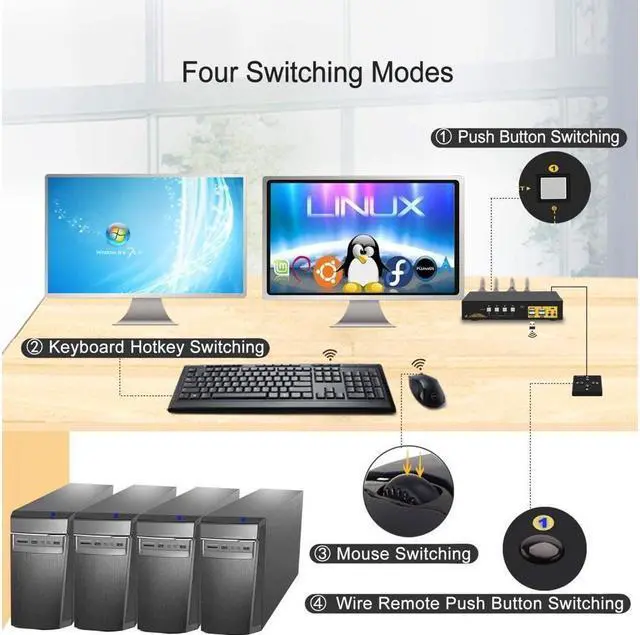
- 4x2 KVM SWITCH 2 MONITORS WITH EASY SWITCHING MODES: 1 Button switch on front Panel; 2 Keyboard hotkey switch; 3 Mouse click switch; 4 Wired remote switch; 5 Auto scan switch with adjustable interval for monitoring or testing purposes
- USB KVM WITH DUAL HDMI INPUT AND OUTPUTS: This dual monitor KVM is designed with 2 HDMI input for each computer and 2 HDMI output for monitors, reliable adapters will be needed for VGA / DVI / USB C / DP outputs, Please be aware of this before order
+
+
Overview
Specs
Reviews
Any questions? Our AI beta will help you find out quickly.
Try me now
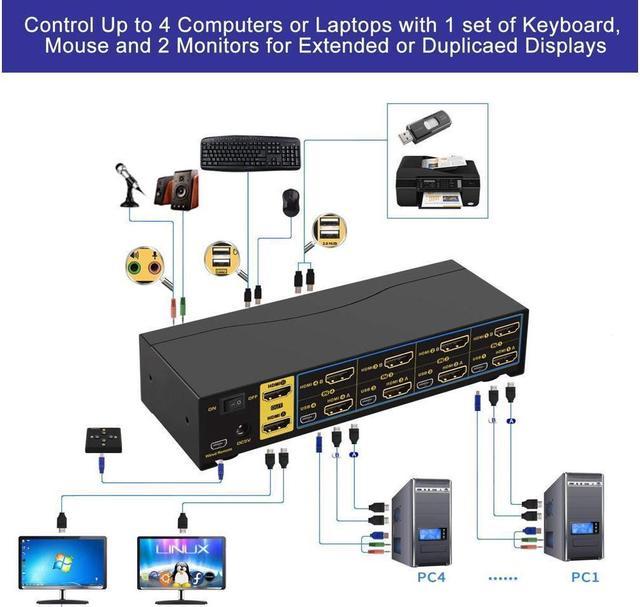
Installation Diagram (Make sure cable connection is correct for each input device)
How to Get Dual Monitor Display:
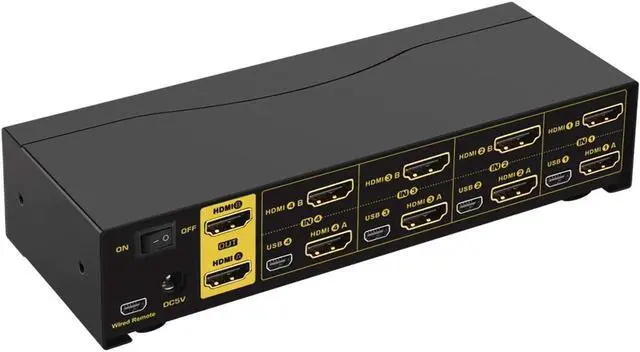
Each computer / laptop needs 2 video connections to correspondent IN A and IN B port on the KVM switch using Cable A and Cable B included.
Reliable adapters are needed but not included for DVI, VGA, DisplayPort (DP), USB Type C video outputs. Please be aware of the adapters needed for your setup before order.
Avoid using adapters on both monitor and computer side for a same video flow.
4 Port Dual Monitor KVM Switch HDMI 4K@60Hz CKL-942HUA-2
Does Everything You Need!
4 computers / laptops share one set of keyboard, mouse and 2 monitors
Dual monitors output support up to 4K@60Hz for extended, mirrored or spliced display
Support wired or wireless keyboard and mouse with USB pass-though technology
Cross support most major OS including Windows, Linux, Mac
Advanced switching modes: Hotkey, mouse click, button switch, auto scan and wired remote
With 2 extra USB 2.0 HUB and audio support
Include all cables except cable for monitors
How to Get Keyboard and Mouse Work:
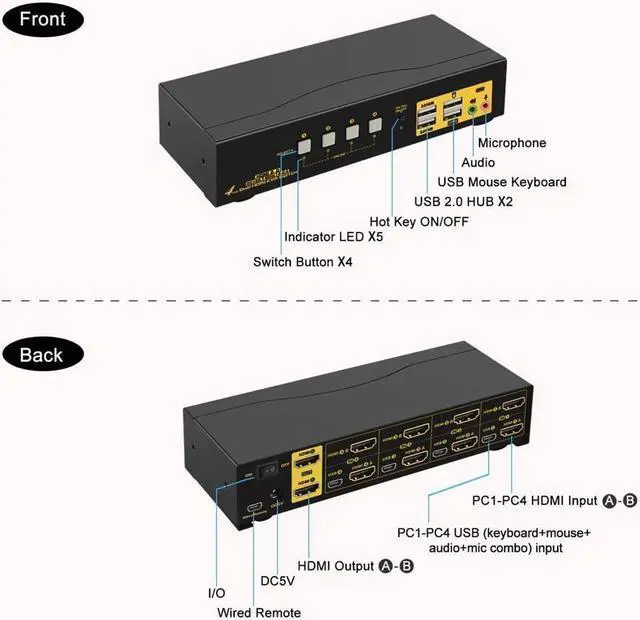
1. Make sure mini USB cable is correctly connected, the end with USB, HDMI must be plugged into computer, the other end with only mini USB must be plugged into correspondent mini USB port
2. The 2 USB ports marked with keyboard and mouse icons are dedicated for hotkeys, when the hotkey is turned off, these 2 USB ports will turn into standard USB 2.0 ports like the other 2 USB 2.0 HUB ports.
3. Recommend to plug Bluetooth adapter of wireless keyboard and mouse into front keyboard port.
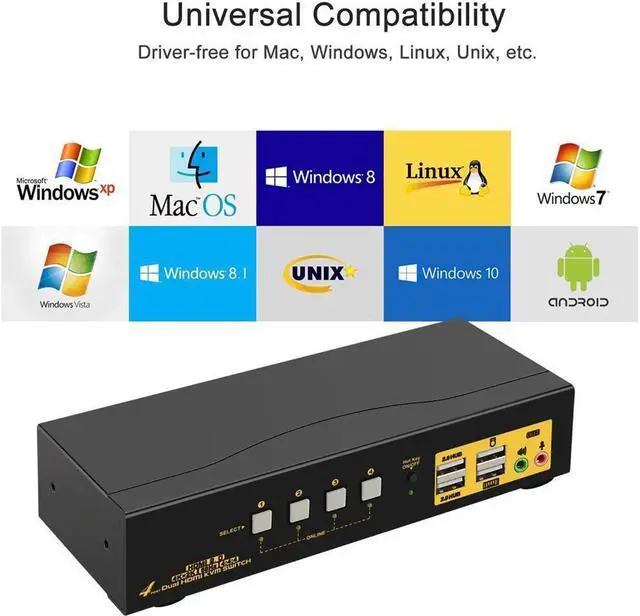
Universal Compatibility
Cross support most major OS including
Windows, Linux, Mac and more.
3 Display Modes
Extended Display
Mirrored Display
Spliced Display(4 monitors horizontal or vertical, depends on system support).
How to Switch:
1.
Keyboard Hotkey: Double click the right Ctrl.
2.
Mouse Click: Double Click the middle roller
of mouse.
3. Push Button on front panel.
4. Auto Scan with adjustable interval time of 8-999 seconds
5. Wired remote
What's in the box
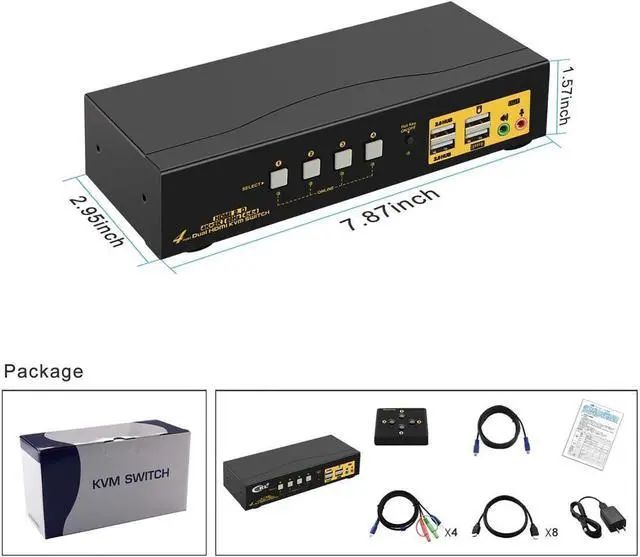
1* 4 Port HDMI KVM switch
1*Power adapter
1*User manual in English
1* Mini USB Cable+Wired Remoter
8*HDMI Cables ( 4.92 ft)
4*USB+Audio Cables ( 4.92 ft)
Noted: HDMI Cable connect to monitor is not including!

How to Get Dual Monitor Display:
Each computer / laptop needs 2 video connections to correspondent IN A and IN B port on the KVM switch using Cable A and Cable B included.
Reliable adapters are needed but not included for DVI, VGA, DisplayPort (DP), USB Type C video outputs. Please be aware of the adapters needed for your setup before order.
Avoid using adapters on both monitor and computer side for a same video flow.
4 Port Dual Monitor KVM Switch HDMI 4K@60Hz CKL-942HUA-2
Does Everything You Need!
4 computers / laptops share one set of keyboard, mouse and 2 monitors
Dual monitors output support up to 4K@60Hz for extended, mirrored or spliced display
Support wired or wireless keyboard and mouse with USB pass-though technology
Cross support most major OS including Windows, Linux, Mac
Advanced switching modes: Hotkey, mouse click, button switch, auto scan and wired remote
With 2 extra USB 2.0 HUB and audio support
Include all cables except cable for monitors
How to Get Keyboard and Mouse Work:
1. Make sure mini USB cable is correctly connected, the end with USB, HDMI must be plugged into computer, the other end with only mini USB must be plugged into correspondent mini USB port
2. The 2 USB ports marked with keyboard and mouse icons are dedicated for hotkeys, when the hotkey is turned off, these 2 USB ports will turn into standard USB 2.0 ports like the other 2 USB 2.0 HUB ports.
3. Recommend to plug Bluetooth adapter of wireless keyboard and mouse into front keyboard port.
Universal Compatibility
Cross support most major OS including
Windows, Linux, Mac and more.
3 Display Modes
Extended Display
Mirrored Display
Spliced Display(4 monitors horizontal or vertical, depends on system support).
How to Switch:
1.
Keyboard Hotkey: Double click the right Ctrl.
2.
Mouse Click: Double Click the middle roller
of mouse.
3. Push Button on front panel.
4. Auto Scan with adjustable interval time of 8-999 seconds
5. Wired remote
What's in the box
1* 4 Port HDMI KVM switch
1*Power adapter
1*User manual in English
1* Mini USB Cable+Wired Remoter
8*HDMI Cables ( 4.92 ft)
4*USB+Audio Cables ( 4.92 ft)
Noted: HDMI Cable connect to monitor is not including!
Warranty & Returns
Warranty, Returns, And Additional Information
Warranty
- Please contact the Seller directly for warranty information. Warranty information may also be found on the Manufacturer's website.
- CONTACT
Return Policies
- Return for refund within: 30 days
- Return for replacement within: 30 days
- This item is covered by Focus Memory Return Policy
Manufacturer Contact Info
- For a directory of all our manufacturers, please click below.
- Manufacturers Directory
LOADING...