

Your Browsing History
- Free 30-day Returns
$133.12
Ships from Hong Kong.


Meet Your Seller

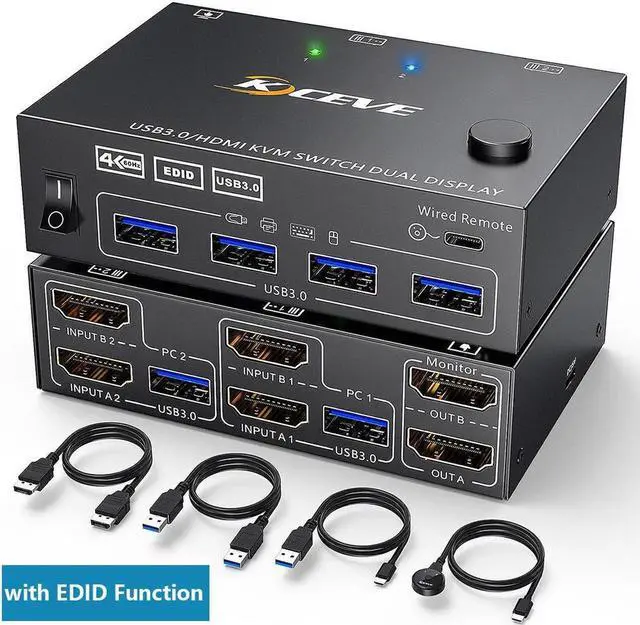
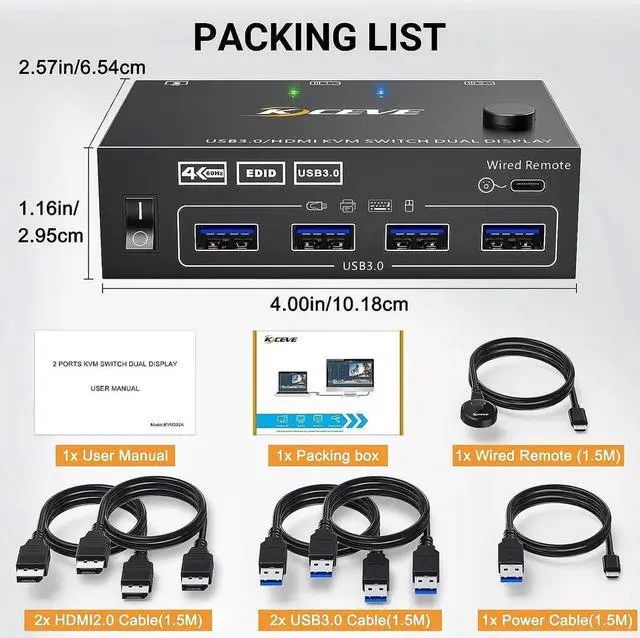


HDMI KVM Switch 2 Computers 2 Monitors, Dual Monitor HDMI USB 3.0 KVM Switcher 2 in 2 Out , 4K@60Hz HD Resolution, Support Copy and Extended Display, with EDID Function to Keep Window in Right Place
Limited time offer, ends 10/14 By E-tech
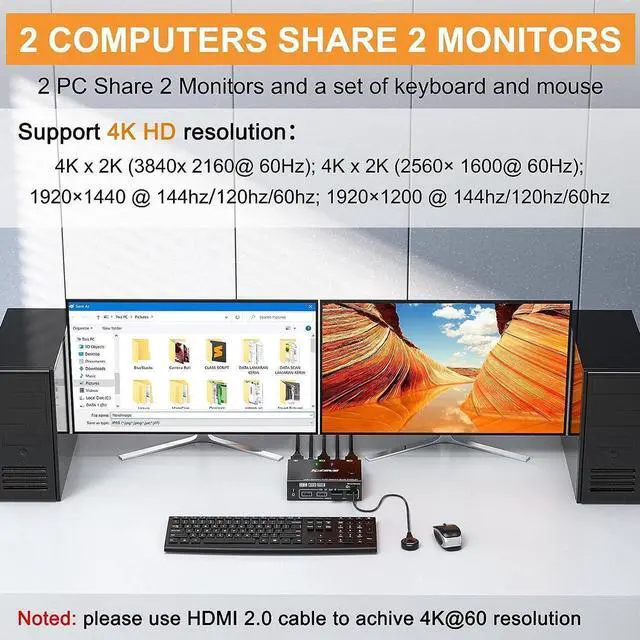
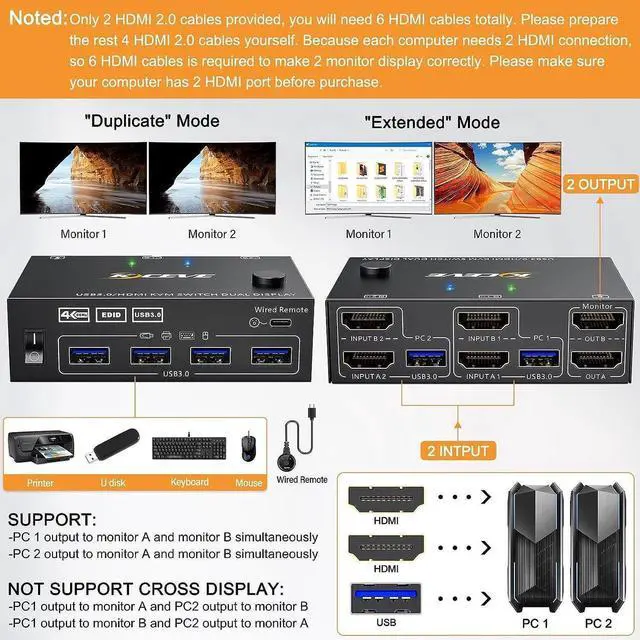
- [Dual Monitor KVM USB 3.0 Switch] This HDMI KVM switch can control 2 computers to share 2 monitors by 1 set of USB keyboard&mouse. When in copy mode the main screen can be copied to the secondary screen. When in extend mode, the window from main screen can be dragged to second screen.
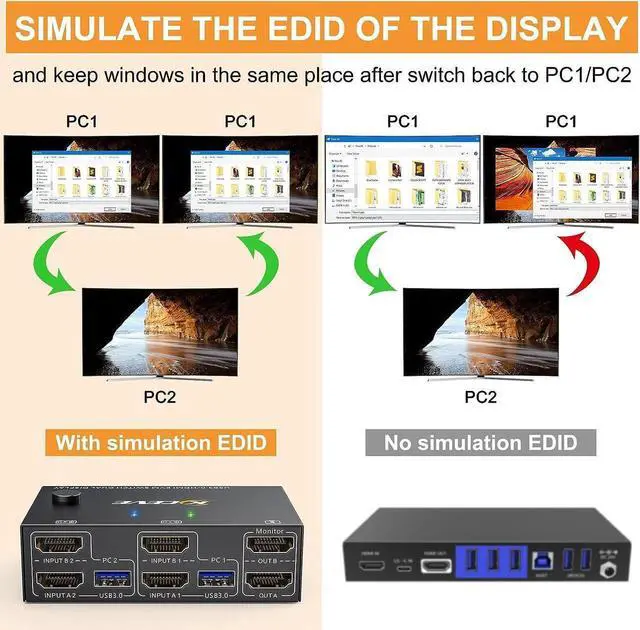
- [With EDID Emulator Function] with EDID emulators in each input port, keep computers always having correct display information when switch back from PC1 or PC2. Compatible with Windows10/8.1/8/7/XP/Vista, MacOS, Linux, ChromeOS.
- [With 4 USB 3.0 USB Ports] This 2 in 2 out KVM USB 3.0 switch with 4 USB 3.0 port for sharing mouse, keyboard, USB printers, etc,. USB 3.0 transmission is more stable and faster.
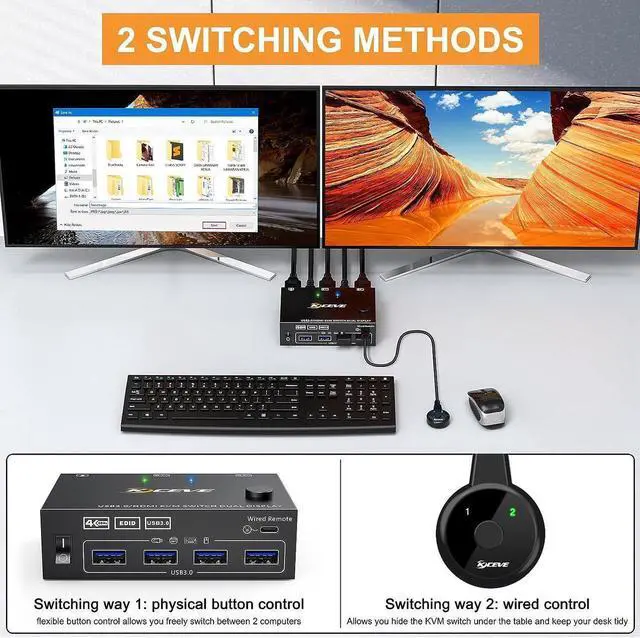
- [Support 2 Mode Switching]Support physical button and wired control. Come with a wired control, support control device within 1.5 meters. Noted: this kvm usb 3.0 switcher not support keyboard hot key switching way.
- [Ultra HD 4k Visual Enjoyment] Support resolution up to 3840x2160@60Hz, downward compatible
+
+
Overview
Specs
Reviews

Any questions? Our AI mode will help you find out quickly.
Try me now
USB 3.0 version Dual Monitor KVM HDMI switch for 2 computers 2 monitors
Product name: KVM HDMI USB 3.0 Switch for 2 computer 2 monitors
Material: Metal shell
Control way: physical button and wired control
Keyboard hotkey switch way: Not supported
Resolution range: Up to 4K@60Hz
Support wired or wireless keyboard and mouse
Easy set up for HDMI devices, 2 HDMI ports are requird for your each computer
Each computer needs 2 HDMI ports, please make sure your computer with 2 HDMI ports before purchasing.
This USB 3.0 version dual monitor KVM switch is for 2 computers share 2 monitors, keyboard, mouse and USB devices. Please connect all cables to make 2 display work properly.
Two HDMI inputs used for HDMI devices, such as computer, laptop, TV box, DVD, PS5/4, etc. Please note if PS console connected, the mouse and keyboard con't control the game via KVM switch.
Upgraded USB 3.0 version ensure data transfer more faster and stable, it's a great solution to solve many USB device disconnected issue during use.
Power suppy is not required for normal USB device, but if USB recognition is unstable, we recommend connect a external power adapter to provide enough power. (power adapter is not provided)
Bluetooth mouse and keyboard will be exist delay for few seconds, we not recommend use Bluetooth mouse and keyboard.
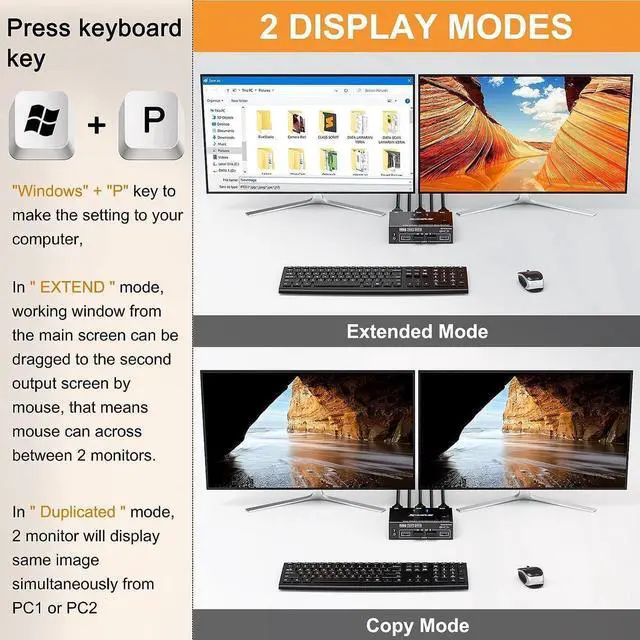
Support 2 display modes
In COPY mode, 2 output monitors will output same image from PC1 or PC2.
In EXTEND mode, the working window from main screen can be dragged to seond output monitor. You can have the mouse across between 2 monitors.
Enjoy HD quality display, support follow resolution
SUPPORT: 4K x 2K (3840x 2160@ 60Hz); 4K x 2K (2560x 1600@ 60Hz); 4K x 2K (2048x 1536@ 60Hz); 2560x1440 @ 60hz; 1920x1440 @ 60hz; 1920x1200 @ 60hz
USB 3.0 KVM Switch with EDID emulators in each input port
USB 3.0 KVM Switch with EDID emulators in each input port, keep computers always having correct display information when switch back.
For most KVM switch on the market are not support EDID locking sreen function, it's not very convenient sometimes.
Support 2 switching ways
Physical button control
Wired control
Physical button control Wired control
Blue light shows PC1 working status
Green light shows PC2 working status
Product name: KVM HDMI USB 3.0 Switch for 2 computer 2 monitors
Material: Metal shell
Control way: physical button and wired control
Keyboard hotkey switch way: Not supported
Resolution range: Up to 4K@60Hz
Support wired or wireless keyboard and mouse
Easy set up for HDMI devices, 2 HDMI ports are requird for your each computer
Each computer needs 2 HDMI ports, please make sure your computer with 2 HDMI ports before purchasing.
This USB 3.0 version dual monitor KVM switch is for 2 computers share 2 monitors, keyboard, mouse and USB devices. Please connect all cables to make 2 display work properly.
Two HDMI inputs used for HDMI devices, such as computer, laptop, TV box, DVD, PS5/4, etc. Please note if PS console connected, the mouse and keyboard con't control the game via KVM switch.
Upgraded USB 3.0 version ensure data transfer more faster and stable, it's a great solution to solve many USB device disconnected issue during use.
Power suppy is not required for normal USB device, but if USB recognition is unstable, we recommend connect a external power adapter to provide enough power. (power adapter is not provided)
Bluetooth mouse and keyboard will be exist delay for few seconds, we not recommend use Bluetooth mouse and keyboard.
Support 2 display modes
In COPY mode, 2 output monitors will output same image from PC1 or PC2.
In EXTEND mode, the working window from main screen can be dragged to seond output monitor. You can have the mouse across between 2 monitors.
Enjoy HD quality display, support follow resolution
SUPPORT: 4K x 2K (3840x 2160@ 60Hz); 4K x 2K (2560x 1600@ 60Hz); 4K x 2K (2048x 1536@ 60Hz); 2560x1440 @ 60hz; 1920x1440 @ 60hz; 1920x1200 @ 60hz
USB 3.0 KVM Switch with EDID emulators in each input port
USB 3.0 KVM Switch with EDID emulators in each input port, keep computers always having correct display information when switch back.
For most KVM switch on the market are not support EDID locking sreen function, it's not very convenient sometimes.
Support 2 switching ways
Physical button control
Wired control
Physical button control Wired control
Blue light shows PC1 working status
Green light shows PC2 working status
Warranty & Returns
Warranty, Returns, And Additional Information
Warranty
- Please contact the Seller directly for warranty information. Warranty information may also be found on the Manufacturer's website.
- CONTACT
Return Policies
- Return for refund within: 30 days
- Return for replacement within: non-replaceable
- This item is covered by E-tech Return Policy
Manufacturer Contact Info
- For a directory of all our manufacturers, please click below.
- Manufacturers Directory
LOADING...