

Your Browsing History
- Free 30-day Returns
$177.89
Ships from Hong Kong.


Meet Your Seller

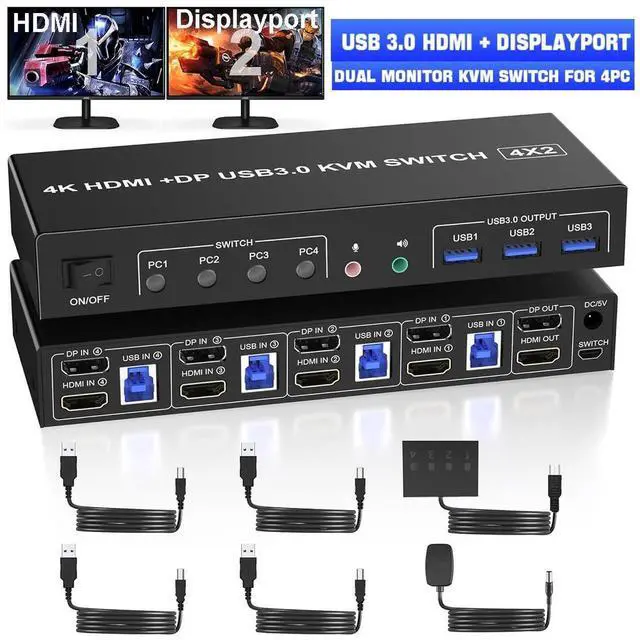


USB 3.0 Displayport+HDMI KVM Switch 2 Monitors 4 Computers, 4K@60Hz KVM Switch with Audio Microphone and 3 USB 3.0 Ports, 4 Port HDMI+DP Dual Monitor KVM Switch for 4 PCs, with Wired Remote
Limited time offer, ends 09/11 By E-tech
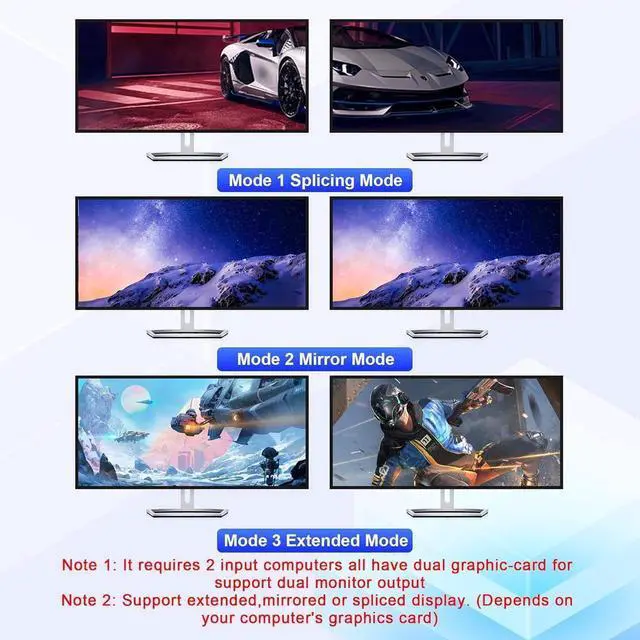
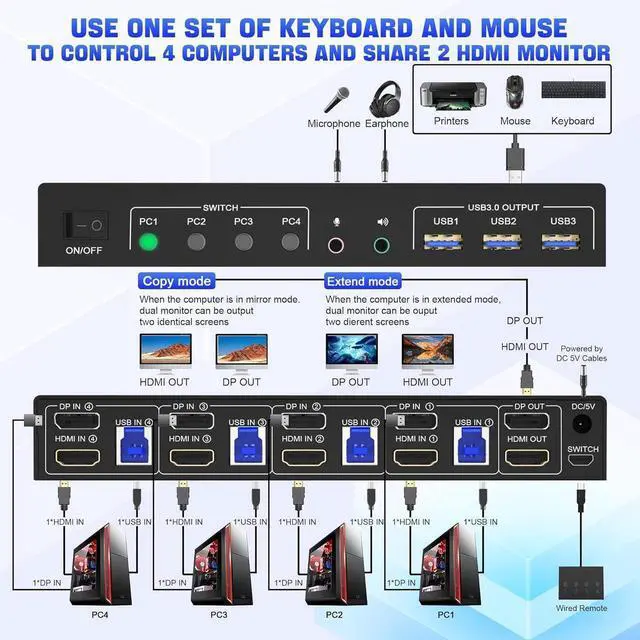
- 4 Port DP+HDMI Dual Monitor KVM Switch: This KVM Switch allows you to control 4 computers or laptops with one set of keyboard, mouse, and single or dual monitors. Note: This KVM supports HDMI + DP dual-screen display (This function requires your PC to support dual display or multi-display).
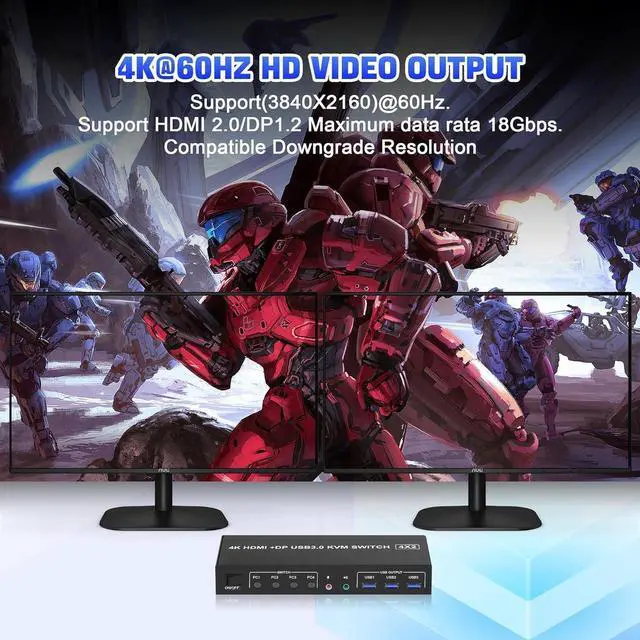
- Ultra HD 4K@60Hz: Supporting high resolution max up to 4K@60Hz, and also supports 3D and 1080P@60Hz or other lower resolution (Downward Compatible). Support up to 4K@60Hz for extended and mirrored display.
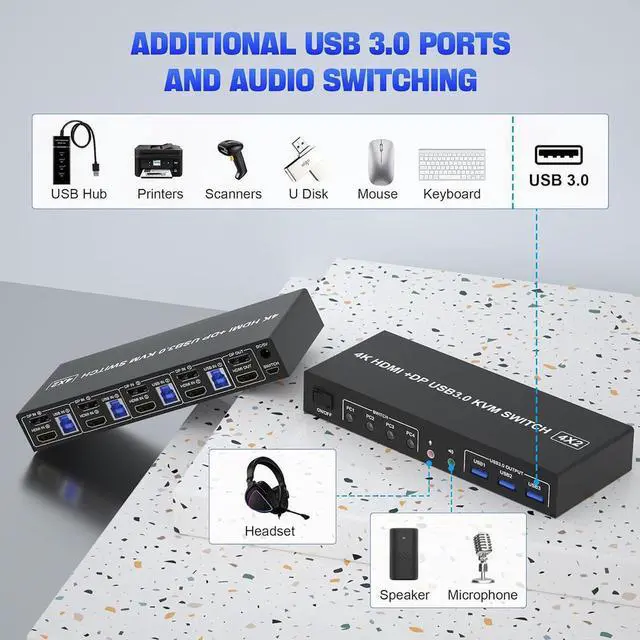
- 3 USB 3.0 and Audio Microphone Ports: with 3 USB 3.0 ports which can recognize keyboard mouse, printer, or other USB devices. USB 3.0 has a faster data transfer speed of up to 5Gbps, backward compatible with USB 2.0/1.1. Come with a 3.5mm Audio Jack port with a DAC chip inside and a 3.5mm microphone interface.
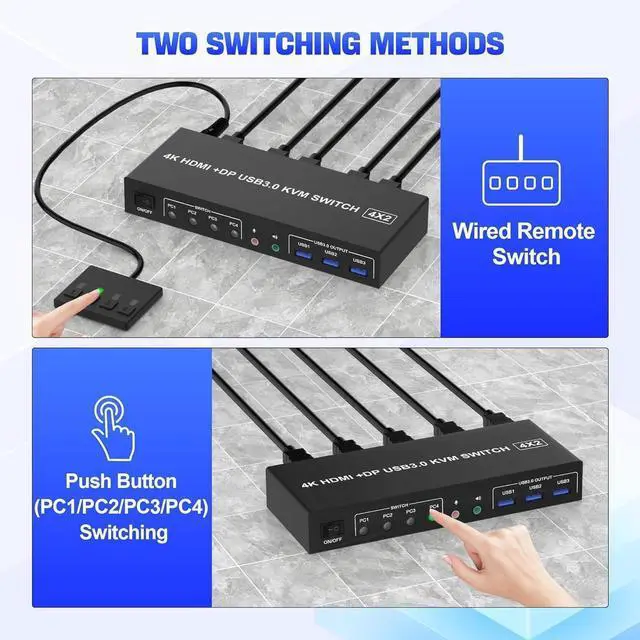
- 2 Switching modes and Wide Compatibility: 1.Toggle selection on front panel 2. Wired remote switch. Compatible with Windows, Linux, Mac, Unix, Ubuntu, Raspberry and most other major OS.
+
+
Overview
Specs
Reviews

Any questions? Our AI mode will help you find out quickly.
Try me now
Dual Monitor 4 Port HDMI + DP USB 3.0 KVM Switch 4K@60Hz
Product Features:
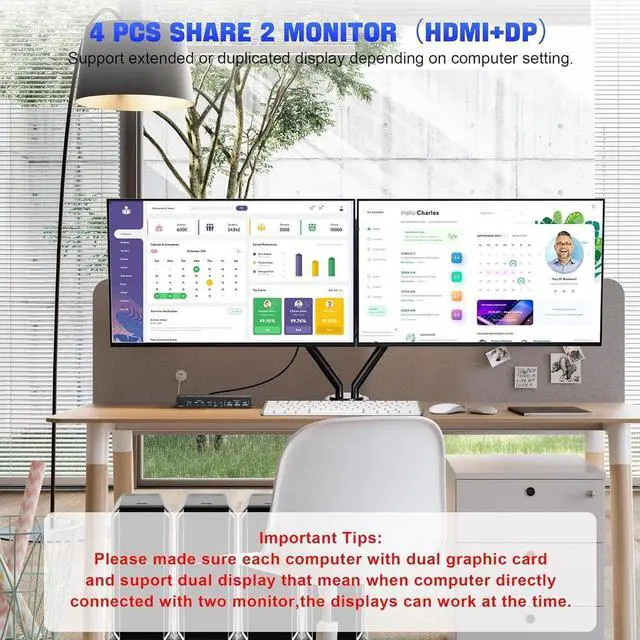
4 computers/laptops share one set of keyboard, mouse and dual monitors, and more USB 3.0 ports;
Support maximum resolution up to 4K 60Hz YUV 4:4: 4, HDCP 1.4, HDR 2.2; Dual monitors output support up to 4K@60Hz for extended and mirrored display;
Compatible with Windows 11/10/7/2000/XP/Vista, Linux, UNIX, Ubuntu, Fedora, and other systems;
Advanced switching modes: push button and wired remote;
No complicated installation is required, and non-professionals can easily operate it;
The ports that need to plug in HDMI/USB cables are all hidden behind the KVM, so the desktop doesn't get cluttered;
Audio Microphone output.
Connection steps:
1. Insert the DC/5V adapter into the KVM;
2. Plug the DP/HDMI cable into the KVM and monitor; (Output)
3. Plug the DP/HDMI cable and USB cable into the KVM and your computer/laptop (DP cables are not included) (Input)
DP IN1 + HDMI IN1 + USB IN1=PC1
DP IN2 +HDMI IN2 + USB IN2=PC2
DP IN3 + HDMI IN3 + USB IN3=PC3
DP IN4+ HDMI IN4+ USB IN4=PC4
4. Insert the mouse and keyboard into the KVM switch
5. If needed, you can connect a microphone and audio port
Note:
1. Most of the reasons why only one video output works is because of incorrect connection. Please make sure each PC has(1 DP/HDMI cables+1 USB cable) connect to the KVM.
2. If the KVM switch does not work, you can turn off the switch on the panel and turn it on again after 2-3 seconds, and it will return to normal.
3. Before purchasing this DP/HDMI dual monitor KVM switch, please make sure that connecting your computer directly to the monitor can work normally, Otherwise, the KVM will not be available.
4.
Note: DP/HDMI cables are not included
USB 3.0 Dual Monitor KVM Support 4K@60HZ
Supports high resolution up to 3840*2160@60Hz and downwards.
Note: Only when both your computer Graphics card and monitor support 4K@60Hz you can get the 4K@60Hz effect, so if you want the maximum resolution you have to check your devices first.
Supports separate audio and microphone output
KVM Switch comes with a 3.5 mm Audio Jack port with a DAC chip inside, which can be inserted into a 3-segment 3.5 mm earpiece device, and a 3.5 mm microphone interface, which can be inserted into a 3-segment microphone.
3 Port USB 3.0 with 5Gbps
Supports 5Gbps data transfer speed, can transfer files in Seconds, Much faster than USB 2.0.
3 USB 3.0 ports, backward compatible with USB 2.0 and USB 1.1, share USB devices such as keyboard mouse scanner, printer, flash drive, etc.
2 monitors 4 computers KVM Support 2 Switching Modes
Quickly switch between the 4 computers with just one click of the switch button on the panel or use the wired remote controller (included in the package).
Please note: This KVM does not support hotkey switching.
Product Features:
4 computers/laptops share one set of keyboard, mouse and dual monitors, and more USB 3.0 ports;
Support maximum resolution up to 4K 60Hz YUV 4:4: 4, HDCP 1.4, HDR 2.2; Dual monitors output support up to 4K@60Hz for extended and mirrored display;
Compatible with Windows 11/10/7/2000/XP/Vista, Linux, UNIX, Ubuntu, Fedora, and other systems;
Advanced switching modes: push button and wired remote;
No complicated installation is required, and non-professionals can easily operate it;
The ports that need to plug in HDMI/USB cables are all hidden behind the KVM, so the desktop doesn't get cluttered;
Audio Microphone output.
Connection steps:
1. Insert the DC/5V adapter into the KVM;
2. Plug the DP/HDMI cable into the KVM and monitor; (Output)
3. Plug the DP/HDMI cable and USB cable into the KVM and your computer/laptop (DP cables are not included) (Input)
DP IN1 + HDMI IN1 + USB IN1=PC1
DP IN2 +HDMI IN2 + USB IN2=PC2
DP IN3 + HDMI IN3 + USB IN3=PC3
DP IN4+ HDMI IN4+ USB IN4=PC4
4. Insert the mouse and keyboard into the KVM switch
5. If needed, you can connect a microphone and audio port
Note:
1. Most of the reasons why only one video output works is because of incorrect connection. Please make sure each PC has(1 DP/HDMI cables+1 USB cable) connect to the KVM.
2. If the KVM switch does not work, you can turn off the switch on the panel and turn it on again after 2-3 seconds, and it will return to normal.
3. Before purchasing this DP/HDMI dual monitor KVM switch, please make sure that connecting your computer directly to the monitor can work normally, Otherwise, the KVM will not be available.
4.
Note: DP/HDMI cables are not included
USB 3.0 Dual Monitor KVM Support 4K@60HZ
Supports high resolution up to 3840*2160@60Hz and downwards.
Note: Only when both your computer Graphics card and monitor support 4K@60Hz you can get the 4K@60Hz effect, so if you want the maximum resolution you have to check your devices first.
Supports separate audio and microphone output
KVM Switch comes with a 3.5 mm Audio Jack port with a DAC chip inside, which can be inserted into a 3-segment 3.5 mm earpiece device, and a 3.5 mm microphone interface, which can be inserted into a 3-segment microphone.
3 Port USB 3.0 with 5Gbps
Supports 5Gbps data transfer speed, can transfer files in Seconds, Much faster than USB 2.0.
3 USB 3.0 ports, backward compatible with USB 2.0 and USB 1.1, share USB devices such as keyboard mouse scanner, printer, flash drive, etc.
2 monitors 4 computers KVM Support 2 Switching Modes
Quickly switch between the 4 computers with just one click of the switch button on the panel or use the wired remote controller (included in the package).
Please note: This KVM does not support hotkey switching.
Warranty & Returns
Warranty, Returns, And Additional Information
Warranty
- Please contact the Seller directly for warranty information. Warranty information may also be found on the Manufacturer's website.
- CONTACT
Return Policies
- Return for refund within: 30 days
- Return for replacement within: non-replaceable
- This item is covered by E-tech Return Policy
Manufacturer Contact Info
- For a directory of all our manufacturers, please click below.
- Manufacturers Directory
LOADING...