

Your Browsing History

Meet Your Seller

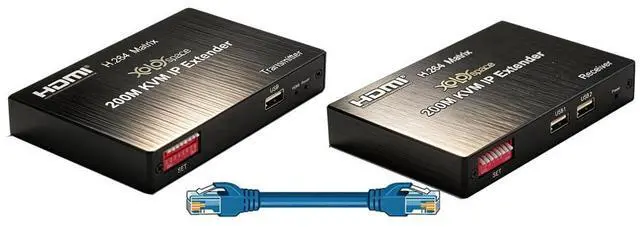
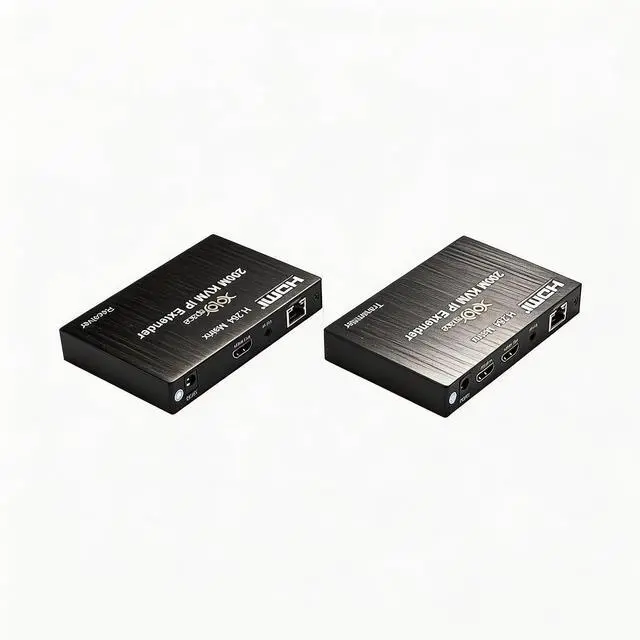
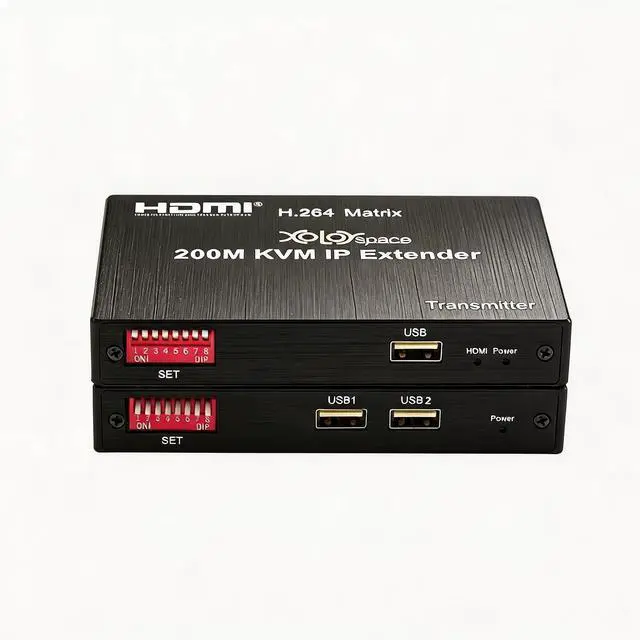
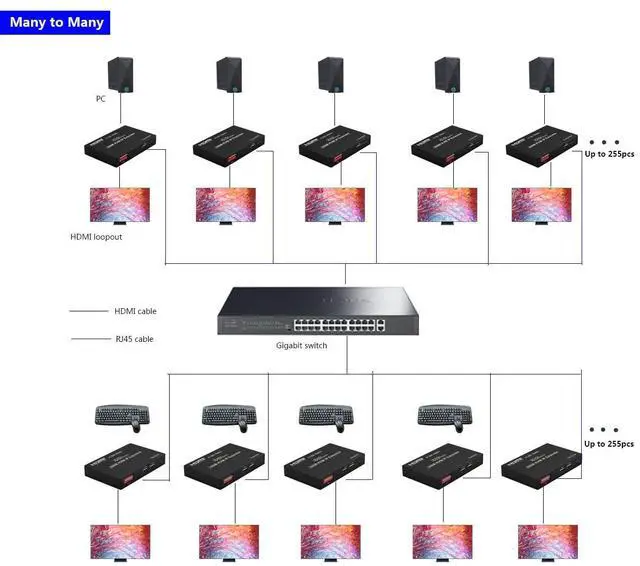
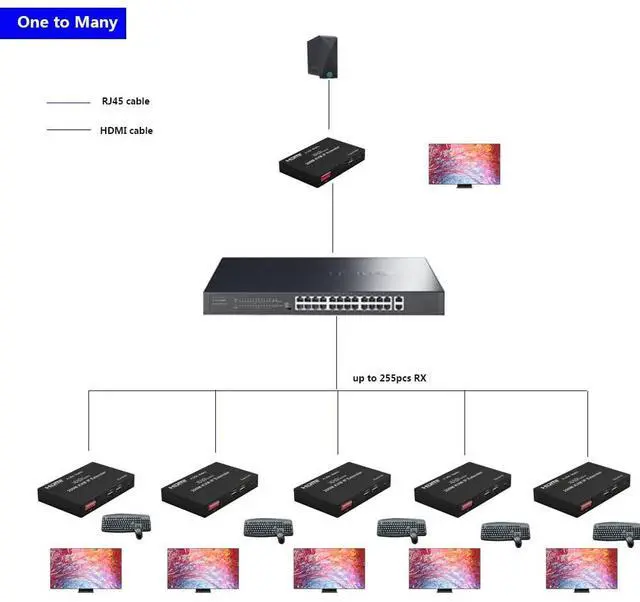


EX200M-K 1080P HDMI Extender Over IP Supports one-to- multipoint and multipoint-to-multipoint with USB KVM Extension
- XOLORspace EX200M-K HDMI 200M Extender over IP is based on TCP/IP standard and advanced H.264 decoding.
- Transmits HDMI signal including USB KVM with the high resolution up to 200 meters away from your DVD or computer source by using one CAT5e/6/7 cable.
- Supports point-to-point mode, one-to-multipoint, multipoint-to-multipoint and cascade connection mode
- Supports unilateral IR return signal, control the source on the far-end receivers side
- Supports IP management by software for multipoint-to-multipoint mode
+
+
Overview
Specs
Reviews

Any questions? Our AI beta will help you find out quickly.
Try me now
Features:
HDMI resolution: 480p, 720p, 1080p
Audio Sample rate: 32 kHz, 44.1 kHz and 48 kHz code
Audio format supports LCPM 2.0
Support point-to-point mode, multipoint-to-multipoint mode and cascade connection mode
Supports 802.3 Ethernet standard
Supports unilateral IR return signal
IR code supports 38 KHz (NEC)
Support USB mouse and keyboard extension
Supports IP management by software for multipoint-to-multipoint mode
Dimension: 163*87*24mm
Net weight: 474g x 2
Connection and operation:
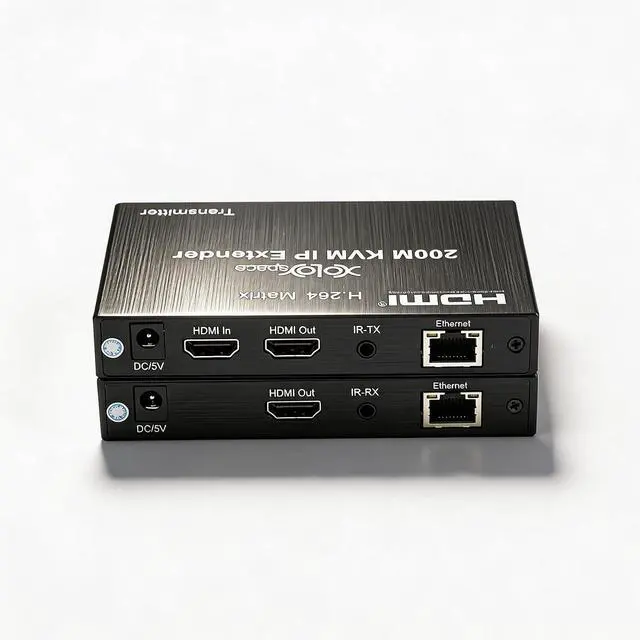
1) Connect the HDMI source (such as DVD, PS3, and STB) to the HDMI IN of transmitter by HDMI cable.
2) Connect the HDMI out of Receiver to HDTV display by HDMI cable.
3) Connect the Transmitter and Receiver with one cat5e/6 cable (recommend).the furthest distance is 200M.
4) Connect the IR receiver into IR-RX port on receiver, and IR transmitter into the IR-TX on transmitter, and make sure the IR transmitter aim at IR port of the source.
5) Plug the mouse and keyboard into the USB port of the receiver, and connect the USB port of the transmitter with the computer if you need the KVM control function.
6) Connect two pieces of 5V power supply to the transmitter and receiver, and power on the HDTV display and HDMI source.
7) Multi-to-multipoint matching settingAs multiple TX and multiple RX units are connected to switches, you can use management software for pairing management.
HDMI resolution: 480p, 720p, 1080p
Audio Sample rate: 32 kHz, 44.1 kHz and 48 kHz code
Audio format supports LCPM 2.0
Support point-to-point mode, multipoint-to-multipoint mode and cascade connection mode
Supports 802.3 Ethernet standard
Supports unilateral IR return signal
IR code supports 38 KHz (NEC)
Support USB mouse and keyboard extension
Supports IP management by software for multipoint-to-multipoint mode
Dimension: 163*87*24mm
Net weight: 474g x 2
Connection and operation:
1) Connect the HDMI source (such as DVD, PS3, and STB) to the HDMI IN of transmitter by HDMI cable.
2) Connect the HDMI out of Receiver to HDTV display by HDMI cable.
3) Connect the Transmitter and Receiver with one cat5e/6 cable (recommend).the furthest distance is 200M.
4) Connect the IR receiver into IR-RX port on receiver, and IR transmitter into the IR-TX on transmitter, and make sure the IR transmitter aim at IR port of the source.
5) Plug the mouse and keyboard into the USB port of the receiver, and connect the USB port of the transmitter with the computer if you need the KVM control function.
6) Connect two pieces of 5V power supply to the transmitter and receiver, and power on the HDTV display and HDMI source.
7) Multi-to-multipoint matching settingAs multiple TX and multiple RX units are connected to switches, you can use management software for pairing management.
Warranty & Returns
Warranty, Returns, And Additional Information
Warranty
- Please contact the Seller directly for warranty information. Warranty information may also be found on the Manufacturer's website.
- CONTACT
Return Policies
- Return for refund within: 30 days
- Return for replacement within: 30 days
- This item is covered by PrimeVolt’Shop Return Policy
Manufacturer Contact Info
- For a directory of all our manufacturers, please click below.
- Manufacturers Directory
LOADING...