

Your Browsing History

Meet Your Seller

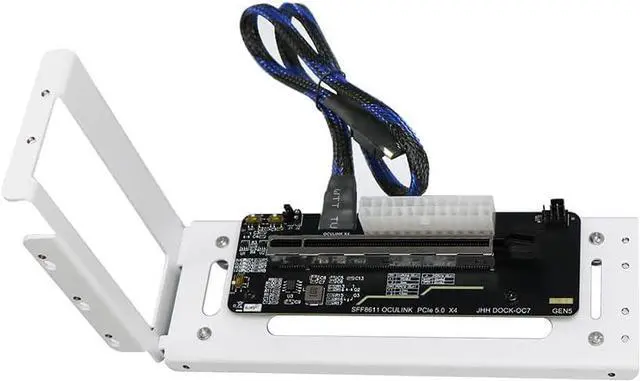


JMT PCIe 5.0 X16 to Oculink 4i GPU Expansion Dock 128G GEN4 High Speed Direct-Connect with 50cm Cable Compatible with M.2 NVMe Docking Station GDP Laptop (DOCK-OC7W)
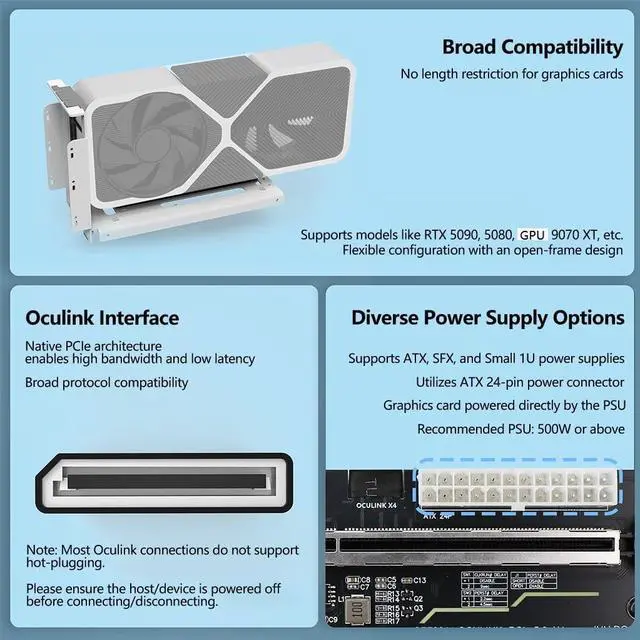
- Supports expansion of external PCIe cards for mini PCs, GDP handheld gaming consoles, and laptops. Use the Oculink port or convert the internal M.2 socket to an Oculink port via an adapter board.
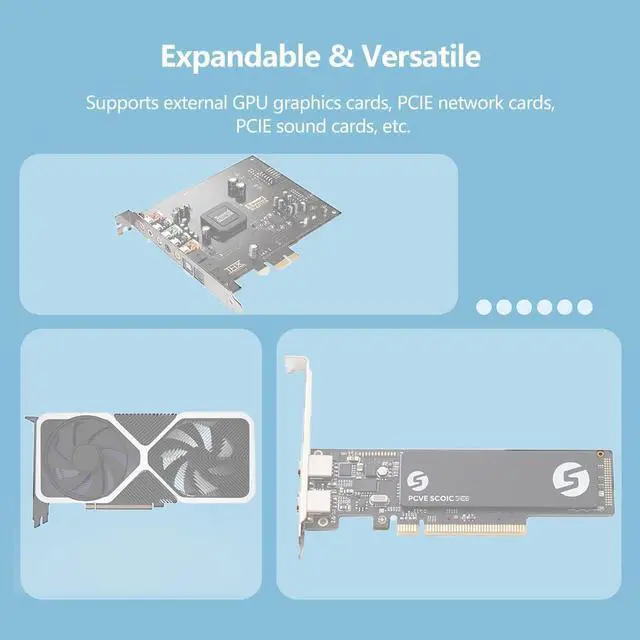
- Compatible with external GPUs, PCIe network cards, PCIe sound cards, PCIe capture cards, NVMe/U.2/U.3 SSDs, etc.
- Maximum bandwidth: PCIe 5.0 x4 Gen4, 128G. Backward compatible with Gen4 and Gen3. Requires host PC to support PCIe 5.0 speeds to achieve maximum PCIe 5.0 performance.
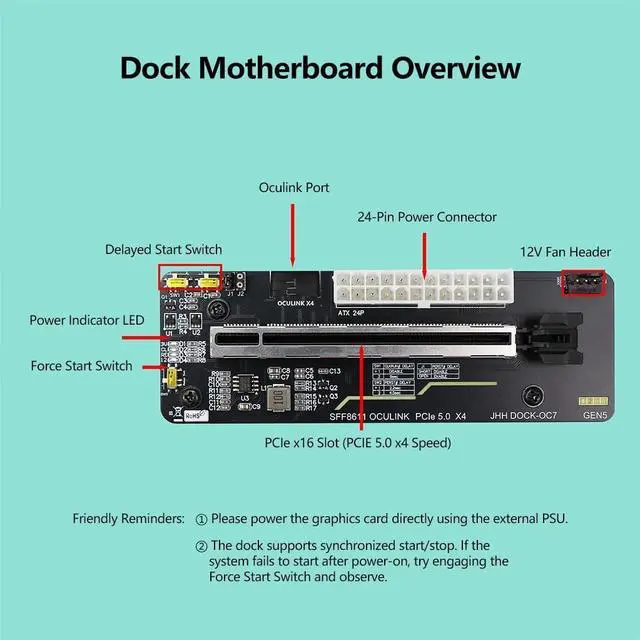
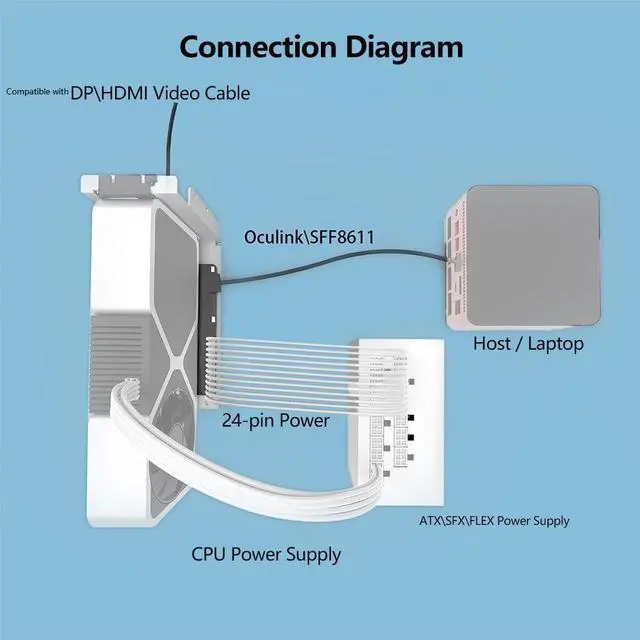
- Compatible with ATX/SFX/small 1U power supplies. The adapter board requires only a 24-pin power connector; GPU power is supplied by the power supply unit. A 500W+ power supply is recommended.
- Supports external GPUs up to the 5090 model, delivering up to 95% of its maximum performance. Do not use with adapter accessories from other manufacturers, as incompatibility or performance degradation may occur.
+
+
Overview
Specs
Reviews

Any questions? Our AI beta will help you find out quickly.
Try me now
JMT PCIe 5.0 X16 to Oculink 4i GPU Expansion Dock 128G GEN4 High Speed Direct-Connect with 50cm Cable Compatible with M.2 NVMe Docking Station GDP Laptop
DOCK-OC7: Black stand
DOCK-OC7W: White stand.
Product Description:
1. Oculink external expansion device, Oculink to PCIe x4 (physical interface PCIe x16)
2. Supports expansion of external PCIe cards for mini PCs, GDP handheld gaming consoles, and laptops. Use the Oculink port or convert the internal M.2 socket to an Oculink port via an adapter board.
3. Compatible with external GPUs, PCIe network cards, PCIe sound cards, PCIe capture cards, NVMe/U.2/U.3 SSDs, etc.
4. Maximum bandwidth: PCIe 5.0 x4 Gen4, 128G. Backward compatible with Gen4 and Gen3.
5. Requires host PC to support PCIe 5.0 speeds to achieve maximum PCIe 5.0 performance.
6. Compatible with ATX/SFX/small 1U power supplies. The adapter board requires only a 24-pin power connector; GPU power is supplied by the power supply unit. A 500W+ power supply is recommended.
7. This model features an ATX-24p right-angle power connector. No matching chassis enclosure is currently available.
8. Supports synchronized startup and shutdown with the host system. Hot-swapping is not supported.
9. Supports external GPUs up to the 5090 model, delivering up to 95% of its maximum performance.
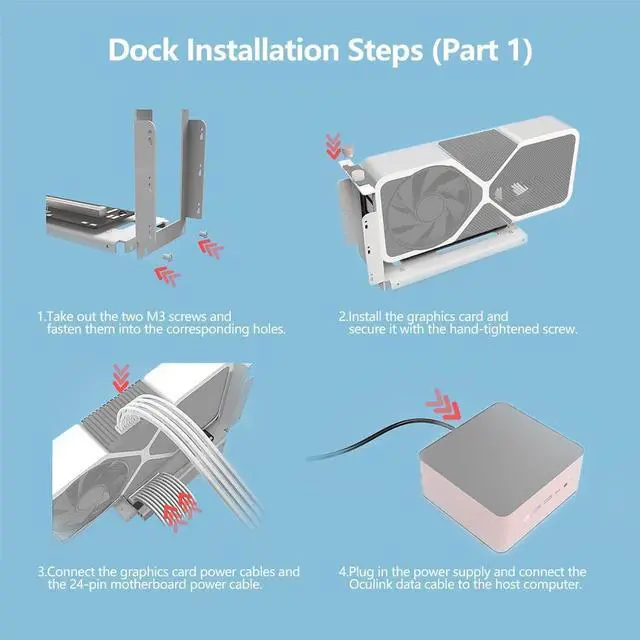
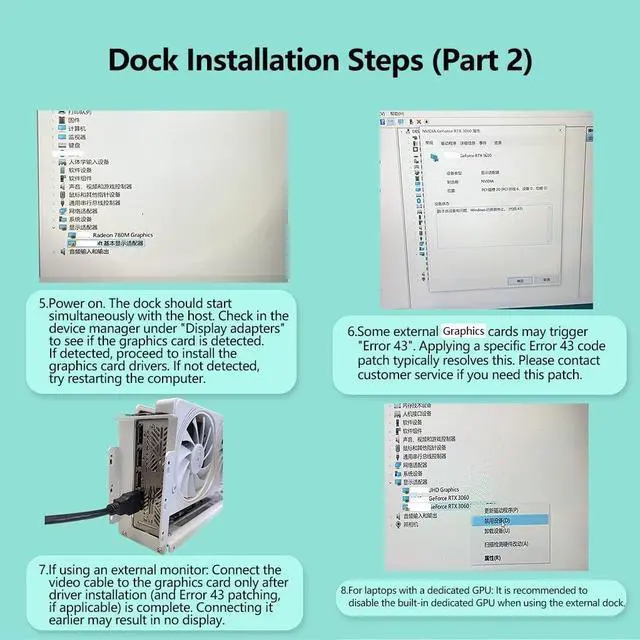
10. After connecting cables and power, the external device will auto-start when the host powers on. The adapter board will display two green lights. Upon entering the system, first check Device Manager for recognition of a new display device. Wait 5 minutes; the system typically auto-connects and updates drivers. If not recognized, try restarting the host first. If the host has a built-in discrete GPU, disable it in Device Manager.
DOCK-OC7: Black stand
DOCK-OC7W: White stand.
Product Description:
1. Oculink external expansion device, Oculink to PCIe x4 (physical interface PCIe x16)
2. Supports expansion of external PCIe cards for mini PCs, GDP handheld gaming consoles, and laptops. Use the Oculink port or convert the internal M.2 socket to an Oculink port via an adapter board.
3. Compatible with external GPUs, PCIe network cards, PCIe sound cards, PCIe capture cards, NVMe/U.2/U.3 SSDs, etc.
4. Maximum bandwidth: PCIe 5.0 x4 Gen4, 128G. Backward compatible with Gen4 and Gen3.
5. Requires host PC to support PCIe 5.0 speeds to achieve maximum PCIe 5.0 performance.
6. Compatible with ATX/SFX/small 1U power supplies. The adapter board requires only a 24-pin power connector; GPU power is supplied by the power supply unit. A 500W+ power supply is recommended.
7. This model features an ATX-24p right-angle power connector. No matching chassis enclosure is currently available.
8. Supports synchronized startup and shutdown with the host system. Hot-swapping is not supported.
9. Supports external GPUs up to the 5090 model, delivering up to 95% of its maximum performance.
10. After connecting cables and power, the external device will auto-start when the host powers on. The adapter board will display two green lights. Upon entering the system, first check Device Manager for recognition of a new display device. Wait 5 minutes; the system typically auto-connects and updates drivers. If not recognized, try restarting the host first. If the host has a built-in discrete GPU, disable it in Device Manager.
Warranty & Returns
Warranty, Returns, And Additional Information
Warranty
- Please contact the Seller directly for warranty information. Warranty information may also be found on the Manufacturer's website.
- CONTACT
Return Policies
- Return for refund within: 30 days
- Return for replacement within: 30 days
- This item is covered by PrimeVolt’Shop Return Policy
Manufacturer Contact Info
- For a directory of all our manufacturers, please click below.
- Manufacturers Directory
LOADING...