Take a tax holiday. Take advantage of limited-time, tax-free savings on select products in certain states. Learn More>
  • $689.79
  • Free 30-day Returns
  • Ships from China.
    Price alert
    Shop it at NeweggBusiness.

    2 Port USB 3.0 Triple Monitor Displayport KVM Switch, Displayport 1.4 Support 8K@30Hz 4K@144Hz, DP KVM Switch 2 Computers 3 Monitors Video Keyboard Mouse Peripheral Audio Sharing Selector with Cables

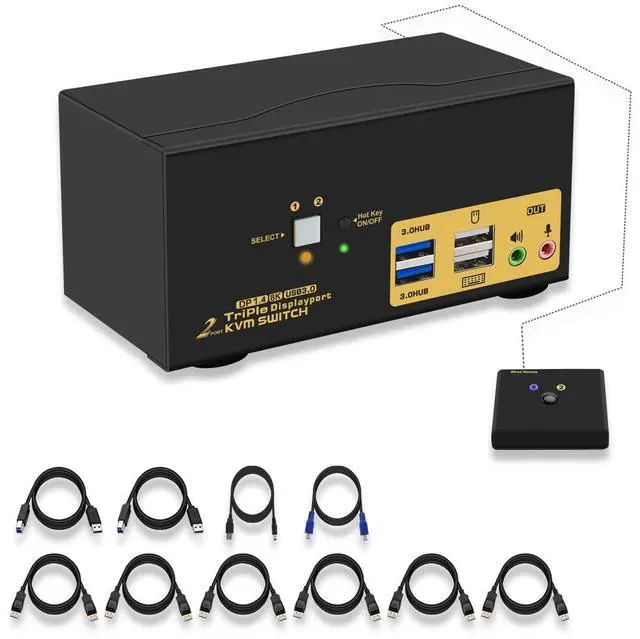
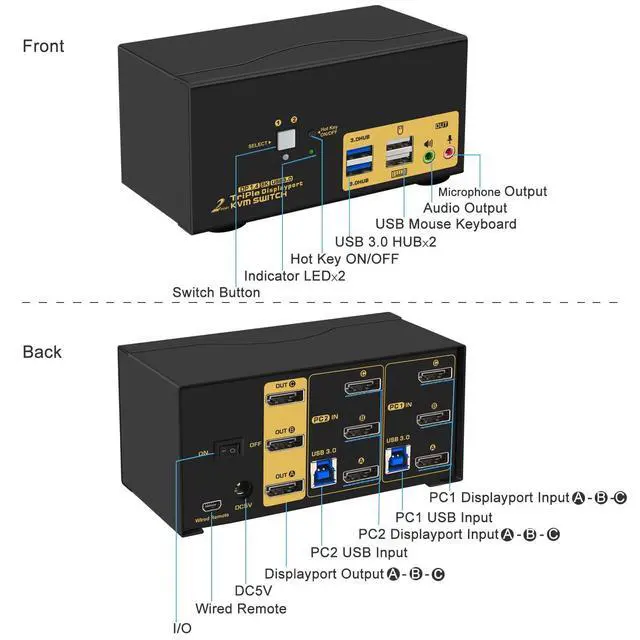
    • KVM Switch Displayport: 2 computers/laptops sharing one set of keyboard & mouse, 3 monitors, audio, microphone and 2 pcs USB 3.0 peripheral devices. It comes with audio and microphone output, 2xUSB 3.0 hub, a DC5V 2A power adapter, and all input cables.
    • 144Hz Displayport KVM Switch USB 3.0: Resolution compatible 7680x4320@30Hz, 5120x2880@50/60Hz, 3840x2160@60/120/144Hz, 3840x1620@60/120/144Hz, 3440x1600@60/120/144Hz etc..
    • 8K KVM USB 3.0 Displayport: Support wired/wireless/unify/Bluetooth keyboard/mouse, Apple keyboard (hotkey is changeable), touch screen, OLED screen, 16:9 widescreen, 21:9 ultra-wide monitors, etc.
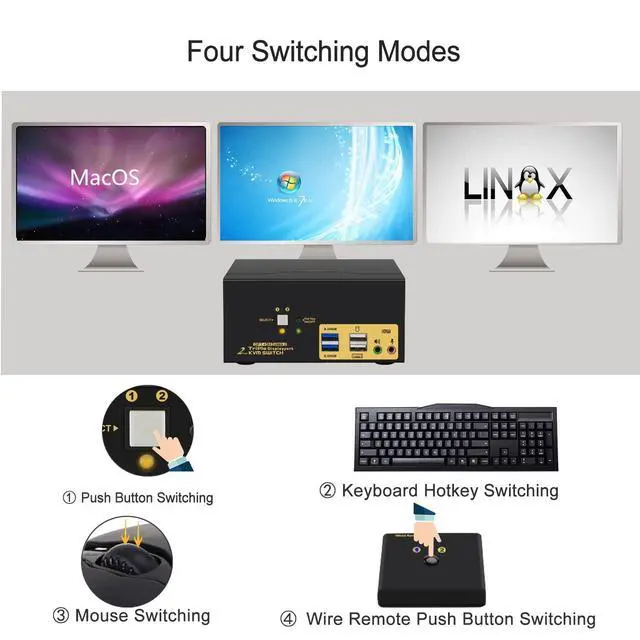
    • KVM Displayport 1.4: Four optional switching way: Hotkey switching (Num Lock + Num Lock + 1 / 2 + Enter, or Ctrl + Ctrl + 1 / 2 + Enter, or Scroll Lock+ Scroll Lock+1 / 2 + Enter), mouse switching (click mouse wheel 2 times), manual button switching, and wired remote push button switching.
    • Support auto detection, auto scan, waking up, with memory function.
    +
    +
    Overview
    Specs
    Reviews
    avatar

    Any questions? Our AI beta will help you find out quickly.

    Computer Switch for 2 Computers KVM for MAC Monitor Switch for 2 Computers Display Port KVM Switches 4K KVM Switch USB 3.0 KVM Switch 2 Computers KVM Switch USB 3.0 KMV Switches Computer Monitor Switch

    Installation Step:

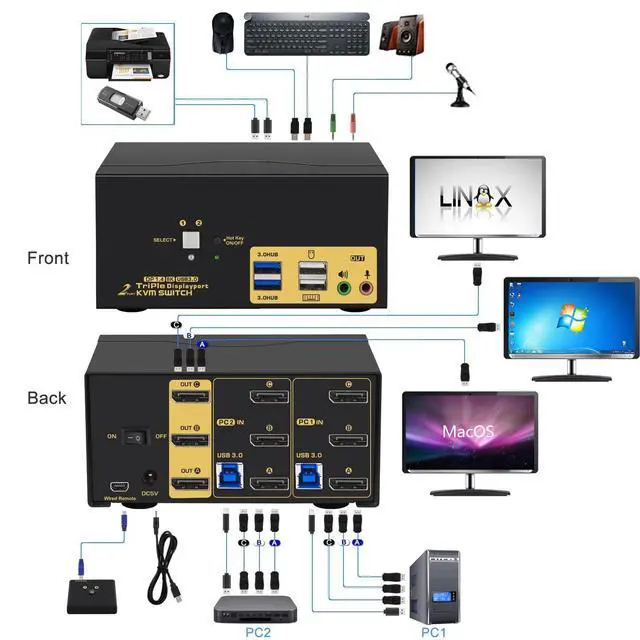
    1. Turn off all devices and unplug all cables;

    2. Plug USB 3.0 cables (transfer USB signal and audio signal), Displayport cables into your computers and KVM switch;

    3. Plug mouse into mouse slot of KVM switch, plug keyboard into keyboard slot of KVM switch (for gaming or mechanical keyboard, please plug them into USB 3.0 HUB on the front panel if they did not work well on rear USB ports);

    4. Plug Displayport cables into the KVM switch and your Monitors;

    5. Plug your speaker or microphone or wired remote push button switch into the KVM switch if needed;

    6. Plug the DC5V 2A power adapter into the KVM switch and AC socket, turn on the KVM switch;

    7. Turn on your computers;

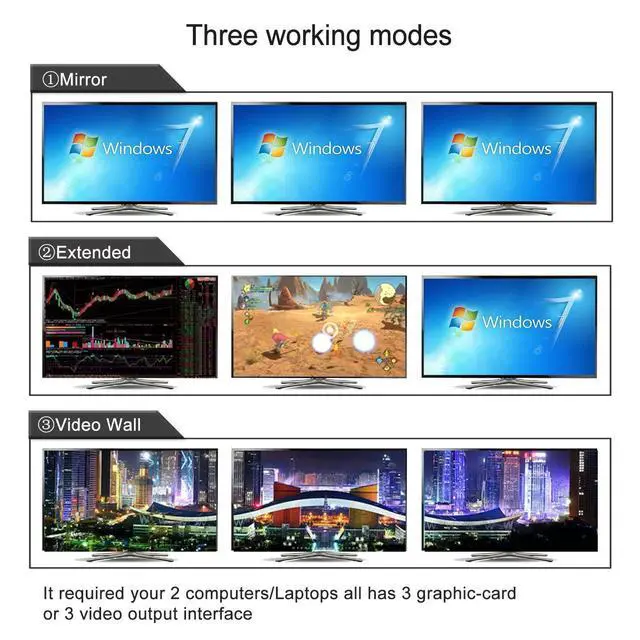
    8. Set computer display modes as extended display/duplicated display.

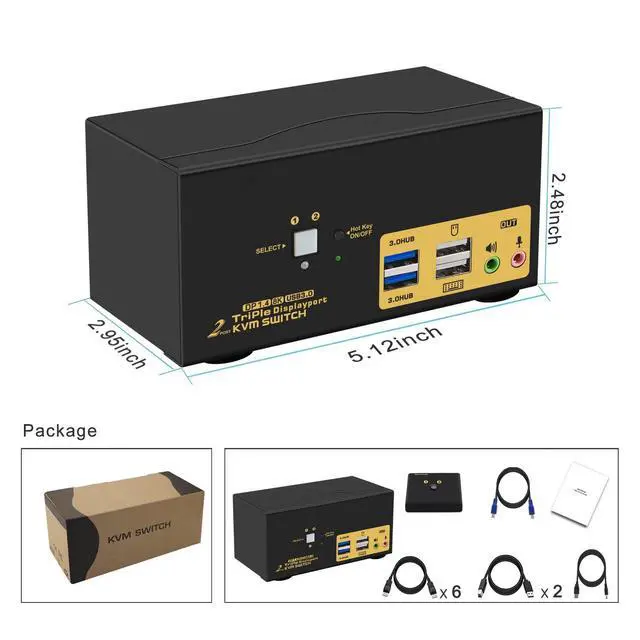
    Package:

    1 x 2 port displayport KVM switch

    6 x displayport cables

    2 x USB 3.0 cables

    1 x DC 5V 2A Power adapter

    1 x English manual

    1 x wire remote push button switch

    Warranty & Returns

    Warranty, Returns, And Additional Information

    Warranty

    • Please contact the Seller directly for warranty information. Warranty information may also be found on the Manufacturer's website.
    • CONTACT

    Return Policies

    Manufacturer Contact Info

    LOADING...