Your Browsing History
Meet Your Seller
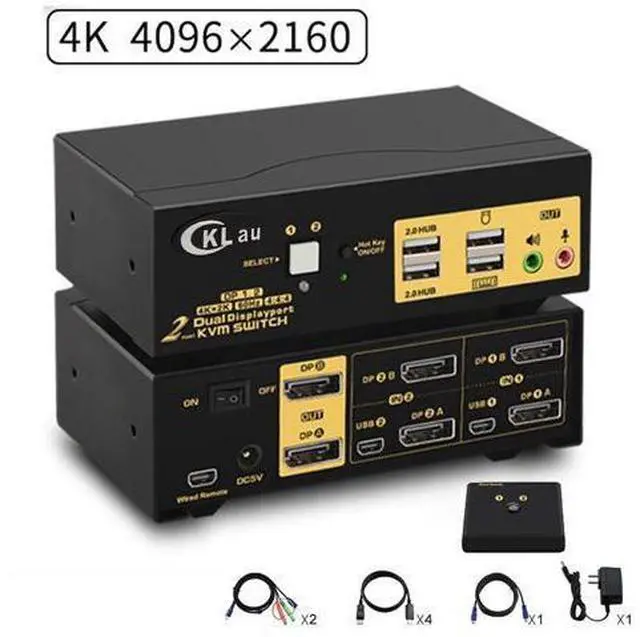
2 Ports KVM Switch Dual Monitor DisplayPort 2 In 2 Out, 2x2 DP KVM Switch with Audio and USB 2.0 HUBs, Support Hotkey Switching Resolution Up to 4096x2160 @60Hz 4:4:4
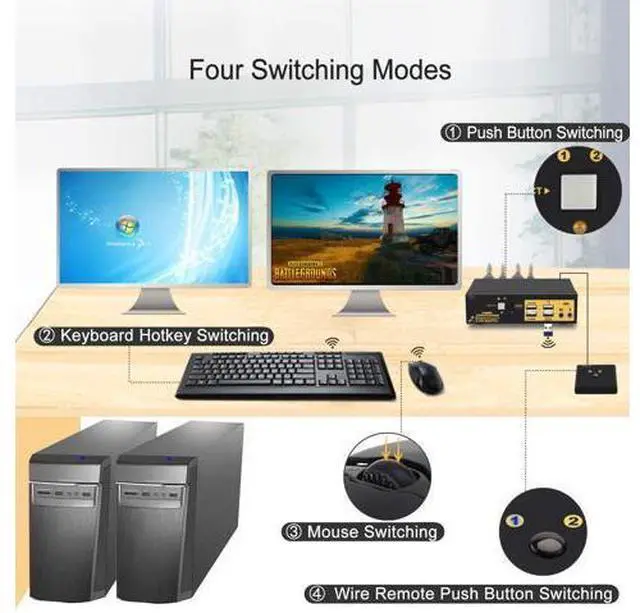
- [2x2 KVM SWITCH DUAL MONITOR DISPLAYPORT] Hooking up 2 dual Display Port desktops and / or Laptops to share one set of keyboard, mouse and 2 monitors for extended, mirrored display; Perfect for computers with 2 DisplayPort graphic outputs and 2 DisplayPort monitors.; [Dual MONITOR KVM SWITCH 4K 60Hz 4:4:4] Conforms to DP 1.2 standard for resolution up to 4096x2160@60Hz, 3840x2160@60Hz and downwards; Resolution is subject to adapter if used any.; [DISPLAY PORT KVM SWITCH] It provides several switching options for different scenarios: 1. Keyboard Hotkey. 2 Mouse click. 3 Push button. 4 Wired Remote. 5. Auto scan with adjustable interval (for monitoring and testing); [SUPPORTS MULTI PLATFORMS] Cross support Windows 2000/XP/Vista,Linux, Mac and most other major operation systems; Plug and play.; [USB 2.0 KVM SWITCH 2 COMPUTERS 2 MONITORS]With 2 USB keyboard and mouse ports (for hotkeys), and 2 extra USB 2.0 HUBS, supporting USB pass-though to compete with more wired or wireless keyboard,mouse.
+
+
Overview
Specs
Reviews
Any questions? Our AI beta will help you find out quickly.
Try me now
2 Port Dual Monitor KVM Switch Display Port Product Benefits You Might be
Looking for:
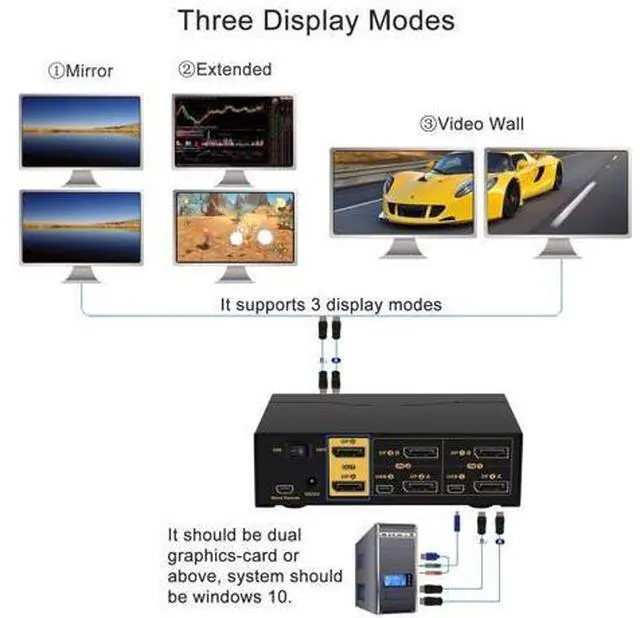
1. Control 2 computers or laptops with one set of keyboard, mouse and 2 monitors.
2. With 2 monitors output for extended, duplicated and spiced display purposes.
3. Support up to 4K@60Hz (4096*2160 4:4: 4).
4.
Multiple Switching Modes: 1. keyboard hotkey 2. mouse click 3. manual button 4. wired remote 5. auto scan.
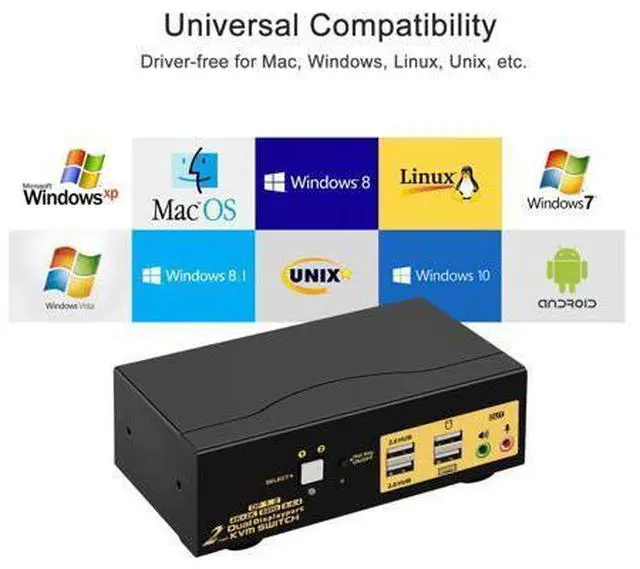
5. Cross support multi platforms inlcuding Windows 10/7/2000/XP/Vista, Linux, Mac and More.
6. Support most wired and wireless keyboard and mouse. 7. WIth extra 2 USB 2.0 HUB ports and audio support. Switching Freely between Home, Work and Gaming PCs Installation Guide (incorrect connection will cause malfunction): PC
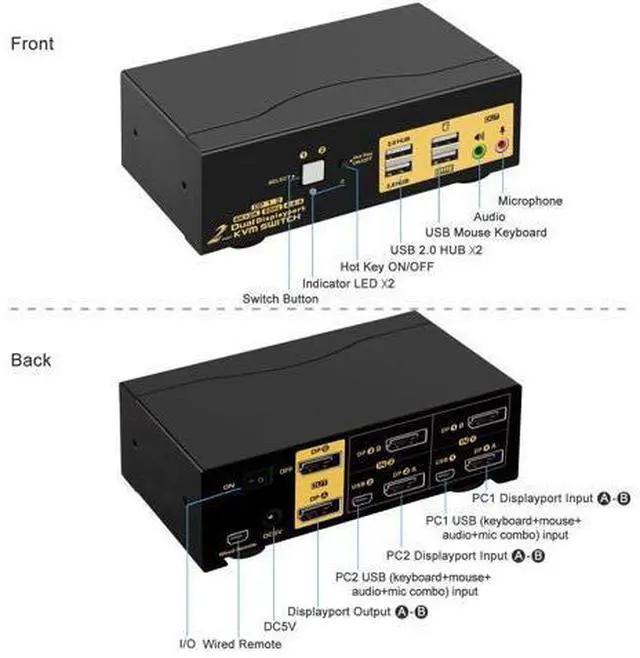
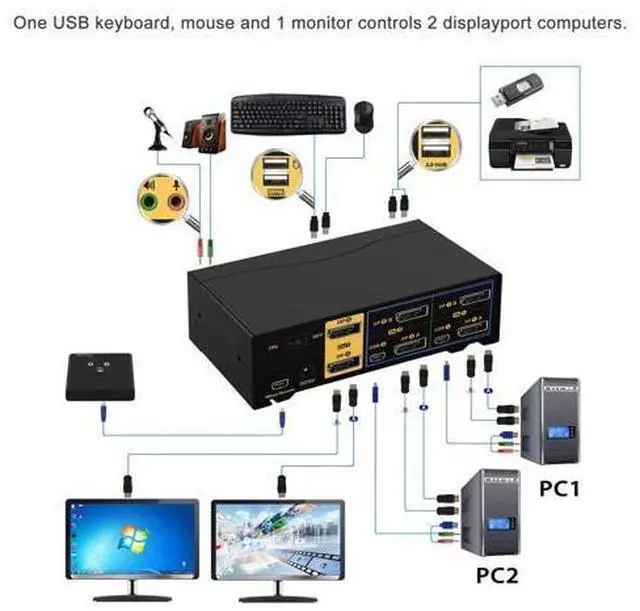
1: Connect 2 DP outputs on PC 1 to DP IN 1A & 1B on the kvm, and USB + Audio combo to USB 1.
PC 2: Connect 2 DP outputs on PC 2 to DP IN 2A & 2B on the kvm, and USB + Audio combo to USB
2.
Monitors: Connect Monitor A to DP A Out, Monitor B to DP B Out.
Wired Keyboard & Mouse: connect Keyboard to USB keyboard port, mouse to USB mouse port Wireless
Keyboard and Mouse: Connect the wireless dongle into USB keyboard port
Power Adapter: connect the power adapter to DC input.
Audio Devices: Connect speaker or microphone output on KVM (optional), make sure the audio jacks are also plugged into your computers if needed. Power on the KVM and computers.
Special Notes: USB connecion is to ensure keyboard and mouse work properly. What if my computer or laptop only has one Di

Looking for:
1. Control 2 computers or laptops with one set of keyboard, mouse and 2 monitors.
2. With 2 monitors output for extended, duplicated and spiced display purposes.
3. Support up to 4K@60Hz (4096*2160 4:4: 4).
4.
Multiple Switching Modes: 1. keyboard hotkey 2. mouse click 3. manual button 4. wired remote 5. auto scan.
5. Cross support multi platforms inlcuding Windows 10/7/2000/XP/Vista, Linux, Mac and More.
6. Support most wired and wireless keyboard and mouse. 7. WIth extra 2 USB 2.0 HUB ports and audio support. Switching Freely between Home, Work and Gaming PCs Installation Guide (incorrect connection will cause malfunction): PC
1: Connect 2 DP outputs on PC 1 to DP IN 1A & 1B on the kvm, and USB + Audio combo to USB 1.
PC 2: Connect 2 DP outputs on PC 2 to DP IN 2A & 2B on the kvm, and USB + Audio combo to USB
2.
Monitors: Connect Monitor A to DP A Out, Monitor B to DP B Out.
Wired Keyboard & Mouse: connect Keyboard to USB keyboard port, mouse to USB mouse port Wireless
Keyboard and Mouse: Connect the wireless dongle into USB keyboard port
Power Adapter: connect the power adapter to DC input.
Audio Devices: Connect speaker or microphone output on KVM (optional), make sure the audio jacks are also plugged into your computers if needed. Power on the KVM and computers.
Special Notes: USB connecion is to ensure keyboard and mouse work properly. What if my computer or laptop only has one Di
Warranty & Returns
Warranty, Returns, And Additional Information
Warranty
- Please contact the Seller directly for warranty information. Warranty information may also be found on the Manufacturer's website.
- CONTACT
Return Policies
- Return for refund within: 30 days
- Return for replacement within: 30 days
- This item is covered by NovaStar Tech Return Policy
Manufacturer Contact Info
- For a directory of all our manufacturers, please click below.
- Manufacturers Directory
LOADING...