

Your Browsing History

Meet Your Seller

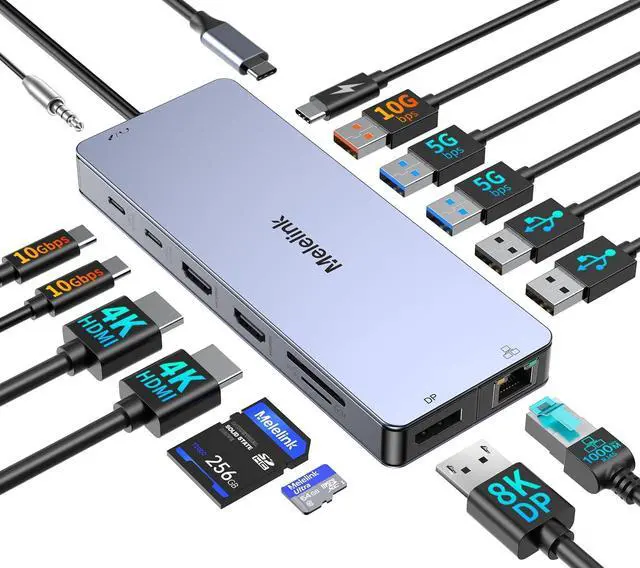


USB C Laptop Docking Station Dual Monitor for Dell/Lenovo/HP, 15 in 1 USB C Hub Multiport Adapter Dongle Dock USB-C to 2 HDMI 4K@60Hz, 8K DisplayPort, 2 USB-C 10Gbps, 5 USB-A, 100W PD, Ethernet, SD/TF
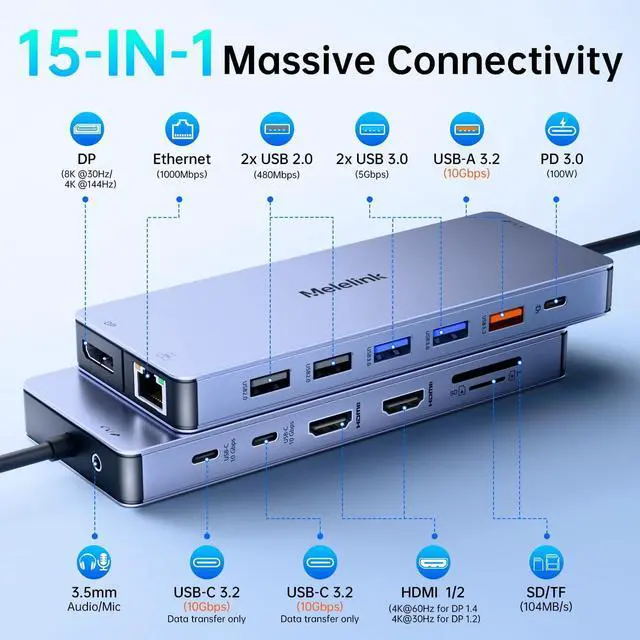
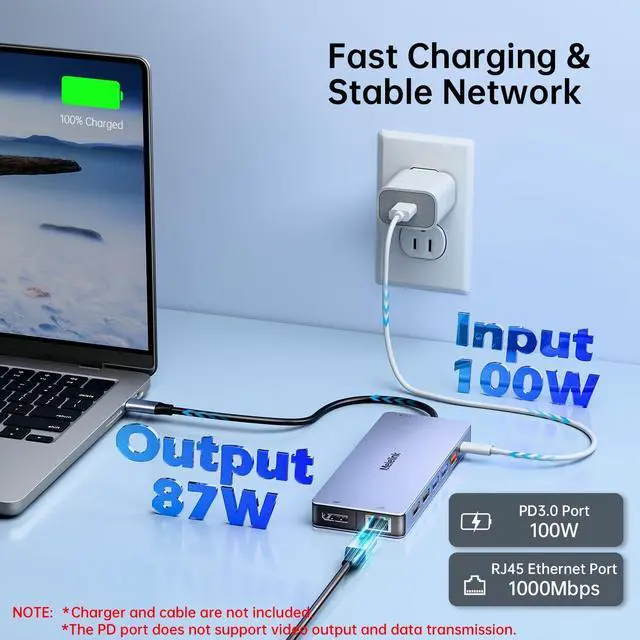
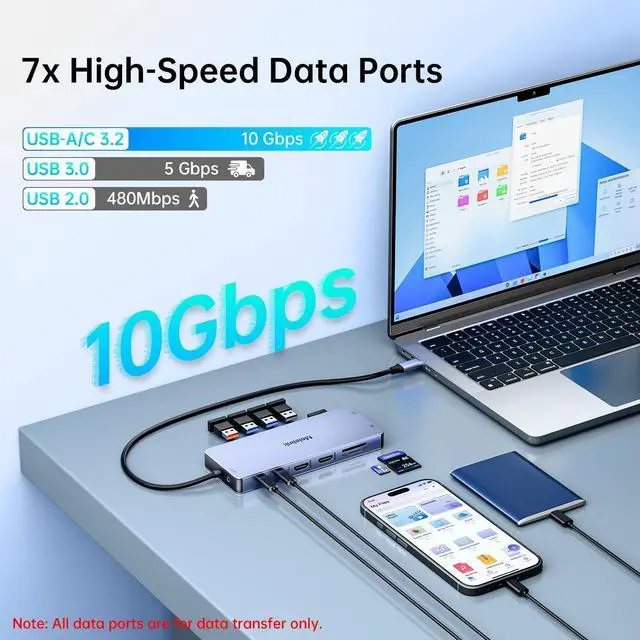
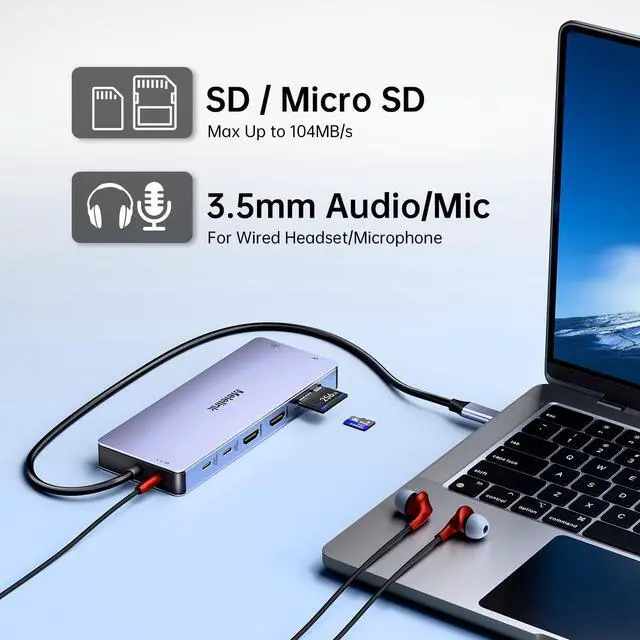
- 15 in 1 USB C Docking Station: Plug-and-play, This docking station could extend your laptop from one usb c/thunderbolt 3/4/type c port into 15 ports: 2 HDMI 4K, DisplayPort 8K(or 4K 144Hz)), 100W USB-C Power Delivery port, Gigabit Ethernet(1000Mbps) ,3 USB-C/A 3.2(10Gbps), 4 USB-A, SD/Micro SD card readers, 3.5mm Mic/audio port. NOTE: To achieve the full capabilities of hub, ensure your laptop's USB-C port is a full-function or Thunderbolt 3/4 port.
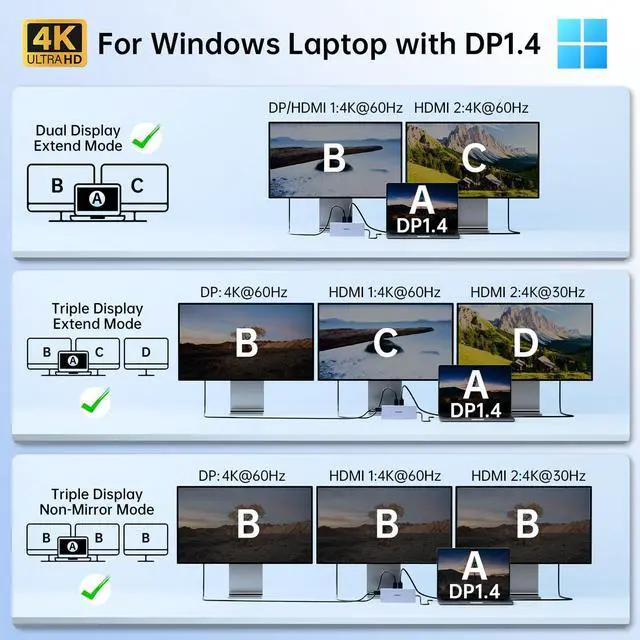
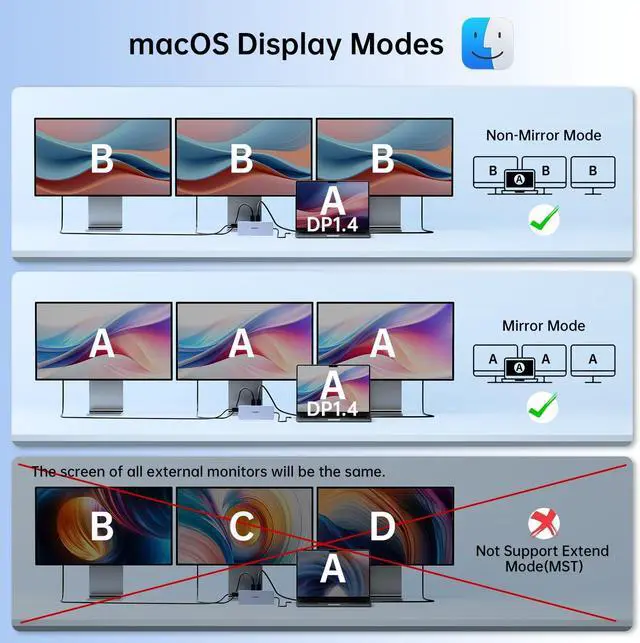
- Docking Station 3 Monitors: Expand your laptop's workspace for projects with Ultra High-definition 4K/8K output : This laptop docking station support dual monitors and triple displays for Windows. Single use HDMI max up to 4K@60Hz, DP up to 8K@30Hz(DP1.4). When connect 2 displays,the resolution will be dual 4K@60Hz(DP1.4). Display output will be dual 4K@60Hz and 2K@60Hz when triple display(DP1.4). Note:MacBook laptops only support same image on external monitors.
- Super Speed Data Transfer: USB-C Hub Multiport Adapter equipped with 2 USB-
+
+
Overview
Specs
Reviews

Any questions? Our AI beta will help you find out quickly.
Try me now
1Widely Compatible2Compatible Models3Friendly Reminder1For Windows with DP1.42For Windows with DP1.23macOS Display Mode4Resolution Reference
1Super Fast Data Transfer21000Mbps Network3100W Charging44xUSB & SD/TF 1.Please make sure your device has thunderbolt 3/4/ USB 4/ USB C 3.1 GEN2 or above ports that support "Power-Delivery, DisplayPort , Alt Mode", full-featured USB C ports that support display, charging and data transfer protocols. If after your purchase you find that you are unable to use the screen extension feature, please check if your laptop's USB-C port supports the features described above.
If you are not sure, you can check with Melelink.
2.The screen resolution will only be optimal if your laptop is a DP1.4 source, and please make sure your device supports 4K display (external screen and laptop at the same time) as well as working with HDMI 2.0 or higher specification cables.
3. PD (charging port) only supports power supply, USB-C data ports (10Gbps) only supports data transfer, does not support the screen extension function.
4.Charger and cable are not included with this product.
5. If you want to realize fast charging, please use 65W and above power supply.
6.The hub will need 7-8W of power consumption for the other ports of the hub to work properly. So it's best to keep the hub in charging state, so that the hub can work better. If there is a slow charging warning, you can ignore it.
7.Only applicable to laptops with built-in usb c port, this usb c docking station Can't be used with converter, () such as usb to usb c converter, HDMI to DVI, HDMI to VGA,etcthe HDMI and DP cable cannot exceed 3 meters.
8.All Mac Devices only support Mirror Mode: AA,AAA,AAAA and Extend Mode : AB,ABB,ABBB. Not support A-B+C or A-B+C+D(which only support for windows laptop)
9.If the Ethernet port cannot connect properly. 9-1: Please install the driver; 2: For Mac devices, add this adapter in the Network settings page. Go to "System Preferences""Network" "+" Select the network card with the corresponding name "Create"
8K Displayport/ 4K HDMI Please read carefully before purchasing:
1Super Fast Data Transfer21000Mbps Network3100W Charging44xUSB & SD/TF 1.Please make sure your device has thunderbolt 3/4/ USB 4/ USB C 3.1 GEN2 or above ports that support "Power-Delivery, DisplayPort , Alt Mode", full-featured USB C ports that support display, charging and data transfer protocols. If after your purchase you find that you are unable to use the screen extension feature, please check if your laptop's USB-C port supports the features described above.
If you are not sure, you can check with Melelink.
2.The screen resolution will only be optimal if your laptop is a DP1.4 source, and please make sure your device supports 4K display (external screen and laptop at the same time) as well as working with HDMI 2.0 or higher specification cables.
3. PD (charging port) only supports power supply, USB-C data ports (10Gbps) only supports data transfer, does not support the screen extension function.
4.Charger and cable are not included with this product.
5. If you want to realize fast charging, please use 65W and above power supply.
6.The hub will need 7-8W of power consumption for the other ports of the hub to work properly. So it's best to keep the hub in charging state, so that the hub can work better. If there is a slow charging warning, you can ignore it.
7.Only applicable to laptops with built-in usb c port, this usb c docking station Can't be used with converter, () such as usb to usb c converter, HDMI to DVI, HDMI to VGA,etcthe HDMI and DP cable cannot exceed 3 meters.
8.All Mac Devices only support Mirror Mode: AA,AAA,AAAA and Extend Mode : AB,ABB,ABBB. Not support A-B+C or A-B+C+D(which only support for windows laptop)
9.If the Ethernet port cannot connect properly. 9-1: Please install the driver; 2: For Mac devices, add this adapter in the Network settings page. Go to "System Preferences""Network" "+" Select the network card with the corresponding name "Create"
8K Displayport/ 4K HDMI Please read carefully before purchasing:
Warranty & Returns
Warranty, Returns, And Additional Information
Warranty
- Please contact the Seller directly for warranty information. Warranty information may also be found on the Manufacturer's website.
- CONTACT
Return Policies
- Return for refund within: 30 days
- Return for replacement within: 30 days
- This item is covered by PrimeVolt’Shop Return Policy
Manufacturer Contact Info
- For a directory of all our manufacturers, please click below.
- Manufacturers Directory
LOADING...