Your Browsing History
Meet Your Seller
4K60Hz HDMI + 2 x Displayport KVM Switch 3 Monitors 4 Computers, USB3.0 Triple Monitor HDMI DP KVM Switch 4 Port for Managing 4 PCs with 1 Set of Keyboard, Mouse and 3 Monitors Setup
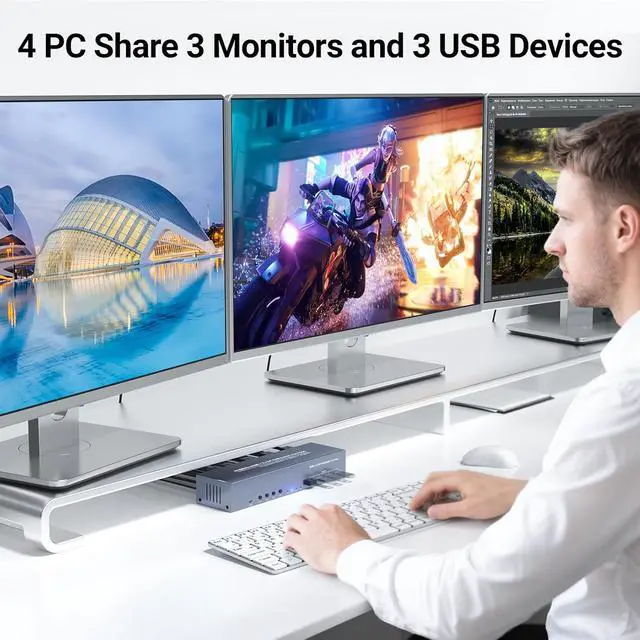
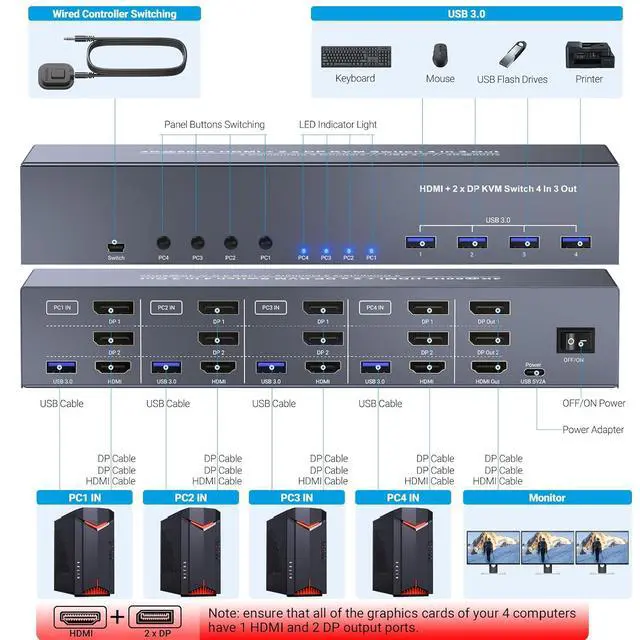
- HDMI + 2 x Displayport KVM Switch 3 Monitors 4 ComputersTake control of up to four computers with just one keyboard, mouse, and three monitors. This HDMI + 2 DisplayPort 4 port KVM switch is your go-to solution for managing multiple systems with unparalleled efficiency. Whether you're a professional juggling multiple workstations, an IT expert managing servers, or a multitasking enthusiast, this triple monitor KVM switch is designed to streamline your workflow and boost your productivity.
- Triple Monitors for Maximum EfficiencyExpand your workspace with the flexibility of triple monitor support. Manage three displays simultaneously for an expanded and more efficient workspace. Each computer connects via 1 HDMI and 2 DisplayPort inputs, ensuring a stable and high-quality connection. Just ensure each computer's graphics card has one HDMI and two DP output ports for the full three-monitor experience.
- Ultra HD 4K VisualsExperience crystal-clear visuals with support for up to 4K@60H
+
+
Overview
Specs
Reviews
Any questions? Our AI beta will help you find out quickly.
Try me now
Tired of wrestling with four computers and tangled cables? This 4 port KVM switch is your solution for running four systems across three monitors with one keyboard and mouse.
This triple monitor KVM switch is ideal for IT nerds managing servers, gamers with epic multi-PC setups, or designers who need all their tools at a glance. Switch between PCs with front buttons or the included external controller.
Specifications:
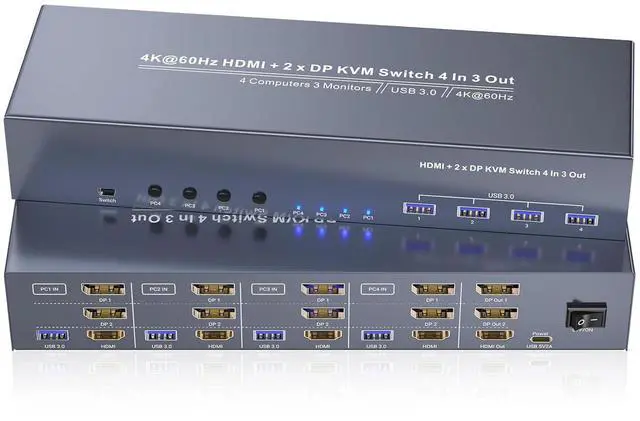
1. Video Ports: 4 x HDMI Input, 8 x DisplayPort Input (2 per PC), 1x HDMI Output, 2 x DisplayPort Output
2. Resolution Support: 4K@60Hz, 4K@30Hz, 1080p@60Hz, etc.
3. USB Ports: 4x USB 3.0 Type-A (front-mounted)
4. Switching Methods: Front buttons or external controller
5. Triple Monitor Setup: Each PC needs 1 HDMI + 2 DP ports for three-screen action
Pro Tip: Grab high-speed HDMI cables (4K@60Hz certified) to keep your setup smooth
Expand your workspace with three monitors running side by side! Critical deets: Each PC needs 1 HDMI + 2 DP portsconnect all three to the KVM switch for the full triple-screen effect. Skip a port and youll miss out on the magic. Ideal for coding on one screen, editing on another, and streaming meetings on the third.
Crisp 4K resolution at 60Hz makes everything look insanewhether youre retouching 4K photos or crushing it in games. Works with lower resolutions too (1080p, 720p), but pro move: Use 4K-certified HDMI cables to unlock the full 4K awesomeness.
Note:
1. The 4 computer KVM switch must be connected to the computers using the provided USB cables. Failure to do so will result in the USB ports on the KVM switch being non-functional. This ensures stable and reliable communication between the computers and the KVM switch.
2. Triple Screen Configuration: To achieve the triple screen display, each computer must be connected with one HDMI cable and two DisplayPort cables. This specific configuration is required for the KVM switch to support three monitors simultaneously.
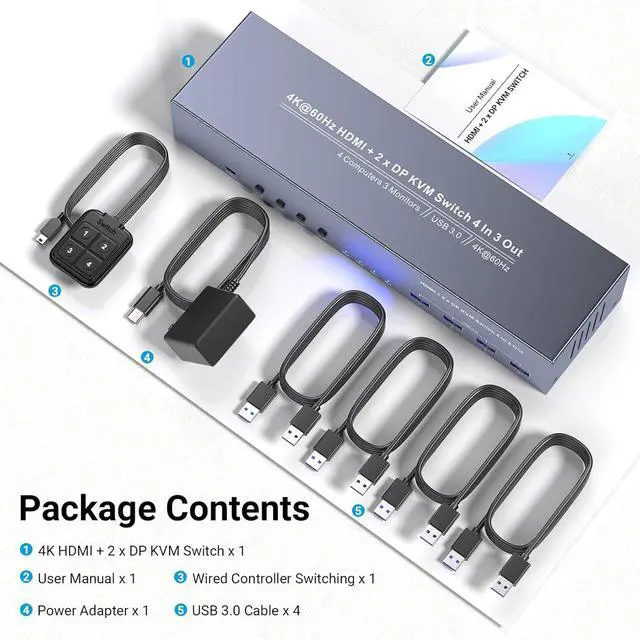
1. Triple monitor KVM switcher
2. User Manual
3. External Controller
4. USB 3.0 cables(4pcs, 1.2 meters)
5. Power adapter
Triple Monitor Support
4-Computer Connectivity
HDMI and DisplayPort Interfaces
4K@60Hz Resolution
USB 3.0 Connectivity
Two Switching Modes
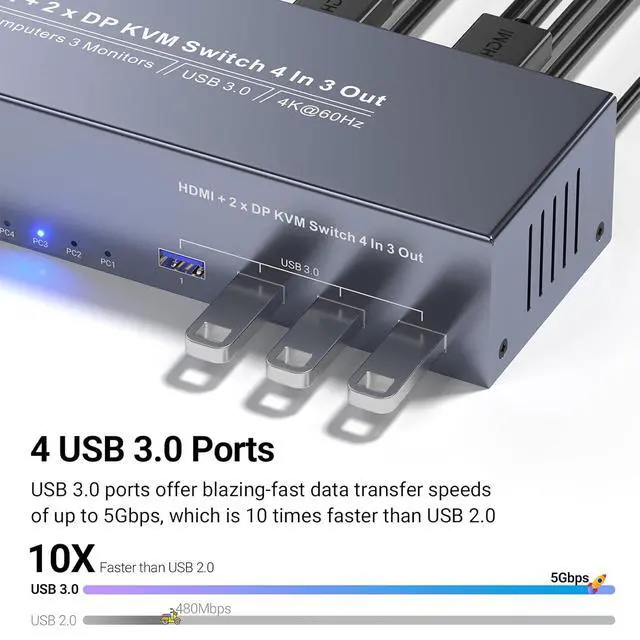
Four USB 3.0 ports let you share printers, external drives, webcams, and more across all four computers. USB 3.0 is 10x faster than USB 2.0, and it plays nice with old-school USB 2.0 gear too.
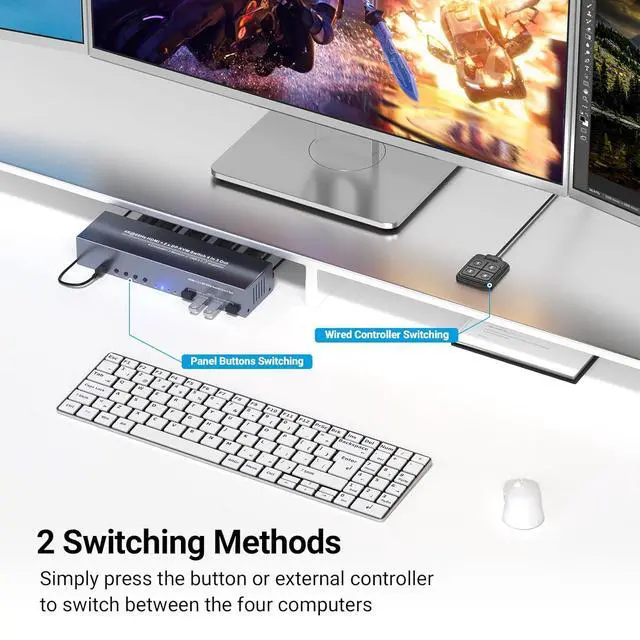
This three monitor KVM switch supports button switching for each computer, providing a convenient and flexible user experience.
Designed with user convenience in mind, you can also use the external controller kit for quick and convenient switching.
4K@60Hz HDMI + 2 x Displayport KVM Switch 3 Monitors 4 Computers - Triple Monitors & USB 3.0 4 in-1 Powerhouse for Controlling 4 Computers on Triple-Monitor Setups Triple Monitor Setup (Yes, Three Screens!) 4K@60Hz Visuals HDMI DisplayPort Triple Monitor KVM Switch for 3 Monitors & 4 Computers Package List Features Lightning-Fast USB 3.0 (5GbpsSo Freaking Fast) Button Switching External Controller

This triple monitor KVM switch is ideal for IT nerds managing servers, gamers with epic multi-PC setups, or designers who need all their tools at a glance. Switch between PCs with front buttons or the included external controller.
Specifications:
1. Video Ports: 4 x HDMI Input, 8 x DisplayPort Input (2 per PC), 1x HDMI Output, 2 x DisplayPort Output
2. Resolution Support: 4K@60Hz, 4K@30Hz, 1080p@60Hz, etc.
3. USB Ports: 4x USB 3.0 Type-A (front-mounted)
4. Switching Methods: Front buttons or external controller
5. Triple Monitor Setup: Each PC needs 1 HDMI + 2 DP ports for three-screen action
Pro Tip: Grab high-speed HDMI cables (4K@60Hz certified) to keep your setup smooth
Expand your workspace with three monitors running side by side! Critical deets: Each PC needs 1 HDMI + 2 DP portsconnect all three to the KVM switch for the full triple-screen effect. Skip a port and youll miss out on the magic. Ideal for coding on one screen, editing on another, and streaming meetings on the third.
Crisp 4K resolution at 60Hz makes everything look insanewhether youre retouching 4K photos or crushing it in games. Works with lower resolutions too (1080p, 720p), but pro move: Use 4K-certified HDMI cables to unlock the full 4K awesomeness.
Note:
1. The 4 computer KVM switch must be connected to the computers using the provided USB cables. Failure to do so will result in the USB ports on the KVM switch being non-functional. This ensures stable and reliable communication between the computers and the KVM switch.
2. Triple Screen Configuration: To achieve the triple screen display, each computer must be connected with one HDMI cable and two DisplayPort cables. This specific configuration is required for the KVM switch to support three monitors simultaneously.
1. Triple monitor KVM switcher
2. User Manual
3. External Controller
4. USB 3.0 cables(4pcs, 1.2 meters)
5. Power adapter
Triple Monitor Support
4-Computer Connectivity
HDMI and DisplayPort Interfaces
4K@60Hz Resolution
USB 3.0 Connectivity
Two Switching Modes
Four USB 3.0 ports let you share printers, external drives, webcams, and more across all four computers. USB 3.0 is 10x faster than USB 2.0, and it plays nice with old-school USB 2.0 gear too.
This three monitor KVM switch supports button switching for each computer, providing a convenient and flexible user experience.
Designed with user convenience in mind, you can also use the external controller kit for quick and convenient switching.
4K@60Hz HDMI + 2 x Displayport KVM Switch 3 Monitors 4 Computers - Triple Monitors & USB 3.0 4 in-1 Powerhouse for Controlling 4 Computers on Triple-Monitor Setups Triple Monitor Setup (Yes, Three Screens!) 4K@60Hz Visuals HDMI DisplayPort Triple Monitor KVM Switch for 3 Monitors & 4 Computers Package List Features Lightning-Fast USB 3.0 (5GbpsSo Freaking Fast) Button Switching External Controller
Warranty & Returns
Warranty, Returns, And Additional Information
Warranty
- Please contact the Seller directly for warranty information. Warranty information may also be found on the Manufacturer's website.
- CONTACT
Return Policies
- Return for refund within: 30 days
- Return for replacement within: 30 days
- This item is covered by PrimeVolt’Shop Return Policy
Manufacturer Contact Info
- For a directory of all our manufacturers, please click below.
- Manufacturers Directory
LOADING...