

Your Browsing History
- $329.99
- Free 30-day Returns


Meet Your Seller

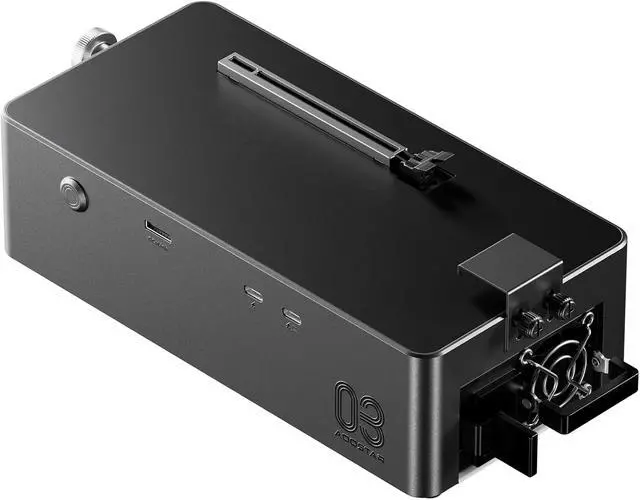



AOOSTAR AG03 eGPU Dock with 800W PSU, OCuLink & Dual Thunderbolt 5, External GPU Dock for Windows 11 Laptops, Mini PCs & Gaming Handhelds, GPU Not Included
- External GPU Dock with Built-in 800W PSUAOOSTAR AG03 is a powerful eGPU dock and external GPU docking station designed to add desktop-class graphics performance to compatible Windows laptops, mini PCs, desktops, and gaming handhelds. This GPU docking station features a built-in 800W server-grade power supply and supports up to 500W GPU power output, helping create a cleaner external GPU setup without bulky extra power bricks. Graphics card is NOT included.
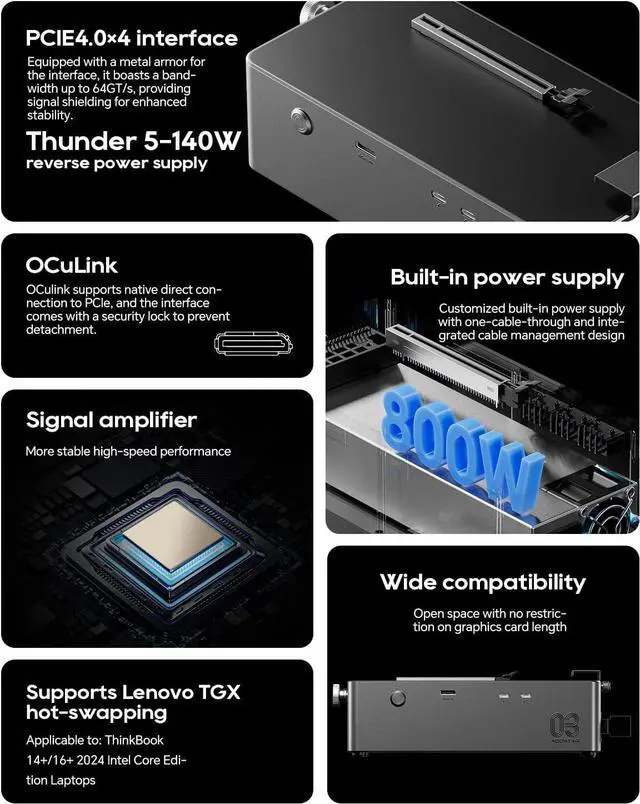
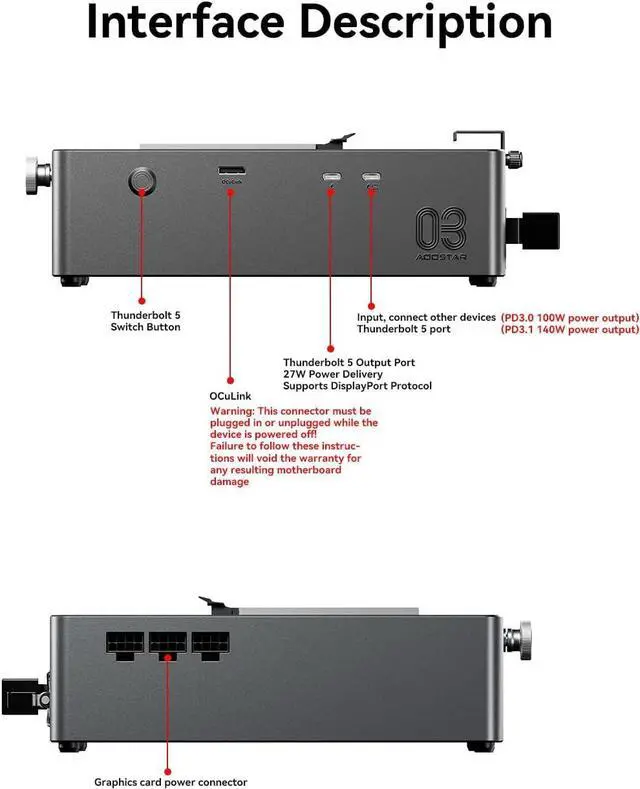
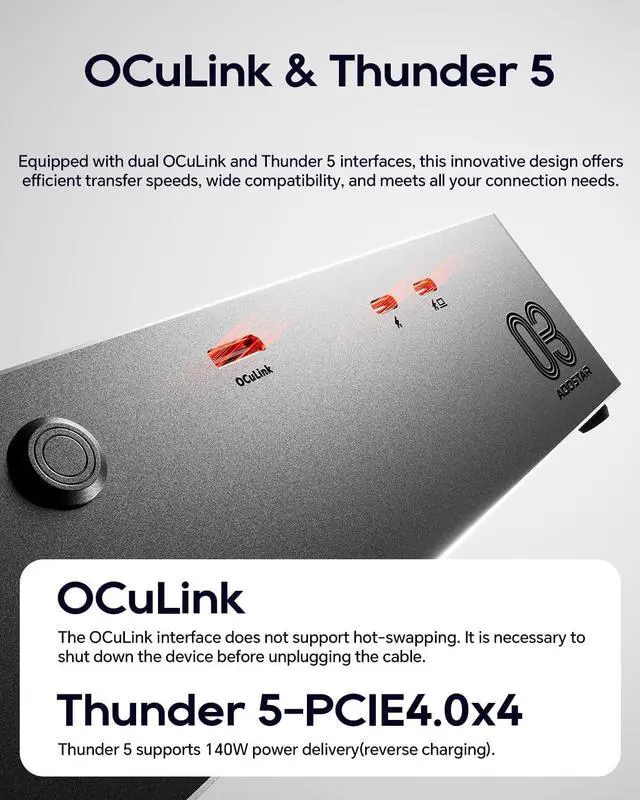
- OCuLink eGPU Dock + Dual Thunderbolt 5 PortsAG03 combines 1 x OCuLink port and 2 x Thunderbolt 5 ports with the Intel JHL9480 controller, making it a flexible OCuLink eGPU dock and Thunderbolt 5 eGPU dock for high-performance expansion. For Thunderbolt/USB4 eGPU connection, please use the right-side TB5 port marked with the computer icon. The left-side TB5 port supports DisplayPort protocol and 27W output, and is not intended as the main eGPU host connection.
- Compatibility Notice Before PurchaseDesigned as an external GPU do
+
+
Overview
Reviews

Any questions? Our AI mode will help you find out quickly.
Try me now
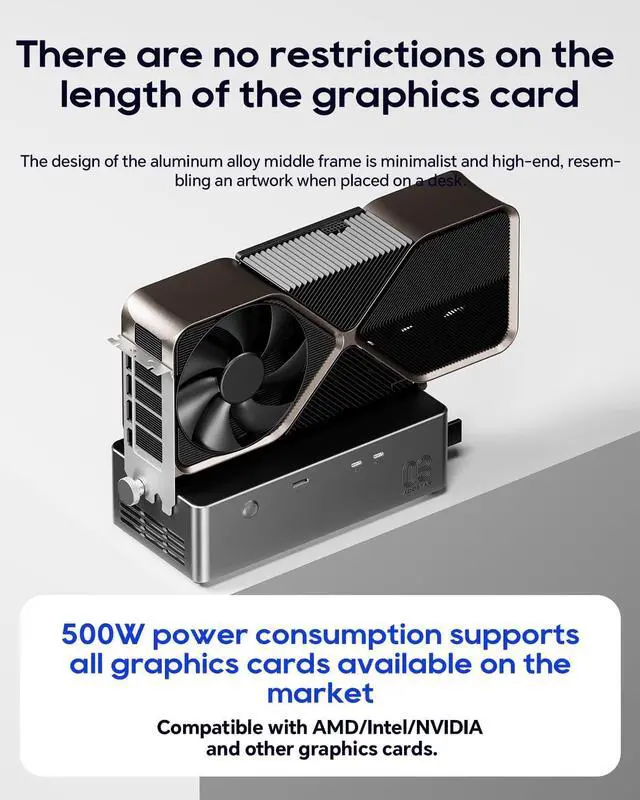
External GPU Dock with Built-in 800W PSUAOOSTAR AG03 is a powerful eGPU dock and external GPU docking station designed to add desktop-class graphics performance to compatible Windows laptops, mini PCs, desktops, and gaming handhelds. This GPU docking station features a built-in 800W server-grade power supply and supports up to 500W GPU power output, helping create a cleaner external GPU setup without bulky extra power bricks. Graphics card is NOT included.
OCuLink eGPU Dock + Dual Thunderbolt 5 PortsAG03 combines 1 x OCuLink port and 2 x Thunderbolt 5 ports with the Intel JHL9480 controller, making it a flexible OCuLink eGPU dock and Thunderbolt 5 eGPU dock for high-performance expansion. For Thunderbolt/USB4 eGPU connection, please use the right-side TB5 port marked with the computer icon. The left-side TB5 port supports DisplayPort protocol and 27W output, and is not intended as the main eGPU host connection.
Compatibility Notice Before PurchaseDesigned as an external GPU dock for select Windows 11 devices equipped with OCuLink, Thunderbolt 4/5, USB4, or USB4 v2 ports. Windows 11 22H2 or later is recommended. Not compatible or not recommended for AOOSTAR GT37, AOOSTAR WTR MAX, ROG Xbox Ally / Z2 Extreme devices, RX 9070 XT GPU setups, and certain MINISFORUM models. Compatibility may vary by host device, BIOS, firmware, GPU model, cable, and driver. Please check compatibility before purchase.
External GPU Enclosure with PSU & GPU Cable NoticeAG03 works as an external GPU enclosure with PSU, providing 3 x 8-pin GPU power connectors and supporting up to 500W graphics card power output. Some high-end graphics cards using 12VHPWR or 12V-2x6 power connectors may require an additional compatible cable or adapter, which is not included. GPUs requiring more than 500W are not recommended.
Active Cooling eGPU Dock for Performance SetupsBuilt for gaming, AI computing, 3D rendering, video editing, and professional workloads, AG03 is an eGPU docking station with active cooling and a server-grade PSU to maintain stable power delivery. Fan noise may be audible in quiet rooms or under heavy GPU load. For setup or compatibility questions, please contact AOOSTAR support before returning the product.
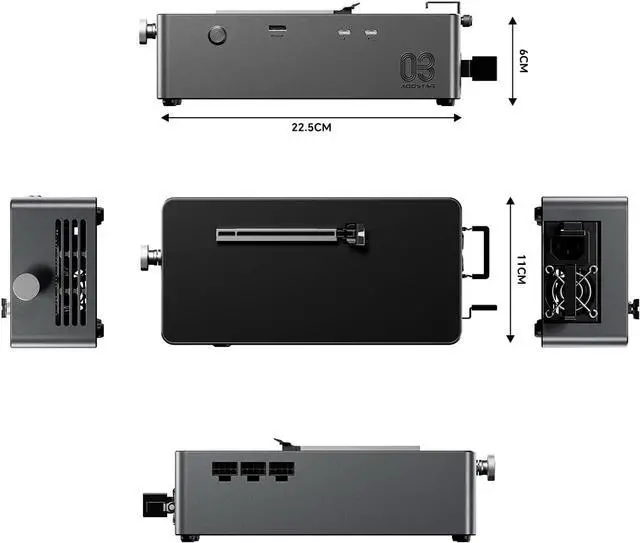
What In Box: 1 x AOOSTAR AG03 Oculink port EGPU Dock 1 x TB5 cable 1 x Power supply 2 x Switch Cable * The GPU is not included.Porduct size 22.5 x 11 x 6cm, weight 1.5KG, and unlimited graphics card length.AOOSTAR provide 12 months after-sales service from the date of order, For compatibility, driver, GPU cable, or setup questions, please contact AOOSTAR support first. Our team can help you check your device, GPU model, cable connection, and driver setup.
OCuLink eGPU Dock + Dual Thunderbolt 5 PortsAG03 combines 1 x OCuLink port and 2 x Thunderbolt 5 ports with the Intel JHL9480 controller, making it a flexible OCuLink eGPU dock and Thunderbolt 5 eGPU dock for high-performance expansion. For Thunderbolt/USB4 eGPU connection, please use the right-side TB5 port marked with the computer icon. The left-side TB5 port supports DisplayPort protocol and 27W output, and is not intended as the main eGPU host connection.
Compatibility Notice Before PurchaseDesigned as an external GPU dock for select Windows 11 devices equipped with OCuLink, Thunderbolt 4/5, USB4, or USB4 v2 ports. Windows 11 22H2 or later is recommended. Not compatible or not recommended for AOOSTAR GT37, AOOSTAR WTR MAX, ROG Xbox Ally / Z2 Extreme devices, RX 9070 XT GPU setups, and certain MINISFORUM models. Compatibility may vary by host device, BIOS, firmware, GPU model, cable, and driver. Please check compatibility before purchase.
External GPU Enclosure with PSU & GPU Cable NoticeAG03 works as an external GPU enclosure with PSU, providing 3 x 8-pin GPU power connectors and supporting up to 500W graphics card power output. Some high-end graphics cards using 12VHPWR or 12V-2x6 power connectors may require an additional compatible cable or adapter, which is not included. GPUs requiring more than 500W are not recommended.
Active Cooling eGPU Dock for Performance SetupsBuilt for gaming, AI computing, 3D rendering, video editing, and professional workloads, AG03 is an eGPU docking station with active cooling and a server-grade PSU to maintain stable power delivery. Fan noise may be audible in quiet rooms or under heavy GPU load. For setup or compatibility questions, please contact AOOSTAR support before returning the product.
What In Box: 1 x AOOSTAR AG03 Oculink port EGPU Dock 1 x TB5 cable 1 x Power supply 2 x Switch Cable * The GPU is not included.Porduct size 22.5 x 11 x 6cm, weight 1.5KG, and unlimited graphics card length.AOOSTAR provide 12 months after-sales service from the date of order, For compatibility, driver, GPU cable, or setup questions, please contact AOOSTAR support first. Our team can help you check your device, GPU model, cable connection, and driver setup.
Warranty & Returns
Warranty, Returns, And Additional Information
Warranty
- Please contact the Seller directly for warranty information. Warranty information may also be found on the Manufacturer's website.
- CONTACT
Return Policies
- Return for refund within: 30 days
- Return for replacement within: 30 days
- This item is covered by Flydigi Authorized Store Return Policy
Manufacturer Contact Info
- For a directory of all our manufacturers, please click below.
- Manufacturers Directory
LOADING...