Your Browsing History
Meet Your Seller
PCIE Oculink Adapter Card, RIITOP PCI-e Express 16x to Quad OCuLink SFF-8612 SFF-8611 Internal VROC Raid0 Adapter for U.2 SSD eGPU External Graphics Card Dock
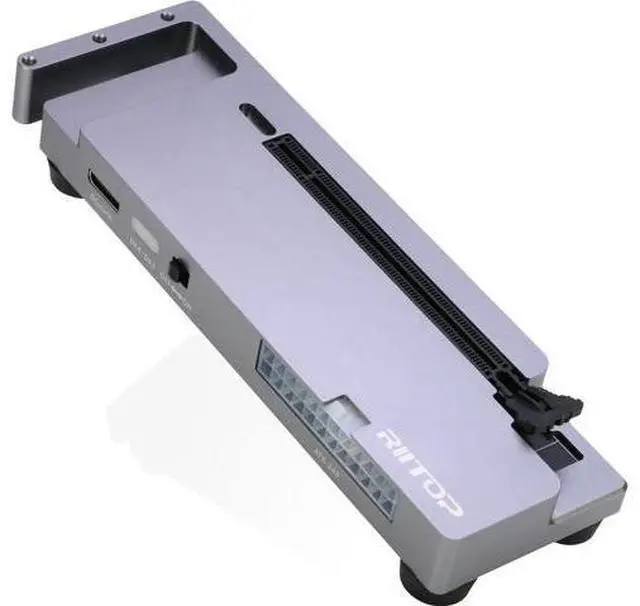
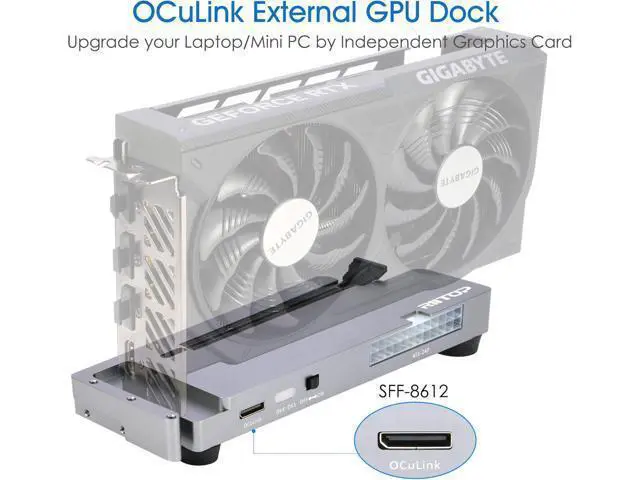
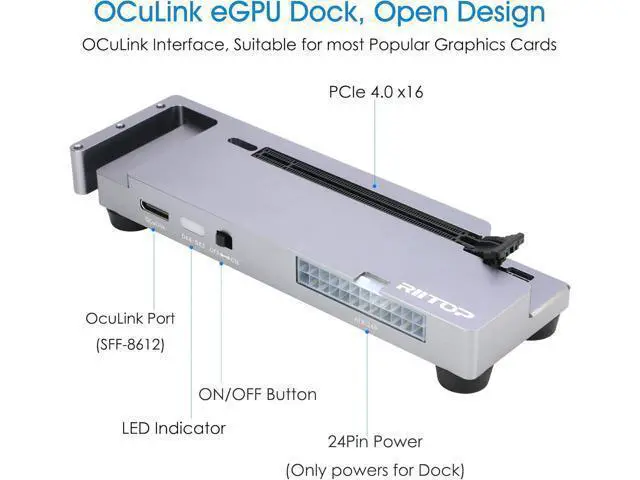
- OCuLink eGPU Dock: RIITOP OCuLink eGPU Docking Station Compensates for the performance limitations of graphics card on thin/ light or older laptops, gaming rigs MINI PC and NUCs, which comes with Oculink SFF-8612 Port . Supports the latest NVIDIA (RTX 50 Series: 5090 D/5080/5070 Ti/5070), AMD (RX 7000 Series) GPUs. Delivering high-performance graphics for AI Computing, cinematic experiences, large-scale rendering, video editing, gaming and creative workloads.; Hardware Requirement: 1x Available Oculink SFF-8612 Port on your laptop, MINI PC or any other device you want to connect, otherwise it can not be used; 1x PCIe 4.0 x16 Graphics card; 1x ATX/SFX Power Supply (It should match the graphics card requirement).; Wide Compatibility: Open design, No restrictions on graphics card size, Supports the most latest graphics card, such as NVIDIA (RTX 50 Series: 5090 D/5080/5070 Ti/5070) and AMD (RX 7000 Series) GPU; Compatible with Windows 10/11 64-bit, Linux, and Mac OS.
+
+
Overview
Specs
Reviews
Any questions? Our AI beta will help you find out quickly.
Try me now
Please Note:
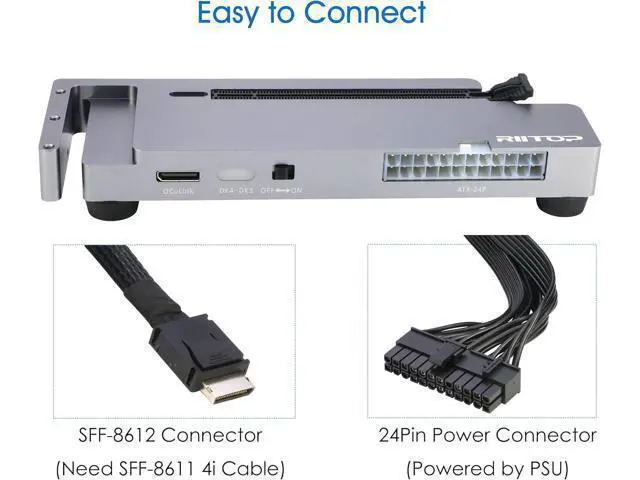
1. The OCULINK interface does not support hot-plugging. Ensure the power is switched off before unplugging or connecting the cable.
2. The OCULINK interface is designed with fixed lock. When disconnecting, you must press the release switch to unlock it first.
3.
About Mac OS: Compatible with Mac OS 10.13. 4 and above, but can only support AMD Graphics Card, no driver need. Not support NVIDIA on Mac OS.
Features: OCuLink eGPU
Dock: RIITOP OCuLink eGPU Docking Station Compensates for the performance limitations of graphics card on thin/ light or older laptops, gaming rigs MINI PC and NUCs, which comes with Oculink SFF-8612 Port. Supports the latest NVIDIA (RTX 50
Series: 5090 D/5080/5070 Ti/5070), AMD (RX 7000 Series) GPUs. Delivering high-performance graphics for AI Computing, cinematic experiences, large-scale rendering, video editing, gaming and creative workloads.
Hardware Requirement: 1x Available Oculink SFF-8612 Port on your laptop, MINI PC or any other device you want to connect, otherwise it can not be used; 1x PCIe 4.0 x16 Graphics card; 1x ATX/SFX Power Supply (It should match the graphics card requirement).
Wide Compatibility: Open design, No restrictions on graphics card size, Supports the most latest graphics card, such as NVIDIA (RTX 50
Series: 5090 D/5080/5070 Ti/5070) and AMD (RX 7000 Series) GPU; Compatible with Windows 10/11 64-bit, Linux, and Mac OS.
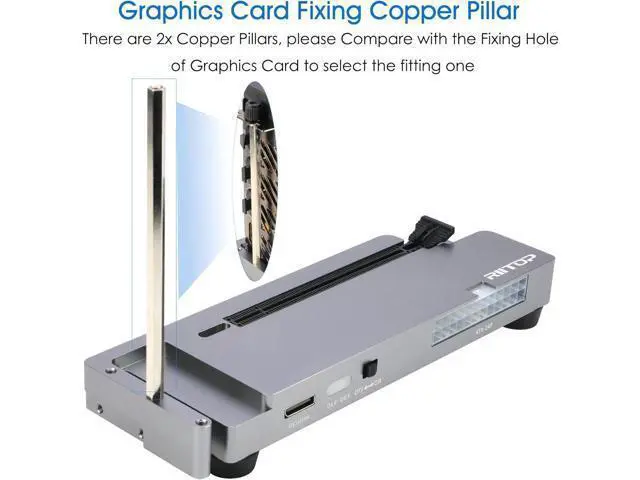
Simple Installation Guide: Step
1: Fit the graphics card, securing it with the dedicated grap

1. The OCULINK interface does not support hot-plugging. Ensure the power is switched off before unplugging or connecting the cable.
2. The OCULINK interface is designed with fixed lock. When disconnecting, you must press the release switch to unlock it first.
3.
About Mac OS: Compatible with Mac OS 10.13. 4 and above, but can only support AMD Graphics Card, no driver need. Not support NVIDIA on Mac OS.
Features: OCuLink eGPU
Dock: RIITOP OCuLink eGPU Docking Station Compensates for the performance limitations of graphics card on thin/ light or older laptops, gaming rigs MINI PC and NUCs, which comes with Oculink SFF-8612 Port. Supports the latest NVIDIA (RTX 50
Series: 5090 D/5080/5070 Ti/5070), AMD (RX 7000 Series) GPUs. Delivering high-performance graphics for AI Computing, cinematic experiences, large-scale rendering, video editing, gaming and creative workloads.
Hardware Requirement: 1x Available Oculink SFF-8612 Port on your laptop, MINI PC or any other device you want to connect, otherwise it can not be used; 1x PCIe 4.0 x16 Graphics card; 1x ATX/SFX Power Supply (It should match the graphics card requirement).
Wide Compatibility: Open design, No restrictions on graphics card size, Supports the most latest graphics card, such as NVIDIA (RTX 50
Series: 5090 D/5080/5070 Ti/5070) and AMD (RX 7000 Series) GPU; Compatible with Windows 10/11 64-bit, Linux, and Mac OS.
Simple Installation Guide: Step
1: Fit the graphics card, securing it with the dedicated grap
Warranty & Returns
Warranty, Returns, And Additional Information
Warranty
- Please contact the Seller directly for warranty information. Warranty information may also be found on the Manufacturer's website.
- CONTACT
Return Policies
- Return for refund within: 30 days
- Return for replacement within: 30 days
- This item is covered by NovaStar Tech Return Policy
Manufacturer Contact Info
- For a directory of all our manufacturers, please click below.
- Manufacturers Directory
LOADING...