Your Browsing History
Meet Your Seller
Visit HOOCCC Store
FOLLOW
HOOCCC OCuLink eGPU Dock Kit, M.2 NVMe to SFF-8612 Adapter Card + 50cm OCuLink 4i Cable, PCIe 4.0 x4 64Gbps External GPU Dock for Mini PC Laptop RTX 4090
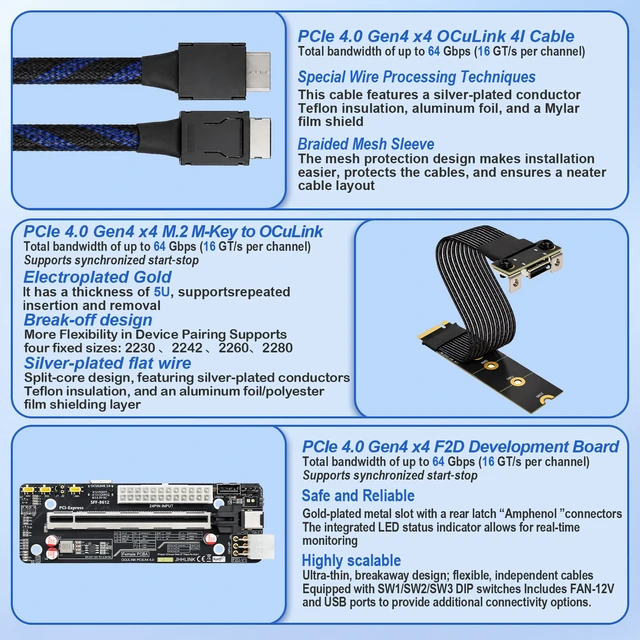
- Blazing Fast 64Gbps: PCIe 4.0 Gen4 x4 OCuLink 4I interface (16 GT/s per channel). Backward compatible, delivering lossless transmission for flagship GPUs (RTX 4090, 4080, RX 7900 XT).
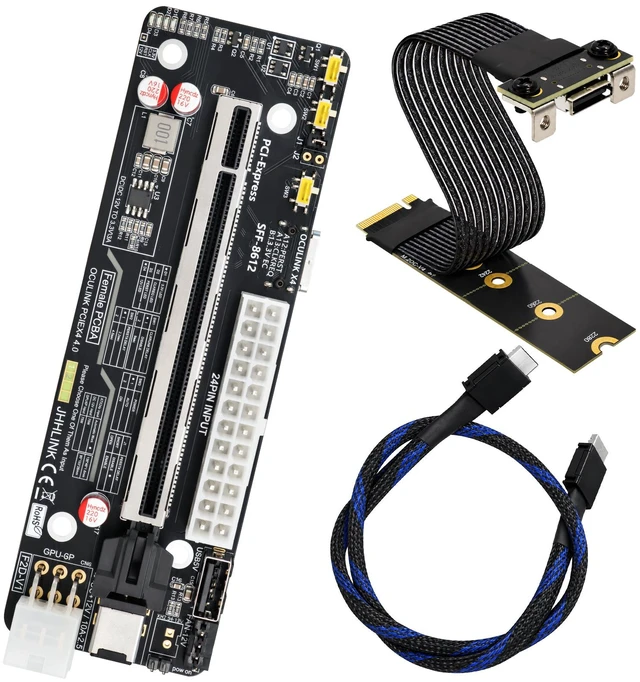
- Complete Expansion Kit: Includes Main Riser Board (SFF-8612), M.2 Key-M Adapter, and 50cm Braided OCuLink Cable. Converts M.2 NVMe (PCIe) to external GPU dock.
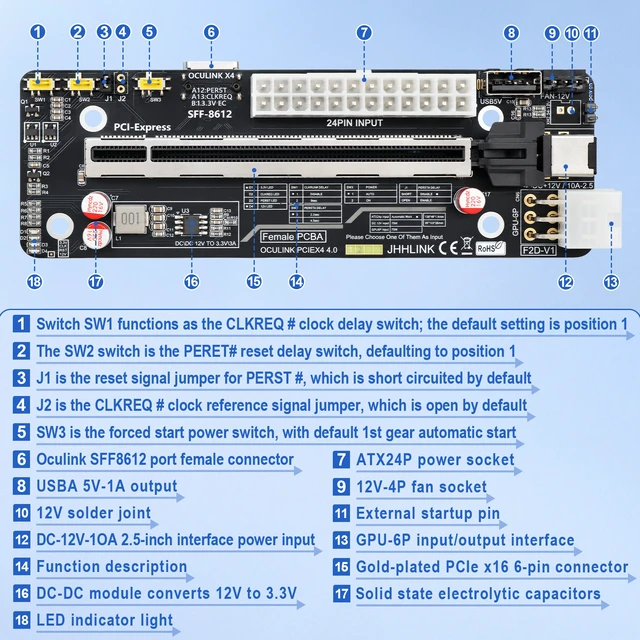
- Powerful Power Design: Supports 24-pin ATX / SFX / FLEX power supply. Built-in DC-DC module (12V to 3.3V), 12V-4P fan socket, and external 12V-10A input.
- Premium Build Quality: Gold-plated PCIe x16 connector, solid-state electrolytic capacitors. Cable features silver-plated conductors, Teflon insulation & aluminum foil shielding.
- Smart Control & I/O: Equipped with SW1/SW2/SW3 DIP switches (CLKREQ/Reset/Start), USB 5V-1A output, GPU 6-pin input, and LED status indicator.
- Broad Compatibility: Requires M.2 NVMe protocol. Ideal for Mini PCs, Laptops, AI Deep Learning, Gaming, and 3D Rendering.
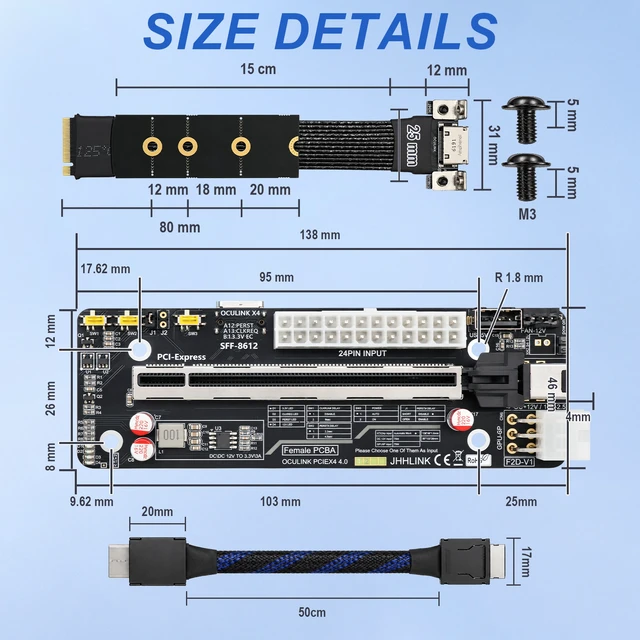
- Size Details:
- Main Board: ~138mm x 46mm | M.2 Adapter: ~150mm | Cable Length: 50cm
- Includes M3 screws; break-off design for M.2 mounting (2230/2242/2260/2280).
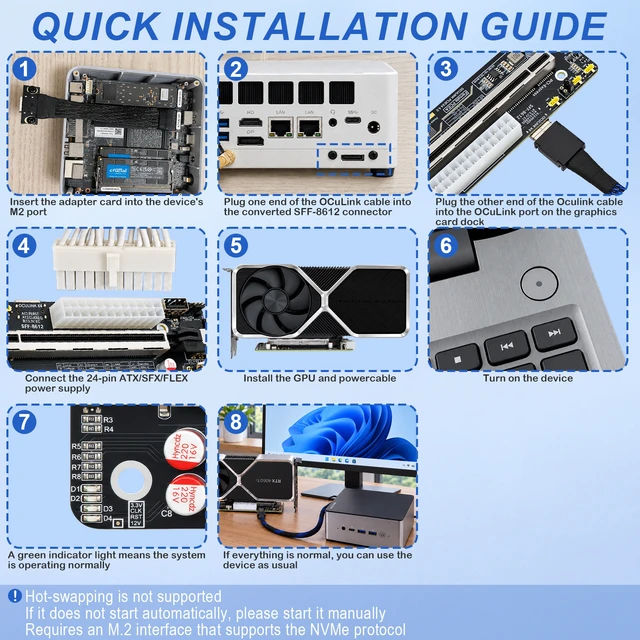
- Quick Installation:
- Insert M.2 adapter into device (Mini PC/Laptop) NVMe port.
- Connect OCuLink cable to SFF-8612 & Graphics Card Dock.
- Connect 24-pin PSU, install GPU, and power on.
- (Note: Hot-swapping not supported. Ensure NVMe protocol. Manual start if auto-start fails).
- Package Includes:
- 1 x PCIe 4.0 Riser Main Board, 1 x M.2 OCuLink Adapter, 1 x 50cm OCuLink Cable.
+
+
Overview
Specs
Reviews
Any questions? Ask CelesteSM will help you find out quickly.
Try me now
OCuLink eGPU Dock Kit M.2 to External Graphics Expansion Solution
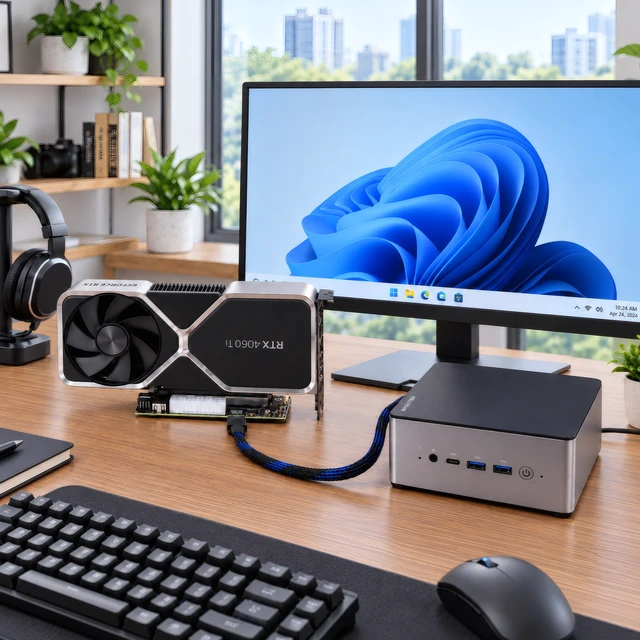
Build a desktop-class GPU setup for your Mini PC or laptop in minutes.
What's in the Kit:
- 1 × OCuLink eGPU Dock (SFF-8612 to PCIe x16 slot)
- 1 × M.2 NVMe (M-Key) to OCuLink SFF-8612 Adapter Card
- 1 × 50cm OCuLink 4i Shielded Cable
Core Specs:
- Interface: OCuLink 4i (SFF-8612), PCIe 4.0 x4
- Bandwidth: Up to 64Gbps (backward compatible with PCIe 3.0)
- GPU Slot: PCIe x16 (physical, runs at x4)
- Power: Supports ATX / SFX / FLEX PSU (not included)
- Cable: Silver-plated, shielded, low-latency
Key Features:
- M.2 to OCuLink Conversion: Turn any spare M.2 NVMe M-Key slot into a high-speed OCuLink port for external GPU docking.
- True PCIe Signal Path: Lower latency than USB4/Thunderbolt, near-native GPU performance for gaming, 3D rendering, AI/LLM workloads.
- Open Dock Design: No GPU length limit; fits RTX 4090, RX 7900 XTX and most full-size graphics cards.
- Stable Signal Integrity: Gold-plated contacts, multi-layer shielding, ReDriver/clock buffer ready.
- Smart Power Control: Sync ON/OFF with host (depending on BIOS), manual force-power switch + status LEDs.
Compatibility:
- Hosts: Mini PCs, laptops, SFF desktops with M.2 M-Key NVMe slot (PCIe mode, not SATA)
- GPUs: NVIDIA RTX 40/30 series, AMD RX 7000/6000 series
- Use cases: eGPU, AI inference, local LLM, video rendering, high-speed PCIe expansion
Notes:
- OCuLink is NOT hot-swappable. Always power off before plugging/unplugging.
- GPU and power supply are NOT included.
- Enable 4x4 or NVMe PCIe bifurcation/segmentation in BIOS if required by your device.
Warranty & Returns
Warranty, Returns, And Additional Information
Warranty
- Please contact the Seller directly for warranty information. Warranty information may also be found on the Manufacturer's website.
- CONTACT
Return Policies
- Return for refund within: 30 days
- Return for replacement within: non-replaceable
- This item is covered by HOOCCC Return Policy
Manufacturer Contact Info
- For a directory of all our manufacturers, please click below.
- Manufacturers Directory
LOADING...