Your Browsing History
- Free 30-day Returns
$329.96
Ships from China.
Meet Your Seller
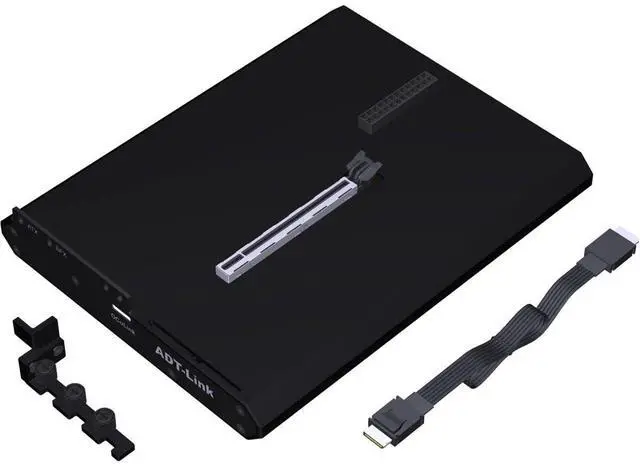
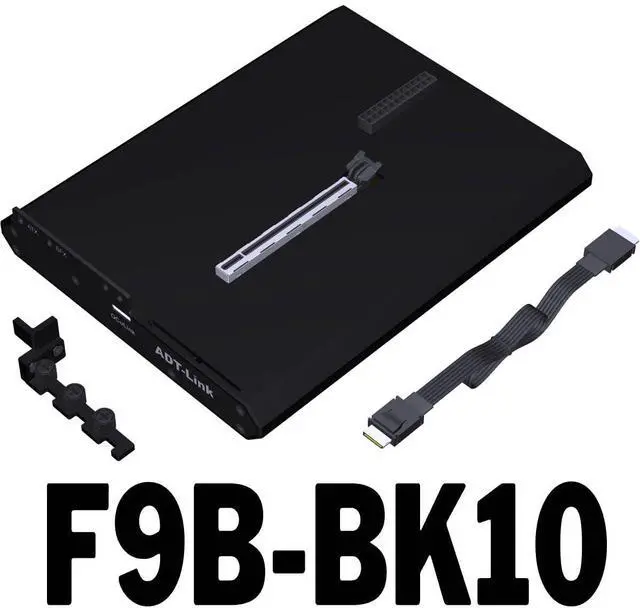
ADT-F9 OCuLink External GPU Dock PCIe 4.0 x4 64Gbps Built-in Switch & LED Indicators, Includes 50cm Cable Supports Graphics Card & PCIe Devices (F9B-BK10)
- True PCIe 4.0 x4 Performance Delivers effective bandwidth up to 64Gbps via pure PCIe channel from your motherboards M.2 slot. Perfect for external GPU, high-speed SSD, or other PCIe peripherals with minimal latency and loss.; Two Models Available Choose F9Q-BK10 (with builtin control chip) for enhanced compatibility, or F9B-BK10 (standard version) to fit your budget and setup. Both support plugandplay operation.; Smart Power & Indicator System Features a side pushbutton switch for manual control; the dock can autostart with your PC when used with our adapter board and cable. LED indicators: PSU (power status), Cable (link detection), RESET (startup confirmation) simple diagnostic at a glance.; Comprehensive Cable Included Comes with a 50cm highquality OCuLink extension cable, shielded for stable signal integrity. Nonstandard cables may cause LED anomalies; we recommend using the included cable for best performance.; Important Safety Note OCuLink does NOT support hotplugging. Always power off your computer before turning the dock on/off. The RESET LED will flash once at boot/shutdown; if it stays solid, check the connection or BIOS settings. Normal operation: switch ON, PSU ON, RESET OFF (Cable LED may stay off this does not affect usage).

+
+
Overview
Specs
Reviews
Any questions? Ask CelesteSM will help you find out quickly.
Try me now
True PCIe 4.0 x4 Performance Delivers effective bandwidth up to 64Gbps via pure PCIe channel from your motherboards M. 2 slot. Perfect for external GPU, high-speed SSD, or other PCIe peripherals with minimal latency and loss.; Two Models Available Choose F9Q-BK10 (with builtin control chip) for enhanced compatibility, or F9B-BK10 (standard version) to fit your budget and setup. Both support plugandplay operation.; Smart Power & Indicator System Features a side pushbutton switch for manual control; the dock can autostart with your PC when used with our adapter board and cable.
LED indicators: PSU (power status), Cable (link detection), RESET (startup confirmation) simple diagnostic at a glance.; Comprehensive Cable Included Comes with a 50cm highquality OCuLink extension cable, shielded for stable signal integrity. Nonstandard cables may cause LED anomalies; we recommend using the included cable for best performance.; Important Safety Note OCuLink does NOT support hotplugging. Always power off your computer before turning the dock on/off. The RESET LED will flash once at boot/shutdown; if it stays solid, check the connection or BIOS settings.
Normal operation: switch ON, PSU ON, RESET OFF (Cable LED may stay off this does not affect usage).
LED indicators: PSU (power status), Cable (link detection), RESET (startup confirmation) simple diagnostic at a glance.; Comprehensive Cable Included Comes with a 50cm highquality OCuLink extension cable, shielded for stable signal integrity. Nonstandard cables may cause LED anomalies; we recommend using the included cable for best performance.; Important Safety Note OCuLink does NOT support hotplugging. Always power off your computer before turning the dock on/off. The RESET LED will flash once at boot/shutdown; if it stays solid, check the connection or BIOS settings.
Normal operation: switch ON, PSU ON, RESET OFF (Cable LED may stay off this does not affect usage).
Warranty & Returns
Warranty, Returns, And Additional Information
Warranty
- Please contact the Seller directly for warranty information. Warranty information may also be found on the Manufacturer's website.
- CONTACT
Return Policies
- Return for refund within: 30 days
- Return for replacement within: 30 days
- This item is covered by VoltSync Return Policy
Manufacturer Contact Info
- For a directory of all our manufacturers, please click below.
- Manufacturers Directory
LOADING...