


Weather Alert: Severe winter storms may impact delivery times in some regions. We appreciate your patience as carriers work to deliver orders as quickly as possible. UPS Service Alerts.
Out of stock
This item is currently out of stock and it may or may not be restocked.
Sold by Newegg

Shipped by Newegg

Shop it at NeweggBusiness.

Plustek AD480 - Compact Desktop Scanner for Doc and Card, Fast Scan Speeds with ADF & Exclusive Card Slot, Ideal for Home Office or On-The-Go Business

  • Two-Sided Multi-Page Scanning : double-sided scanning of each page at up to 20 pages per minute directly to PDF, searchable PDF, JPEG
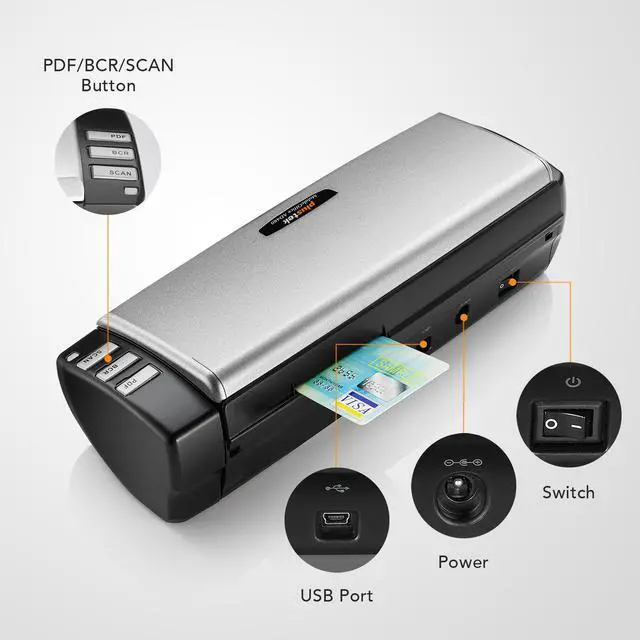
  • One touch button: 3 Mode choosing (Scan / PDF/ JPEG), easy scan and assort file
  • Business Card handling: bundle with NewSoft Presto! BizCard 6. Helps you scan & edit your business cards and then synchronize the contacts to various management applications
  • Editable: Generate to Microsoft Word, Excel, and PowerPoint files
  • Powerful features: Auto Threshold / Auto Rotate / Auto Crop & Deskew / Blank Page Removal and Color Dropout
  • Support Window XP / Vista / 7 / 8 / 10
Overview
Specs
Reviews
avatar

Any questions? Our AI beta will help you find out quickly.

Plustek PS30D double

Easy, Speedy, Compact with Auto Document Feeder

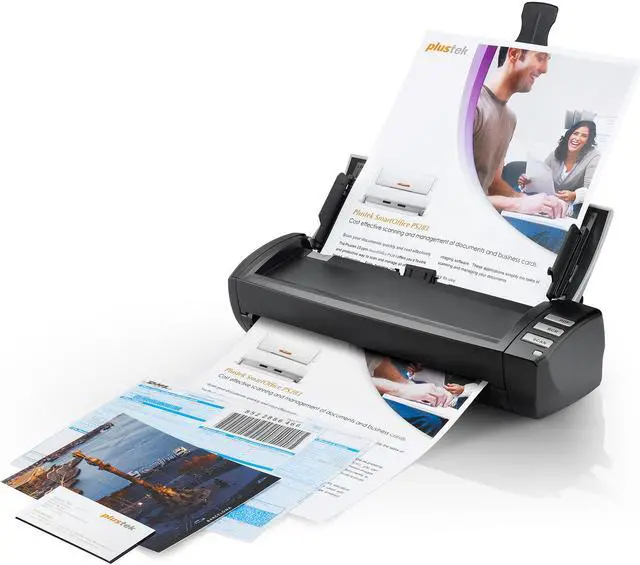
The AD480 scanner is versatile and robust mobile scanner in its class, designed for home and small offices. With double-sided scanning up to 20ppm and a 20-page ADF capacity users can scan efficiently, in the office or at home. It has a strong robust design for handling up to 1500 documents a day. It delivers speed, image quality, and great paper handling, along with easy integration and compatibility with document imaging applications.

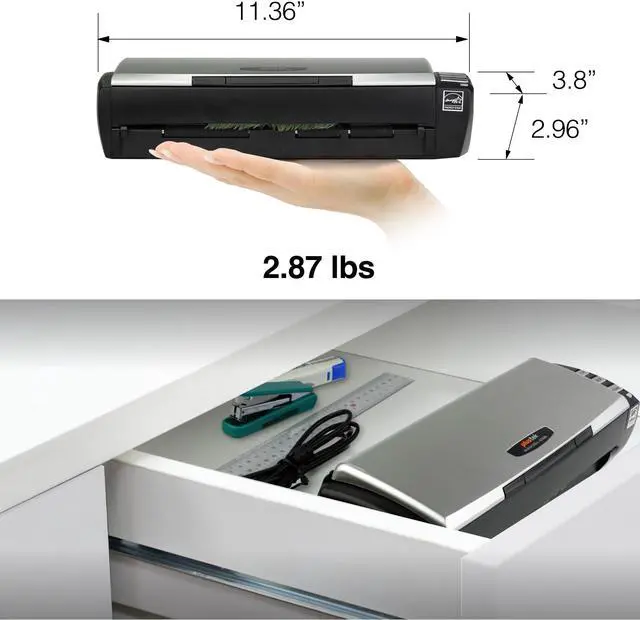
  • Compact design for easy storage
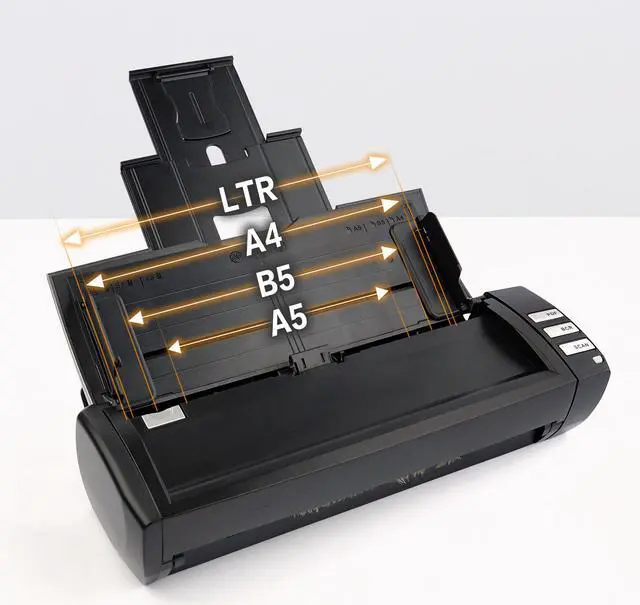
  • Handles different paper sizes - from legal documents to business cards
  • Create searchable PDF and editable Word and Excel files
  • Allow up to 1.24mm for ID and embossed cards (conform with ISO 7810)?
  • AD480 features TWAIN and WIA drivers with industry-standard

Compatible with Most Office Software
The bundled TWAIN driver ensures compatibilty with thousands of hardware systems and software applications.

Plustek PS30D double

Customize the file name

Manage your scanned documents with your own prefix name, help you save time and stay organized with scan data.

Plustek PS30D double

Save Multiple Page PDF format

PDFs are often commonly as official documents , to increase organization efficiency, you can scan and save documents to a Multi-page PDF, or save into a individual PDF file.

Plustek PS30D double

Edit file with Excel and Word

With OCR (Optical character recognition) function, system can recognition up to 183 languages, help you transfer your data from paper-base to Excel , Word or CVS format.

Plustek PS30D double

Intelligent Scan Correction function

Advanced technology allows for high precision scanning up to 600dpi. Numerous features such as Auto Color Detection, Auto Rotate for Text Orientation, Multi-image output, Remove Blank Pages, Remove Punch Holes, Remove Background, Denoise, Character Enhancement are included, so there’s no need to pre-sort your documents before scanning. Simply load and then let the AD480 do the work for you. An optical resolution of 600dpi, plus all the latest image processing features, ensures outstanding quality results every time.


3 Software include

Plustek PS30D double

Button utility scanning

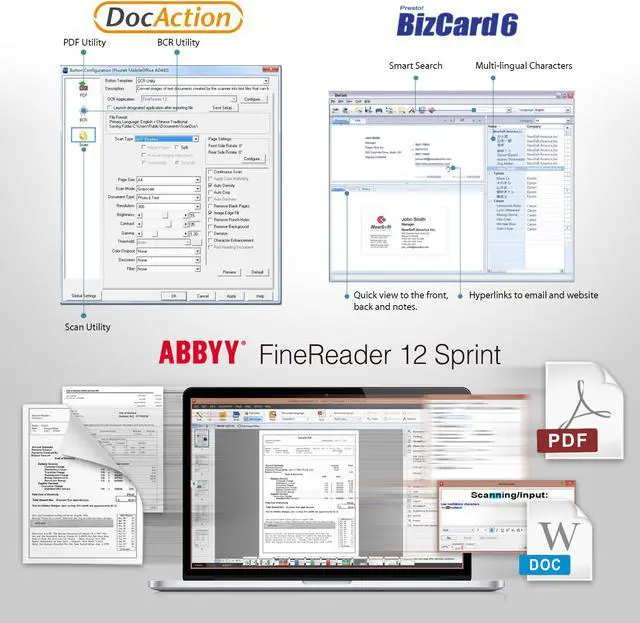
DocAction enables you to specify your personalized scanning configuration and scan documents with the touch of a button. Scanned documents are automatically sent directly to Printer, Email, Folder or FTP. DocAction also enables you to scan directly to many imaging and document management applications. DocAction saves scanned documents in all common imaging formats including: JPEG, TIFF, and PDF.

Plustek PS30D double

Convert PDFs and scans

FineReader is an all-in-one OCR and PDF software application for increasing business productivity when working with documents. It provides powerful, yet easy-to-use tools to access and modify information locked in paper-based documents and PDFs.

Plustek PS30D double

Business Card Management

BizCard can convert images of cards into information that is available for searching and editing in databases. With synchronization, you can add contact information to Google Contacts, Salesforce, ACT!, Lotus Notes, or Microsoft Outlook. Contact information can also be exported and archived as vCards, in CSV format, or imported to MobileMe, Gmail, or Hotmail.

The Plustek AD480 scanner is versatile scanner in its class, designed for home , counter and small offices. With double-sided scanning up to 40ipm and a 20-page ADF capacity users can scan efficiently, in the office or at home.

Ultra compact for space saving but with aute paper feeder
For some Usage scenarios. Like front desk, counter or small office desk, the space is limited, but need multi-page double-sided scan with paper feeder. The AD480 size just 11.36" x 3.8". and the auto paper feeder can put 20 pages paper in one time. and the paper feeder can cover to device to save the space.

Dedicated ID card scanner
In some industry - like Medical care, Insurance or Pharmacy , need scan insurance card or ID card. AD480 has its own dedicated card scanning slot , can scan up to 1.24mm thick card (correspond with ISO 7810)

Multi Features
The Pluste AD480 can Auto Deskew, Auto Crop, Auto Size for Page Detection, Gamma, Contrast, Brightness, Colour Dropout (RGB), Image Edge Fill, Preview, Page Size, Scan Mode, Multi-image Output, Job Function, Merge Page/Split Page, Card Scanning Mode, Outputs scanned documents in a variety of formats such as PDF, JPEG and TIFF formats.
It can also recognize text using OCR and create multi-page pdfs with automatic document feeders.

Bundle software
- PlustekDocAction
Button utility to simplify document scanning.DocAction enables you to specify your personalized scanning configuration settings and scan.Automatically sent directly to Printer, Email, Folder or FTP,also enables you to scan directly to many imaging and document management applications. You can save scanned documents in all common imaging formats including: BMP, JPEG, TIFF, and PDF.

- ABBYY FineReader Sprint
Tool that increases your productivity and efficiency which comes with simple user interface and supports recognition up to 183 languages.

- Presto! BizCard 6
Provides a full range of contact management functions for adding business cards without typing. Convert images of cards into information that is available for searching and editing in databases.

Warranty & Returns

Warranty, Returns, And Additional Information

Return Policies

Manufacturer Contact Info

LOADING...