


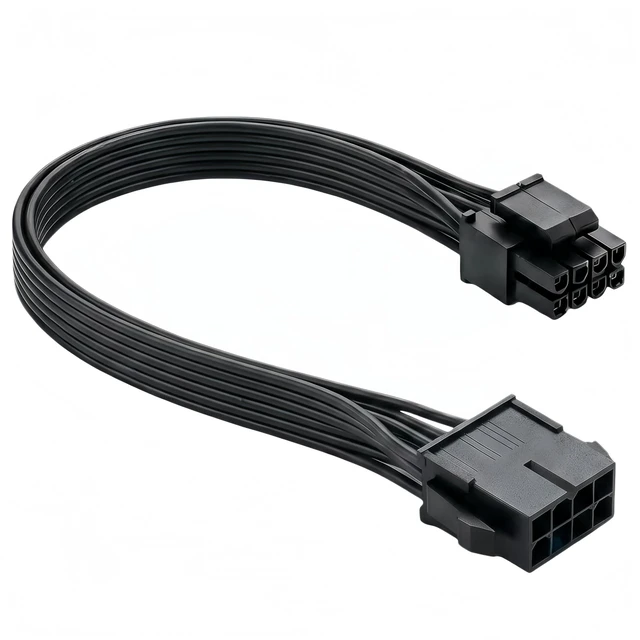


Are you struggling with a power supply CPU cable that‘s too short to reach your motherboard cleanly? Maybe you‘re building in a full-tower case, upgrading your system, or simply want to improve cable management for better airflow and aesthetics. This CPU 8 Pin Extension Cable is the simple, cost-effective solution you need-.
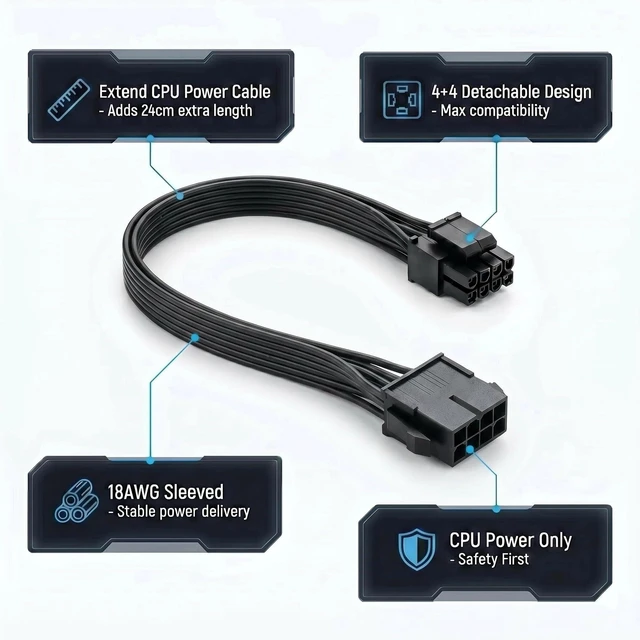
This extension cable adds 9.5 inches (24cm) of extra length to your existing CPU power cable, allowing you to route it behind the motherboard tray for a clean, professional finish-. The detachable 4+4 pin design means it works with both 4-pin and 8-pin motherboard CPU power sockets – simply slide the 4-pin section on or off to match your motherboard‘s configuration-.
Built with high-quality 18AWG tin-plated copper wire and a durable braided sleeve, this cable ensures stable power delivery and long-term reliability.
This cable is exclusively designed for motherboard CPU power (EPS/ATX 12V). It is NOT for graphics cards (PCIe). The connectors are keyed differently for CPU vs. PCIe power.
- Connector A (Input): ATX 12V 8-pin (4+4) Male (connects to your PSU‘s CPU cable)
- Connector B (Output): ATX 12V 8-pin Female (connects to your motherboard‘s CPU power port)
Compatible With:
- Power Supplies: Any PSU with an ATX 8-pin male CPU power output-
- Motherboards: Boards with ATX 4-pin, 8-pin, or 4+4-pin CPU power sockets-
NOT Compatible With:
- Graphics cards (PCIe/GPU) – this will cause permanent damage
- Motherboards without CPU power sockets
- Power supplies without a CPU 8-pin output
Technical Specifications
Step 1: Identify Your PSU Cable – Locate the CPU 8-pin cable from your power supply. This is typically labeled “CPU” or “EPS”.
Step 2: Connect the Extension – Plug the Male (4+4) end of this extension cable into your PSU‘s CPU cable. Then plug the Female end into your motherboard‘s CPU power port.
Step 3: Route and Manage – Route the cable behind the motherboard tray or through cable management channels. Use the included cable ties for a clean, organized finish.
Title:Is This Cable Right for Your System?
Compatible With:
- Power Supplies: Any PSU with an ATX 8-pin male CPU power output-
- Motherboards: Boards with ATX 4-pin, 8-pin, or 4+4-pin CPU power sockets-
- Use Case: Extending CPU power cable for better cable management and cleaner builds-
NOT Compatible With:
- Graphics Cards (PCIe/GPU) – this cable is for CPU power only
- Motherboards without CPU power sockets
- Power supplies without a CPU 8-pin output
Visual: A simple diagram showing the connection path:
PSU CPU 8-Pin Cable ? Extension Cable Male (4+4) ? Extension Cable Female ? Motherboard CPU Power Socket. A separate warning box: “
FOR CPU POWER ONLY – DO NOT USE WITH GRAPHICS CARDS”.
Title:CRITICAL SAFETY WARNING – READ BEFORE USE
This cable is for MOTHERBOARD CPU POWER ONLY. Using it for anything else will cause permanent damage.
Correct Use Incorrect Use
Motherboard CPU 8-pin (4+4) power socket Graphics Card (PCIe) power socket
EPS/ATX 12V CPU power connection Any PCIe/GPU power connection
Extending CPU power from PSU Any other device
What happens if you use it incorrectly?
- Plugging this cable into a graphics card will short circuit the power supply
- The connectors are keyed differently for CPU vs. PCIe
- This will cause immediate and permanent damage to your GPU, PSU, or both
Visual: Red background with white text. A clear side-by-side comparison: left side shows “Correct – Motherboard CPU Socket” with a green checkmark, right side shows “Incorrect – GPU/PCIe Socket” with a red X.
Are you struggling with a power supply CPU cable that‘s too short to reach your motherboard cleanly? Maybe you‘re building in a full-tower case, upgrading your system, or simply want to improve cable management for better airflow and aesthetics. This CPU 8 Pin Extension Cable is the simple, cost-effective solution you need-.
This extension cable adds 9.5 inches (24cm) of extra length to your existing CPU power cable, allowing you to route it behind the motherboard tray for a clean, professional finish-. The detachable 4+4 pin design means it works with both 4-pin and 8-pin motherboard CPU power sockets – simply slide the 4-pin section on or off to match your motherboard‘s configuration-.
Built with high-quality 18AWG tin-plated copper wire and a durable braided sleeve, this cable ensures stable power delivery and long-term reliability.
This cable is exclusively designed for motherboard CPU power (EPS/ATX 12V). It is NOT for graphics cards (PCIe). The connectors are keyed differently for CPU vs. PCIe power.
- Connector A (Input): ATX 12V 8-pin (4+4) Male (connects to your PSU‘s CPU cable)
- Connector B (Output): ATX 12V 8-pin Female (connects to your motherboard‘s CPU power port)
Compatible With:
- Power Supplies: Any PSU with an ATX 8-pin male CPU power output-
- Motherboards: Boards with ATX 4-pin, 8-pin, or 4+4-pin CPU power sockets-
NOT Compatible With:
- Graphics cards (PCIe/GPU) – this will cause permanent damage
- Motherboards without CPU power sockets
- Power supplies without a CPU 8-pin output
Technical Specifications
| Connector A (Input) | 1x ATX 12V 8-pin (4+4) Male (Detachable) |
| Connector B (Output) | 1x ATX 12V 8-pin Female |
| Cable Length | 9.5 inches / 24 cm (including connectors) |
| Wire Gauge | 18AWG Tin-Plated Copper |
| Rated Temperature | 80°C |
| Rated Voltage | 300V |
| Sleeving | Braided / Sleeved |
| Compatible PSUs | Power supplies with ATX 8-pin male CPU port |
| Compatible Motherboards | Boards with ATX 4-pin, 8-pin, or 4+4-pin CPU sockets |
Step 1: Identify Your PSU Cable – Locate the CPU 8-pin cable from your power supply. This is typically labeled “CPU” or “EPS”.
Step 2: Connect the Extension – Plug the Male (4+4) end of this extension cable into your PSU‘s CPU cable. Then plug the Female end into your motherboard‘s CPU power port.
Step 3: Route and Manage – Route the cable behind the motherboard tray or through cable management channels. Use the included cable ties for a clean, organized finish.
Title:Is This Cable Right for Your System?
Compatible With:
- Power Supplies: Any PSU with an ATX 8-pin male CPU power output-
- Motherboards: Boards with ATX 4-pin, 8-pin, or 4+4-pin CPU power sockets-
- Use Case: Extending CPU power cable for better cable management and cleaner builds-
NOT Compatible With:
- Graphics Cards (PCIe/GPU) – this cable is for CPU power only
- Motherboards without CPU power sockets
- Power supplies without a CPU 8-pin output
Visual: A simple diagram showing the connection path:
PSU CPU 8-Pin Cable ? Extension Cable Male (4+4) ? Extension Cable Female ? Motherboard CPU Power Socket. A separate warning box: “
FOR CPU POWER ONLY – DO NOT USE WITH GRAPHICS CARDS”.
Title:CRITICAL SAFETY WARNING – READ BEFORE USE
This cable is for MOTHERBOARD CPU POWER ONLY. Using it for anything else will cause permanent damage.
Correct Use Incorrect Use
Motherboard CPU 8-pin (4+4) power socket Graphics Card (PCIe) power socket
EPS/ATX 12V CPU power connection Any PCIe/GPU power connection
Extending CPU power from PSU Any other device
What happens if you use it incorrectly?
- Plugging this cable into a graphics card will short circuit the power supply
- The connectors are keyed differently for CPU vs. PCIe
- This will cause immediate and permanent damage to your GPU, PSU, or both
Visual: Red background with white text. A clear side-by-side comparison: left side shows “Correct – Motherboard CPU Socket” with a green checkmark, right side shows “Incorrect – GPU/PCIe Socket” with a red X.