• $15.99
  • Free 30-day Returns
  • Price alert
    Shop it at NeweggBusiness.

    Meet Your Seller

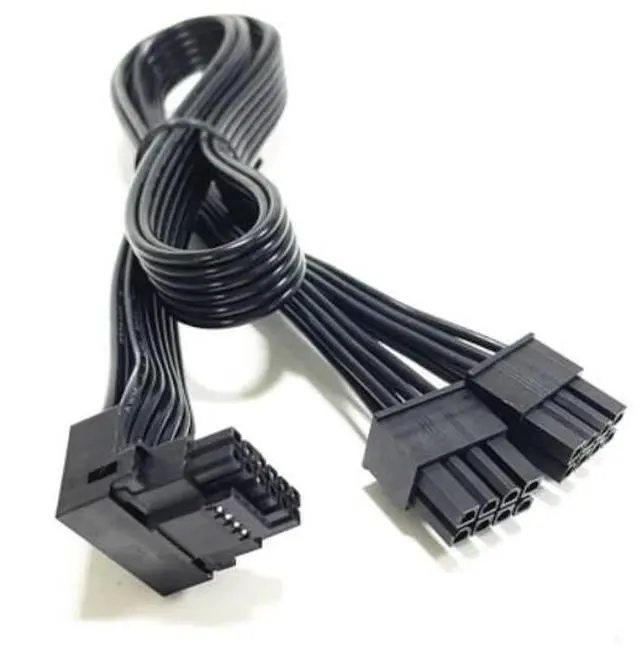
    for Corsair 90° Angled 12VHPWR Cable Dual 8 Pin to 16 Pin 12V-2x6 PCIe 5.0 GPU Power Cord, 16AWG 600W, Type B (4-Pin on Top Design) for RTX 5090/5080/4090 Type3/Type 4 Modular PSUs

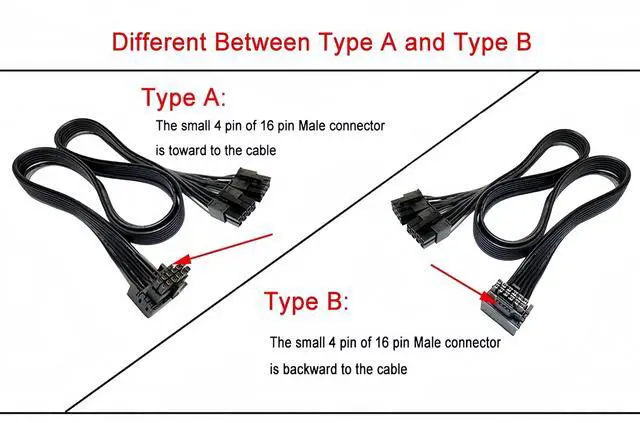
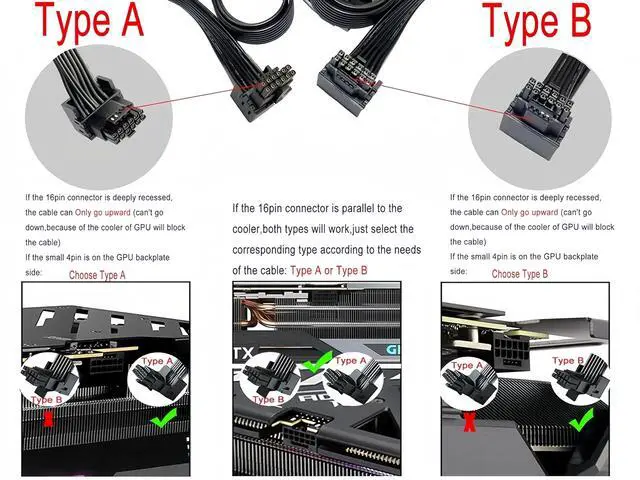
    • CORSAIR TYPE B CONFIGURATION 4-PIN ON TOP DESIGN This cable features the official Corsair Type B configuration, with the 4-pin sense wires positioned on the top side of the connector (closer to the GPU backplate) . This design is specifically optimized for graphics cards with components or capacitors below the power connector, ensuring full insertion without interference. Available in two versionsType A (4-Pin on Bottom) and Type B (4-Pin on Top)giving you the freedom to route the cable above or below your graphics card for the perfect fit in your build .
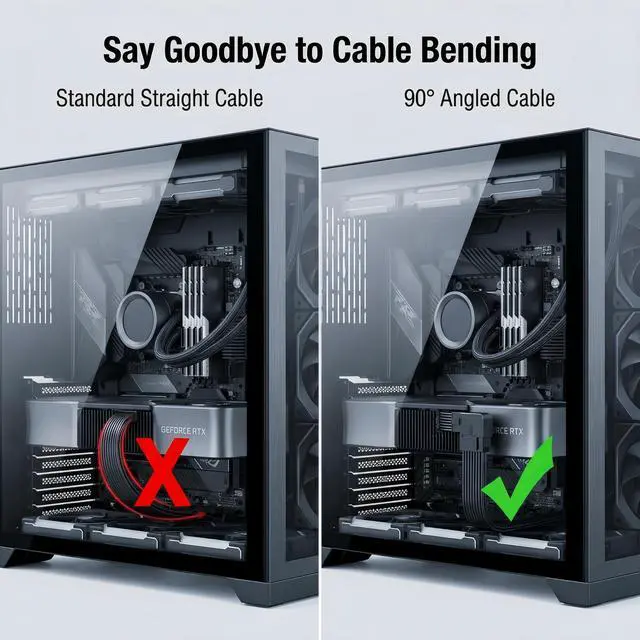
    • 90° ANGLED CONNECTOR PREVENTS SHARP BENDS The factory-molded 90° angled 12V-2x6 connector eliminates the need to bend cables near the GPU portthe #1 cause of connector failure . Standard straight cables often require sharp bends that press against glass side panels; our angled design routes the cable cleanly upward, reducing stress on both the GPU port and your case. It is recommended to maintain at least 35mm of straight cable before any bend .
    • 600W POWER DELIVERY RTX 50 & 40 SERIES READY Built to power the most demanding graphics cards. This cable delivers up to 600W of stable power through two PCIe 8-pin inputs on your Corsair PSU. Fully compatible with NVIDIA GeForce RTX 50 Series (5090/5080/5070 Ti) and RTX 40 Series (4090/4080/4070 Ti) . Supports both 12VHPWR and the updated 12V-2x6 GPU connector standardsthe cable works with both, as the difference lies in the GPU-side socket.
    +
    +
    Overview
    Specs
    Reviews
    avatar

    Any questions? Our AI beta will help you find out quickly.

    About this item
    1. CORSAIR TYPE B CONFIGURATION 4-PIN ON TOP DESIGN This cable features the official Corsair Type B configuration, with the 4-pin sense wires positioned on the top side of the connector (closer to the GPU backplate) . This design is specifically optimized for graphics cards with components or capacitors below the power connector, ensuring full insertion without interference. Available in two versionsType A (4-Pin on Bottom) and Type B (4-Pin on Top)giving you the freedom to route the cable above or below your graphics card for the perfect fit in your build .
    2. 90° ANGLED CONNECTOR PREVENTS SHARP BENDS The factory-molded 90° angled 12V-2x6 connector eliminates the need to bend cables near the GPU portthe #1 cause of connector failure . Standard straight cables often require sharp bends that press against glass side panels; our angled design routes the cable cleanly upward, reducing stress on both the GPU port and your case. It is recommended to maintain at least 35mm of straight cable before any bend .
    3. 600W POWER DELIVERY RTX 50 & 40 SERIES READY Built to power the most demanding graphics cards. This cable delivers up to 600W of stable power through two PCIe 8-pin inputs on your Corsair PSU. Fully compatible with NVIDIA GeForce RTX 50 Series (5090/5080/5070 Ti) and RTX 40 Series (4090/4080/4070 Ti) . Supports both 12VHPWR and the updated 12V-2x6 GPU connector standardsthe cable works with both, as the difference lies in the GPU-side socket, not the cable itself .
    4. PREMIUM 16AWG CONSTRUCTION HIGH THERMAL ENDURANCE Built with high-quality 16AWG tinned copper wire, capable of carrying up to 55A of current with 105°C temperature resistance . Delivers stable power with minimal voltage drop. The plug terminals feature alloy copper with tin plating for superior conductivity and corrosion resistance. Each cable is factory-tested for reliability under load.
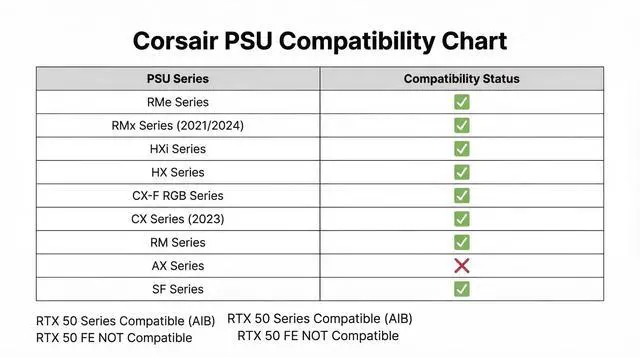
    5. EXACT FIT FOR CORSAIR TYPE 3 / TYPE 4 MODULAR PSUs Engineered specifically for Corsair Type 3 and Type 4 power supplies . Compatible with RM, RMx, RMi, RMe, HX, HXi, AX, AXi, SF, TX-M, CX-M series. NOT compatible with other PSU brands (EVGA, Seasonic, Lian Li, etc.) or Corsair AX Gold/HX Bronze seriesusing with incompatible PSUs may cause permanent damage .
    6. OPTIMAL CABLE LENGTH 650MM (25.6 INCHES) Total length of 650mm (25.6 inches) provides ample reach for routing behind the motherboard tray or through cable management channels . Includes a reusable cable tie for clean organization.
    7. CRITICAL INSTALLATION SAFETY WARNINGS The #1 cause of 12VHPWR/12V-2x6 connector failure is incomplete insertion and bending within 35mm of the connector . When connecting to your GPU: Push the connector straight and firmly into the GPU port until you hear a CLICK Verify that no gap exists between the connector housing and GPU socket Do not bend the cable within 35mm (1.4 inches) of the connectormaintain a straight approach as required by PCI-SIG specifications.


    Product description


    When building a high-end PC with a powerful graphics card like the NVIDIA GeForce RTX 5090 or RTX 4090, cable management becomes criticalespecially in compact cases where the side panel presses against the stiff power cable. The Corsair Type B 90° Angled 12V-2x6 Cable solves this problem with a factory-molded 90° connector that routes cleanly without sharp bends .

    This cable features the official Corsair Type B design, with the 4-pin sense wires positioned on the top side of the connector (closer to the GPU backplate) . Corsair offers this cable in two versionsType A (4-Pin on Bottom) and Type B (4-Pin on Top)allowing you to choose the orientation that best fits your graphics card's power connector layout .

    Type B is ideal for:


    1. Graphics cards with components or capacitors located directly below the power connector
    2. GPUs where the area below the power connector has limited clearance
    3. Ensuring full insertion without obstruction from PCB components


    Standard straight 12VHPWR cables often require bending immediately after the connector, which can:


    1. Create stress on the GPU power port
    2. Push against glass side panels
    3. Increase the risk of incomplete insertionthe #1 cause of connector melting


    Our 90° angled design eliminates these issues by directing the cable where you need it to goupward away from the GPU PCB or backward toward the cable management channel.

    RTX 50 SERIES CONFIRMED COMPATIBLE

    This cable is fully compatible with NVIDIA GeForce RTX 50 Series (5090, 5080, 5070 Ti, 5070) and RTX 40 Series GPUs . Both 12VHPWR and 12V-2x6 standards use identical cablesthe difference is only in the GPU-side connector socket, which is fully backward compatible .

    Important RTX 50 Series Note: The CORSAIR Power Bridge is not compatible with RTX 50 Series Founders Edition GPUs due to their recessed vertical 12V-2x6 connector design . However, this angled cable (Type B) is designed to work with most AIB partner cards; please verify your GPU's connector orientation before purchase.

    GPU Compatibility:
    GPU SeriesCompatibility Status
    NVIDIA RTX 50 Series(NVIDIA RTX 5090/5080/5070 Ti/5070)
    NVIDIA RTX 50 FE Series(NVIDIA RTX 5090/5080 FE) NOT COMPATIBLE (recessed vertical connector)
    NVIDIA RTX 40 Series((NVIDIA RTX 4090/4080/4070 Ti/4070) FULLY COMPATIBLE (FE & AIB)
    NVIDIA RTX 30 Series (3090 Ti)FULLY COMPATIBLE
    ASUS ROG STRIX/TUF 40 SeriesNOT COMPATIBLE (rotated connector)
    AMD Radeon RX 7000 SeriesNot Compatible (uses 8-pin PCIe)
    CRITICAL CORSAIR PSU ONLY (designed for Corsair Type 3/ Type 4 modular)
    PSU SeriesCompatible Models
    AXi / AXAX760i, AX860i, AX1200i, AX1500i, AX1600i (Platinum/Titanium)
    HXi / HXHX750i, HX850i, HX1000i, HX1200i, HX750/850/1000/1200 Platinum
    RM / RMx / RMi / RMeAll wattages 650W and above
    SF SeriesSF600, SF750, SF850
    TX-M / CX-MTX550M, TX650M, TX750M, TX850M; CX550M, CX650M, CX750M

    NOT COMPATIBLE WITH:


    1. Corsair AX Gold series (AX760 Gold, AX860 Gold, etc.)
    2. Corsair HX Bronze/White series
    3. Any non-Corsair power supplies (EVGA, Seasonic, Lian Li, Thermaltake, Cooler Master, etc.)
    4. PSUs under 650W (for RTX 5090, recommend 1000W+ PSU)


    1. FULLY SEAT THE CONNECTORThe #1 cause of 12VHPWR/12V-2x6 connector failure is incomplete insertion . When connecting to your GPU:


    1. Push the connector straight and firmly into the GPU port
    2. You must hear a distinct "CLICK" indicating the retention clip is engaged
    3. After installation, verify no visible gap remains between the connector and GPU socket
    4. For cables with color-coded connectors, if you see yellow, it's not fully seated
    5. NVIDIA recommends plugging the cable into the GPU before inserting it into the motherboard


    2. MAINTAIN PROPER BEND RADIUS Do not bend the cable within 35mm (1.4 inches) of the connector as required by PCI-SIG specifications . The angled design eliminates the need for sharp bends, but ensure the straight portion remains unbent.

    3. PREVENT SIDE PANEL PRESSUREDo not let your PC case side panel press against the cable or connector . If your case is too narrow, use a vertical GPU mount or ensure adequate clearance.

    4. REGULAR INSPECTIONFor high-power GPUs like RTX 5090, periodically inspect the connector for signs of melting, discoloration, or unusual odor . If you notice any abnormality, power down immediately and replace the cable.

    5. CORSAIR PSU ONLYDifferent PSU brands use different pinouts on the PSU side. Using this cable with non-Corsair PSUs may cause immediate and permanent damage to your GPU and/or power supply .

    Technical Specifications
    SpecificationDetails
    Connector A (PSU Side)2x PCIe 8-pin Male (Corsair Type 3/Type 4)
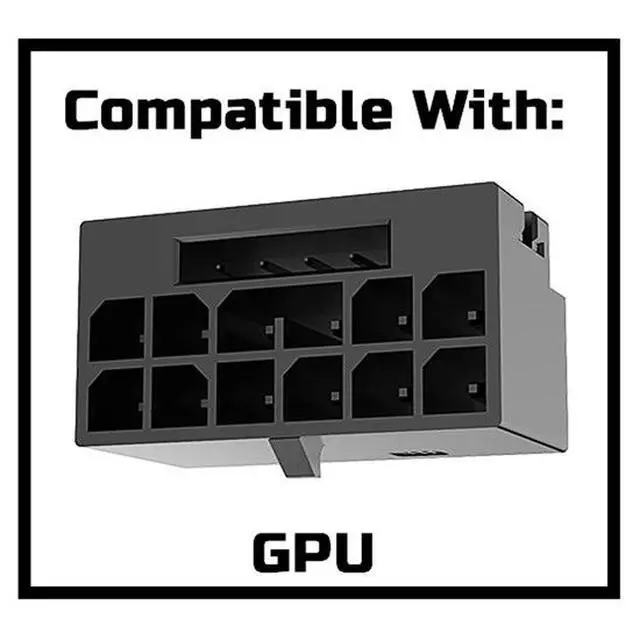
    Connector B (GPU Side)12V-2x6 / 12VHPWR 16-Pin (12+4) Female 90° Angled, Type B (4-Pin on Top)
    Cable Length650 mm / 25.6 inches (including connectors)
    Wire Gauge16AWG + 24AWG (UL1007 rated tinned copper)
    Maximum Power600W
    Current RatingUp to 55A
    Temperature Rating105°C
    StandardsPCIe 5.0 / 12VHPWR / 12V-2x6
    Power Supply Recommendations for RTX 50 Series:
    GPU ModelRecommended PSU Wattage
    RTX 50901000W or higher
    RTX 5080850W or higher
    RTX 5070 Ti / 5070750W or higher


    Warranty & Returns

    Warranty, Returns, And Additional Information

    Warranty

    • Please contact the Seller directly for warranty information. Warranty information may also be found on the Manufacturer's website.
    • CONTACT

    Return Policies

    Manufacturer Contact Info

    LOADING...