Take a tax holiday. Take advantage of limited-time, tax-free savings on select products in certain states. Learn More>
  • $8.99
  • Free 30-day Returns
  • Price alert
    Shop it at NeweggBusiness.

    Meet Your Seller

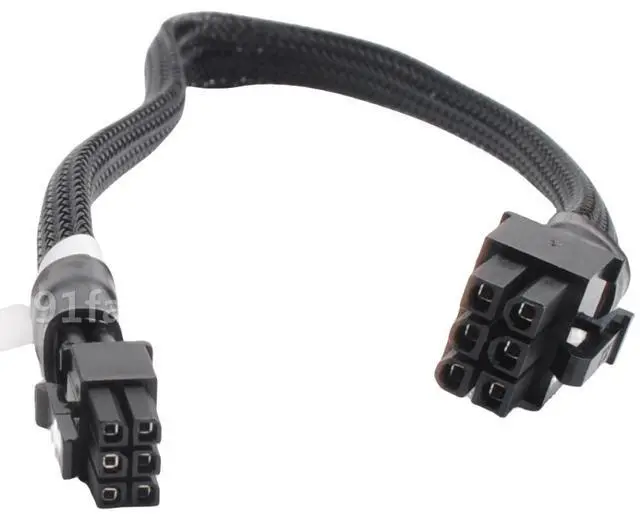
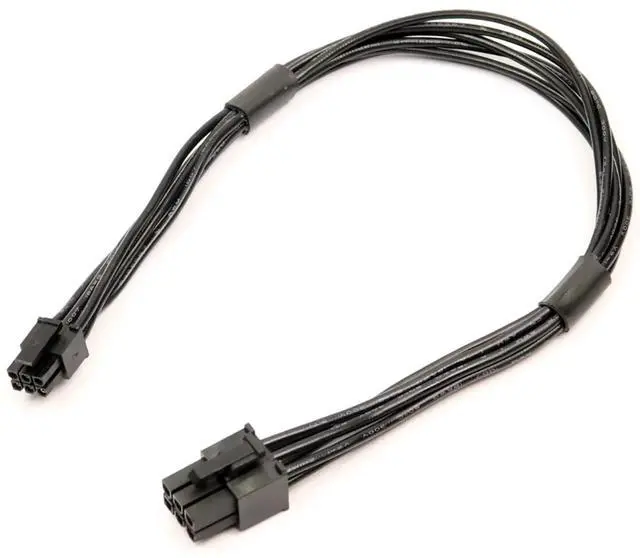
    Mini 6 Pin to 6 Pin PCI Express Video Card Power Adapter Cable for Mac Pro G5 14-inch (35cm) 18AWG, Compatible with Power Mac G5 & Pro (1,1-5,1) 2006-2012, GPU Power Cable

    • CONVERT MAC MINI 6-PIN TO STANDARD PCIe 6-PIN UPGRADE YOUR GRAPHICS CARD This adapter cable features a Mini 6-pin male connector on one end (to plug into your Mac Pro or Power Mac G5 motherboard) and a standard 6-pin PCIe male connector on the other (to plug into your graphics card). It allows you to use modern PCIe video cards that require a 6-pin power connection in older Mac Pro and Power Mac G5 towers.
    • WIDE COMPATIBILITY MAC PRO (1,1 5,1) & POWER MAC G5 Compatible with all Mac Pro models (1,1), (2,1), (3,1), (4,1), (5,1) covering years 2006 through 2012, as well as Power Mac G5 models. The Mini 6-pin connector is specifically designed for the proprietary power ports found on Mac Pro and Power Mac G5 logic boards.
    • PREMIUM 18AWG CONSTRUCTION SAFE & RELIABLE Built with high-quality 1007-18AWG tin-coated copper wire for stable power delivery and minimal voltage drop. The 14-inch (35cm) length provides flexible routing inside the Mac Pro tower chassis. Rated for reliable power delivery to your video card.
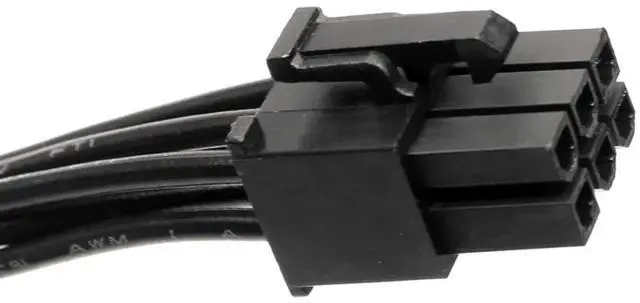
    • CRITICAL COMPATIBILITY WARNING MINI 6-PIN NOT STANDARD 6-PIN The connector on the Mac motherboard end is Mini 6-pin, which is physically smaller than standard 6-pin PCIe connectors. This cable is exclusively designed for Mac Pro and Power Mac G5 logic boards. DO NOT attempt to use this cable with standard motherboards or non-Apple systems it will not fit and may cause damage.
    +
    +
    Overview
    Specs
    Reviews
    avatar

    Any questions? Our AI beta will help you find out quickly.

    About this item
    1. CONVERT MAC MINI 6-PIN TO STANDARD PCIe 6-PIN UPGRADE YOUR GRAPHICS CARD This adapter cable features a Mini 6-pin male connector on one end (to plug into your Mac Pro or Power Mac G5 motherboard) and a standard 6-pin PCIe male connector on the other (to plug into your graphics card). It allows you to use modern PCIe video cards that require a 6-pin power connection in older Mac Pro and Power Mac G5 towers.
    2. WIDE COMPATIBILITY MAC PRO (1,1 5,1) & POWER MAC G5 Compatible with all Mac Pro models (1,1), (2,1), (3,1), (4,1), (5,1) covering years 2006 through 2012, as well as Power Mac G5 models. The Mini 6-pin connector is specifically designed for the proprietary power ports found on Mac Pro and Power Mac G5 logic boards.
    3. PREMIUM 18AWG CONSTRUCTION SAFE & RELIABLE Built with high-quality 1007-18AWG tin-coated copper wire for stable power delivery and minimal voltage drop. The 14-inch (35cm) length provides flexible routing inside the Mac Pro tower chassis. Rated for reliable power delivery to your video card.
    4. CRITICAL COMPATIBILITY WARNING MINI 6-PIN NOT STANDARD 6-PIN The connector on the Mac motherboard end is Mini 6-pin, which is physically smaller than standard 6-pin PCIe connectors. This cable is exclusively designed for Mac Pro and Power Mac G5 logic boards. DO NOT attempt to use this cable with standard motherboards or non-Apple systems it will not fit and may cause damage.
    5. PLUG-AND-PLAY SECURE CONNECTION Easy installation with secure connector design. Simply connect the Mini 6-pin end to your Macs logic board and the standard 6-pin end to your graphics card. No drivers or software required.


    Product description

    Are you looking to upgrade the graphics card in your Mac Pro or Power Mac G5, but your new GPU requires a standard 6-pin PCIe power connector that your Macs logic board doesnt directly support? This Mini 6 Pin to 6 Pin PCI Express Power Adapter Cable is the solution.

    Apples Mac Pro and Power Mac G5 towers use a proprietary Mini 6-pin power connector on the logic board, which is physically smaller than standard PCIe 6-pin connectors-1. This adapter cable bridges that gap, converting the Mini 6-pin output from your Macs motherboard into a standard 6-pin PCIe connector for your graphics card.

    Whether youre installing a newer NVIDIA or AMD GPU, this cable provides the clean, reliable power connection you need to breathe new life into your classic Mac tower.

    Please verify your Mac model before purchasing. This cable is only compatible with the following systems-1:

    Compatible Mac Models:


    1. Mac Pro (1,1) 2006
    2. Mac Pro (2,1) 2007
    3. Mac Pro (3,1) 2008
    4. Mac Pro (4,1) 2009
    5. Mac Pro (5,1) 2010-2012
    6. Power Mac G5 PCIe-based models-


    NOT Compatible With:


    1. Standard PC motherboards (non-Apple)
    2. Mac laptops or iMacs
    3. Mac Pro models after 2012 (6,1 trash can Mac Pro uses different power connectors)
    4. Any system without Mini 6-pin power ports on the logic board


    Note: The connector on the Mac motherboard end is Mini 6-pin, which is physically smaller than standard 6-pin PCIe connectors-1. This cable is designed for Mac Pro and Power Mac G5 logic boards ONLY. If you connect this cable to incompatible motherboards, it will burn or damage the motherboards or graphics card-1.

    Technical Specifications
    Connector A(Input)1x Mini 6 Pin Male (Mac Pro / Power Mac G5 proprietary)
    Connector B(Output)1x PCIe 6 Pin Male (Standard)
    Cable Length14 inches / 35 cm (including connectors)
    Wire Gauge1007-18AWG Tin-Coated Copper
    Compatible ModelsCompatible Models Mac Pro (1,1 5,1) 2006-2012, Power Mac G5

    Step 1: Identify Your Macs Power Port Locate the Mini 6-pin power connector on your Mac Pro or Power Mac G5 logic board. This is typically located near the PCIe slots.

    Step 2: Connect the Cable Plug the Mini 6-pin male end

    Learn more about the Detailed Specifications

    Additional Information
    First Listed on Newegg May 21, 2026

    Warranty & Returns

    Warranty, Returns, And Additional Information

    Warranty

    • Please contact the Seller directly for warranty information. Warranty information may also be found on the Manufacturer's website.
    • CONTACT

    Return Policies

    Manufacturer Contact Info

    LOADING...