- Free 30-day Returns
Best Sellers
- $51.16
- + FREE SHIPPING
- $53.01
Meet Your Seller
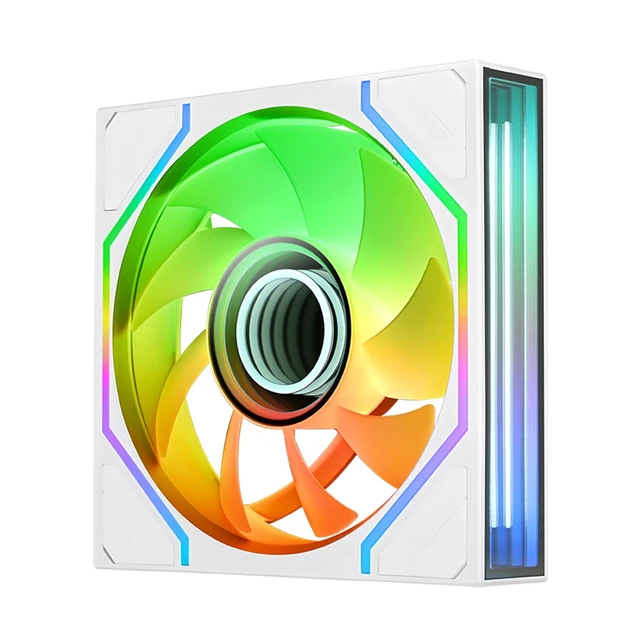
Thermaltake SWAFAN 120 EX Infinity ARGB White Infinity Mirror Hub and Frame PC Cooling Fan CL-F265-PL12SW-A
- Infinite StyleTurn heads with a stand out appearance, the SWAFAN INFINITY EX features a dual ring inifinity hub to provide some extra depth and two side mounted inifity mirrors along with dedicated 5v ARGB lighting to get the perfect color for your build.
- MAGForce 2.0Equipped with MagForce 2.0 enhancing connection stability with a new layout for the pogo pins and contact pads that is now two times larger for better contact and ease of alignment with the magnetic connectors.
- Airflow in StyleBeneath the dual ring infinity hub you will find a hydraulic bearing motor capable of 500~2000 RPMs and supported by a 28mm housign allows the SWAFAN INFNITY to move up to 56.15/58.13 CFM of airflow and 2.23/2.86mm-H2O Static Pressure.
- Swappable BladesEnsure your presentation is always on point no matter the orientation thanks to the included swappable blades, with standard blades preinstalled a quick swap out will reverse the airflow direction while keeping the LEDs and infinity mirrors where you want to see them.
- Hidden ScrewsKeep unwanted screws out of sight with thanks to the redesigned frame that supports removable corner bumpers and recessed screw mounts.
Any questions? Ask CelesteSM will help you find out quickly.
A new revision of the SWAFAN design, the SWAFAN INFINITY EX12 brings a new set of features to the table. Packed with a dual ring infinity hub and two side frame mounted infinity mirrors as well to create an eye-catching display thats always shown. To keep air moving and in the desired direction we included a standard (58.13 CFM 2.86mm-H2O) and reverse (56.15 CFM 2.23mm-H2O) set of blades. To keep connections reliable we also upgraded with MagForce 2.0 that has 2x larger pad contacts.
Warranty & Returns
Warranty, Returns, And Additional Information
Warranty
- Please contact the Seller directly for warranty information. Warranty information may also be found on the Manufacturer's website.
- Read full details
- CONTACT
Return Policies
- Return for refund within: 30 days
- Return for replacement within: non-replaceable
- This item is covered by Thermaltake Return Policy
Manufacturer Contact Info
- For a directory of all our manufacturers, please click below.
- Manufacturers Directory
The Thermaltake SWAFAN 120 EX Infinity ARGB White is a 120 mm PC case-cooling fan with infinity-mirror ARGB lighting, magnetic connections, and swappable blades for changing airflow direction. It suits PC builders who want adjustable case airflow and a coordinated white lighting setup.
Recommended For
- Showcase-PC builders who want infinity-mirror lighting visible inside a white-themed case; the hub and frame mirrors make appearance a central feature.
- Builders placing intake fans where the fan face remains visible who want to keep the preferred lighting side facing inward; the swappable blades let them change airflow direction without simply turning the fan around.
- PC builders wiring several case fans who want magnetic fan-to-fan connections to simplify daisy-chaining and reduce inter-fan cable clutter.
- Users who want one 120 mm case fan to serve as either intake or exhaust while retaining its intended appearance, with PWM speed adjustment for different cooling needs.
Real-World Use Scenarios
- In a glass-sided or panoramic PC case, use the reverse blades for side intake so the fan can pull in fresh air while keeping its infinity-mirror lighting facing the display side.
- When arranging several fans in a row, use the magnetic connections to simplify linking them and reduce visible cabling inside the case.
- When planning case airflow, choose standard or reverse blades to set each fan as intake or exhaust without turning the illuminated side away from view.
- For a coordinated white PC build, install the fans where their hub and frame lighting are visible; the layered infinity-mirror effect becomes part of the case’s lighting display.
- When adding fans to a case or compatible radiator setup, use them to support airflow during gaming or other sustained workloads; actual temperatures depend on the full system and fan layout.