
Your Browsing History




Any questions? Our AI beta will help you find out quickly.
Sends key combinations and macros
Easily program and reproduce multiple devices
Optimized for controlling KVMs, these can send any key combination, macro or string of keystrokes. Anything an operator can do on a keyboard can be replicated and assigned to one clearly labeled key. Dedicated keys maximize efficiency and lower operator training time.
Please note:
KVM version send pure USB HID keyboard codes and are intended for use only with hardware that does not have a traditional operating system behind it (like a KVM). If the will be connected directly to a Windows, OS X, or Linux couter, our standard products
may be better suited to fit your requirements. Emulates a USB Keyboard
Includes programming software for Windows XP or newer
Coatie with any KVM supporting USB Keyboard
Sends key combinations and macros
Easily program and reproduce multiple devices
provide rugged, reliae couter input hardware - programmae keypads, keyboards, and controls. Serving everyone from individual users to multinational corporations and providing mission-critical controls with unparalleled support. Tsands of our devices make the man to machine connection in studios, laboratories, offices, factories, and homes worldwide.
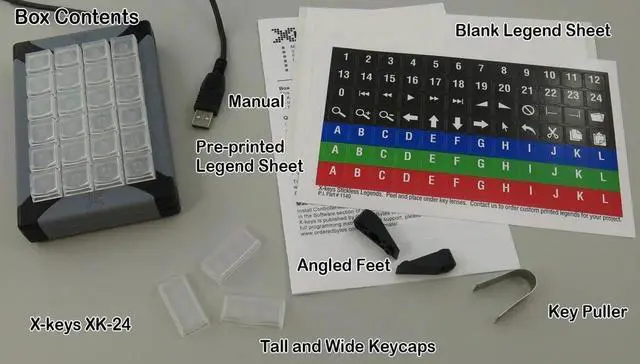
Clear Key Lenses Hold Legends Securely and Protect them from WearSelect from a sheet of pre-printed icons or create your own legends on the ank sheet which is also included.
Clearly labeling your dedicated keys iroves efficiency and shortens training time for new users.
Included Software for Windows Setup Software
Basic Setup is a standalone Windows application for programming keystrokes and key combinations into the onboard memory. can hold approximately 21, 000 total keystrokes in non-volatile memory.
Save programmed scripts to easily setup multiple with identical programming.
Backlighting Control
Set backlighting state and brightness. Each key has one red and one ue LED behind it and each LED can be turned on or off independently. Brightness levels for each color may be set for the entire device.
Instant CustomizationAdd or remove keys, ors, and large keys to create an intuitive layout for your workflow. Grouping keys with related functions iroves efficiency and allows the user to focus on creative elements instead of searching for tools or functions in the interface.
Orient the XK-24 in either direction. Well suited for either desktop or handheld application.
Two tall keys, one wide key, and a key puller are included. Large keys and key ors are availae as accessories.