


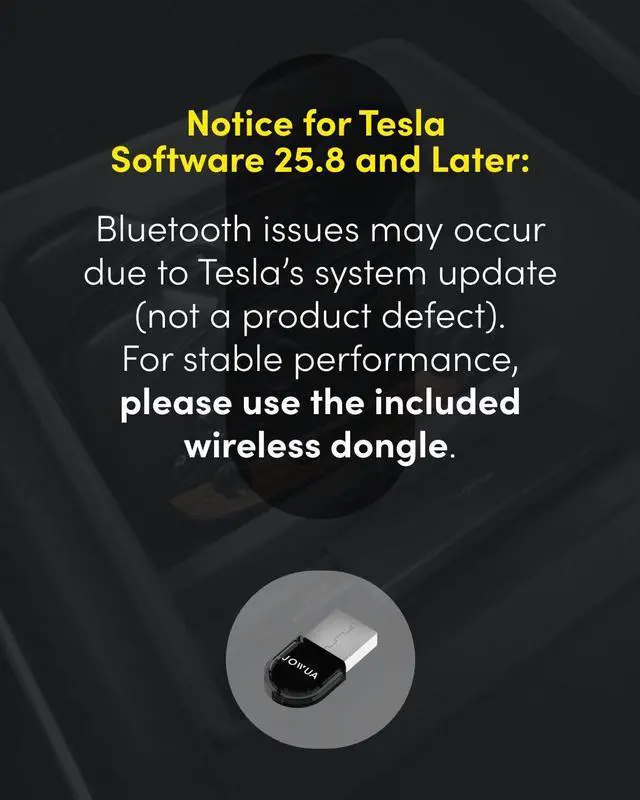


* For vehicles with software version 25.8, connecting via Bluetooth is not recommended. We suggest using the included connector for the best experience.
JOWUA controllers can still be used seamlessly through two alternative connection methods:
- Install the Wireless USB Dongle in the glovebox for a hassle-free connection.
- Detailed instructions are in the controller manual under the “How to Pair” section on the Wireless USB Dongle page.
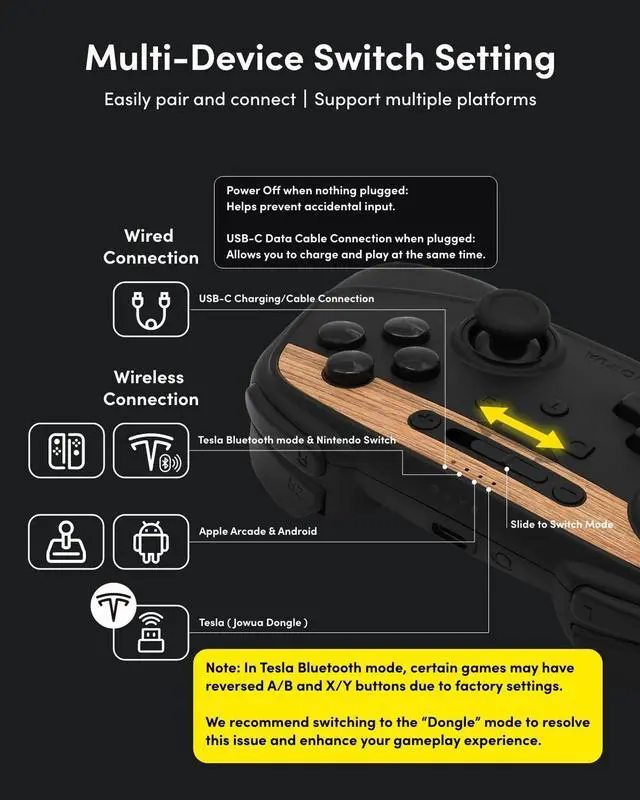
- Set the controller to S Mode to connect via Bluetooth.


* For vehicles with software version 25.8, connecting via Bluetooth is not recommended. We suggest using the included connector for the best experience.
Following Tesla’s 2024 37 software update, an issue with Bluetooth connectivity has arisen, causing abnormalities when connecting controllers via Bluetooth. Tesla has not yet resolved this problem. However, JOWUA controllers can still be used seamlessly through two alternative connection methods:
- Install the Wireless USB Dongle in the glovebox for a hassle-free connection.
- Detailed instructions are in the controller manual under the “How to Pair” section on the Wireless USB Dongle page.
- Set the controller to S Mode to connect via Bluetooth.

Q : How to connect the controller by using Bluetooth
Following Tesla’s 2024 37 software update, an issue with Bluetooth connectivity has arisen, causing abnormalities when connecting controllers via Bluetooth. Tesla has not yet resolved this problem. However, JOWUA controllers can still be used seamlessly through two alternative connection methods:
Using Our Wireless USB Dongle
Switching to S Mode (Switch Mode)

Q : I use the USB-C port in center console but controller can't work.
The center console USB-C ports in the Model 3/Y only support charging and do not transmit data. Please connect your device to the USB-A port in the glovebox..

Q : Why I can't play the super sonic when connect the controller
Please push the + button to start the super sonic.

For more Question.
If you have any question about the controller, please leave message.

Support 4 players play in the model X/S
Our controller supports up to four players simultaneously in the Model S/X.
To connect controllers, please follow these instructions:
- Pair two controllers via Bluetooth.
- Use two wireless dongles, which can be installed on our JOWUA 3-Port USB HUB with DashCam Reader. Alternatively, you can install them on our JOWUA Hub Bar Mini designed for the Tesla Model S/X.
Alternatively, you can use four wireless dongles:
- Install two wireless dongles on the JOWUA 3-Port USB HUB with DashCam Reader.
- Install two additional wireless dongles on the JOWUA Hub Bar Mini for the Tesla Model S/X.
This setup allows you to enjoy multiplayer gaming with up to four joysticks simultaneously.
* For vehicles with software version 25.8, connecting via Bluetooth is not recommended. We suggest using the included connector for the best experience.
JOWUA controllers can still be used seamlessly through two alternative connection methods:
- Install the Wireless USB Dongle in the glovebox for a hassle-free connection.
- Detailed instructions are in the controller manual under the “How to Pair” section on the Wireless USB Dongle page.
- Set the controller to S Mode to connect via Bluetooth.
* For vehicles with software version 25.8, connecting via Bluetooth is not recommended. We suggest using the included connector for the best experience.
Following Tesla’s 2024 37 software update, an issue with Bluetooth connectivity has arisen, causing abnormalities when connecting controllers via Bluetooth. Tesla has not yet resolved this problem. However, JOWUA controllers can still be used seamlessly through two alternative connection methods:
- Install the Wireless USB Dongle in the glovebox for a hassle-free connection.
- Detailed instructions are in the controller manual under the “How to Pair” section on the Wireless USB Dongle page.
- Set the controller to S Mode to connect via Bluetooth.

Q : How to connect the controller by using Bluetooth
Following Tesla’s 2024 37 software update, an issue with Bluetooth connectivity has arisen, causing abnormalities when connecting controllers via Bluetooth. Tesla has not yet resolved this problem. However, JOWUA controllers can still be used seamlessly through two alternative connection methods:
Using Our Wireless USB Dongle
Switching to S Mode (Switch Mode)

Q : I use the USB-C port in center console but controller can't work.
The center console USB-C ports in the Model 3/Y only support charging and do not transmit data. Please connect your device to the USB-A port in the glovebox..

Q : Why I can't play the super sonic when connect the controller
Please push the + button to start the super sonic.

For more Question.
If you have any question about the controller, please leave message.
Support 4 players play in the model X/S
Our controller supports up to four players simultaneously in the Model S/X.
To connect controllers, please follow these instructions:
- Pair two controllers via Bluetooth.
- Use two wireless dongles, which can be installed on our JOWUA 3-Port USB HUB with DashCam Reader. Alternatively, you can install them on our JOWUA Hub Bar Mini designed for the Tesla Model S/X.
Alternatively, you can use four wireless dongles:
- Install two wireless dongles on the JOWUA 3-Port USB HUB with DashCam Reader.
- Install two additional wireless dongles on the JOWUA Hub Bar Mini for the Tesla Model S/X.
This setup allows you to enjoy multiplayer gaming with up to four joysticks simultaneously.