Your Browsing History
- Free 30-day Returns
$85.45
Ships from China.
Meet Your Seller
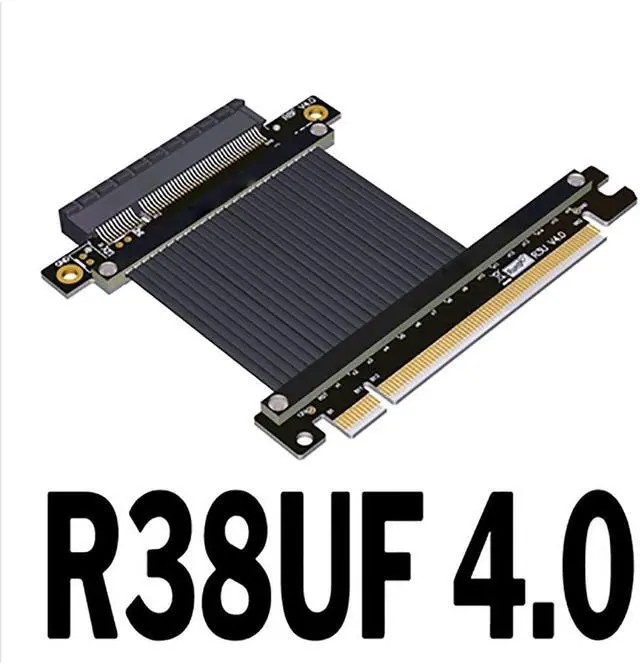
PCI Express 4.0 X16 Male to X8 Female Extension Cable PCIe 4.0 X8 128G/bps Max R38UF 4.0 R38UL 4.0 PCIe 16x High-Speed Adapter(R38UF 4.0)(25cm)
- PCI Express 4.0 X16 Male to X8 Female Extension Cable PCIe 4.0 X8 128G/bps Max R38UF 4.0 R38UL 4.0 PCIe 16x High-Speed Adapter(R38UF 4.0)(25cm)
+
+
Overview
Specs
Reviews
Any questions? Our AI beta will help you find out quickly.
Try me now
Product Type.
R38UF 4.0 x16 to x8 180 degree connector black
R38UL 4.0 x16 to x8 90 degree connector black version
Product Name: PCI-E 4.0 x16 to x8 extension cable
Cable length: 15cm, 25cm, if you need other length, please contact us to change the price.
Speed Bandwidth: PCIe 4.0 x8
Restrictions on use: PCIe 4.0 is demanding on the device, as long as the extension cable is connected the signal will be attenuated. This item does not guarantee PCIE 4.0 full speed, aging equipment, poor signal or bad environment will affect the speed.
Cable length and hole pitch description:
The length of the product refers to the length of the cable and does not include the PCB and connectors.
Technical questions in a nutshell
What is the quality of the wire? Is it shielded?
Yes, there is metal layer shielding with advanced EMI shielding conductive polymers, new materials for EMI shielding and flat cable design. This technology allows each cable to be completely covered by an EMI shield of conductive polymer to prevent incoming or outgoing emissions of electromagnetic frequencies, to miniaturise interference and performance degradation and to reduce the weight of the rows of cables.
Is the wire soft? Is it bendable?
Yes, the cable is a PCIe cable, the black version is 1.3 mm thick, the silver version is 1.4 mm thick and the blue version is 0.85 mm thick, the cable can be bent or folded and does not affect the use.
Why is the performance of the extension cable poorer when connected? Or is it slow or unusable?
There are three common problems with inadequate performance or abnormal functionality after connecting a graphics card extension cable.
1. The extension cable is incorrectly assembled, the graphics extension cable should be installed in the graphics slot closest to the CPU, the other slots have poor performance.
2. graphics card gold fingers or motherboard slot terminal contact is not good or have oxide, resulting in a slow card lag, gold finger contact points should be clean.
3. motherboard aging, aging graphics card, equipment more than 3 years is not recommended to use this extension cable. Equipment aging or signal is poor please reduce the speed of use.

R38UF 4.0 x16 to x8 180 degree connector black
R38UL 4.0 x16 to x8 90 degree connector black version
Product Name: PCI-E 4.0 x16 to x8 extension cable
Cable length: 15cm, 25cm, if you need other length, please contact us to change the price.
Speed Bandwidth: PCIe 4.0 x8
Restrictions on use: PCIe 4.0 is demanding on the device, as long as the extension cable is connected the signal will be attenuated. This item does not guarantee PCIE 4.0 full speed, aging equipment, poor signal or bad environment will affect the speed.
Cable length and hole pitch description:
The length of the product refers to the length of the cable and does not include the PCB and connectors.
Technical questions in a nutshell
What is the quality of the wire? Is it shielded?
Yes, there is metal layer shielding with advanced EMI shielding conductive polymers, new materials for EMI shielding and flat cable design. This technology allows each cable to be completely covered by an EMI shield of conductive polymer to prevent incoming or outgoing emissions of electromagnetic frequencies, to miniaturise interference and performance degradation and to reduce the weight of the rows of cables.
Is the wire soft? Is it bendable?
Yes, the cable is a PCIe cable, the black version is 1.3 mm thick, the silver version is 1.4 mm thick and the blue version is 0.85 mm thick, the cable can be bent or folded and does not affect the use.
Why is the performance of the extension cable poorer when connected? Or is it slow or unusable?
There are three common problems with inadequate performance or abnormal functionality after connecting a graphics card extension cable.
1. The extension cable is incorrectly assembled, the graphics extension cable should be installed in the graphics slot closest to the CPU, the other slots have poor performance.
2. graphics card gold fingers or motherboard slot terminal contact is not good or have oxide, resulting in a slow card lag, gold finger contact points should be clean.
3. motherboard aging, aging graphics card, equipment more than 3 years is not recommended to use this extension cable. Equipment aging or signal is poor please reduce the speed of use.
Warranty & Returns
Warranty, Returns, And Additional Information
Warranty
- Please contact the Seller directly for warranty information. Warranty information may also be found on the Manufacturer's website.
- CONTACT
Return Policies
- Return for refund within: 30 days
- Return for replacement within: 30 days
- This item is covered by Zaixiong Keji Return Policy
Manufacturer Contact Info
- For a directory of all our manufacturers, please click below.
- Manufacturers Directory
LOADING...