




 here!
here!
I’m your shopping assistant for PC builds, upgrades, and everything tech.
Got questions? Ask away!
Start a conversation
here!
I’m your shopping assistant for PC builds, upgrades, and everything tech.
Got questions? Ask away!
Start a conversationShipped by Hebei XG Technology Co., Ltd.



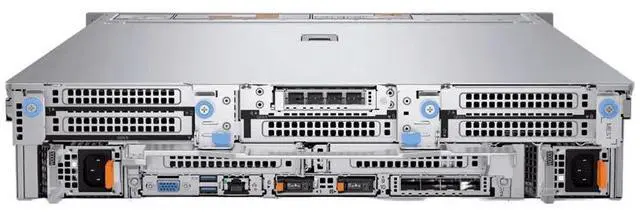
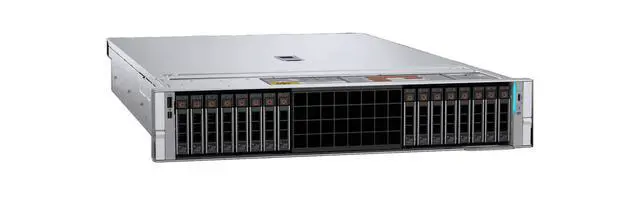
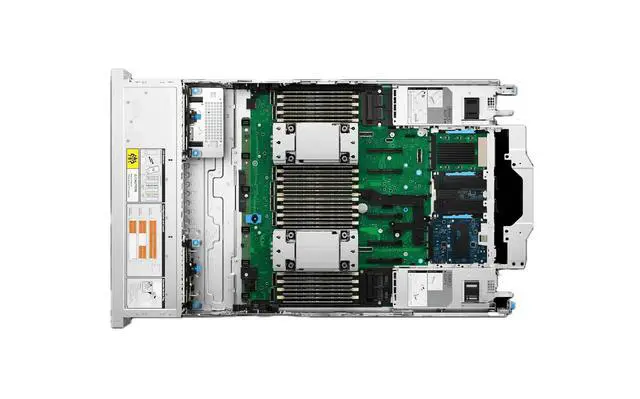
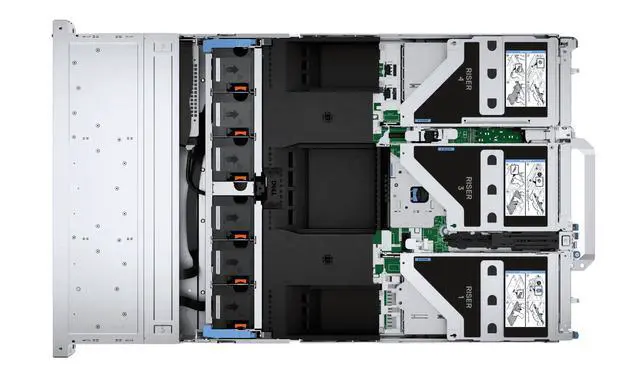



Any questions? Ask CelesteSM will help you find out quickly.
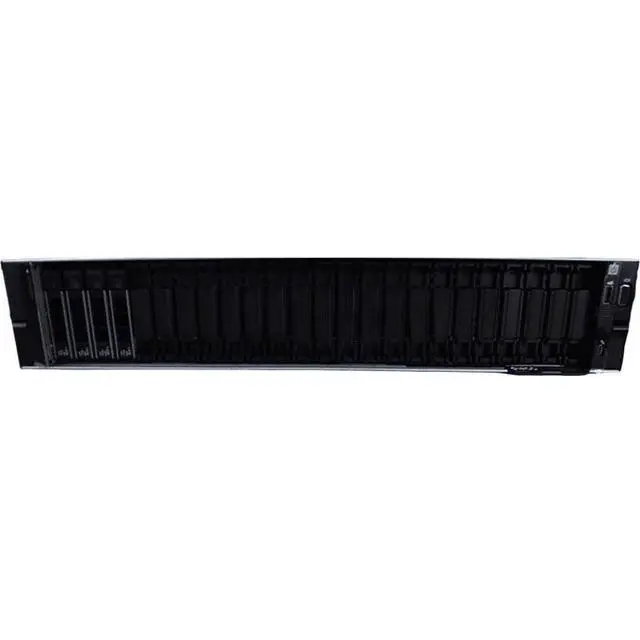
1. Customization Freedom:Lacking pre - installed CPU, memory, disk, RAID card, and power supply, the Dell R770 barebone server allows users to fully customize the server. You can select components based on your specific requirements, whether for a small - scale business's basic data storage or a large - scale enterprise's high - performance computing needs.
2. Storage Flexibility:The 8 x 2.5 - inch drive bays offer great flexibility in storage configuration. You can choose high - speed SSDs for quick data access in applications like real - time analytics, or high - capacity HDDs for long - term data storage, adapting to different data - handling scenarios.
3. High - Performance Potential:Despite being a barebone server, the R770 is designed to support high - end components. Once you install the appropriate CPU, memory, and other parts, it can deliver excellent performance for demanding tasks such as virtualization and AI - related computations.
4. Brand - New and In - Stock:As a brand - new product in stock, you can get it immediately and start building your server system without delay. The newness ensures reliable quality and the latest technology integration.
5. Cost - Effective Solution:Purchasing a barebone server means you only invest in the components you need. This approach reduces the initial cost, especially beneficial for startups or businesses on a tight budget. You can gradually upgrade components as your business expands.
The Dell R770 is a new barebone server chassis for IT teams, system integrators, and businesses that want to build a custom server with their own CPU, memory, storage, RAID, and power configuration for virtualization, AI, or scalable storage deployments.
| Attribute | Value |
|---|---|
| Best For | IT teams and system builders who need a customizable, storage-dense barebone rack server chassis for virtualization and AI workloads once CPU, memory, and storage are installed |
| Model Identifiers | Dell R770 barebone server (rack chassis) |
| Chassis And Drive Bays | Front storage capacity: 16 × 2.5-inch drive bays plus 8 NVMe slots for dense SSD/HDD configurations |
| Configuration And Expandability | Barebone unit — ships without CPU, memory, disk/storage, RAID card, or power supply; intended for user-supplied components and customization |
| Condition And Availability | Brand-new and listed as in stock |
| Performance Potential | Designed to support high-end components; suitable for demanding tasks such as virtualization and AI-related computations after components are installed |
Q: Should I choose the Dell PowerEdge R770 barebone or the previous-generation PowerEdge R760?
A: Choose the PowerEdge R770 barebone if you are building a new 2U platform for current Intel Xeon 6 deployment, higher DDR5 memory speeds, and stronger performance-per-watt in Dell’s own generation-to-generation testing. Dell’s published comparisons show the R770 delivering higher SPECpower efficiency than the R760, and Dell’s database benchmarking also shows measurable gains in concurrency-oriented virtualized workloads. Choose the R760 instead if you want a mature 16th-generation platform, are standardizing around existing R760 infrastructure, or are buying based on used-market familiarity rather than a forward-looking refresh.
Q: Is the Dell PowerEdge R770 barebone a better fit than a 1U server like the PowerEdge R670?
A: Choose the R770 if you want a 2U build with more expansion headroom for storage and accelerators. Dell positions the R770 as the larger sibling to the R670, and official comparison materials show the R770 supports substantially more accelerator capacity, including up to 2 double-width 450 W GPUs or 6 single-width 75 W accelerators, while the R670 is aimed at denser 1U deployments with lower expansion limits. Choose a 1U option like the R670 when rack density matters more than internal flexibility.
Q: Should I buy this barebone R770 or a lower-tier single-socket server for virtualization and mixed business workloads?
A: Choose the R770 barebone if you expect your environment to grow into higher VM density, more memory capacity, or heavier I/O. As a dual-socket 2U platform, the R770 is designed for broader scaling than lower-tier single-socket systems, and Dell positions it for demanding virtualization, analytics, and AI-adjacent workloads. A lower-tier server is the better fit when your priority is a smaller initial build, simpler configuration, and lower platform overhead rather than maximum expansion.
Q: Is the R770 barebone the right choice over a higher-tier GPU-focused server?
A: Choose the R770 barebone when you need a balanced 2U platform that can support some accelerator deployments but still prioritizes mainstream enterprise compute and storage flexibility. Dell documentation shows the R770 can support GPUs, including up to 2 double-width 450 W cards in supported configurations, which is useful for inference, VDI, or mixed workloads. Move to a higher-tier GPU-oriented platform when your design centers on larger multi-GPU footprints, maximum accelerator density, or specialized AI infrastructure rather than balanced general-purpose deployment.
Q: Who is this barebone server suitable for?
A: This model is best for IT teams, system integrators, and experienced buyers who already plan to choose their own CPU, memory, storage, RAID, and power configuration. It is a good fit when customization matters more than out-of-box readiness. It is not ideal for buyers who want a ready-to-run server with all core components preinstalled.
Q: Do I need to buy other parts before this server can be used?
A: Yes. This is a chassis-level barebone configuration, so it cannot be deployed as-is. Based on the product data, you still need at minimum compatible CPU, memory, storage, power supply, and likely a RAID or storage controller depending on your planned setup. Buyers should confirm component compatibility before ordering because the value of a barebone system depends on completing the build correctly.
Q: Is this a good choice if I want flexible storage now and upgrades later?
A: Yes, if storage flexibility is a priority. The listed 16 x 2.5-inch bays plus 8 NVMe slots make it suitable for buyers who expect mixed storage needs, phased expansion, or tiered performance. The main trade-off is that you must plan the full storage stack yourself, including drive type, controller path, and power budgeting, since the system does not include drives or key internal components.
Q: Is this a cost-effective way to build a server?
A: It can be cost-effective for buyers who only want to pay for the exact components they need and may already own compatible parts or have a standard build plan. It is less cost-effective for buyers who need a complete, validated configuration immediately, because the final cost can rise once CPU, RAM, storage, controller, and power components are added.
Q: Is this a good fit for virtualization, AI, or other demanding workloads?
A: Potentially yes, but only after it is fully configured with the right compute, memory, and storage parts. The chassis is positioned for high-performance builds, and the large drive capacity supports data-heavy workloads. The decision depends less on the barebone itself and more on the quality of the CPU, RAM, NVMe, controller, and power configuration you add.
Q: Who is a Dell R770 barebone server best suited for?
A: It is best suited for IT teams, labs, and businesses that already know their CPU, memory, storage, and power requirements and want to configure the system themselves. A barebone R770 makes more sense for custom virtualization, storage, or mixed-performance builds than for buyers who want a ready-to-run server.
Q: Is a barebone R770 worth buying instead of a fully configured server?
A: It can be worth buying if you already have a parts plan or want to avoid paying for bundled components you will replace. The trade-off is that total cost, compatibility checking, and deployment effort all shift to you, so it is usually a better fit for experienced buyers than for first-time server purchasers.
Q: What are the main trade-offs of buying this R770 barebone model?
A: The main advantage is configuration freedom. The main trade-offs are that it ships without CPU, memory, disks, RAID, or power supplies, so it is not usable as-is and the final build depends on correct part selection. It is a stronger option for buyers prioritizing flexibility and phased upgrades than for buyers who need simple deployment.
Q: Is this a good choice for storage-heavy or virtualization-focused builds?
A: Yes, if your plan needs a dense 2U chassis with many front bays and some NVMe capability. Based on the listed configuration, it is better suited to storage-heavy and virtualization-oriented builds than to simple office or light-duty server roles. Buyers should still confirm controller, backplane, and software-stack compatibility before purchase.
Q: Is this a good fit for first-time server buyers?
A: Usually no. A barebone R770 is better for buyers who understand enterprise server parts, firmware, storage topology, and support trade-offs. First-time buyers will usually have an easier path with a complete, tested configuration rather than sourcing every major component separately.


