

Your Browsing History

Meet Your Seller

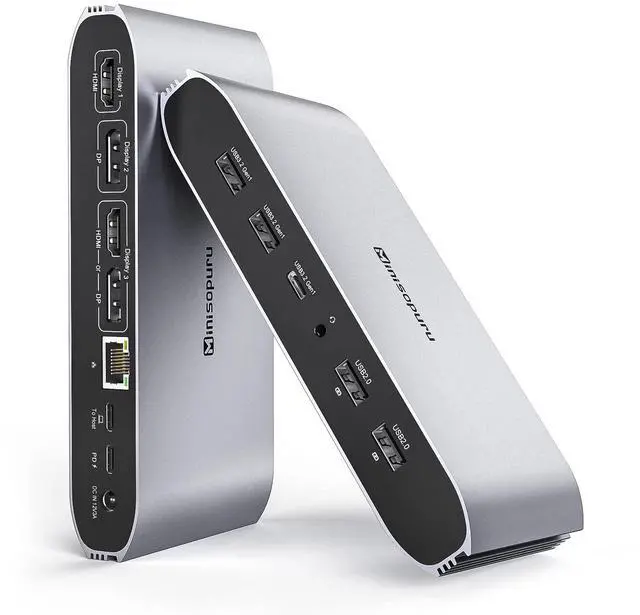


DS808 DisplayLink Docking Station 3 Monitors with 2 HDMI 2 DP | 100W PD, USB-C Data, Gigabit Ethernet, Audio, 4 USB-A, DisplayLink Dock for Macbook M1/M2/M3/M4/M5 and Windows Laptops
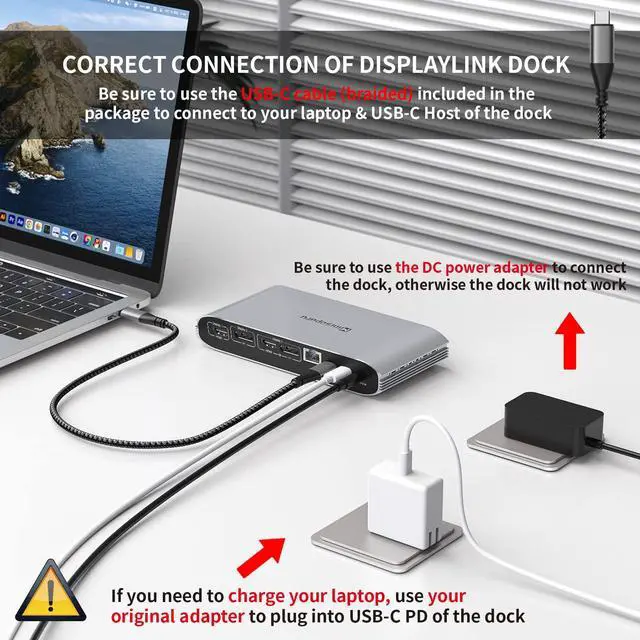
- Overcome the limitation of MacBook M1/M2/M3/M4 by installing the DisplayLink driver, enabling your MacBook to extend three distinct displays without being restricted by the M1/M2/M3/M4 chip. This DisplayLink docking station works with Windows, Chrome OS, Ubuntu, and Android. Note: Linux/Unix is not compatible. Note: You need to install the DisplayLink driver on your device to ensure correct media display functionality. This displaylink dock, which includes a 36W power adapter, expands to 12 ports for daily tasks: 2*4K HDMI, 2*4K DisplayPort, 2*5Gbps USB-A 3.2 Gen1 ports (data only), a 5Gbps USB-C 3.2 Gen1 port (data only), a 100W USB-C PD port (Max), 2*USB-A 2.0 ports (data & charge), Gigabit Ethernet, and a 3.5 mm audio/mic jack. Note: The docking station must be connected to the 36W DC power adapter, otherwise it will not function. The two USB-A 2.0 ports on the laptop docking station can connect a keyboard and mouse, and also supply 7.5W power to charge your phone or other devices. The dock also features two 5Gbps USB-A 3.2 Gen1 ports and a 5Gbps USB-C 3.2 Gen1 port (USB-A/C 3.2 Gen1 only support data transfer), moving 1GB of files in seconds. Additionally, you can use the USB-C PD port (Max 100W) of the laptop dock to charge your laptop. For a laptop with a USB-C port, this 3-monitor docking station is a comprehensive solution. When the host port connects to a laptop's Thunderbolt 5/4/3, USB4, or a USB-C full-featured port, it can support three different displays: HDMI
+
+
Overview
Specs
Reviews

Any questions? Our AI mode will help you find out quickly.
Try me now
Overcome the limitation of MacBook M1/M2/M3/M4 by installing the DisplayLink driver, enabling your MacBook to extend three distinct displays without being restricted by the M1/M2/M3/M4 chip. This DisplayLink docking station works with Windows, Chrome OS, Ubuntu, and Android.
Note: Linux/Unix is not compatible.
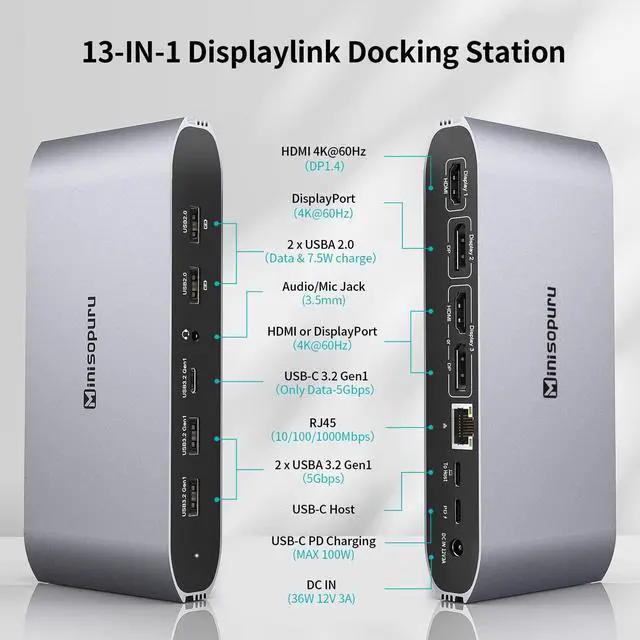
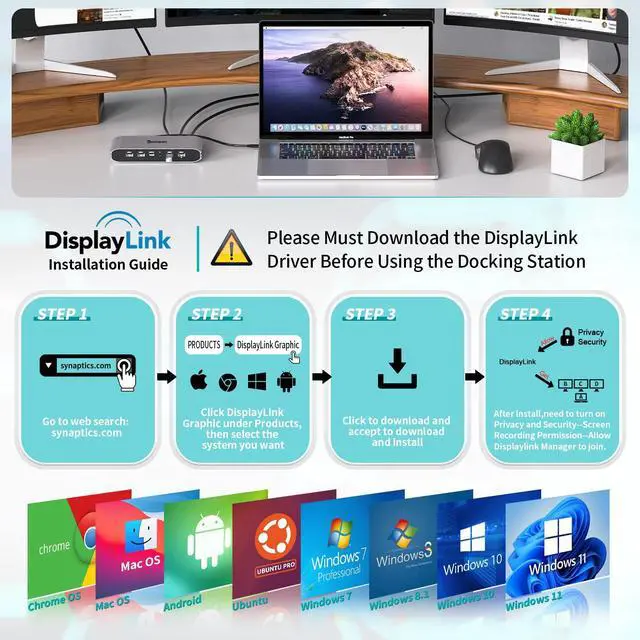
Note: You need to install the DisplayLink driver on your device to ensure correct media display functionality. This displaylink dock, which includes a 36W power adapter, expands to 12 ports for daily tasks: 2*4K HDMI, 2*4K DisplayPort, 2*5Gbps USB-A 3.2 Gen1 ports (data only), a 5Gbps USB-C 3.2 Gen1 port (data only), a 100W USB-C PD port (Max), 2*USB-A 2.0 ports (data & charge), Gigabit Ethernet, and a 3.5 mm audio/mic jack.
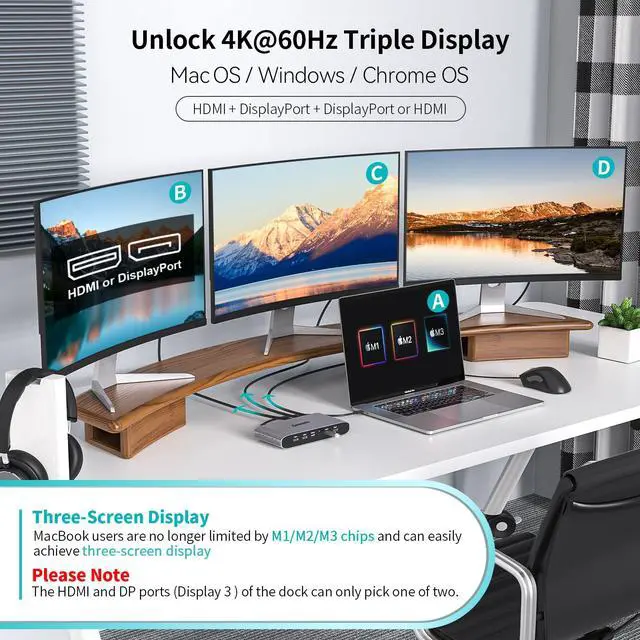
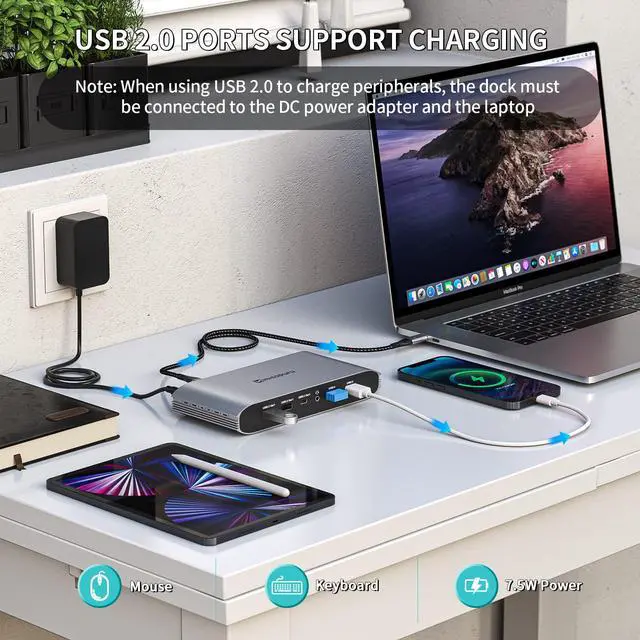
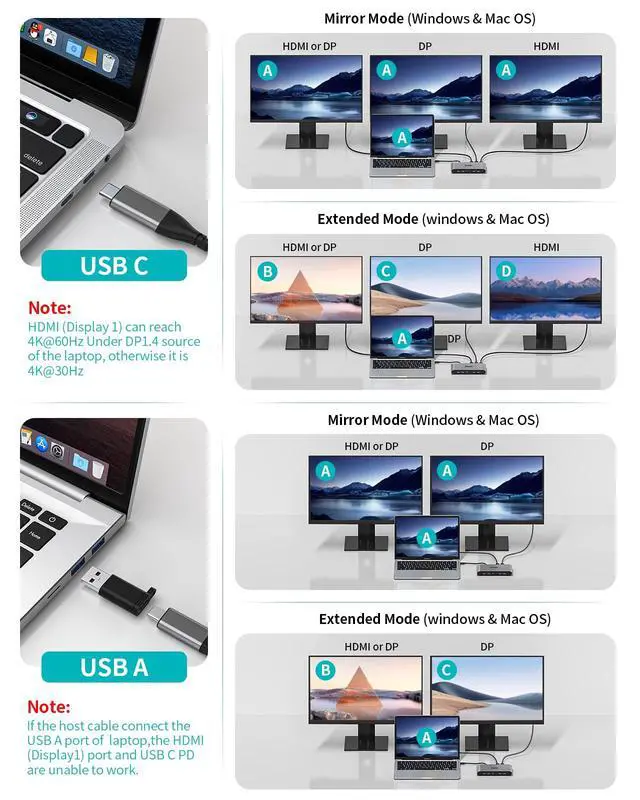
Note: The docking station must be connected to the 36W DC power adapter, otherwise it will not function. The two USB-A 2.0 ports on the laptop docking station can connect a keyboard and mouse, and also supply 7.5W power to charge your phone or other devices. The dock also features two 5Gbps USB-A 3.2 Gen1 ports and a 5Gbps USB-C 3.2 Gen1 port (USB-A/C 3.2 Gen1 only support data transfer), moving 1GB of files in seconds. Additionally, you can use the USB-C PD port (Max 100W) of the laptop dock to charge your laptop. For a laptop with a USB-C port, this 3-monitor docking station is a comprehensive solution. When the host port connects to a laptop's Thunderbolt 5/4/3, USB4, or a USB-C full-featured port, it can support three different displays: HDMI (Display 1) + DP (Display 2) + DP or HDMI (Display 3) will achieve 4K@60Hz (under DP 1.4 ).
Note: The HDMI and DP ports in the display 3 area can only be used one at a time. For a laptop with a USB-A port, this docking station supports dual monitors. When the USB-C host port is connected to the USB-A port of a laptop, it can enable dual different displays: DP (Display 2), and DP or HDMI (Display 3) will reach 4K@60Hz.
Please note: When the USB-C host port is connected to the USB-A port of the laptop, HDMI (Display 1) and the USB-C PD port are unable to work. This dock is compatible with MacBook M1, MacBook M2, MacBook M3, MacBook M4, Windows, Chrome OS, Ubuntu, Android, MacBook Pro, laptop's Thunderbolt 5/4/3, USB4, USB-C full-featured port, and USB A laptops
Note: Linux/Unix is not compatible.
Note: You need to install the DisplayLink driver on your device to ensure correct media display functionality. This displaylink dock, which includes a 36W power adapter, expands to 12 ports for daily tasks: 2*4K HDMI, 2*4K DisplayPort, 2*5Gbps USB-A 3.2 Gen1 ports (data only), a 5Gbps USB-C 3.2 Gen1 port (data only), a 100W USB-C PD port (Max), 2*USB-A 2.0 ports (data & charge), Gigabit Ethernet, and a 3.5 mm audio/mic jack.
Note: The docking station must be connected to the 36W DC power adapter, otherwise it will not function. The two USB-A 2.0 ports on the laptop docking station can connect a keyboard and mouse, and also supply 7.5W power to charge your phone or other devices. The dock also features two 5Gbps USB-A 3.2 Gen1 ports and a 5Gbps USB-C 3.2 Gen1 port (USB-A/C 3.2 Gen1 only support data transfer), moving 1GB of files in seconds. Additionally, you can use the USB-C PD port (Max 100W) of the laptop dock to charge your laptop. For a laptop with a USB-C port, this 3-monitor docking station is a comprehensive solution. When the host port connects to a laptop's Thunderbolt 5/4/3, USB4, or a USB-C full-featured port, it can support three different displays: HDMI (Display 1) + DP (Display 2) + DP or HDMI (Display 3) will achieve 4K@60Hz (under DP 1.4 ).
Note: The HDMI and DP ports in the display 3 area can only be used one at a time. For a laptop with a USB-A port, this docking station supports dual monitors. When the USB-C host port is connected to the USB-A port of a laptop, it can enable dual different displays: DP (Display 2), and DP or HDMI (Display 3) will reach 4K@60Hz.
Please note: When the USB-C host port is connected to the USB-A port of the laptop, HDMI (Display 1) and the USB-C PD port are unable to work. This dock is compatible with MacBook M1, MacBook M2, MacBook M3, MacBook M4, Windows, Chrome OS, Ubuntu, Android, MacBook Pro, laptop's Thunderbolt 5/4/3, USB4, USB-C full-featured port, and USB A laptops
Warranty & Returns
Warranty, Returns, And Additional Information
Warranty
- Please contact the Seller directly for warranty information. Warranty information may also be found on the Manufacturer's website.
- CONTACT
Return Policies
- Return for refund within: 30 days
- Return for replacement within: 30 days
- This item is covered by Audivibe Return Policy
Manufacturer Contact Info
- For a directory of all our manufacturers, please click below.
- Manufacturers Directory
LOADING...