

Your Browsing History

Meet Your Seller

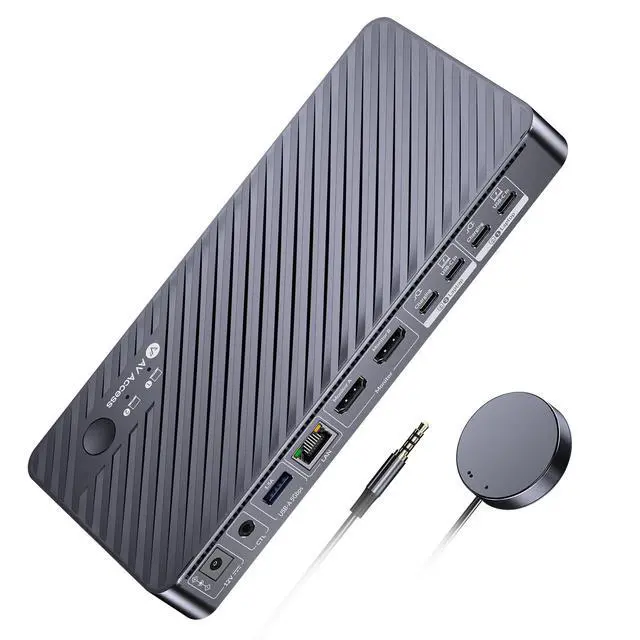


AV Access Docking Station KVM Switch 2 Monitors 2 Laptops, 4K Dual Display | 100W PD for Each PC, 1G Ethernet, EDID Emulation, 4K KVM Dock for Home Office
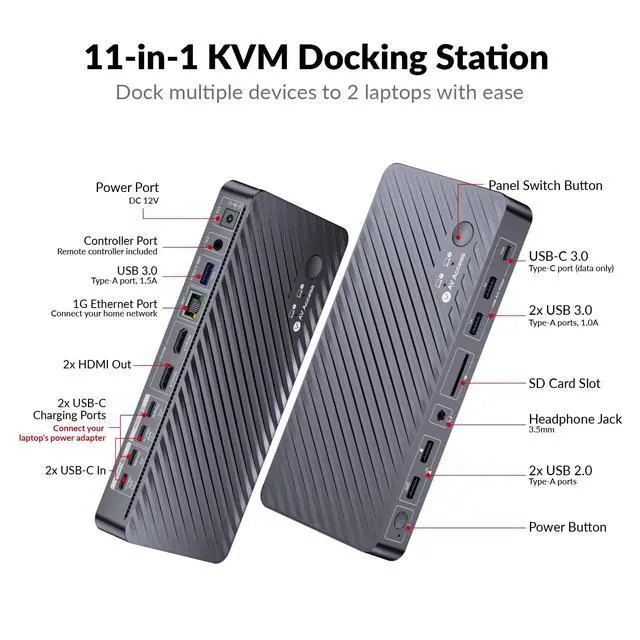
- KVM Docking Station for 2 Laptops and 2 Monitors: This dual-monitor KVM switch (2× HDMI outputs) enables you to conveniently connect 2 monitors to two USB-C laptops, allowing smooth switching between work and personal laptops to boost productivity. Note: Mac OS only supports mirror mode. Powerful 11-in-1 Docking Station: With this KVM switch docking station, you can expand your workspace with a variety of shared ports between 2 laptops, containing 3x USB 3.0, 2x USB 2.0, 1x USB-C, 1x 1G Ethernet, 1x 3.5mm headset, 1x SD card slot, and 2x HDMI outputs. Set up a powerful workstation at home effortlessly. 1G Ethernet for 2 Laptops: The KVM switch for 2 laptops includes a single Gigabit LAN port that reliably delivers stable, high-speed internet to 2 laptops. It ensures that 2 laptops can access the Internet simultaneously, regardless of which laptop you switch to. USB-C MST & 100W Charging: Each USB-C (MST) input port is equipped with an adjacent USB-C charging port for dual 4K video output, 5 Gbps data transfer, and concurrent 100W laptop charging (original laptop power adapter required). Note: Some USB-C laptops, particularly those with integrated graphics, may not support dual 4K video output. Confirm your laptop's video output capabilities. Effortless and Fast Switching: This KVM switch for 2 laptops and 2 monitors incorporates EDID emulation and automatic PC wake-up functions, enabling you to switch between your laptops in just 2-3 seconds. Use the front panel button or t
+
+
Overview
Specs
Reviews

Any questions? Our AI mode will help you find out quickly.
Try me now
KVM Docking Station for 2 Laptops and 2
Monitors: This dual-monitor KVM switch (2× HDMI outputs) enables you to conveniently connect 2 monitors to two USB-C laptops, allowing smooth switching between work and personal laptops to boost productivity.
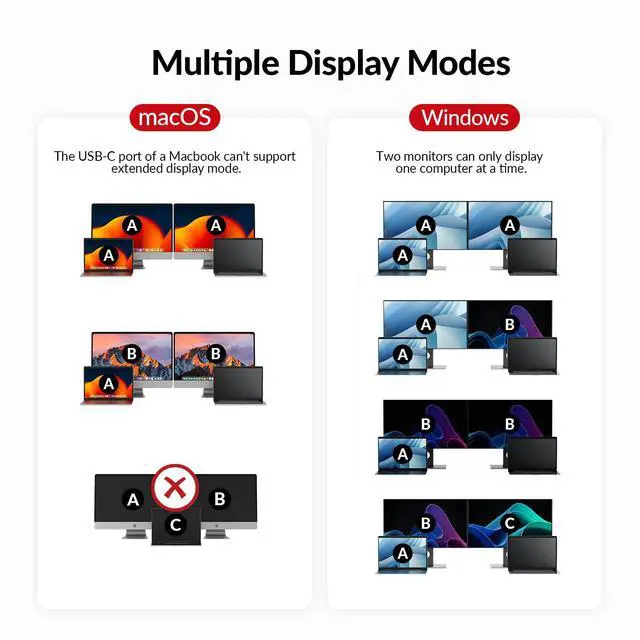
Note: Mac OS only supports mirror mode.
Powerful 11-in-1 Docking Station: With this KVM switch docking station, you can expand your workspace with a variety of shared ports between 2 laptops, containing 3x USB 3.0, 2x USB 2.0, 1x USB-C, 1x 1G Ethernet, 1x 3.5 mm headset, 1x SD card slot, and 2x HDMI outputs. Set up a powerful workstation at home effortlessly. 1G Ethernet for 2
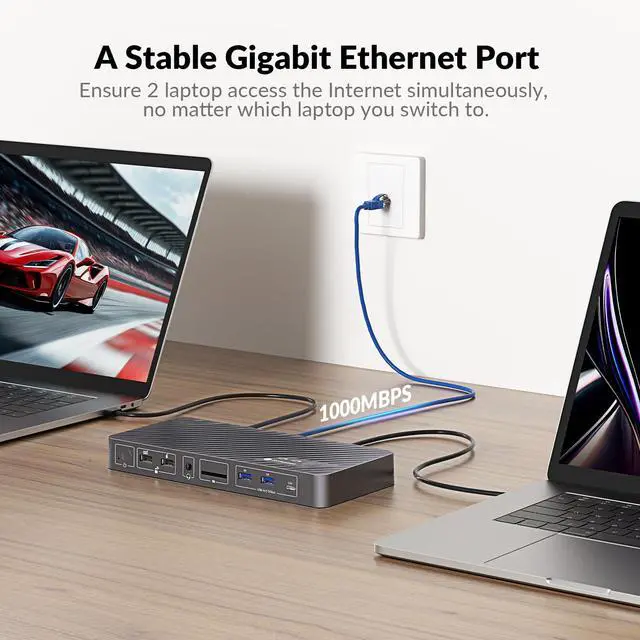
Laptops: The KVM switch for 2 laptops includes a single Gigabit LAN port that reliably delivers stable, high-speed internet to 2 laptops. It ensures that 2 laptops can access the Internet simultaneously, regardless of which laptop you switch to. USB-C MST & 100W
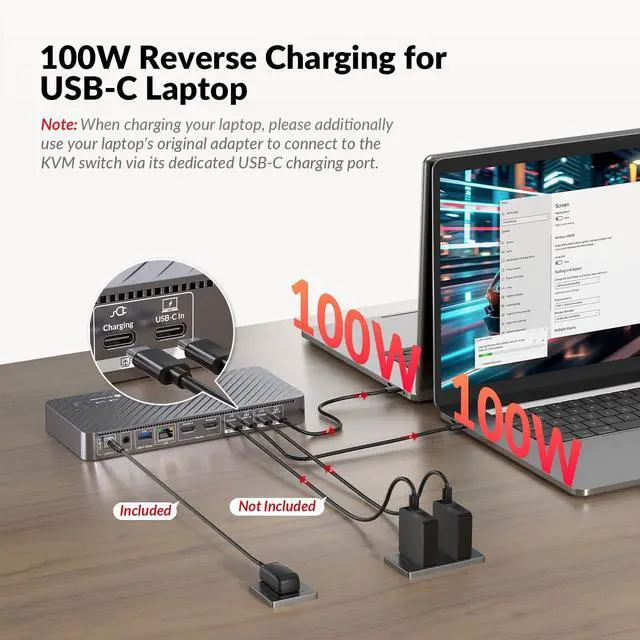
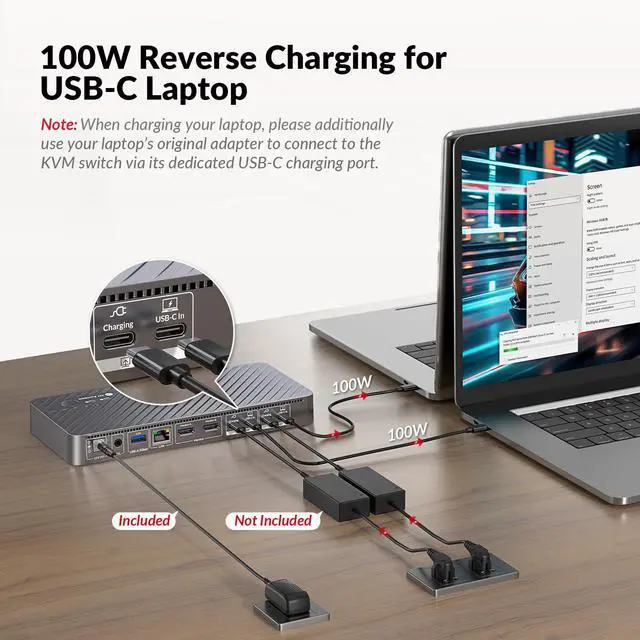
Charging: Each USB-C (MST) input port is equipped with an adjacent USB-C charging port for dual 4K video output, 5 Gbps data transfer, and concurrent 100W laptop charging (original laptop power adapter required).
Note: Some USB-C laptops, particularly those with integrated graphics, may not support dual 4K video output. Confirm your laptop's video output capabilities.
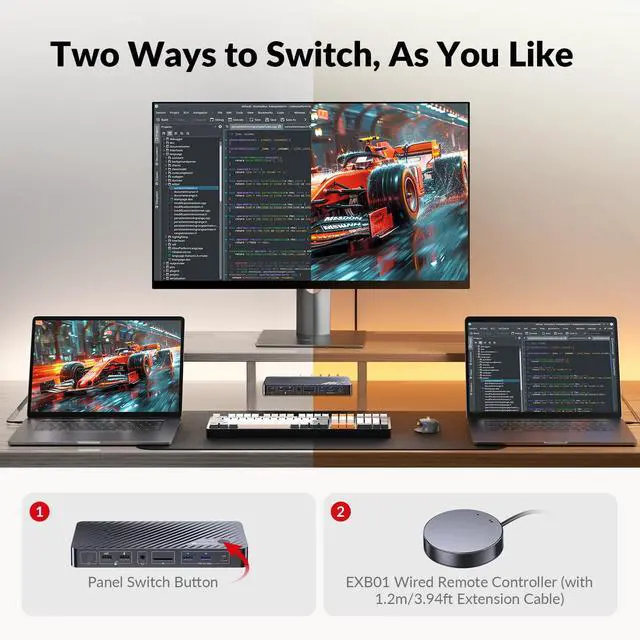
Effortless and Fast Switching: This KVM switch for 2 laptops and 2 monitors incorporates EDID emulation and automatic PC wake-up functions, enabling you to switch between your laptops in just 2-3 seconds. Use the front panel button or the provided wired remote controller to switch conveniently. 4K
UHD & Smooth Gaming: Experience crystal-clear visuals with support for up to 4K@60Hz. The 4K KVM switch dual monitor also supports 2560x1440@144Hz and 1080P@240Hz/165Hz, providing a fluid, lag-free experience in high-speed racing games.
Important Notes: MacOS does not support USB-C MST (multi-stream transport), so two duplicate contents will be displayed. Please connect your laptop's original adapter to the USB-C port labeled with Charging for reverse charging
Monitors: This dual-monitor KVM switch (2× HDMI outputs) enables you to conveniently connect 2 monitors to two USB-C laptops, allowing smooth switching between work and personal laptops to boost productivity.
Note: Mac OS only supports mirror mode.
Powerful 11-in-1 Docking Station: With this KVM switch docking station, you can expand your workspace with a variety of shared ports between 2 laptops, containing 3x USB 3.0, 2x USB 2.0, 1x USB-C, 1x 1G Ethernet, 1x 3.5 mm headset, 1x SD card slot, and 2x HDMI outputs. Set up a powerful workstation at home effortlessly. 1G Ethernet for 2
Laptops: The KVM switch for 2 laptops includes a single Gigabit LAN port that reliably delivers stable, high-speed internet to 2 laptops. It ensures that 2 laptops can access the Internet simultaneously, regardless of which laptop you switch to. USB-C MST & 100W
Charging: Each USB-C (MST) input port is equipped with an adjacent USB-C charging port for dual 4K video output, 5 Gbps data transfer, and concurrent 100W laptop charging (original laptop power adapter required).
Note: Some USB-C laptops, particularly those with integrated graphics, may not support dual 4K video output. Confirm your laptop's video output capabilities.
Effortless and Fast Switching: This KVM switch for 2 laptops and 2 monitors incorporates EDID emulation and automatic PC wake-up functions, enabling you to switch between your laptops in just 2-3 seconds. Use the front panel button or the provided wired remote controller to switch conveniently. 4K
UHD & Smooth Gaming: Experience crystal-clear visuals with support for up to 4K@60Hz. The 4K KVM switch dual monitor also supports 2560x1440@144Hz and 1080P@240Hz/165Hz, providing a fluid, lag-free experience in high-speed racing games.
Important Notes: MacOS does not support USB-C MST (multi-stream transport), so two duplicate contents will be displayed. Please connect your laptop's original adapter to the USB-C port labeled with Charging for reverse charging
Warranty & Returns
Warranty, Returns, And Additional Information
Warranty
- Please contact the Seller directly for warranty information. Warranty information may also be found on the Manufacturer's website.
- CONTACT
Return Policies
- Return for refund within: 30 days
- Return for replacement within: 30 days
- This item is covered by Audivibe Return Policy
Manufacturer Contact Info
- For a directory of all our manufacturers, please click below.
- Manufacturers Directory
LOADING...