• $199.99
  • Free 30-day Returns
  • Price alert
    Shop it at NeweggBusiness.

    Meet Your Seller

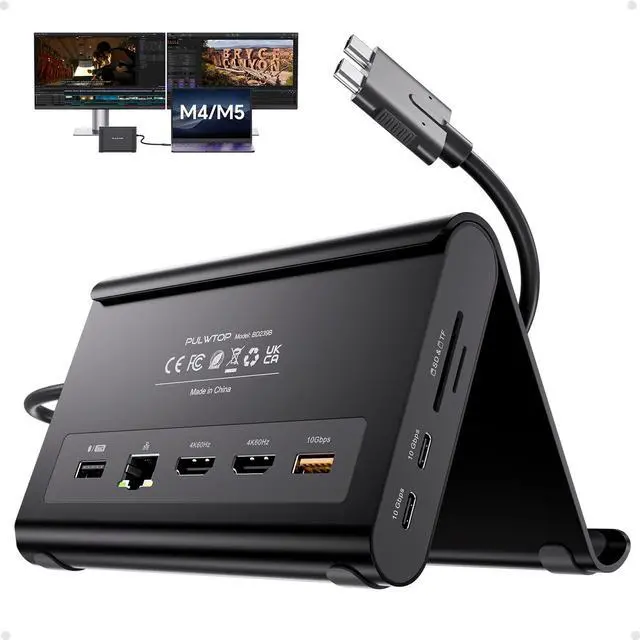
    MacBook Docking Station Dual Monitor 4K@60Hz for MacBook Pro/Air M4/M5/M6 Macbook Pro Stand USB C Dock with 2 HDMI, Gigabit Ethernet, 3 USB 10Gbps, SD/TF, Audio, PD for Home & office, Black

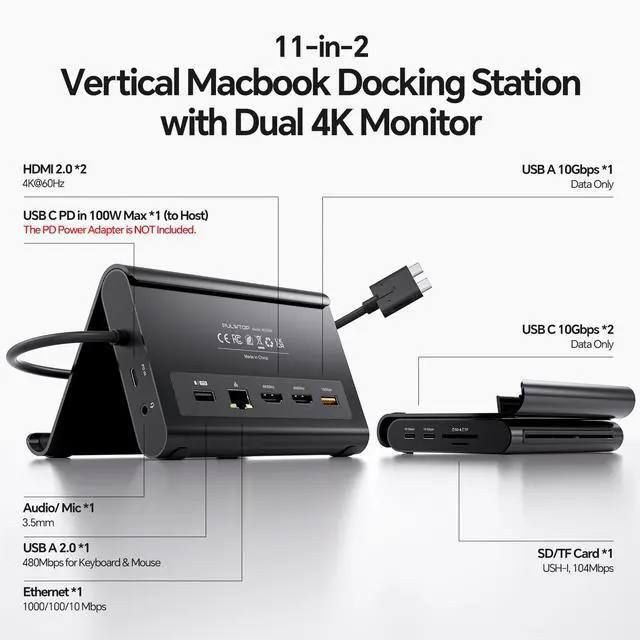
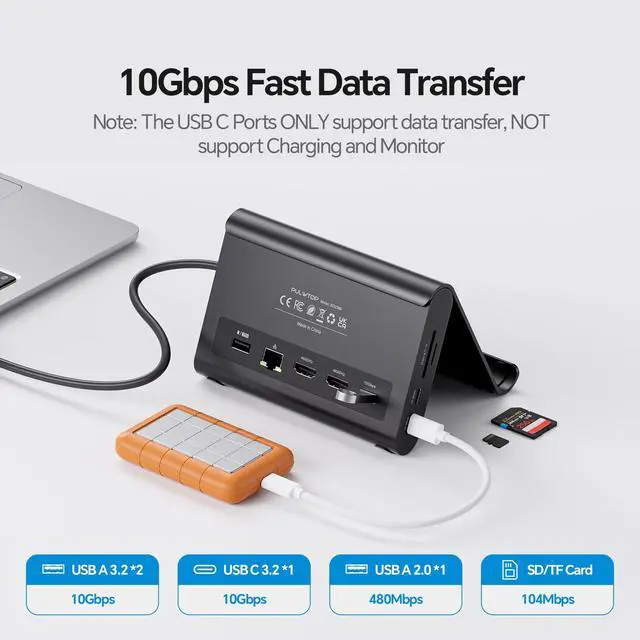
    • 2-in-1 Stand & Dock ComboThis docking station functions as both a sturdy stand and a multi-port hub. Raise your laptop, tablet, or phone for improved ergonomics and airflow while accessing 2× HDMI 4K@60Hz, 2× USB-C 10Gbps, 1× USB-A 10Gbps, 1× USB-A 2.0, SD/TF, 3.5mm audio, and Gigabit Ethernet ports. Supports 100W PD pass-through; power adapter not included. 4K Dual MonitorEnjoy crisp 4K@60Hz output and dual-monitor support for up to 2× 4K@60Hz displays. Suitable for watching movies, attending meetings, and multitasking. CompatibilityDesigned for MacBook Pro/Air models from 2016-2026 with Intel, M1M5 Pro/Max, and M4/M5 base chips. Dual-display output is not supported with M1/M2/M3 MacBook base-chip models. Not for MacBook Neo A18 Pro, Windows, or Chrome. High-Speed Data Transfer, 100W PD & Gigabit EthernetIncludes 2× 10Gbps USB-C ports, 1× 10Gbps USB-A port, and 1× USB-A 2.0 port for a mouse or keyboard. Supports charging via 100W Power Delivery; an adapter is required. Provides wired Gigabit Ethernet. Clamshell Mode SetupGo to Applications Utilities on your MacBook and open Terminal. Enter `sudo pmset -a disablesleep 1` and press Enter, then enter the administrator password and press Enter again. You can use dual displays with your MacBook lid closed. If the external display does not show output after running the command, restart your MacBook. To restore the default sleep behavior, run `sudo pmset -a disablesleep 0`
    +
    +
    Overview
    Specs
    Reviews

    Any questions? Ask CelesteSM will help you find out quickly.

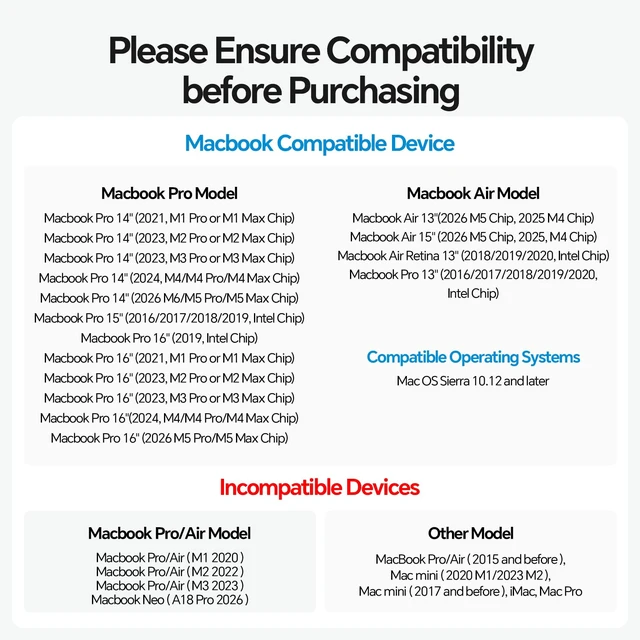
    2-in-1 Stand & Dock ComboThis docking station functions as both a sturdy stand and a multi-port hub. Raise your laptop, tablet, or phone for improved ergonomics and airflow while accessing 2× HDMI 4K@60Hz, 2× USB-C 10Gbps, 1× USB-A 10Gbps, 1× USB-A 2.0, SD/TF, 3.5 mm audio, and Gigabit Ethernet ports. Supports 100W PD pass-through; power adapter not included. 4K Dual MonitorEnjoy crisp 4K@60Hz output and dual-monitor support for up to 2× 4K@60Hz displays. Suitable for watching movies, attending meetings, and multitasking. CompatibilityDesigned for MacBook Pro/Air models from 2016-2026 with Intel, M1M5 Pro/Max, and M4/M5 base chips.

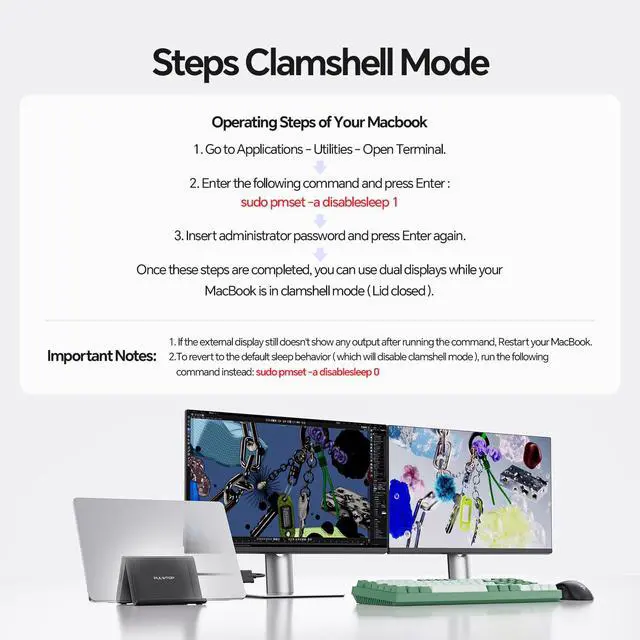
    Dual-display output is not supported with M1/M2/M3 MacBook base-chip models. Not for MacBook Neo A18 Pro, Windows, or Chrome. High-Speed Data Transfer, 100W PD & Gigabit EthernetIncludes 2× 10Gbps USB-C ports, 1× 10Gbps USB-A port, and 1× USB-A 2.0 port for a mouse or keyboard. Supports charging via 100W Power Delivery; an adapter is required. Provides wired Gigabit Ethernet. Clamshell Mode SetupGo to Applications Utilities on your MacBook and open Terminal. Enter `sudo pmset -a disablesleep 1` and press Enter, then enter the administrator password and press Enter again.

    You can use dual displays with your MacBook lid closed. If the external display does not show output after running the command, restart your MacBook. To restore the default sleep behavior, run `sudo pmset -a disablesleep 0`

    Warranty & Returns

    Warranty, Returns, And Additional Information

    Warranty

    • Please contact the Seller directly for warranty information. Warranty information may also be found on the Manufacturer's website.
    • CONTACT

    Return Policies

    Manufacturer Contact Info

    LOADING...