

Your Browsing History
- Free 30-day Returns
$35.90
Ships from China.

Meet Your Seller


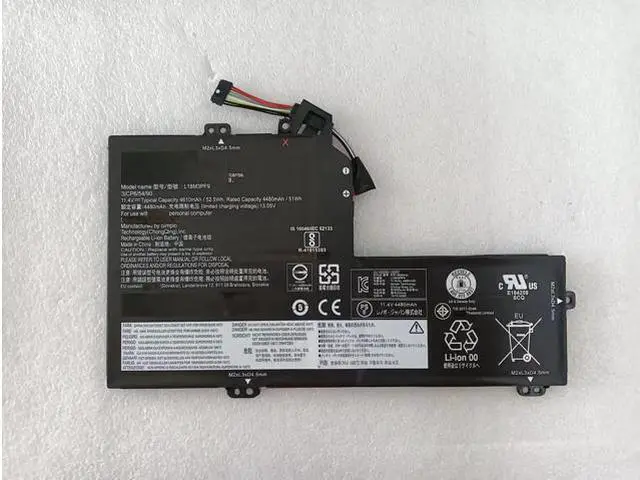
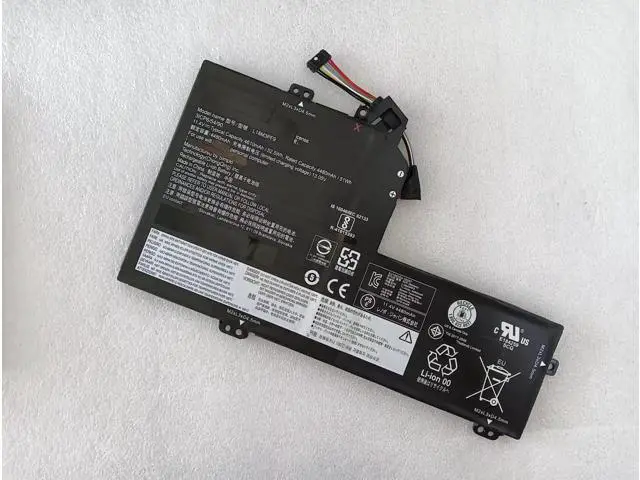
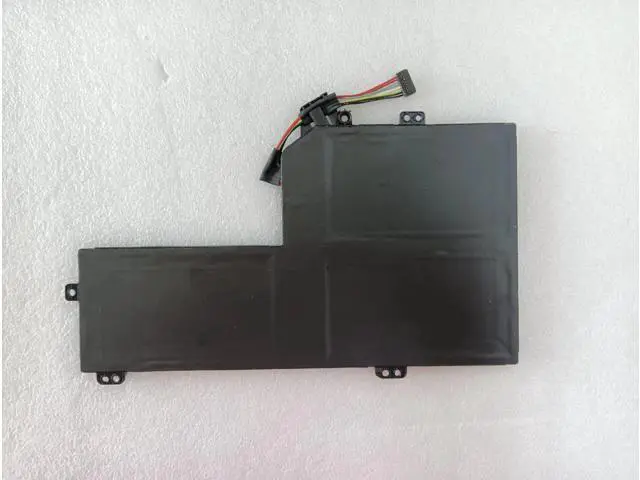


L18L3PF6 L18M3PF9 Battery for Lenovo IdeaPad S540-15IWL GTX Series Laptop - 52.5Wh 11.34V 3-Cell
Limited time offer, ends 08/31 By VoltSync
- CRITICAL COMPATIBILITY NOTICE PLEASE READ FIRST!; This battery is designed ONLY for the Lenovo IdeaPad S540-15IWL GTX Series laptops (models with dedicated NVIDIA GTX graphics).; This battery is NOT compatible with the standard Lenovo IdeaPad S540-15IWL Series (models with integrated graphics). Installing the wrong battery can cause damage.; Always verify the exact part number on your original battery before ordering.
+
+
Overview
Specs
Reviews

Any questions? Our AI mode will help you find out quickly.
Try me now
Restore Full Power to Your Gaming & Performance Laptop Is your Lenovo IdeaPad S540-15IWL GTX laptop constantly plugged in, or does it die quickly during demanding tasks? Our high-performance replacement battery is engineered specifically for your GTX model. With a 52.5W h (4630mAh) capacity and stable 11.34V output, it delivers the robust, reliable power needed for gaming, content creation, and intensive applications, bringing back true portability. VERIFY YOUR COMPATIBILITY HERE This is a direct, compatible replacement for the following Lenovo battery part numbers. Your old battery MUST show one of these codes: L18L3PF6 L18M3PF9 5B10W67284 5B10T26389 5B10W67250 5B10T26390
Compatible Laptop Model: Lenovo IdeaPad S540-15IWL GTX Series (with dedicated NVIDIA GeForce GTX graphics card) Example
Model Numbers: Look for identifiers like 81NG or similar on the bottom label of your laptop.
INCOMPATIBLE Models: Standard Lenovo IdeaPad S540-15IWL Series (with Intel UHD or Iris Plus integrated graphics only). Product
Features Battery Model: Compatible with L18L3PF6 / L18M3PF9
Battery Type: Lithium-Ion (Li-ion), 3-Cell
Configuration Voltage: 11.34V
Capacity: 52.5 Watt-hours (Wh) / 4630mAh
Condition: 100% Brand New, High-Quality
Cells Key Benefit: Restores original runtime and solves issues like rapid draining, failure to charge, or unexpected shutdowns. Installation Guide & Important Notes Backup &
Power Down: Back up your data, shut down Windows completely, and unplug the AC adapter.
Access the Battery: Remove the bottom panel of your laptop (usually requires a Phillips screwdriver). Refer to an official Lenovo hardware maintenance manual or a trusted online teardown guide for your exact model (e. g., "Lenovo S540-15IWL 81NG disassembly").
Swap the Battery: Locate the old battery, disconnect its cable from the motherboard, remove mounting screws, and take it out. Install the new battery by securing it and firmly reconnecting the cable.
Reassemble & Calibrate: Replace the bottom panel, plug in the charger, and allow the battery to charge to 100%. For best accuracy, perform 2-3 full charge/discharge cycles to help the operating system recalibrate the battery gauge. Safety & Best Practices Use Original Charger: Always use the official Lenovo power adapter (65W or higher, as required by your GTX model) for safe and efficient charging.
Professional Help: If you are uncomfortable with the installation process, seek assistance from a qualified technician.
Recycle Responsibly: Dispose of your old laptop battery at a designated e-waste or battery recycling facility. Package Includes 1 x 52.5W h Laptop Battery (Compatible with Lenovo L18L3PF6 / L18M3PF9)
Compatible Laptop Model: Lenovo IdeaPad S540-15IWL GTX Series (with dedicated NVIDIA GeForce GTX graphics card) Example
Model Numbers: Look for identifiers like 81NG or similar on the bottom label of your laptop.
INCOMPATIBLE Models: Standard Lenovo IdeaPad S540-15IWL Series (with Intel UHD or Iris Plus integrated graphics only). Product
Specifications
&Features Battery Model: Compatible with L18L3PF6 / L18M3PF9
Battery Type: Lithium-Ion (Li-ion), 3-Cell
Configuration Voltage: 11.34V
Capacity: 52.5 Watt-hours (Wh) / 4630mAh
Condition: 100% Brand New, High-Quality
Cells Key Benefit: Restores original runtime and solves issues like rapid draining, failure to charge, or unexpected shutdowns. Installation Guide & Important Notes Backup &
Power Down: Back up your data, shut down Windows completely, and unplug the AC adapter.
Access the Battery: Remove the bottom panel of your laptop (usually requires a Phillips screwdriver). Refer to an official Lenovo hardware maintenance manual or a trusted online teardown guide for your exact model (e. g., "Lenovo S540-15IWL 81NG disassembly").
Swap the Battery: Locate the old battery, disconnect its cable from the motherboard, remove mounting screws, and take it out. Install the new battery by securing it and firmly reconnecting the cable.
Reassemble & Calibrate: Replace the bottom panel, plug in the charger, and allow the battery to charge to 100%. For best accuracy, perform 2-3 full charge/discharge cycles to help the operating system recalibrate the battery gauge. Safety & Best Practices Use Original Charger: Always use the official Lenovo power adapter (65W or higher, as required by your GTX model) for safe and efficient charging.
Professional Help: If you are uncomfortable with the installation process, seek assistance from a qualified technician.
Recycle Responsibly: Dispose of your old laptop battery at a designated e-waste or battery recycling facility. Package Includes 1 x 52.5W h Laptop Battery (Compatible with Lenovo L18L3PF6 / L18M3PF9)
Warranty & Returns
Warranty, Returns, And Additional Information
Warranty
- Please contact the Seller directly for warranty information. Warranty information may also be found on the Manufacturer's website.
- CONTACT
Return Policies
- Return for refund within: 30 days
- Return for replacement within: 30 days
- This item is covered by VoltSync Return Policy
Manufacturer Contact Info
- For a directory of all our manufacturers, please click below.
- Manufacturers Directory
LOADING...