

Your Browsing History

Meet Your Seller
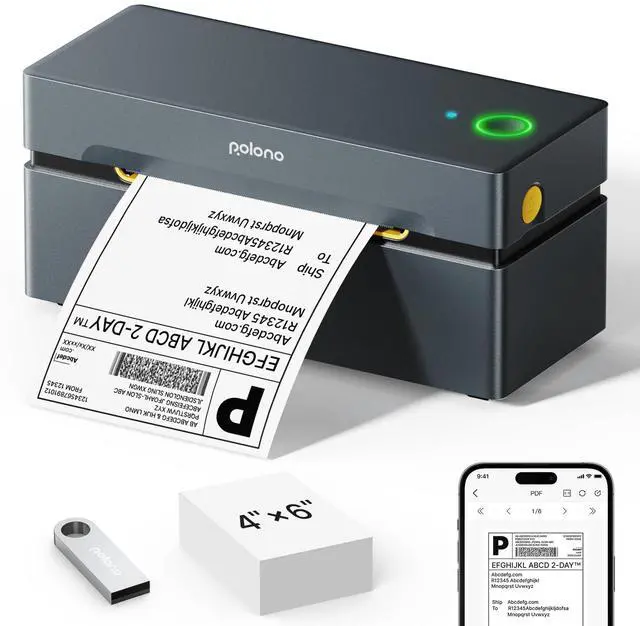

Bluetooth Thermal Shipping Label Printer, Wireless 4x6 Shipping Label Printer for Small Business, Support iOS, Android, Windows, Mac. Compatible with Amazon, Shopify, Etsy, USPS, Grey
Limited time offer, ends 09/18 By Tecinhblissu
- New Version: Bluetooth thermal printer provides faster and more distinct printing. This PL80E Bluetooth thermal printer is a high-speed shipping label printer, capable of printing up to 72 labels per minute for 4x6-inch labels. This thermal printer works with fanfold and roll labels (0.97" to 4.25" width) and produces 203 dpi high-resolution prints. Note: Monochrome printing only. Printing via Bluetooth: The thermal printer enables Bluetooth printing through the "Labelnize" app. Obtain the app from Google Play or Apple App Store for Android and iOS 13 or above. For Windows 7 and later, to link the shipping label printer via Bluetooth, please install the driver via USB first before utilizing the Bluetooth connection. Permit the app to use Bluetooth, and connect solely through the app. Do not pair with it directly in Bluetooth settings. Note: MAC does not support Bluetooth connection. Printing via USB: For both Windows and Mac, you can link the shipping label printer employing a USB cable. This thermal printer is simple to set up and operate, excellent for small businesses. Wide Compatibility 4x6 inch Thermal Printer for Shipping Packages. You can consult the operation video and manual to set it up. Note: PL80E shipping label printer does not support Chrome OS. If nothing prints on 4x6 labels, ensure the paper is face up and choose 100x150 mm. Broad Usage: The thermal printer is extensively utilized for printing labels from various marketplaces and shipping platforms, such as
+
+
Overview
Specs
Reviews

Any questions? Our AI mode will help you find out quickly.
Try me now
New Version: Bluetooth thermal printer provides faster and more distinct printing.
This PL80E Bluetooth thermal printer is a high-speed shipping label printer, capable of printing up to 72 labels per minute for 4x6-inch labels.
This thermal printer works with fanfold and roll labels ( 0.97" to 4.25" width) and produces 203 dpi high-resolution prints.
Note: Monochrome printing only.
Printing via Bluetooth: The thermal printer enables Bluetooth printing through the "Labelnize" app.
Obtain the app from Google Play or Apple App Store for Android and iOS 13 or above.
For Windows 7 and later, to link the shipping label printer via Bluetooth, please install the driver via USB first before utilizing the Bluetooth connection.
Permit the app to use Bluetooth, and connect solely through the app.
Do not pair with it directly in Bluetooth settings.
Note: MAC does not support Bluetooth connection.
Printing via USB: For both Windows and Mac, you can link the shipping label printer employing a USB cable.
This thermal printer is simple to set up and operate, excellent for small businesses.
Wide Compatibility 4x6 inch Thermal Printer for Shipping Packages.
You can consult the operation video and manual to set it up.
Note: PL80E shipping label printer does not support Chrome OS.
If nothing prints on 4x6 labels, ensure the paper is face up and choose 100x150 mm.
Broad Usage: The thermal printer is extensively utilized for printing labels from various marketplaces and shipping platforms, such as ShipStation, ShippingEasy, Shopify, UPS, FedEx, USPS, and Shippo.
(Note: Please recall to download the 4x6 inch label to be printed on the corresponding platform before printing, then upload it to the editor app "Labelnize" for printing).
Employ this Bluetooth shipping label printer to print shipping labels and warehouse labels, assisting you in boosting productivity.
Highly suitable for use by schools, teachers, and kids, customizable with name labels, category tags, and personal item tags
This PL80E Bluetooth thermal printer is a high-speed shipping label printer, capable of printing up to 72 labels per minute for 4x6-inch labels.
This thermal printer works with fanfold and roll labels ( 0.97" to 4.25" width) and produces 203 dpi high-resolution prints.
Note: Monochrome printing only.
Printing via Bluetooth: The thermal printer enables Bluetooth printing through the "Labelnize" app.
Obtain the app from Google Play or Apple App Store for Android and iOS 13 or above.
For Windows 7 and later, to link the shipping label printer via Bluetooth, please install the driver via USB first before utilizing the Bluetooth connection.
Permit the app to use Bluetooth, and connect solely through the app.
Do not pair with it directly in Bluetooth settings.
Note: MAC does not support Bluetooth connection.
Printing via USB: For both Windows and Mac, you can link the shipping label printer employing a USB cable.
This thermal printer is simple to set up and operate, excellent for small businesses.
Wide Compatibility 4x6 inch Thermal Printer for Shipping Packages.
You can consult the operation video and manual to set it up.
Note: PL80E shipping label printer does not support Chrome OS.
If nothing prints on 4x6 labels, ensure the paper is face up and choose 100x150 mm.
Broad Usage: The thermal printer is extensively utilized for printing labels from various marketplaces and shipping platforms, such as ShipStation, ShippingEasy, Shopify, UPS, FedEx, USPS, and Shippo.
(Note: Please recall to download the 4x6 inch label to be printed on the corresponding platform before printing, then upload it to the editor app "Labelnize" for printing).
Employ this Bluetooth shipping label printer to print shipping labels and warehouse labels, assisting you in boosting productivity.
Highly suitable for use by schools, teachers, and kids, customizable with name labels, category tags, and personal item tags
Warranty & Returns
Warranty, Returns, And Additional Information
Warranty
- Please contact the Seller directly for warranty information. Warranty information may also be found on the Manufacturer's website.
- CONTACT
Return Policies
- Return for refund within: 30 days
- Return for replacement within: 30 days
- This item is covered by Tecinhblissu Return Policy
Manufacturer Contact Info
- For a directory of all our manufacturers, please click below.
- Manufacturers Directory
LOADING...