

Your Browsing History

Meet Your Seller

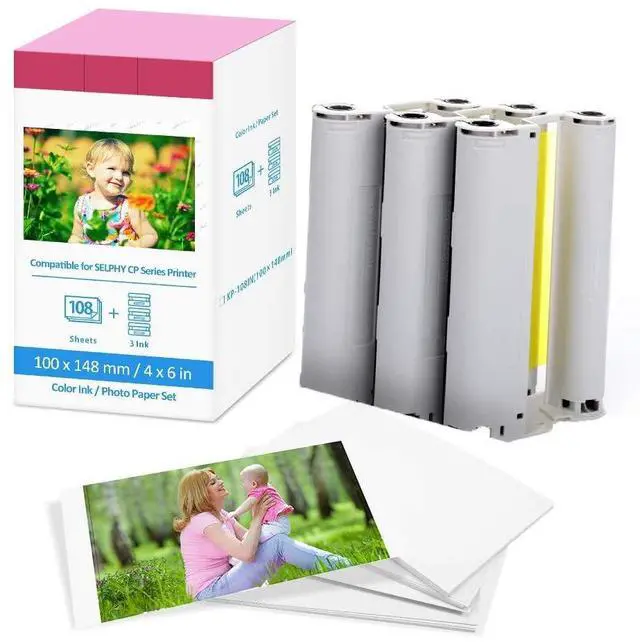

2X Color Ink and Paper Set KP-108IN for Canon Selphy CP1500 CP1300 Photopaper
Limited time offer, ends 10/05 By EpicTransTrade
- Package Included: Canon Selphy Ink and Paper 4x6 glossy photo paper high quality, postcard size. Includes 216 sheets of 4 inch x 6 inch photo paper (approximately) and 6 ink cassettes. Compatible with Canon Selphy Paper CP series Compatible with Canon KP-108IN Selphy CP series: CP100 / CP200 / CP300 / CP400 / CP500 / CP600 / CP700 / CP720 / CP730 / CP740 / CP760 / CP770 / CP780 / CP790 / CP800 / CP810 / CP820 / CP900 / CP910 / CP1000 / CP1200 / CP1300 / CP1500 Wireless Compact Photo Printer Wireless and Mobile PrintingUsing wifi to connect mobile device, directly with AirPrint, PicBridge. Connecting computer USB port, directly with Canon PRINT, and Canons Selphy app. Everyone can print from the same little printer. With dye sublimation print technologyCompatible KP-108IN Canon Selphy CP1500 Ink and Paper can keep instantly dry, Smudge free and withstand water. Glossy photo paper, smooth surface for professional printing. Warm ReminderIn order to use Canon Selphy CP1300 Paper and Ink effectively, You can Install the ribbon after turning on the printer, and then removing it when you finished the printing, it can effectively avoid waste of ribbon! Please note that Canon Selphy CP1000 and below may be affected due to aging models
+
+
Overview
Specs
Reviews

Any questions? Our AI mode will help you find out quickly.
Try me now
Package Included: Canon Selphy Ink and Paper 4x6 glossy photo paper high quality, postcard size. Includes 216 sheets of 4 inch x 6 inch photo paper (approximately) and 6 ink cassettes. Compatible with Canon Selphy Paper CP series Compatible with
Canon KP-108IN Selphy CP series: CP100 / CP200 / CP300 / CP400 / CP500 / CP600 / CP700 / CP720 / CP730 / CP740 / CP760 / CP770 / CP780 / CP790 / CP800 / CP810 / CP820 / CP900 / CP910 / CP1000 / CP1200 / CP1300 / CP1500 Wireless Compact Photo Printer Wireless and Mobile PrintingUsing wifi to connect mobile device, directly with AirPrint, PicBridge. Connecting computer USB port, directly with Canon PRINT, and Canons Selphy app. Everyone can print from the same little printer. With dye sublimation print technologyCompatible KP-108IN Canon Selphy CP1500 Ink and Paper can keep instantly dry, Smudge free and withstand water. Glossy photo paper, smooth surface for professional printing. Warm ReminderIn order to use Canon Selphy CP1300 Paper and Ink effectively, You can Install the ribbon after turning on the printer, and then removing it when you finished the printing, it can effectively avoid waste of ribbon! Please note that Canon Selphy CP1000 and below may be affected due to aging models
Canon KP-108IN Selphy CP series: CP100 / CP200 / CP300 / CP400 / CP500 / CP600 / CP700 / CP720 / CP730 / CP740 / CP760 / CP770 / CP780 / CP790 / CP800 / CP810 / CP820 / CP900 / CP910 / CP1000 / CP1200 / CP1300 / CP1500 Wireless Compact Photo Printer Wireless and Mobile PrintingUsing wifi to connect mobile device, directly with AirPrint, PicBridge. Connecting computer USB port, directly with Canon PRINT, and Canons Selphy app. Everyone can print from the same little printer. With dye sublimation print technologyCompatible KP-108IN Canon Selphy CP1500 Ink and Paper can keep instantly dry, Smudge free and withstand water. Glossy photo paper, smooth surface for professional printing. Warm ReminderIn order to use Canon Selphy CP1300 Paper and Ink effectively, You can Install the ribbon after turning on the printer, and then removing it when you finished the printing, it can effectively avoid waste of ribbon! Please note that Canon Selphy CP1000 and below may be affected due to aging models
Warranty & Returns
Warranty, Returns, And Additional Information
Warranty
- Please contact the Seller directly for warranty information. Warranty information may also be found on the Manufacturer's website.
- CONTACT
Return Policies
- Return for refund within: 30 days
- Return for replacement within: 30 days
- This item is covered by EpicTransTrade Return Policy
Manufacturer Contact Info
- For a directory of all our manufacturers, please click below.
- Manufacturers Directory
LOADING...