

Your Browsing History

Meet Your Seller

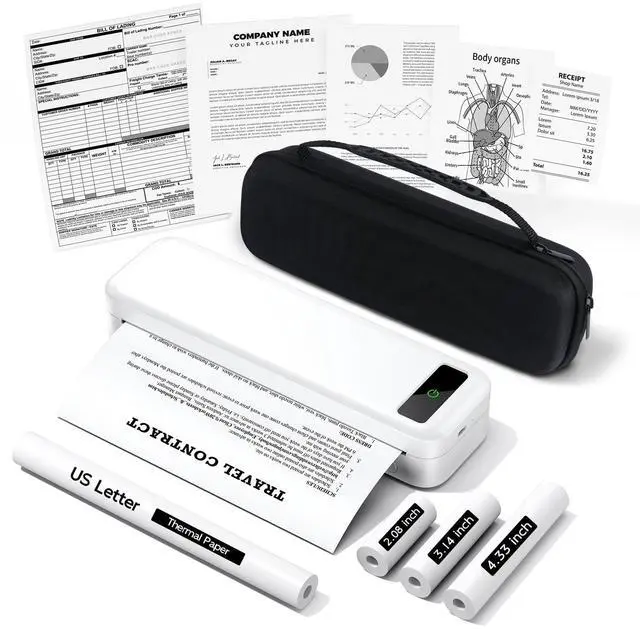

Portable Printers Wireless for Travel, A285M Bluetooth Inkless Thermal Printer, Support 8.5" X 11" US Letter & A4, Small Mobile Printer with Carry Case and 4 Rolls Thermal Paper, for Home Car Receipt
- Portable Travel Printer with Carrying Case [Compact & Space-saving]: Inkless portable printer weighs only 1.5lb, built-in high-capacity rechargeable battery, print 160 sheets of 8.5'' x 11'' thermal paper per charge. The package includes a thermal printer, a carrying case, 4 rolls of thermal paper (1 roll letter size thermal paper inside the printer & 4.33"/3.14"/2.08'' size), USB-C & USB-A cable, user guide. Ideal for on-the-go printing during business travel, in car or truck, small office, construction site, school and home use Inkless Printer [Cost-Effective & Inkless Printing]: The Bluetooth mobile printer adopt advanced thermal technology, no ink, toner, or ribbon required during printing, no clogging and cleaning problems! (Note: Only support the thermal paper, Not support regular copy paper. Only support black and white printing.) Wireless Bluetooth Printer [High Compatibility]: The portable thermal printer compatible with iPhone, Android Phone, iPad, Tablet via Bluetooth. You can print documents, contracts, bills, receipts, web pages, notes, lists anytime, anywhere. You can also use the USB-C cable to connect your laptop and computer for printing. (Note: Laptop and computer only work with USB connection, need to download the driver first: a285m.labelife.cc) Thermal Printer [Multi-Size Printing]: The wireless portable printer with built-in paper bin, support thermal roll paper, folded and single sheet thermal paper. This small wireless printer also supports 5 sizes o
+
+
Overview
Specs
Reviews

Any questions? Our AI beta will help you find out quickly.
Try me now
Portable Travel Printer with Carrying Case [Compact
& Space-saving]: Inkless portable printer weighs only 1.5 lb, built-in high-capacity rechargeable battery, print 160 sheets of 8.5 '' x 11'' thermal paper per charge. The package includes a thermal printer, a carrying case, 4 rolls of thermal paper (1 roll letter size thermal paper inside the printer & 4.33" / 3.14" / 2.08 '' size), USB-C & USB-A cable, user guide. Ideal for on-the-go printing during business travel, in car or truck, small office, construction site, school and home use Inkless Printer [Cost-Effective
& Inkless Printing]: The Bluetooth mobile printer adopt advanced thermal technology, no ink, toner, or ribbon required during printing, no clogging and cleaning problems! (Note: Only support the thermal paper, Not support regular copy paper. Only support black and white printing. ) Wireless Bluetooth Printer [High
Compatibility]: The portable thermal printer compatible with iPhone, Android Phone, iPad, Tablet via Bluetooth. You can print documents, contracts, bills, receipts, web pages, notes, lists anytime, anywhere. You can also use the USB-C cable to connect your laptop and computer for printing.
(Note: Laptop and computer only work with USB connection, need to download the driver first: a285m. labelife. cc) Thermal Printer [Multi-Size
Printing]: The wireless portable printer with built-in paper bin, support thermal roll paper, folded and single sheet thermal paper. This small wireless printer also supports 5 sizes of thermal paper: 8.5 X 11 US Letter, A4, 4.33 '' (110mm), 3.14 '' (80mm), 2.08 '' (53mm) width thermal paper, can meet most of your needs Mobile Printer [High
Quality Printing]: The compact printer designed for people who work outside. A wireless inkless portable printer good for mobile notaries, truck drivers, business travelers, office workers, teachers and students.
Note: Please charge the printer for 2 hours before first print. Don't use the charger that output above 5V How to Connect Phone or Tablet to
Print: 1) Download the APP according to the user manual. 2) Turn on the printer and enable Bluetooth on your phone. 3) Click the "Connect" icon in the App to search for the A285M printer, connect printer via Bluetooth in the App, and select thermal paper size and file type to start printing How to Connect Laptop or Computer to
Print: 1) Download and Install the driver for your computer system: a285m. labelife. cc 2) Turn on the printer and connect the printer to your laptop with USB-C Cable. 3) Open the document and select the A285M printer to print
& Space-saving]: Inkless portable printer weighs only 1.5 lb, built-in high-capacity rechargeable battery, print 160 sheets of 8.5 '' x 11'' thermal paper per charge. The package includes a thermal printer, a carrying case, 4 rolls of thermal paper (1 roll letter size thermal paper inside the printer & 4.33" / 3.14" / 2.08 '' size), USB-C & USB-A cable, user guide. Ideal for on-the-go printing during business travel, in car or truck, small office, construction site, school and home use Inkless Printer [Cost-Effective
& Inkless Printing]: The Bluetooth mobile printer adopt advanced thermal technology, no ink, toner, or ribbon required during printing, no clogging and cleaning problems! (Note: Only support the thermal paper, Not support regular copy paper. Only support black and white printing. ) Wireless Bluetooth Printer [High
Compatibility]: The portable thermal printer compatible with iPhone, Android Phone, iPad, Tablet via Bluetooth. You can print documents, contracts, bills, receipts, web pages, notes, lists anytime, anywhere. You can also use the USB-C cable to connect your laptop and computer for printing.
(Note: Laptop and computer only work with USB connection, need to download the driver first: a285m. labelife. cc) Thermal Printer [Multi-Size
Printing]: The wireless portable printer with built-in paper bin, support thermal roll paper, folded and single sheet thermal paper. This small wireless printer also supports 5 sizes of thermal paper: 8.5 X 11 US Letter, A4, 4.33 '' (110mm), 3.14 '' (80mm), 2.08 '' (53mm) width thermal paper, can meet most of your needs Mobile Printer [High
Quality Printing]: The compact printer designed for people who work outside. A wireless inkless portable printer good for mobile notaries, truck drivers, business travelers, office workers, teachers and students.
Note: Please charge the printer for 2 hours before first print. Don't use the charger that output above 5V How to Connect Phone or Tablet to
Print: 1) Download the APP according to the user manual. 2) Turn on the printer and enable Bluetooth on your phone. 3) Click the "Connect" icon in the App to search for the A285M printer, connect printer via Bluetooth in the App, and select thermal paper size and file type to start printing How to Connect Laptop or Computer to
Print: 1) Download and Install the driver for your computer system: a285m. labelife. cc 2) Turn on the printer and connect the printer to your laptop with USB-C Cable. 3) Open the document and select the A285M printer to print
Warranty & Returns
Warranty, Returns, And Additional Information
Warranty
- Please contact the Seller directly for warranty information. Warranty information may also be found on the Manufacturer's website.
- CONTACT
Return Policies
- Return for refund within: 30 days
- Return for replacement within: 30 days
- This item is covered by EpicTransTrade Return Policy
Manufacturer Contact Info
- For a directory of all our manufacturers, please click below.
- Manufacturers Directory
LOADING...