




 here!
here!
I’m your shopping assistant for PC builds, upgrades, and everything tech.
Got questions? Ask away!
Start a conversation
here!
I’m your shopping assistant for PC builds, upgrades, and everything tech.
Got questions? Ask away!
Start a conversation





Any questions? Ask CelesteSM will help you find out quickly.


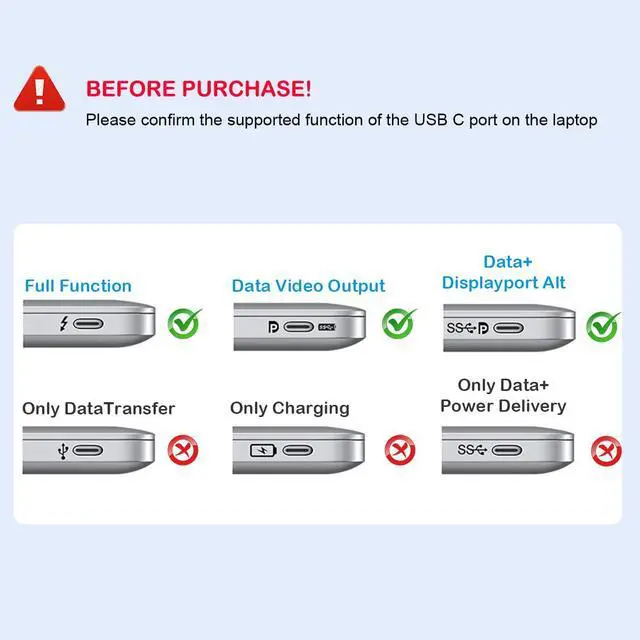
Compatibility Note: This docking station compatible with many laptops with a Full-featured USB Type-C port (support DisplayPort,charging,data transfer protocol), such as the thunderbolt 3, thunderbolt 4, USB-C 3.2 Gen 1&Gen 2 with Power Delivery& DisplayPort functions ports. But NOT all USB-C devices are compatible with this docking station,please check the compatibility list before purchase. This laptop docking station is incompatible with many laptops ALREADY equipped with HDMI ports. You can check with HCCBM Team if you are not sure.
Compatible List(Not Fulllist):
· ONLY support Mirror Mode For: MacBook/ MacBook Pro (2024/2022/2020/2019/2018/2017/2016), Macbook Air 2025-2028,Mac mini 2024-2018, iPad Pro 2018
· For HP Laptops: HP Spectre Laptop 13-af001TU/ Spectre x360 13t/ Spectre folio (13t-ak000cto)/ Spectre 360 laptop/ Specter x369; Elitebook 840 G5 series/ Elitebook X2/ Elitebook x360 1030 G3/ Elitebook 745 G6/ Elitebook 830 G6/ 2018 HP Elite 800 G4; Envy Geforce mx250/ Envy x360 Laptop (15z-ds100); Z book 15u G3/ Zbook 17 G4
· For Dell Laptops: Dell XPS 9380/ XPS 13 9365/ XPS 15 2018/ XPS 13 9300/ New XPS 15 with i7 dedicated video card 64GB of ram and 2TB SSD; Latitute 7280/ Latitude 5310 2-in-1; Precision 7730/ Precision 7750; Laptop 5590
· For: Samsung Galaxy S10+/S10/S9+ /S9 /S8+ /S8 Plus, Note 10 / 9 / 8
· For Thinkpad Laptops: Yoga 720-13IKB/ Yoga 730/ Yoga 900-13ISK/ Yoga 910/ Yoga 920/ Yoga 930/ Yoga 940-14IIL; 3rd generation Thinkpad Yoga; Yoga15 Thinkpad Ultrabook Pro; Thinkpad E590/ Thinkpad P72/ Thinkpad T470/ Thinkpad X1 Carbon (2019 model); Flex 14 IML (81XG)/ Flex 5; Legion Y530; Lenovo C930/ T480s/ X390/ 81N8
· For Mircrosoft Surface Laptops: Microsoft Surface Book 2/ Surface Go/ Surface Laptop 3; Surface Pro 7
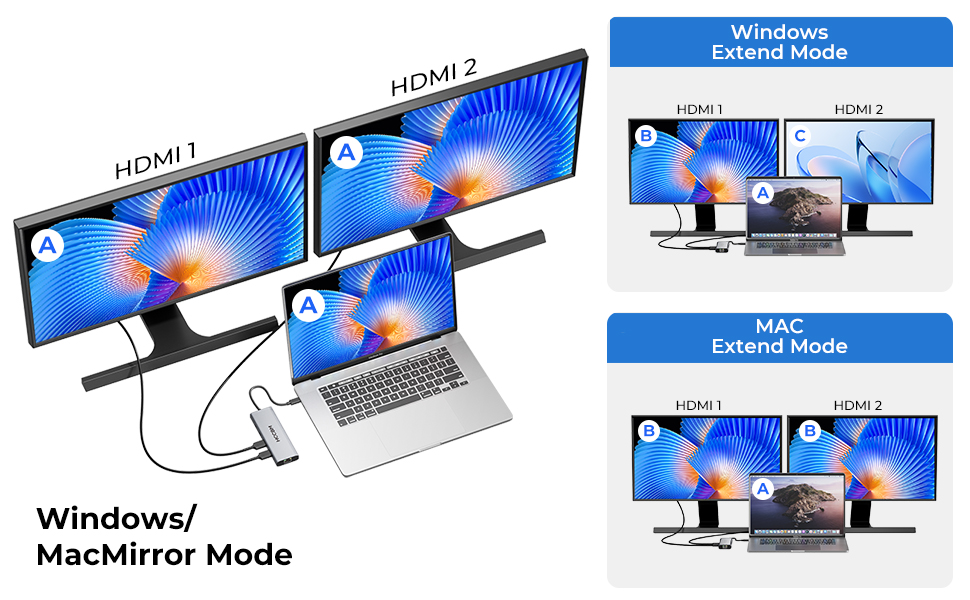
If your usb c laptops is win system laptop.
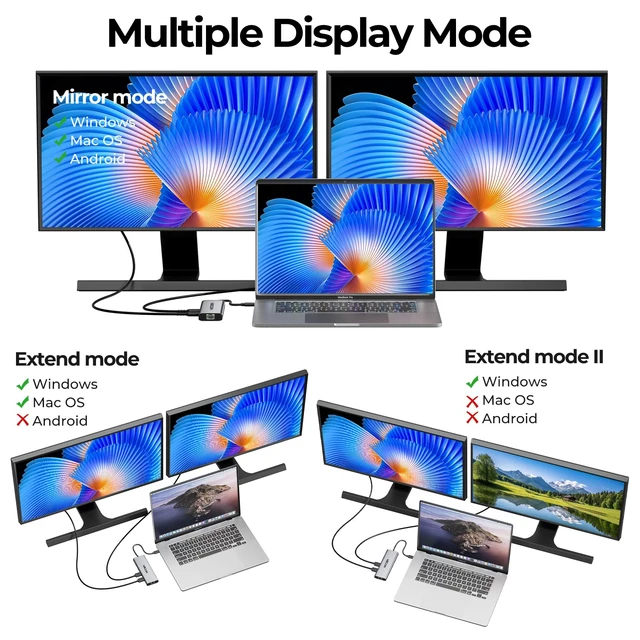
You can use 1 single hdmi or dual hdmi to extend your laptops. It allows you to extend extra 1/2 more different monitors. (The monitors' screen will be different as the laptop when in extend mode-same as the picture showed).
A-A / A-B / A-B+B / A-B+C
If your usb c laptops is Mac system laptop.
You can you 1 single hdmi or dual hdmi to extend your laptops. It allows you to mirror extra 1/2 more monitors.(The monitors' screen will be same as the laptop when in mirror mode-same as the picture showed)
A-A / A-A+A / A-B+B

1.How to connect Extend Mode for Windows OS?
Right-click desktop? select Intel display Settings ? pop-up Settings screen select display? select multi-screen display? expand the desktop
(If the display 3 is not display, please to manually select the display?click apply confirm can set OK).
2.If one of display does not display, How to do?
Right click desktop > Graphics Settings > Select One or More Active Displays.
3.How to switch Mac device to Extend Mode?
"Setting" ? "Display" ? click the "mirror display" box to switch to Extend mode ? then you can drag a window of website/movie to the rightest side of your desktop screen until it disappear on your desktop screen and show up on the external monitor screen.
( Important Note: As Apple company itself limited, for Mac OS devices use in extend mode, the image on the two external screens will be the same.)

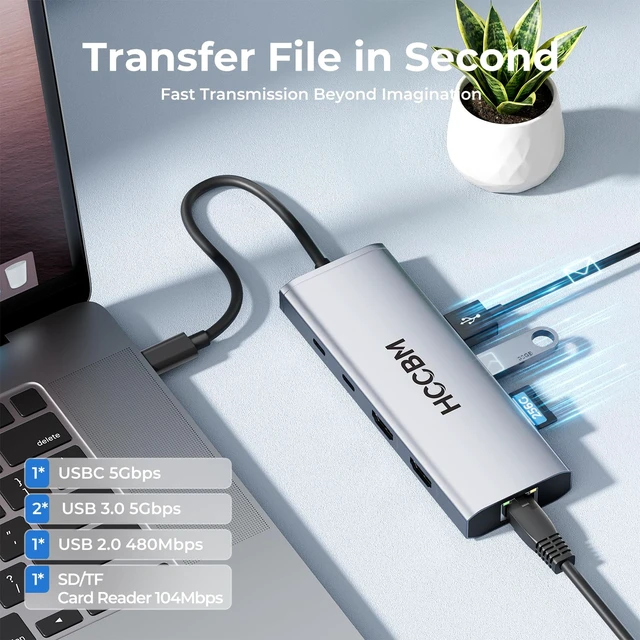
2*USB 3.0 & 1*USBC Port supports up to 5 Gbps, allows you transfer files in seconds from your usb flash driver, usb/usb c hard disks. And 1*USB A 2.0 port allows you to connect keyboard or mouse without any lags.
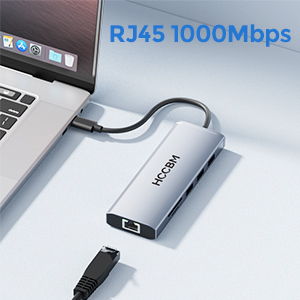
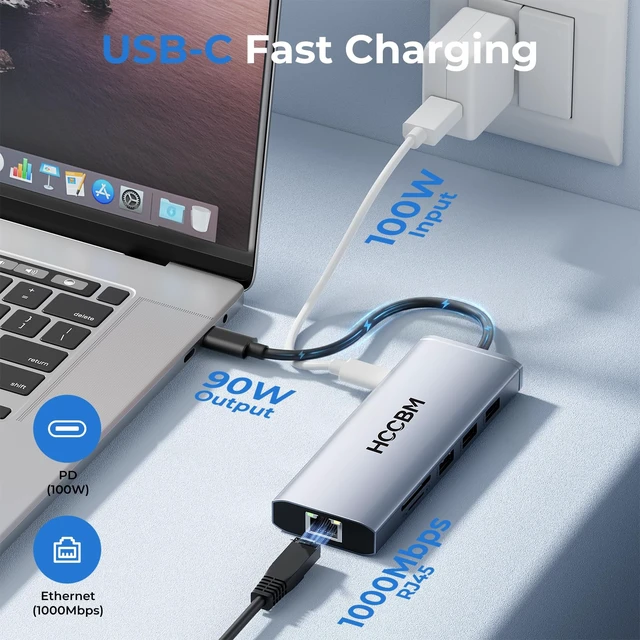
USB C to Gigabit Ethernet hub supports 1000Mbps with faster, more reliable connection, enjoy a smoother online gaming or working experience.

Sigle HDMI USED: Resolution up to 4K(3840X2160P@60HZ),down compatible with 2K (2560x1440@60Hz),1080P(1920x1080)@60Hz
Dual HDMI USED: Resolution up to 4K(3840X2160P@30HZ),down compatible with 2K (2560x1440@60Hz),1080P(1920x1080)@60Hz
 2 IN 1 Dual HDMI adapter |  2 IN 1 HDMI+DP adapter |  2 IN 1 Dual DP adapter |  10 IN 1 USBC Docking Station | |
|---|---|---|---|---|
| Customer Reviews | — | — | — | — |
| Price | — | — | — | — |
| Input Port | USBC | USBC | USBC | USBC |
| Output Port | 2*HDMI | HDMI+DP | 2*DP | 2*HDMI/3*USB/1*USBC/1*SD/TF |
| Other Function | no data | no data | no data | PD Charging/Gigabit Ethernet |

Compatibility Note: This docking station compatible with many laptops with a Full-featured USB Type-C port (support DisplayPort,charging,data transfer protocol), such as the thunderbolt 3, thunderbolt 4, USB-C 3.2 Gen 1&Gen 2 with Power Delivery& DisplayPort functions ports. But NOT all USB-C devices are compatible with this docking station,please check the compatibility list before purchase. This laptop docking station is incompatible with many laptops ALREADY equipped with HDMI ports. You can check with HCCBM Team if you are not sure.
Compatible List(Not Fulllist):
· ONLY support Mirror Mode For: MacBook/ MacBook Pro (2024/2022/2020/2019/2018/2017/2016), Macbook Air 2025-2028,Mac mini 2024-2018, iPad Pro 2018
· For HP Laptops: HP Spectre Laptop 13-af001TU/ Spectre x360 13t/ Spectre folio (13t-ak000cto)/ Spectre 360 laptop/ Specter x369; Elitebook 840 G5 series/ Elitebook X2/ Elitebook x360 1030 G3/ Elitebook 745 G6/ Elitebook 830 G6/ 2018 HP Elite 800 G4; Envy Geforce mx250/ Envy x360 Laptop (15z-ds100); Z book 15u G3/ Zbook 17 G4
· For Dell Laptops: Dell XPS 9380/ XPS 13 9365/ XPS 15 2018/ XPS 13 9300/ New XPS 15 with i7 dedicated video card 64GB of ram and 2TB SSD; Latitute 7280/ Latitude 5310 2-in-1; Precision 7730/ Precision 7750; Laptop 5590
· For: Samsung Galaxy S10+/S10/S9+ /S9 /S8+ /S8 Plus, Note 10 / 9 / 8
· For Thinkpad Laptops: Yoga 720-13IKB/ Yoga 730/ Yoga 900-13ISK/ Yoga 910/ Yoga 920/ Yoga 930/ Yoga 940-14IIL; 3rd generation Thinkpad Yoga; Yoga15 Thinkpad Ultrabook Pro; Thinkpad E590/ Thinkpad P72/ Thinkpad T470/ Thinkpad X1 Carbon (2019 model); Flex 14 IML (81XG)/ Flex 5; Legion Y530; Lenovo C930/ T480s/ X390/ 81N8
· For Mircrosoft Surface Laptops: Microsoft Surface Book 2/ Surface Go/ Surface Laptop 3; Surface Pro 7
If your usb c laptops is win system laptop.
You can use 1 single hdmi or dual hdmi to extend your laptops. It allows you to extend extra 1/2 more different monitors. (The monitors' screen will be different as the laptop when in extend mode-same as the picture showed).
A-A / A-B / A-B+B / A-B+C
If your usb c laptops is Mac system laptop.
You can you 1 single hdmi or dual hdmi to extend your laptops. It allows you to mirror extra 1/2 more monitors.(The monitors' screen will be same as the laptop when in mirror mode-same as the picture showed)
A-A / A-A+A / A-B+B

1.How to connect Extend Mode for Windows OS?
Right-click desktop? select Intel display Settings ? pop-up Settings screen select display? select multi-screen display? expand the desktop
(If the display 3 is not display, please to manually select the display?click apply confirm can set OK).
2.If one of display does not display, How to do?
Right click desktop > Graphics Settings > Select One or More Active Displays.
3.How to switch Mac device to Extend Mode?
"Setting" ? "Display" ? click the "mirror display" box to switch to Extend mode ? then you can drag a window of website/movie to the rightest side of your desktop screen until it disappear on your desktop screen and show up on the external monitor screen.
( Important Note: As Apple company itself limited, for Mac OS devices use in extend mode, the image on the two external screens will be the same.)
2*USB 3.0 & 1*USBC Port supports up to 5 Gbps, allows you transfer files in seconds from your usb flash driver, usb/usb c hard disks. And 1*USB A 2.0 port allows you to connect keyboard or mouse without any lags.
USB C to Gigabit Ethernet hub supports 1000Mbps with faster, more reliable connection, enjoy a smoother online gaming or working experience.
Sigle HDMI USED: Resolution up to 4K(3840X2160P@60HZ),down compatible with 2K (2560x1440@60Hz),1080P(1920x1080)@60Hz
Dual HDMI USED: Resolution up to 4K(3840X2160P@30HZ),down compatible with 2K (2560x1440@60Hz),1080P(1920x1080)@60Hz
2 IN 1 Dual HDMI adapter | 2 IN 1 HDMI+DP adapter | 2 IN 1 Dual DP adapter | 10 IN 1 USBC Docking Station | |
|---|---|---|---|---|
| Customer Reviews | — | — | — | — |
| Price | — | — | — | — |
| Input Port | USBC | USBC | USBC | USBC |
| Output Port | 2*HDMI | HDMI+DP | 2*DP | 2*HDMI/3*USB/1*USBC/1*SD/TF |
| Other Function | no data | no data | no data | PD Charging/Gigabit Ethernet |



