

Your Browsing History

Meet Your Seller

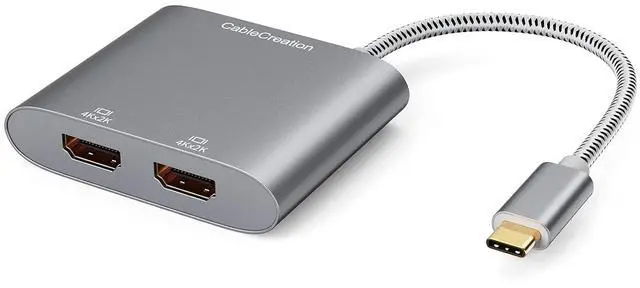
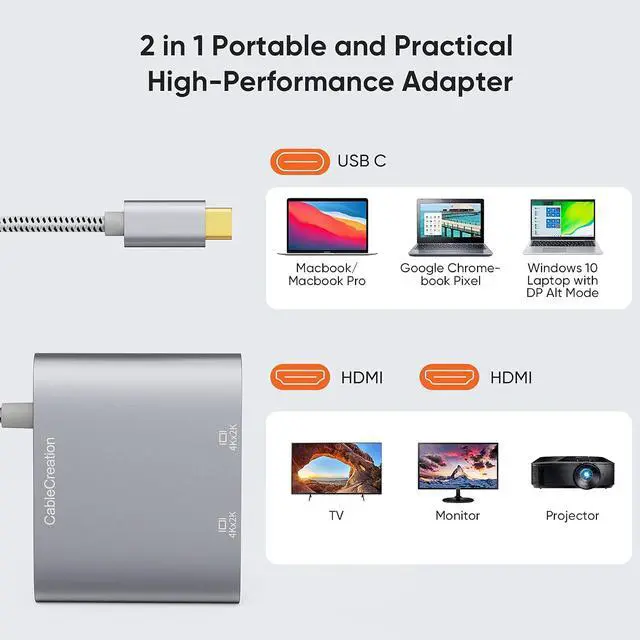


USB C to Dual HDMI 4K Adapter, USB Type C (Compatible Thunderbolt 3) to 2 HDMI Adapter Compatible with MacBook Pro 2020/2019/2018/2017,XPS 13/Surface Book 2,Chromebook Pixel, Yoga 710
Limited time offer, ends 10/15 By EmpressTech
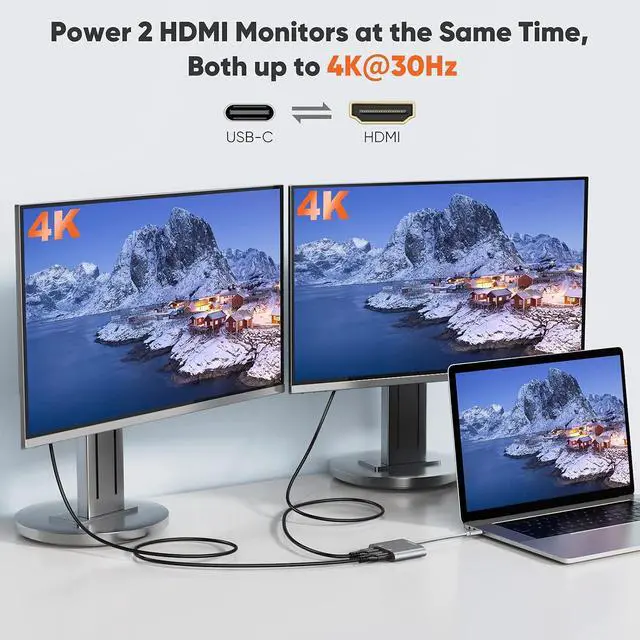
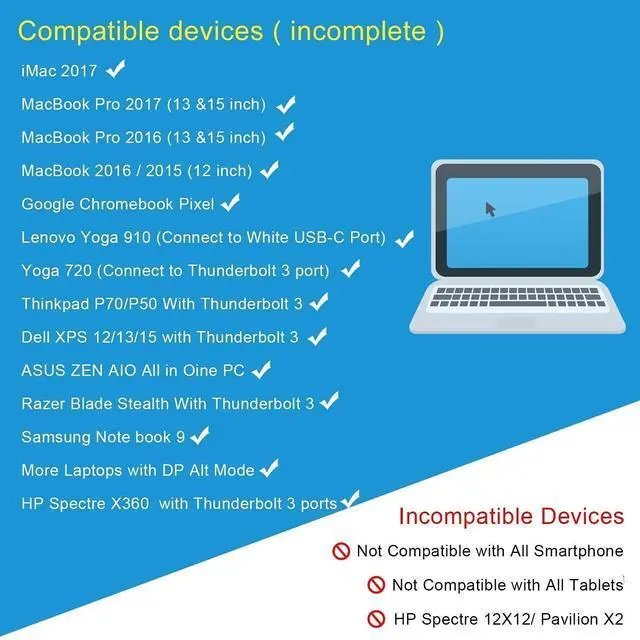
- BEFORE PURCHASE NOTE: Make sure your laptop or PC supports Thunderbolt 3 or display output modeDP ALT mode. OTHERWISE it is NOT COMPATIBLE. If you don't know if your device is compatible with our products, send us a message via Amazon and we will help you; How to set Dual display on MacBook: Please noted that MacBook is NOT able to run EXTEND MODE if you enable 2 or above extension display. ONLY MIRROR MODE is available if you connected 2 or above extension display on MacBook. Steps Top left corner Apple iconSystem PreferencesDisplays Mirror or Extend Displays, both HDMI monitor are identical but different with laptop screen; How to set Dual display on Windows: Both mirror and extend mode is available on Windows. StepsPress Windows key + P combination commandChoose Duplicate or Extend; Plug & Play, Vivid 4K resolution: No driver or software needed. 2 extension display resolution is up to 4K@30Hz, please makre sure us HDMI 1.4 cable or above to avoid Screens flickering. If your source video or laptop is over 4K@30Hz. Please lower the resolution as :For Windows Menu Setting Display Advanced Display Settings, set your laptop's resolution same as or lower the resolution of external monitor. For MacOS: Left-upper Apple iconSystem PreferencesDisplaysMirror displays; What You Get: We provide 24 months worry free warranty for this USB-C dual hdmiI convertor, please feel free to contact us if you have any question or suggestion, we will get ba
+
+
Overview
Specs
Reviews

Any questions? Our AI mode will help you find out quickly.
Try me now
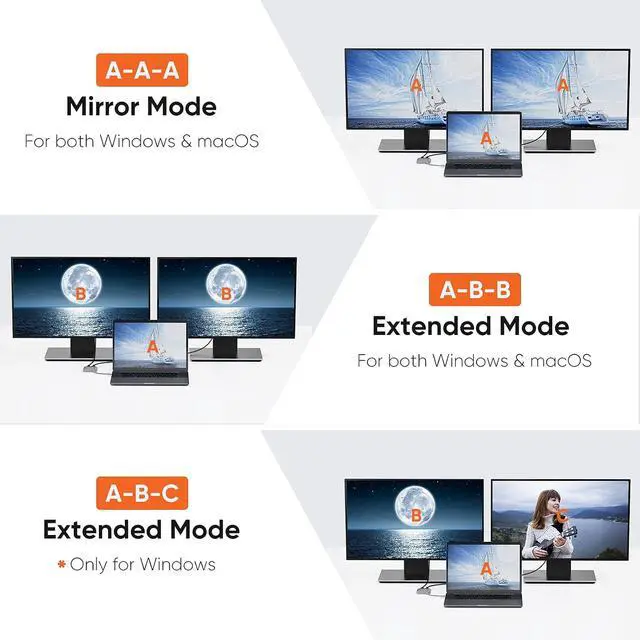
Product description matters need attention Please make sure your PC supports Thunderbolt 3 or display output modeDP ALT mode. OTHERWISE, it is NOT COMPATIBLE. If you don't know if your device is compatible with our products, please send us a message via Amazon and we will help you For macOS systems, it will NOT support Extend Mode, two HDMI monitors will show the same image. As the third picture shows. If you want to use extended mode on the macOS system, you can use the Win10 system, or you can consider products ASIN B07799WBKW (CD0502) & ASIN B019Q652AG (CD0101).
Please be informed that CD0502 is ONLY compatible with Thunderbolt 3 laptops, it is also NOT compatible with MacBook12 due to this laptop being USB-C Gen 1 NOT Thunderbolt. In order to enjoy the 4K high resolution, please make sure to use HDMI 2.0 cable. Supports resolution up to 4k@30Hz, but we recommend you make sure your monitor/TV could supply the corresponding output. If the resolution of your laptop is higher than the external monitor.
For windows: Windows Menu Setting Display Advanced Display Settings, set your laptop's resolution same as or lower the resolution of external monitor.
For macOS: Left-upper Apple iconSystem PreferencesDisplaysMirror displays. Then your HDMI monitor would mirror your Mac. However, here you have two choices. One is "Optimize For" your built-in Retina Display, the other is "Optimize For" your HDMI monitor. You can choose which one you like. For Windows system laptop, if the external monitor could not work, please update the BIOS and graphic card driver from laptop official website. How to Set Dual Display on Windows Dual mode under
Windows system: Mirror
Mode: laptop shows "A" + 2 extension displays show "A" is available
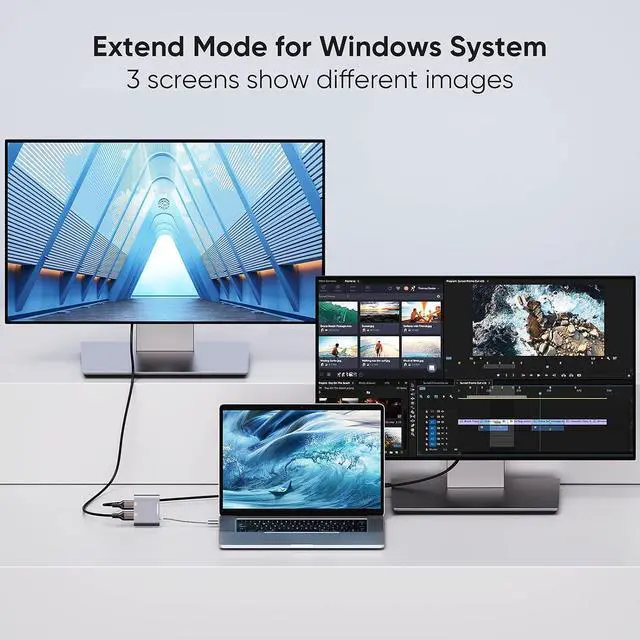
Extend Mode: 1 laptop shows "A" + 2 extension displays show A is available 2laptop shows "A" + 2 extension displays show B is available 3 laptop shows "A" + 1 extension display shows B + 1 extension display shows "C" is available How to Set Dual Display on MacBook Dual mode under macOS system: Mirror
Mode: laptop shows "A" + 2 extension displays show "A" is available
Extend Mode: 1 laptop shows "A" + 2 extension displays show A is available 2laptop shows "A" + 2 extension displays show B is available 3 laptop shows "A" + 1 extension display shows B + 1 extension display shows "C" is NOT AVAILABLE High Quality Material Aluminum alloy case Durable cotton braided cable Dual 4K Monitor You will get two monitors with HDMI at 4K@30Hz Compact & Portable Easy to carry around, perfect for business travel or home office.
Compatible devices (not full list): * MacBook Pro 2019 / 2018 / 2017 / 2016 / Mac Pro / iPad Pro * iMac (Mid 2017) and newer / iMac Pro * Mac Mini (Late 2018) and newer * MacBook (Early 2015) and newer / MacBook Air (Late 2018) and newer * New Chromebook Pixel / Pixelbook 2-in-1 / Pixel Slate 2-in-1 / Chromebook Pixel (2015) * XPS 15 / 13 / 12 * EliteBook Folio G1 / Spectre 13 laptop / Spectre x360 2-in-1 * Thinkpad E580 / T470 / T480 / X1 Carbon (2017) / A485 / A285 / E485 / E585 / Yoga 900 / 910 / 920 * Asus Zen AIO All-in-One PC * Surface Book 2/surface go * Galaxy S8 / S8+ / Note8 / S9 / S9+ / Note9 / S10 /S10e / S10+ / Note 10 and Tab S4. * LG G5 / G7 / G7+ / Q8 / V20 / V30 /V30+ / V35 / V35+ / V40 / Exodus 1 * HTC 10 / HTC U Ultra / U11+ / HTC U12+ * Mate 10 / Mate 10 Pro / Mate 20 / Mate 20 Pro / Mate X / P20 / P20 Pro / P30 / P30 Pro / Honor Note 10 / Honor View 20 Please confirm whether it is compatible with your device before the purchase
Please be informed that CD0502 is ONLY compatible with Thunderbolt 3 laptops, it is also NOT compatible with MacBook12 due to this laptop being USB-C Gen 1 NOT Thunderbolt. In order to enjoy the 4K high resolution, please make sure to use HDMI 2.0 cable. Supports resolution up to 4k@30Hz, but we recommend you make sure your monitor/TV could supply the corresponding output. If the resolution of your laptop is higher than the external monitor.
For windows: Windows Menu Setting Display Advanced Display Settings, set your laptop's resolution same as or lower the resolution of external monitor.
For macOS: Left-upper Apple iconSystem PreferencesDisplaysMirror displays. Then your HDMI monitor would mirror your Mac. However, here you have two choices. One is "Optimize For" your built-in Retina Display, the other is "Optimize For" your HDMI monitor. You can choose which one you like. For Windows system laptop, if the external monitor could not work, please update the BIOS and graphic card driver from laptop official website. How to Set Dual Display on Windows Dual mode under
Windows system: Mirror
Mode: laptop shows "A" + 2 extension displays show "A" is available
Extend Mode: 1 laptop shows "A" + 2 extension displays show A is available 2laptop shows "A" + 2 extension displays show B is available 3 laptop shows "A" + 1 extension display shows B + 1 extension display shows "C" is available How to Set Dual Display on MacBook Dual mode under macOS system: Mirror
Mode: laptop shows "A" + 2 extension displays show "A" is available
Extend Mode: 1 laptop shows "A" + 2 extension displays show A is available 2laptop shows "A" + 2 extension displays show B is available 3 laptop shows "A" + 1 extension display shows B + 1 extension display shows "C" is NOT AVAILABLE High Quality Material Aluminum alloy case Durable cotton braided cable Dual 4K Monitor You will get two monitors with HDMI at 4K@30Hz Compact & Portable Easy to carry around, perfect for business travel or home office.
Compatible devices (not full list): * MacBook Pro 2019 / 2018 / 2017 / 2016 / Mac Pro / iPad Pro * iMac (Mid 2017) and newer / iMac Pro * Mac Mini (Late 2018) and newer * MacBook (Early 2015) and newer / MacBook Air (Late 2018) and newer * New Chromebook Pixel / Pixelbook 2-in-1 / Pixel Slate 2-in-1 / Chromebook Pixel (2015) * XPS 15 / 13 / 12 * EliteBook Folio G1 / Spectre 13 laptop / Spectre x360 2-in-1 * Thinkpad E580 / T470 / T480 / X1 Carbon (2017) / A485 / A285 / E485 / E585 / Yoga 900 / 910 / 920 * Asus Zen AIO All-in-One PC * Surface Book 2/surface go * Galaxy S8 / S8+ / Note8 / S9 / S9+ / Note9 / S10 /S10e / S10+ / Note 10 and Tab S4. * LG G5 / G7 / G7+ / Q8 / V20 / V30 /V30+ / V35 / V35+ / V40 / Exodus 1 * HTC 10 / HTC U Ultra / U11+ / HTC U12+ * Mate 10 / Mate 10 Pro / Mate 20 / Mate 20 Pro / Mate X / P20 / P20 Pro / P30 / P30 Pro / Honor Note 10 / Honor View 20 Please confirm whether it is compatible with your device before the purchase
Warranty & Returns
Warranty, Returns, And Additional Information
Warranty
- Please contact the Seller directly for warranty information. Warranty information may also be found on the Manufacturer's website.
- CONTACT
Return Policies
- Return for refund within: 30 days
- Return for replacement within: 30 days
- This item is covered by EmpressTech Return Policy
Manufacturer Contact Info
- For a directory of all our manufacturers, please click below.
- Manufacturers Directory
LOADING...