




 here!
here!
I’m your shopping assistant for PC builds, upgrades, and everything tech.
Got questions? Ask away!
Start a conversation
here!
I’m your shopping assistant for PC builds, upgrades, and everything tech.
Got questions? Ask away!
Start a conversation



Any questions? Ask CelesteSM will help you find out quickly.
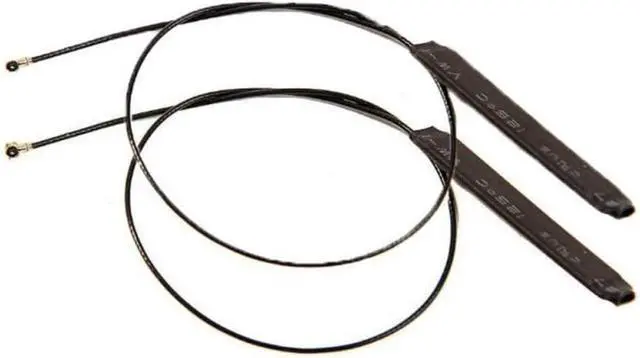
Is your laptop or desktop PC suffering from weak WiFi signals, dropped connections, or slow speeds? The internal antennas in your device may be damaged, poorly placed, or simply outdated for modern WiFi standards. This 1Pair MHF4 Internal Dual Band Antenna Kit is the perfect solution.
Designed specifically for M.2 (NGFF) interface WiFi cards including popular models like the Intel 7265, 8265, 9260, 9560, AX200, and AX201 these 3dBi antennas deliver reliable 2.4GHz and 5GHz performance.
Compact with:
Note
WARNING: Don't pull the MHF4 connector out once installed, That part is even harder (90 degrees is the golden rule) and can potentially damage the socket on the motherboard
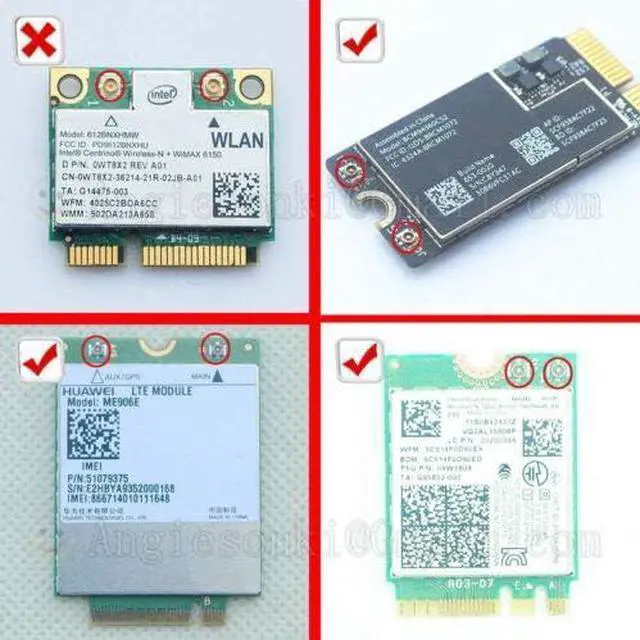
NOT Compatible With:
Important Read Before Installing
The MHF4 connector is small and requires careful handling. Do not force or wiggle the connector at an angle.
Step 1 Access Your WiFi Card
Step 2 Remove Old Antennas (if present)
Step 3 Connect New Antennas
Step 4 Route the Cables
Step 5 Test Your Connection
Specifications:
Frequency Range: DC up to 6GHz (VSWR: 1,3 max at 0,1~3GHz; VSWR: 1,4 max at 3~6GHz) ( option: 1,2Ghz 2,4Ghz 3Ghz 6Ghz 8Ghz 12Ghz 18G)
Contact Resistance: 20m ohm max (Signal) and 10m ohm max(Ground)
Withstand Voltage: AC 200V
Insulation Resistance: 500M ohm Min/DC 100V density, and ultra small size connector for Note Book PC, Smart Mobile phone, GPS module cable, GSM module cablem WLAN 2,4GHz module cable, WLAN 5,8Ghz module cable, Digital apploance
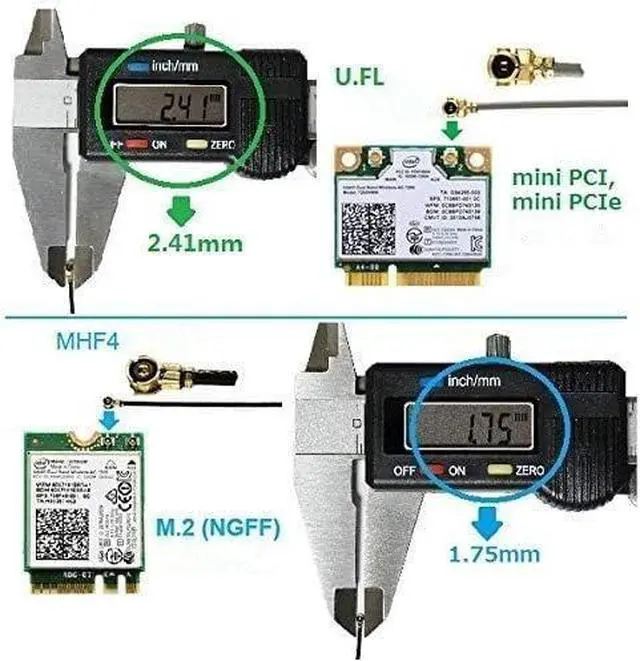
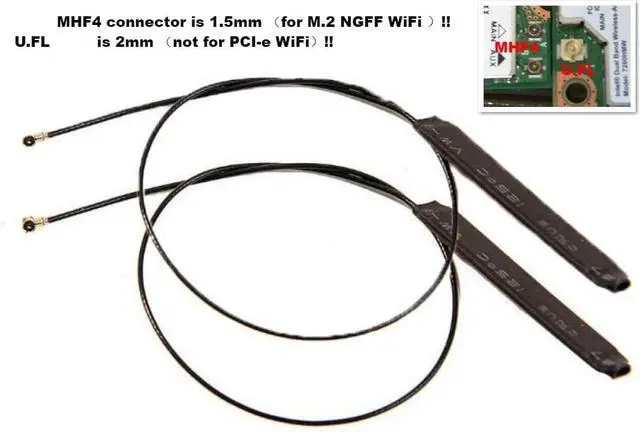
MHF4 RF Microwave Coaxial AntennaNote! Don't work on MINI PCIE module slot (please look the Picture)Features:
Support: 4G / 3G / 2,4G / 5G
Compatible with: MHF4 Antenna Slot
SMT type coaxial receptacle and Mating plug cable connector
Small form factor and low profile 1,2mm Max Mating Height
Applicable cable: 0,81mm RF coaxial cable
High productivity: Easy cable termination by i-Fit without soldering
Application Technology: IEEE802,11 ax/ac/a/b/g/n, WiMax, Zigbee, Bluetooth Wireless
Length: one:42cm(16,53inches) another:47cm(18,50inches)
Connect
Caring for your U,FL/MHF4 connector is all about keeping that shiny electrical contact
pristine and contacting! Grime, oxidation, and mountain dew will increase the impedance
to/from the antenna and will reduce range, Bent contacts won't let any of the electric
pixies through at all and those "it works if I hold it just right" problems are definitely the
worst to debug!
1, Inspect the antenna receptacles on the module; don't use if deformed or damaged,
2, If possible, acquire or 3D print an installation tool, If using a tool; follow the instructions found with the tool,
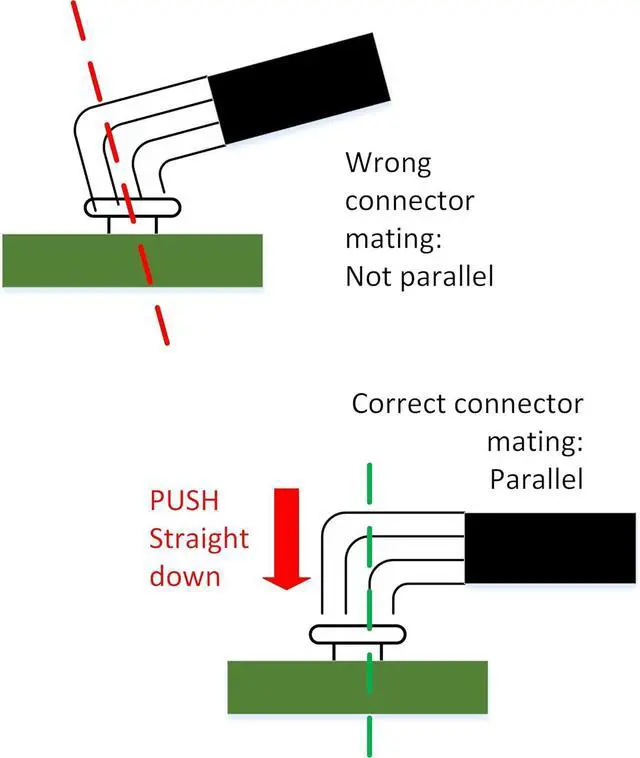
3, For manual installation, align the connectors so they are perpendicular,Attempting to
engage connectors at an angle damages both connectors
4, Press the antenna wire connector straight down onto the module receptacle, You should hear an audible click and mechanical snap when a proper connection is made
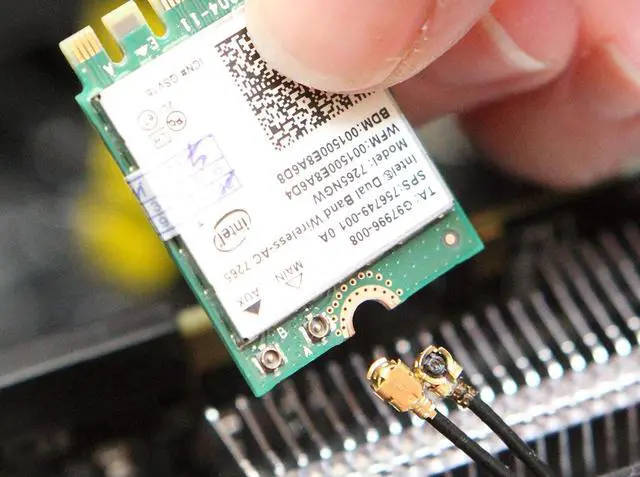
When connecting the parts of the U,FL/MHF4, first make sure your finger is relatively clean, To avoid putting pressure on the connection, pinch the cable one or two cm from the end and try to align it so that the female connector rests evenly across the surface of the male connector, You can then lightly put your finger on top of the stacked connectors
if it feels like your elementary school's old see-saw then try again, you want this to be stable, Also be sure that the two connectors are centered on one another left-to-right and up-to-down when you look at the connector from above the board
If everything is good to go, use the very center of your finger to press firmly down - you'll feel a satisfying "lock sensation" as the datasheet puts it! (P,S I had to move my finger off to the side so that you could see the connector in there, but you should really make an effort to push down right in the center of the connector)
Note
MHF4 connector is a tough nut to crack, especially for first-time users, It has to be dead center and 90 degrees straight down to be pushed in with a tiny bit of force, Easy does it,
Yes, it's a bit scary (just like first time riding a bicycle,)
Do not ever think to try using a slightly tilted angle to wiggle it in, That will probably hurt the connector alignment itself
WARNING, Don't pull the MHF4 connector out once installed, That part is even harder (90 degrees is the golden rule) and can potentially damage the socket on the motherboard
Key Benefits at a Glance| M.2 NGFF Compatibility | Works with Intel AX200, AX201, 9260, 9560, 8265, 7265, and more |
| Dual Band (2.4GHz/5GHz) | Supports both legacy and modern high-speed networks |
| 3dBi Gain | Optimized for internal placement stronger signal than damaged stock antennas |
| MHF4 (IPEX 4) Connectors | Standard connector for modern M.2 WiFi cards |
| 50cm + 72cm Cables | Flexible routing for laptops, desktops, and mini PCs |
| Plug & Play | No drivers just connect and go |
| Frequency Bands | 2.4GHz (2400-2500 MHz), 5GHz (4900-5850 MHz) |
| Gain | 3 dBi |
| Connector Type | MHF4 (IPEX 4) |
| mpedance | 50 Ohms |
| Cable Length (Black) | Cable Length (Black) |
| Cable Length (White) | 72cm / 28.3 inches |
| Compatible Cards | M.2 NGFF: 7260, 7265, 8260, 8265, 9260, 9560, AX200, AX201, etc. |
| NOT Compatible With | Mini PCIe interface cards |
| VSWR | 1.5 at 0.1-3GHz; 1.8 at 3-6GHz |
| For Intel | 7260, 7265, 8260, 8265, 9260, 9560, AX200, AX201, 17265, 18265 |
| For Huawei | ME906E, ME906V, ME906J, ME906C, ME936, MU736 |
| For Broadcom | BCM943228ZH, BCM94352Z |
| For Others | Sierra Wireless AirPrime, Qualcomm GOBI5000 |


