Your Browsing History
Meet Your Seller
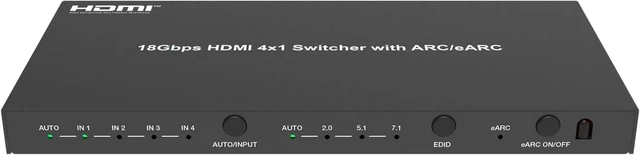
U9 ViewHD HDMI 2.0b 4K 4x1 Switch 18Gbps 4:4:4 with Built-in ARC/eARC Audio Extractor Atmos Dedicated for eARC HDMI Soundbar/Receiver | UHDe4x1
- This UHDe4X1 HDMI 2.0 4K@60Hz HDR Dolby Vision Switch is made to work with latest generation HDMI sound bar and receiver with an eARC or ARC HDMI port. The package includes: the UHDe4X1 switch, 100V-240V AC to 5V DC power adapter with US plug, IR remote and user manual. Support lastest Apple TV with eARC function. This switch is HDMI v2.0, if your HDMI source is HDMI v2.1, such as PS5, make sure to disable v2.1 video features to avoid no video problems.
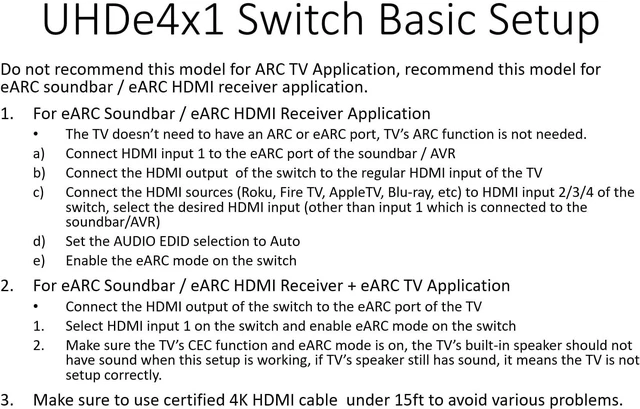
- UHDe4X1 has 4 HDMI inputs and 1 HDMI output; the HDMI input #1 should be connected to the HDMI eARC port of the sound bar or receiver for eARC audio application. Connect the HDMI source, such as a Blu-ray player to the HDMI input 2/3/4 of this switch. The HDMI audio signal from the selected HDMI input source can be extracted and sent to the eARC HDMI port of a sound bar or receiver from HDMI input #1 port. Make sure to use "Auto" setting for the audio EDID selection.
- If the HDMI output is connected to the ARC / eARC por
+
+
Overview
Specs
Reviews
Any questions? Our AI mode will help you find out quickly.
Try me now
This UHDe4X1 HDMI 2.0 4K@60Hz HDR Dolby Vision Switch is made to work with latest generation HDMI sound bar and receiver with an eARC or ARC HDMI port.
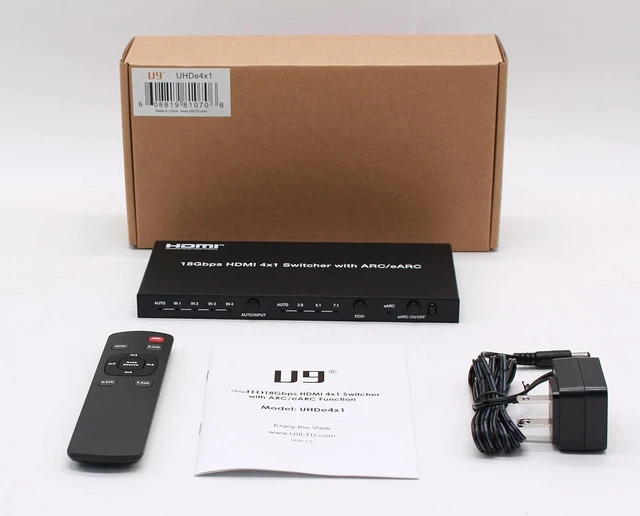
The package includes: the UHDe4X1 switch, 100V-240V AC to 5V DC power adapter with US plug, IR remote and user manual. Support lastest Apple TV with eARC function. This switch is HDMI v 2.0, if your HDMI source is HDMI v 2.1, such as PS5, make sure to disable v 2.1 video features to avoid no video problems.
UHDe4X1 has 4 HDMI inputs and 1 HDMI output; the HDMI input #1 should be connected to the HDMI eARC port of the sound bar or receiver for eARC audio application. Connect the HDMI source, such as a Blu-ray player to the HDMI input 2/3/4 of this switch. The HDMI audio signal from the selected HDMI input source can be extracted and sent to the eARC HDMI port of a sound bar or receiver from HDMI input #1 port. Make sure to use " Auto" setting for the audio EDID selection.
If the HDMI output is connected to the ARC / eARC port of the TV, then the TV can send ARC audio to the ARC or eARC port of the sound bar or receiver connected to HDMI input #1, when the eARC mode is enabled. When the audio signal is from the TV, make sure to select input 1 of the switch. Make sure to enable CEC and ARC mode on the TV for TV' s eARC application.
The TV doesn' t need to have ARC or eARC port to use this model. If the TV has ARC or eARC port, then just select input #1 and enable eARC mode, for the TV to send ARC audio; enable the eARC mode and select the desired input source (2/3/4) to extract HDMI audio for the sound bar or receiver.
eARC is backward compatible with ARC, so this model also supports ARC HDMI ports. When the eARC mode is not used / disabled, this switch can be used as a regular 4x1 switch; when the eARC mode is enabled, this switch can only be used as a 3x1 switch, because input #1 needs to be connected to the eARC port of the sound bar / receiver. The eARC audio extractor does not support the regular HDMI input of a sound bar, it must use the eARC HDMI port for audio extraction application.

The package includes: the UHDe4X1 switch, 100V-240V AC to 5V DC power adapter with US plug, IR remote and user manual. Support lastest Apple TV with eARC function. This switch is HDMI v 2.0, if your HDMI source is HDMI v 2.1, such as PS5, make sure to disable v 2.1 video features to avoid no video problems.
UHDe4X1 has 4 HDMI inputs and 1 HDMI output; the HDMI input #1 should be connected to the HDMI eARC port of the sound bar or receiver for eARC audio application. Connect the HDMI source, such as a Blu-ray player to the HDMI input 2/3/4 of this switch. The HDMI audio signal from the selected HDMI input source can be extracted and sent to the eARC HDMI port of a sound bar or receiver from HDMI input #1 port. Make sure to use " Auto" setting for the audio EDID selection.
If the HDMI output is connected to the ARC / eARC port of the TV, then the TV can send ARC audio to the ARC or eARC port of the sound bar or receiver connected to HDMI input #1, when the eARC mode is enabled. When the audio signal is from the TV, make sure to select input 1 of the switch. Make sure to enable CEC and ARC mode on the TV for TV' s eARC application.
The TV doesn' t need to have ARC or eARC port to use this model. If the TV has ARC or eARC port, then just select input #1 and enable eARC mode, for the TV to send ARC audio; enable the eARC mode and select the desired input source (2/3/4) to extract HDMI audio for the sound bar or receiver.
eARC is backward compatible with ARC, so this model also supports ARC HDMI ports. When the eARC mode is not used / disabled, this switch can be used as a regular 4x1 switch; when the eARC mode is enabled, this switch can only be used as a 3x1 switch, because input #1 needs to be connected to the eARC port of the sound bar / receiver. The eARC audio extractor does not support the regular HDMI input of a sound bar, it must use the eARC HDMI port for audio extraction application.
Warranty & Returns
Warranty, Returns, And Additional Information
Warranty
- Please contact the Seller directly for warranty information. Warranty information may also be found on the Manufacturer's website.
- CONTACT
Return Policies
- Return for refund within: 30 days
- Return for replacement within: 30 days
- This item is covered by Yongxian Pan Business Co., Limited Return Policy
Manufacturer Contact Info
- For a directory of all our manufacturers, please click below.
- Manufacturers Directory
LOADING...