Your Browsing History
- Free 30-day Returns
$34.99
Meet Your Seller
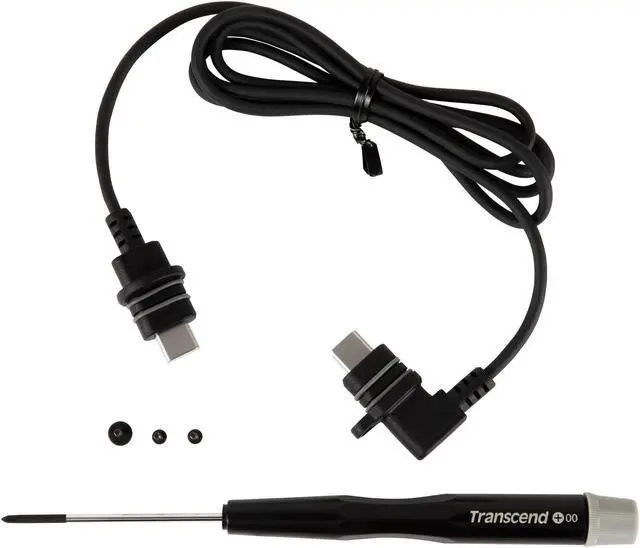
Transcend Accessory Kit TS-DBK3 for DrivePro Body - Cable and Screwdriver Model TS-DBK3
- Precision screwdriver set: This Transcend hand screwdriver and nutdriver set offers a precise and reliable solution for various home improvement tasks, ensuring optimal performance and durability.
- Versatile applications: With a wide range of compatible screw heads and nuts, this set is perfect for handling intricate tasks, assembling furniture, repairing electronics, and more, making it an essential addition to any toolbox.
- Ergonomic design: The ergonomic handle design provides a comfortable and secure grip, reducing hand fatigue and enhancing user control for prolonged use, ensuring efficiency and precision.
- Durable construction: Crafted with high-quality materials, these screwdrivers and nutdrivers are built to withstand tough usage, providing long-lasting performance and reliability for all your home improvement needs.
+
+
Overview
Specs
Reviews
Any questions? Our AI mode will help you find out quickly.
Try me now
This accessory kit (Transcend TS-DBK3) is designed specifically for the Transcend DrivePro Body 60 and 70 models. The kit contains all the accessories you need to make the most of your Transcend Body Cam 60 or 70:
- 1-meter wearable cable (replaces the cable from the tethered camera)
- Screws
- Screwdriver
These accessories help you get the most from your camera as it replaces the tethered cable from the original camera and body unit.
Quick installation:
Remove the screw from the DrivePro Body lens/unit
Disconnect the original cable from the lens/unit
Connect the new Accessory Kit (TS-DBK3) cable to the DrivePro Body
Tighten the new screw to the DrivePro Body
Note: Do not remove the O-ring from the cable. To avoid cable deformation, fasten the screw carefully

- 1-meter wearable cable (replaces the cable from the tethered camera)
- Screws
- Screwdriver
These accessories help you get the most from your camera as it replaces the tethered cable from the original camera and body unit.
Quick installation:
Remove the screw from the DrivePro Body lens/unit
Disconnect the original cable from the lens/unit
Connect the new Accessory Kit (TS-DBK3) cable to the DrivePro Body
Tighten the new screw to the DrivePro Body
Note: Do not remove the O-ring from the cable. To avoid cable deformation, fasten the screw carefully
Warranty & Returns
Warranty, Returns, And Additional Information
Warranty
- Please contact the Seller directly for warranty information. Warranty information may also be found on the Manufacturer's website.
- CONTACT
Return Policies
- Return for refund within: 30 days
- Return for replacement within: 30 days
- This item is covered by Hot Deals 4 Less Return Policy
Manufacturer Contact Info
- For a directory of all our manufacturers, please click below.
- Manufacturers Directory
LOADING...