


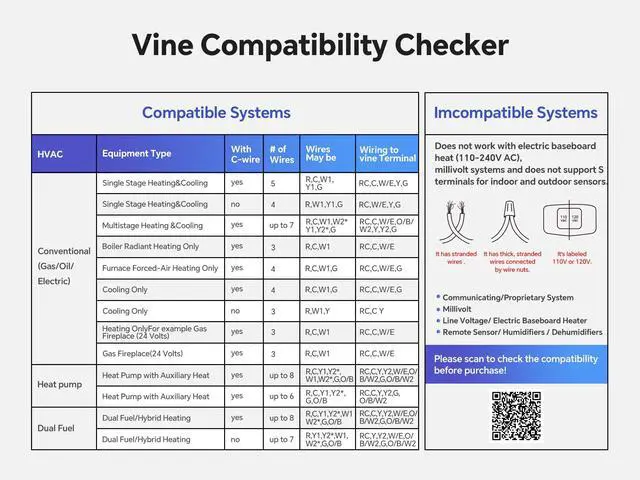


Vine Thermostat Compatibility Checker
Merchant Video


My thermostat is not heating or cooling, what should I do?
Assuming that you choose Heat Pump, please check whether your cooling or heating is selected correctly, you can try to "Reverse Valve Energize" inside the cool and heat to switch each other to see whether it is back to normal!
If the temperature deviates too much, is there any way to calibrate my displayed temperature?
Try to enter the device sensor setting interface to adjust the temperature. Path: Menu-->Settings-->Advanced-->Sensor Calibration, and adjust the Current Reading temperature to the temperature at which the thermometer is left standing.
The thermostat is locked and I can't edit/modify the thermostat, how can I unlock it?
Please click the "O" button of the thermostat 3 times continuously or remove the thermostat from the wall and hang it up again to complete the unlocking.
How can I set up a Filter notification or warning on the Vine?
Your filter warning is built into the thermostat and it defaults to 6 months of activity of the unit. A filter icon will appear on the thermostat when it is time to change it. Setting the filter change reminder: Menu-> Setting -> Advanced -> Runtime.
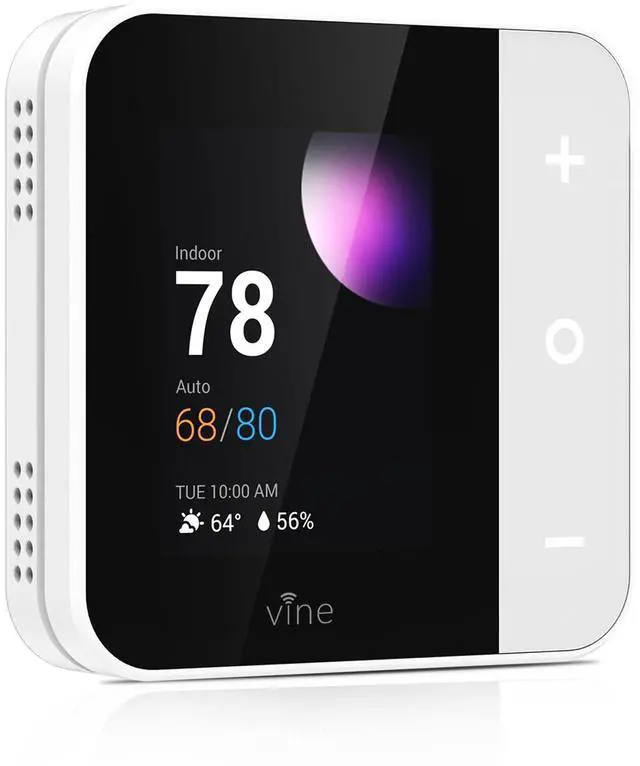
vine Smart Thermostat for House
 Smart Thermostat TJ-550 |  Smart Thermostat TJ-560 |  Smart Thermostat TJ-560 |  Smart Thermostat TJ-919T | |
|---|---|---|---|---|
Customer Reviews | — | — | — | — |
Price | — | — | — | — |
Screen Size | 2.8" | 4.0" | 4.0" | 4.3" |
Screen Operation | 3 Touch Buttons | Touchscreen | Touchscreen | Touchscreen |
Backshell Color | White | White | Grey | White |
Optional Wallpaper | ? | ? | ? | ? |
Nightlight | ? | ? | ? | ? |


Vine Programmable Thermostat
Smart control your home's temperature with the Vine Smart Thermostats.

Vine Thermostat Compatibility Checker
Merchant Video

User-friendly Design
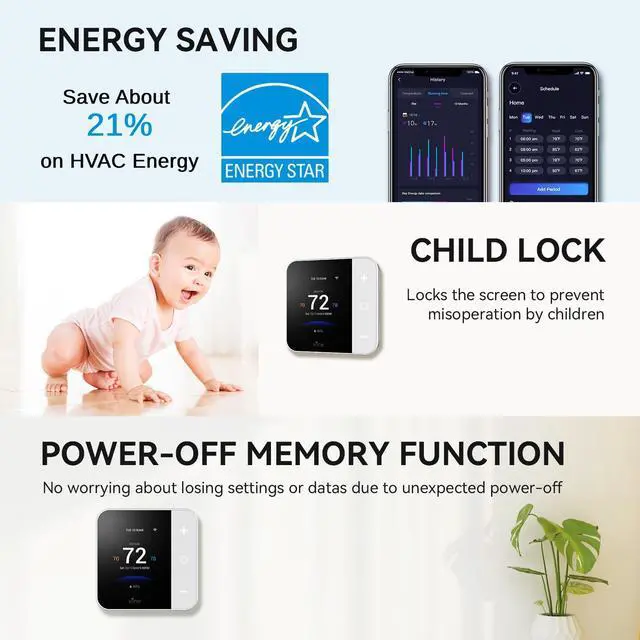
Child-lock


Smooth touchscreen, easy to operate
Locks the screen from APP, prevent mis-operation by children
My thermostat is not heating or cooling, what should I do?
Assuming that you choose Heat Pump, please check whether your cooling or heating is selected correctly, you can try to "Reverse Valve Energize" inside the cool and heat to switch each other to see whether it is back to normal!
If the temperature deviates too much, is there any way to calibrate my displayed temperature?
Try to enter the device sensor setting interface to adjust the temperature. Path: Menu-->Settings-->Advanced-->Sensor Calibration, and adjust the Current Reading temperature to the temperature at which the thermometer is left standing.
The thermostat is locked and I can't edit/modify the thermostat, how can I unlock it?
Please click the "O" button of the thermostat 3 times continuously or remove the thermostat from the wall and hang it up again to complete the unlocking.
How can I set up a Filter notification or warning on the Vine?
Your filter warning is built into the thermostat and it defaults to 6 months of activity of the unit. A filter icon will appear on the thermostat when it is time to change it. Setting the filter change reminder: Menu-> Setting -> Advanced -> Runtime.
vine Smart Thermostat for House
Smart Thermostat TJ-550 | Smart Thermostat TJ-560 | Smart Thermostat TJ-560 | Smart Thermostat TJ-919T |
|---|---|---|---|
| Customer Reviews | |||
| — | — | — | — |
| Price | |||
| — | — | — | — |
| Screen Size | |||
| 2.8" | 4.0" | 4.0" | 4.3" |
| Screen Operation | |||
| 3 Touch Buttons | Touchscreen | Touchscreen | Touchscreen |
| Backshell Color | |||
| White | White | Grey | White |
| Optional Wallpaper | |||
| ? | ? | ? | ? |
| Nightlight | |||
| ? | ? | ? | ? |