




 here!
here!
I’m your shopping assistant for PC builds, upgrades, and everything tech.
Got questions? Ask away!
Start a conversation
here!
I’m your shopping assistant for PC builds, upgrades, and everything tech.
Got questions? Ask away!
Start a conversation



Any questions? Ask CelesteSM will help you find out quickly.
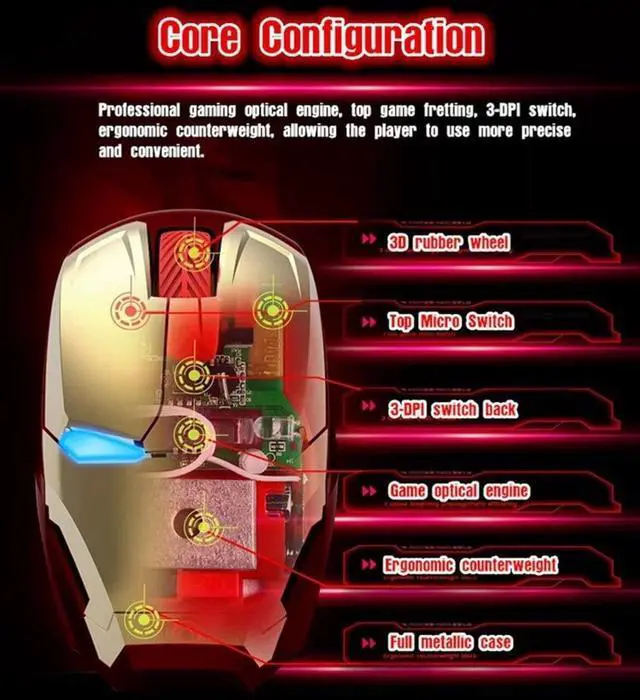
A Mikayoo Wireless Mouse takes you far away from the everyday. All the way to your happy place. Lasts up to 3 months on 2 batteries. Responds up to 50 ft. with a nano wireless receiver. Rips through web pages and docs with precision scrolling.
Plug and Play:
No additional software or driver installation is needed, wherever you go, just simply plug in the tiny nano receiver and start using your mouse right away.
2.4 G wireless transmission technology:
Enjoy the fast data transfer at the convenience of wireless technology
100 millions clicks Life:
Split design with100 million times longer using life
Compatibility:
Windows 11/ 10 / 8 / 7 / Vista / XP / 2000
Linux
Mac OS X system etc.
Wireless rated voltage: 3.0 V
Battery: 2 * AAA (not included)
Mouse operation instructions:
1. Open the battery warehouse, load 2*AAA batteries, remove the USB receiver in the battery warehouse, cover the battery warehouse, and enter the boot mode.
2. Insert the USB receiver into the computer's free USB port. The first time you install the computer, you will be prompted to find an available USB device, and it will be installed automatically. You can use the mouse normally.
3. When the mouse is not operated for 3 minutes, it will automatically enter the standby state. It cannot be used. You can click the left mouse button to activate the mouse.
4. If the mouse has not been used for a long time, please remove the battery in the battery warehouse to prevent the battery from leaking and damaging the mouse.
Package including:
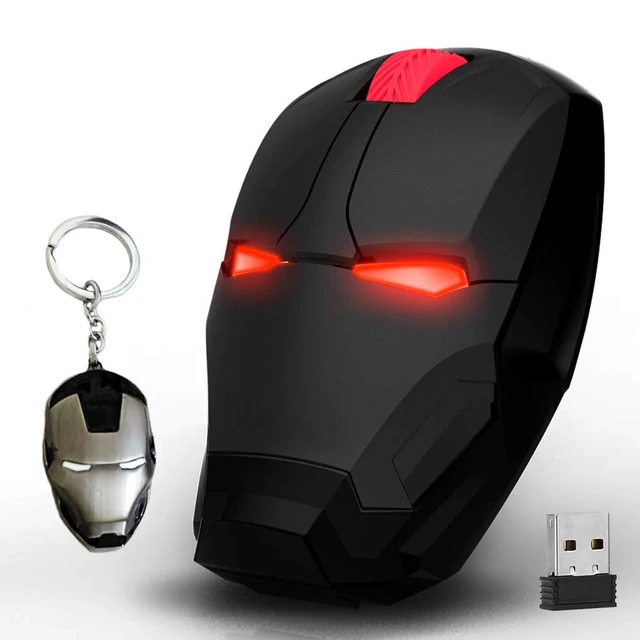
Wireless Mouse * 1
A USB Receiver * 1
A keychain * 1


