






- Note:
- Please remove the protective film before use.
- The PD charger will only output voltage after communication. When testing the PD charger, the device must be connected to the "USBC OUT".
- The working voltage of the USB resistor load should not exceed 5V, and it should not be used for more than 2 minutes without active heat dissipation. When working, it will generate high temperature and do not touch it. It is normal for the high temperature to cause the green layer of the resistor to fall off.
- Please read the user manual carefully before usage.
- Due to manual measurement, there may be deviation.
- Due to lighting, the picture and material object may slightly differ in color, please in kind prevail.
The Type-C PD charger is not displayed when plugged into the USB meter:
PD is a two-way communication charging protocol. The charger must establish communication with the powered device to output voltage, so it is not displayed when plugged into the meter alone.
Type-C PD is not displayed when plugged into electrical equipment:
most of the Type-C line PD communication pins CC1 and CC2 are only connected to one of them, resulting in failure to communicate and power on. Solution Turn over the data cable and try again. Try to use the same brand of Type-C cable.
Most of the CC1 and CC2 pins of the Type-C line PD communication are only connected to one of them, causing the end of the meter to be plugged into the instrument and it is impossible to communicate and power. The solution is to turn any one of the plugs into the meter and try again. Try to use the Type-C line of the same brand.

- Voltage/Current measurement range: 3.60V~32.00V/0.00~5.10A
- USB load : 5V 1A/2A/3A Limit 15W (do not exceed the use)
- Capacity/Power accumulation range: 0~99999mAh/0~999.99Wh
- Power measurement range: 000.00~163.00W
- Impedance measurement range: 1~999.9O
- Temperature measurement range: 0~80°C
- Timing range: 999hours 59minutes 59seconds
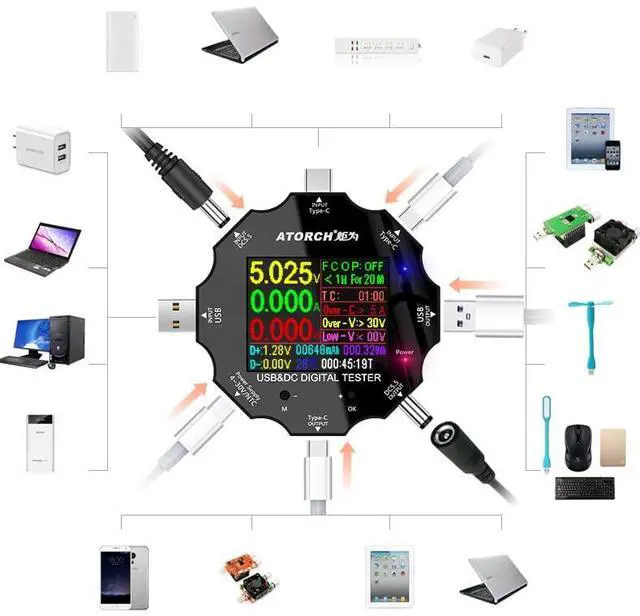
- Input interface: Type-C/Micro USB/USB
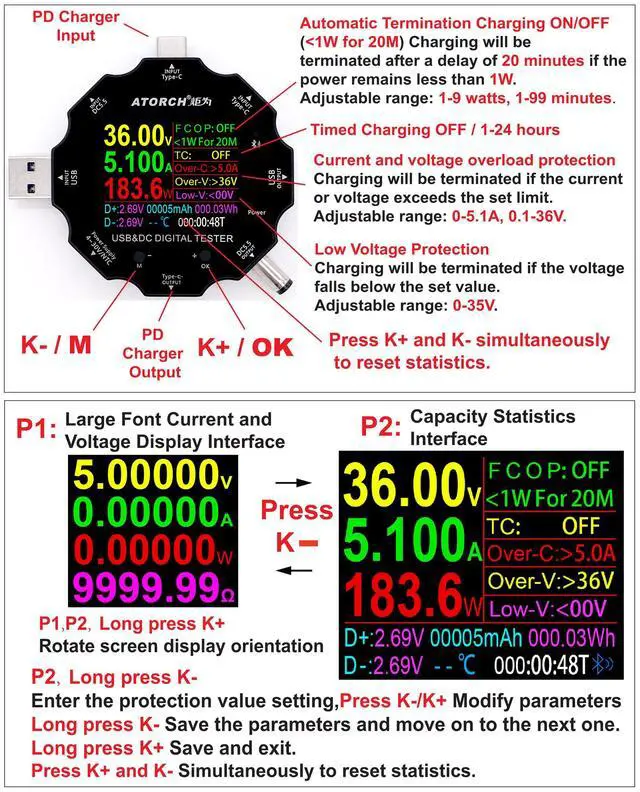
- Timing charging reminder setting: countdown 24-hour arbitrary setting
- USB D+ D- Voltage range: 0V~2.99V
- Mobile phone full charging reminder threshold parameters: <2W/0.5 hour
- Refresh time: > 500mS/times
- Measurement rate: about 0.5 times/sec
- Alarm mode: siren sound+ prompt display
- Screen: 1.8inches 128*160 color screen
- Self-consumption current: <0.025A
- Operating temperature: -10~+60°C
- Item size/weight(tester only): 6.2*6.2*1.4cm / 2.44*2.44*0.55in /34g / 1.19oz
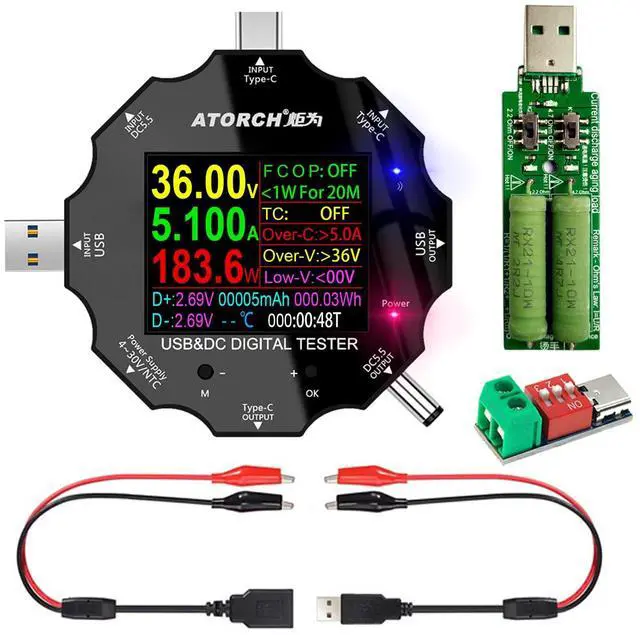
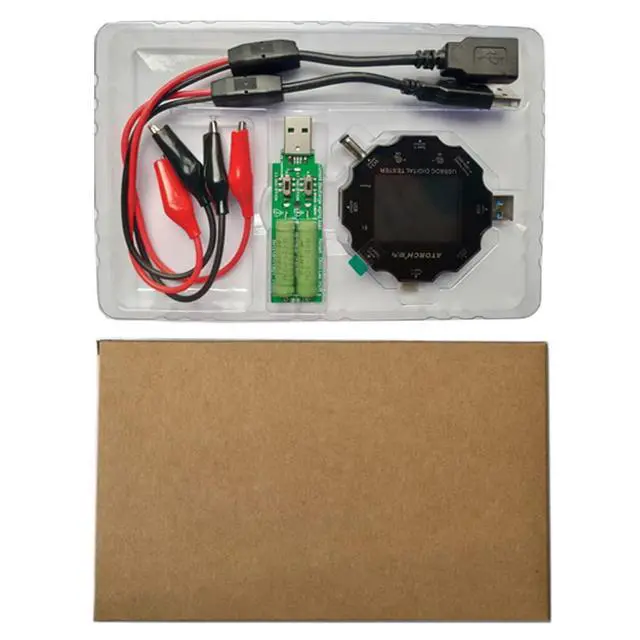
- Packing List: USB Tester X 1,Crocodile Clip X 2, USB Load X 1, Fast Charging Protocol Trigger X 1

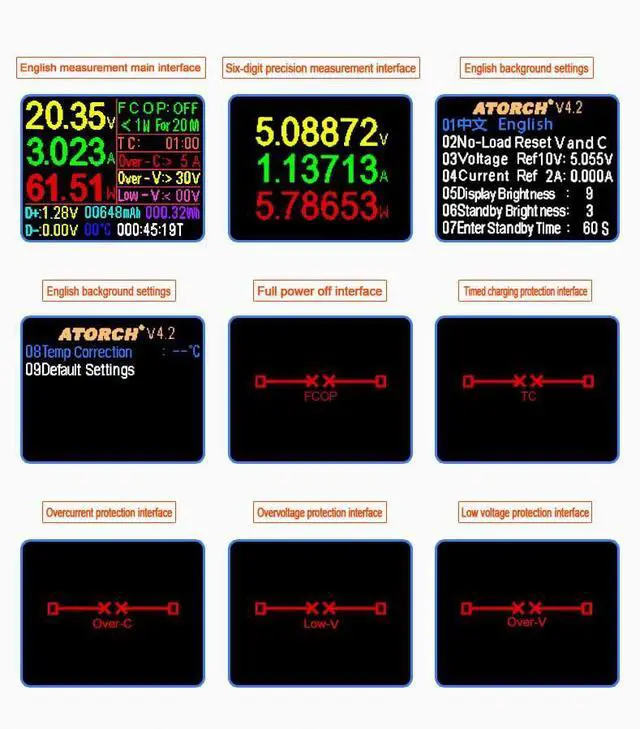
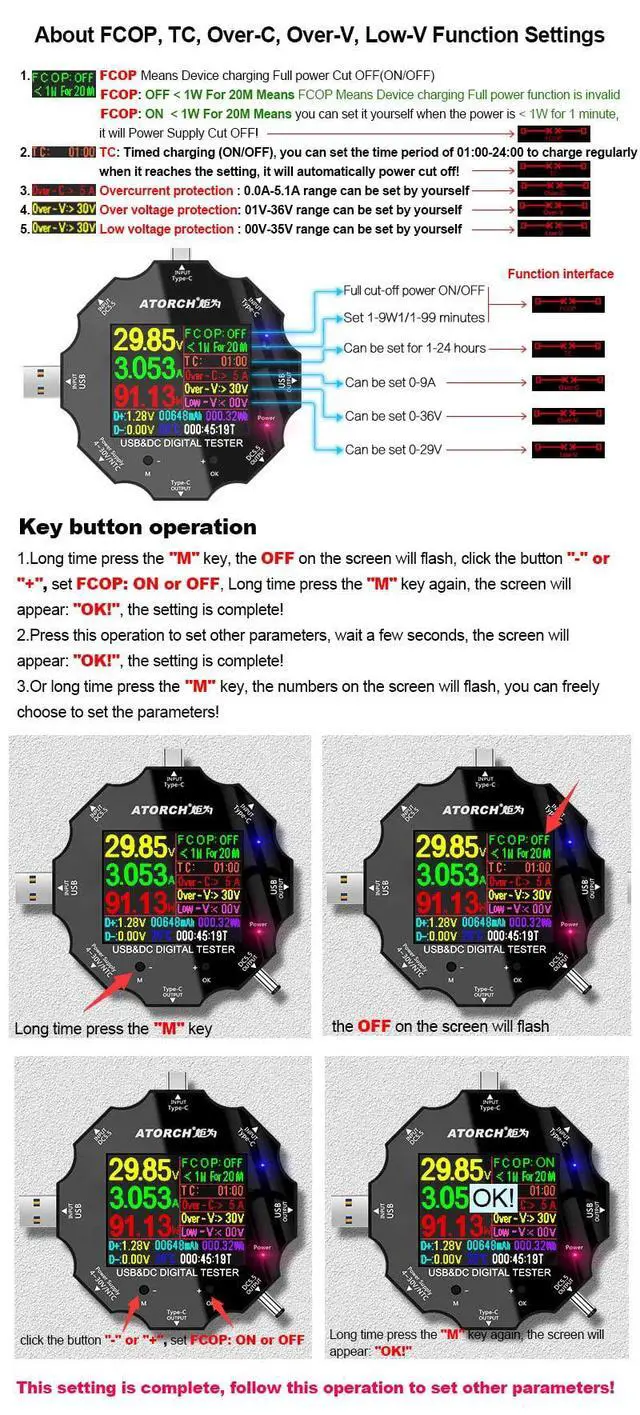
How to Adjust Screen Brightness
- The device is disconnected from the power input,
- Press and hold the "M" key,
- Plug in the power supply and the setup menu will appear.
- Press + to select 05 Display Brightness
- Press and hold the + key until the set parameter value flashes.
- Press the + key to write the parameters you need.
- Long press the + key to save.
- Disconnect power and restart.


- Note:
- Please remove the protective film before use.
- The PD charger will only output voltage after communication. When testing the PD charger, the device must be connected to the "USBC OUT".
- The working voltage of the USB resistor load should not exceed 5V, and it should not be used for more than 2 minutes without active heat dissipation. When working, it will generate high temperature and do not touch it. It is normal for the high temperature to cause the green layer of the resistor to fall off.
- Please read the user manual carefully before usage.
- Due to manual measurement, there may be deviation.
- Due to lighting, the picture and material object may slightly differ in color, please in kind prevail.
The Type-C PD charger is not displayed when plugged into the USB meter:
PD is a two-way communication charging protocol. The charger must establish communication with the powered device to output voltage, so it is not displayed when plugged into the meter alone.
Type-C PD is not displayed when plugged into electrical equipment:
most of the Type-C line PD communication pins CC1 and CC2 are only connected to one of them, resulting in failure to communicate and power on. Solution Turn over the data cable and try again. Try to use the same brand of Type-C cable.
Most of the CC1 and CC2 pins of the Type-C line PD communication are only connected to one of them, causing the end of the meter to be plugged into the instrument and it is impossible to communicate and power. The solution is to turn any one of the plugs into the meter and try again. Try to use the Type-C line of the same brand.
- Voltage/Current measurement range: 3.60V~32.00V/0.00~5.10A
- USB load : 5V 1A/2A/3A Limit 15W (do not exceed the use)
- Capacity/Power accumulation range: 0~99999mAh/0~999.99Wh
- Power measurement range: 000.00~163.00W
- Impedance measurement range: 1~999.9O
- Temperature measurement range: 0~80°C
- Timing range: 999hours 59minutes 59seconds
- Input interface: Type-C/Micro USB/USB
- Timing charging reminder setting: countdown 24-hour arbitrary setting
- USB D+ D- Voltage range: 0V~2.99V
- Mobile phone full charging reminder threshold parameters: <2W/0.5 hour
- Refresh time: > 500mS/times
- Measurement rate: about 0.5 times/sec
- Alarm mode: siren sound+ prompt display
- Screen: 1.8inches 128*160 color screen
- Self-consumption current: <0.025A
- Operating temperature: -10~+60°C
- Item size/weight(tester only): 6.2*6.2*1.4cm / 2.44*2.44*0.55in /34g / 1.19oz
- Packing List: USB Tester X 1,Crocodile Clip X 2, USB Load X 1, Fast Charging Protocol Trigger X 1
How to Adjust Screen Brightness
- The device is disconnected from the power input,
- Press and hold the "M" key,
- Plug in the power supply and the setup menu will appear.
- Press + to select 05 Display Brightness
- Press and hold the + key until the set parameter value flashes.
- Press the + key to write the parameters you need.
- Long press the + key to save.
- Disconnect power and restart.