

Your Browsing History
- Free 30-day Returns
$137.89
Ships from China.


Meet Your Seller

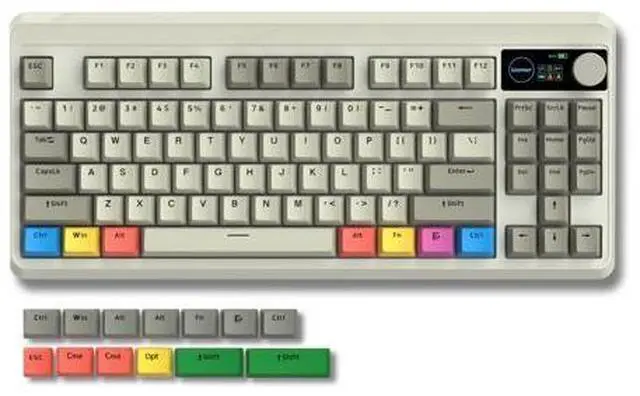
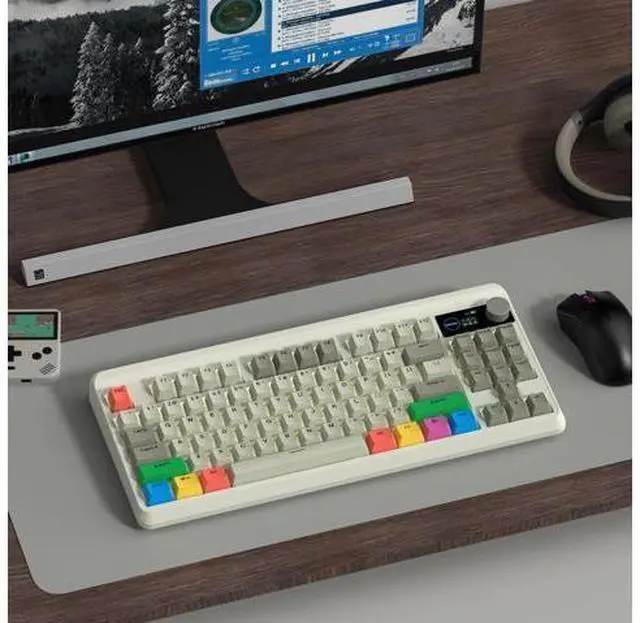


Womier Retro 75% Gaming Keyboard with OLED Display&Knob, M87 Pro Bluetooth 5.1/2.4GHz /USB-C Wireless Mechanical Keyboard with Hot-Swappable Custom Switch, Compact Gamer RGB Keyboard-Grey
Limited time offer, ends 09/28 By PixelCore
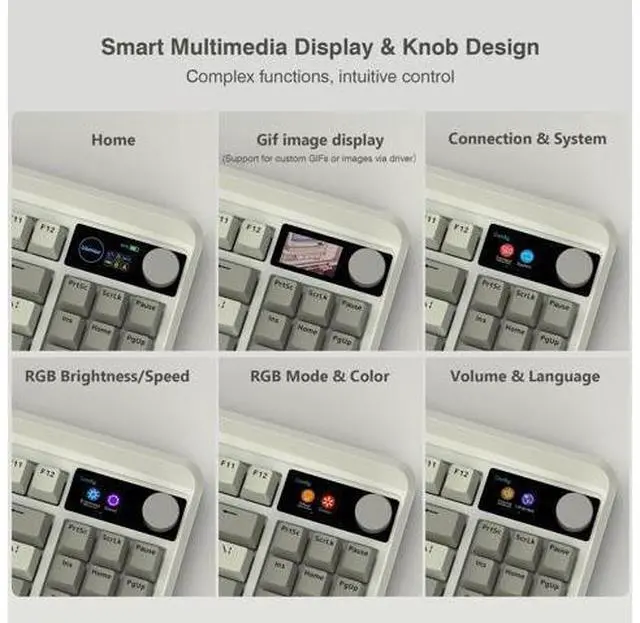
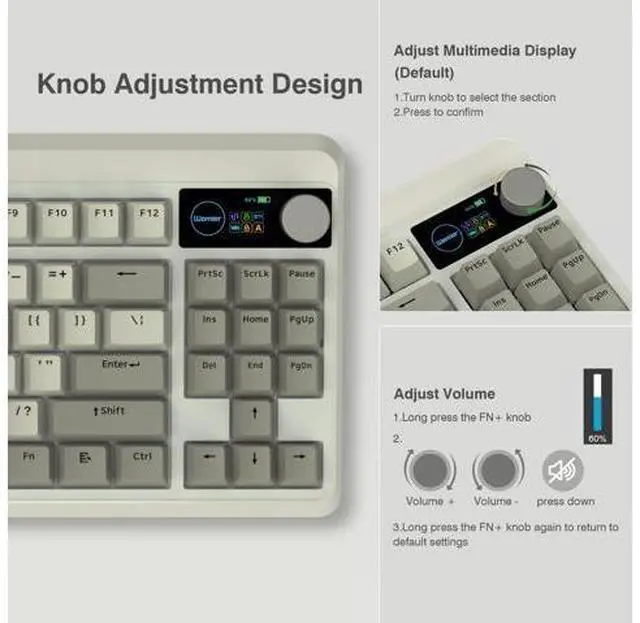
- Smart OLED Color Display and Knob DesignWomier M87 PRO gaming keyboard built-in smart OLED color display can intuitively display the keyboard status, including custom gif image, caps lock, connection mode, WIN/MAC, battery. Built-in mechanical knobs allow quick adjustment of complex functions: connection, system, backlit brightness/speed, RGB mode/color, volume & language.
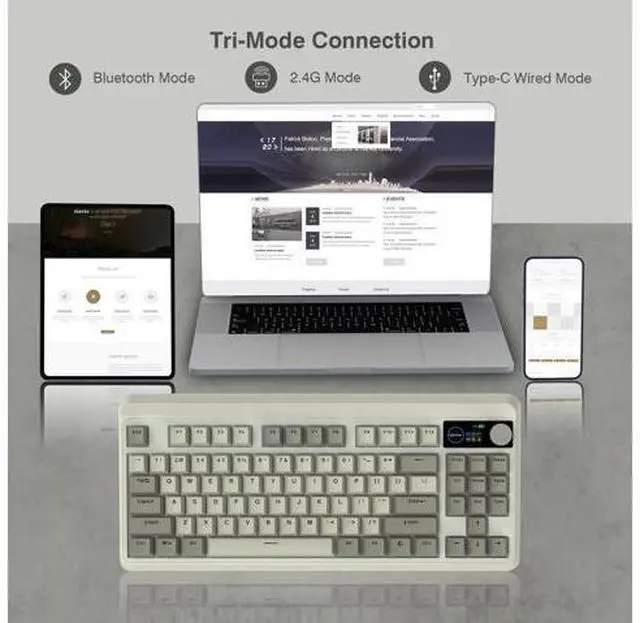
- 3-Mode Connection Wireless KeyboardThe M87 Pro TKL mechanical keyboard gears tri-mode connectivity technology, USB-C wired, BT 5.1 and 2.4Ghz wireless modes, which can be easily switched not only with key combinations, but also by knobs.
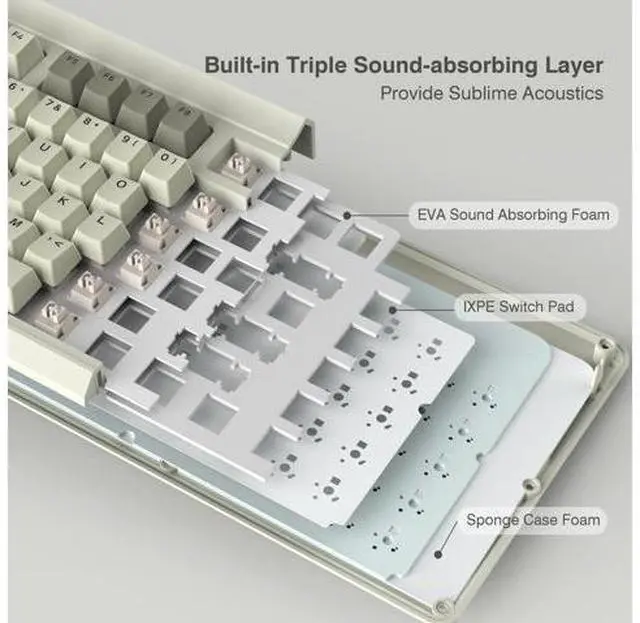
- Unique silencing Installation DesignThis custom keyboard has built-in triple absorption layers, including an EVA sound absorbing foam, an IXPE switch pad and the sponge case Foam, In addition, silencer foam installed under the space bar, which increase the rebound speed of the keys while reducing vibration, resulting in improved key sound for a unique typing feel.
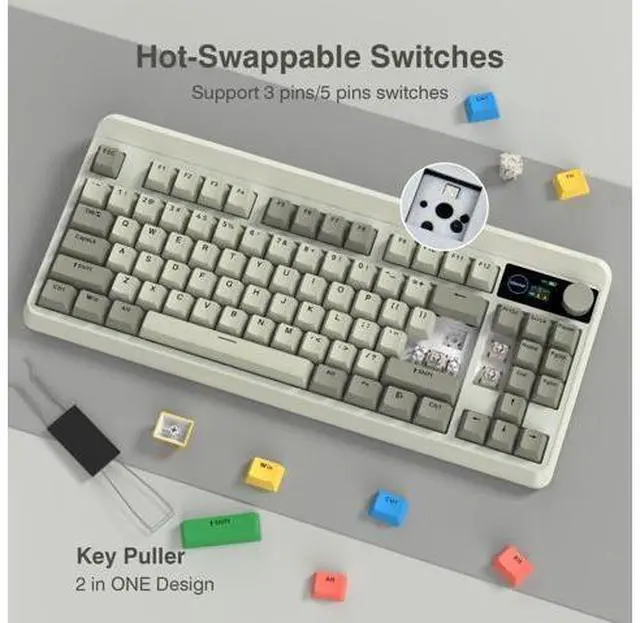
- Hot-Swappable Custom KeyboardYou can alter every switch on the M87 pro keyboard without the need to solder. Hot-swap PCB is compatible with almost all 3-pin/5-pin switches on the market, personalize your typing experience with ease.
+
+
Overview
Specs
Reviews

Any questions? Our AI mode will help you find out quickly.
Try me now
How to use and switch 2.4G hz & BT mode? 2.4G hz mode: Step1. Switch Power On. Step2. Insert the wireless dongle to a USB port on the PC. Step3. Turn the knob to the 2.4G icon, short press the knob to select 2.4G hz mode.
BT mode: Step 1. Switch Power On. Step 2. Turn the knob to select the connection mode and press the knob to confirm it. Step 3. Turn the knob to the BT1 icon, long press the knob to enter BT1 pairing mode, and the display shows "BT1 Pairing". Step 4 Turn on the bluetooth of computer/phone, then connect the device. Previous page Next page 1 Tri-Mode Connection 2 3-Layer Dampening 3 RGB Backlight 4 Pro Driver 5 Outemu White Switch Long Battery Life Built in a 3000 mAh rechargeable battery, last up to 7 days normal use (count 8hrs per day). Adjustable keyboard angles Comes with 1 adjustable keyboard feet which can give you the comfort angle you need for marathon gaming sessions. Womier Mechanical Gaming Keyboard Womier WK75 Womier WK75 Womier WK61 PRO Redragon K742 Redragon K742 Redragon K742 Redragon K742 Customer Reviews Price Layout 75% Layout 75% Layout 60% Layout 98% Layout 98% Layout 98% Layout 98% Layout Connection 2.4G /Bluetooth/Type-C wired 2.4G /Bluetooth/Type-C wired 2.4G /Bluetooth/Type-C wired 2.4G /Bluetooth/Type-C wired 2.4G /Bluetooth/Type-C wired 2.4G /Bluetooth/Type-C wired 2.4G /Bluetooth/Type-C wired Switch Type Hot Swappable Hot Swappable Hot Swappable Hot Swappable Hot Swappable Hot Swappable Hot Swappable Keyboard Switches Linear Switch Linear Switch Linear Switch Linear Switch Linear Switch Linear Switch Linear Switch Backlit RGB RGB RGB RGB RGB RGB RGB DIY Software??????? Previous page About COSTOM Founded in 2018, a sub-brand of Womier, a professional manufacturer integrating design, production and sales of custom keyboards and related peripherals.
We are committed to providing each customer with better service. We focuses on providing our customers with a better user experience. We will bring more customizable theme peripherals products, letting you have fun in mechanical keyboards! What's New M87 Pro Series New TKL Mechanical Keyboards Hot SK65 Mechanical Keyboard Best-seller Keycaps New PBT Keycaps Custom Keycaps Best-seller Keycaps Outlets Deal Carol Sea Theme Peripherals Outlets Deals New Gaming Mouse WK87 Mechanical Keyboard SK65 Aluminum Keyboard M87 Wired Keyboard Mouse Combo G705 Gaming Mouse Custom Keycaps Custom Keycaps Next page How to use and switch 2.4G hz & BT mode? 2.4G hz mode: Step1. Switch Power On. Step2. Insert the wireless dongle to a USB port on the PC. Step3. Turn the knob to the 2.4G icon, short press the knob to select 2.4G hz mode.
BT mode: Step 1. Switch Power On. Step 2. Turn the knob to select the connection mode and press the knob to confirm it. Step 3. Turn the knob to the BT1 icon, long press the knob to enter BT1 pairing mode, and the display shows "BT1 Pairing". Step 4 Turn on the bluetooth of computer/phone, then connect the device. 2 Tri-Mode Connection 3 3-Layer Dampening 4 RGB Backlight 5 Pro Driver 6 Outemu White Switch Long Battery Life Built in a 3000 mAh rechargeable battery, last up to 7 days normal use (count 8hrs per day). Adjustable keyboard angles Comes with 1 adjustable keyboard feet which can give you the comfort angle you need for marathon gaming sessions. Womier Mechanical Gaming Keyboard Womier WK75 Womier WK75 Womier WK61 PRO Redragon K742 Redragon K742 Redragon K742 Redragon K742 Customer Reviews Customer Reviews Customer Reviews Customer Reviews Customer Reviews Customer Reviews Customer Reviews Price Price Price Price Price Price Price Layout Layout Layout Layout Layout Layout Layout 75% Layout 75% Layout 60% Layout 98% Layout 98% Layout 98% Layout 98% Layout Connection Connection Connection Connection Connection Connection Connection 2.4G /Bluetooth/Type-C wired 2.4G /Bluetooth/Type-C wired 2.4G /Bluetooth/Type-C wired 2.4G /Bluetooth/Type-C wired 2.4G /Bluetooth/Type-C wired 2.4G /.
..
BT mode: Step 1. Switch Power On. Step 2. Turn the knob to select the connection mode and press the knob to confirm it. Step 3. Turn the knob to the BT1 icon, long press the knob to enter BT1 pairing mode, and the display shows "BT1 Pairing". Step 4 Turn on the bluetooth of computer/phone, then connect the device. Previous page Next page 1 Tri-Mode Connection 2 3-Layer Dampening 3 RGB Backlight 4 Pro Driver 5 Outemu White Switch Long Battery Life Built in a 3000 mAh rechargeable battery, last up to 7 days normal use (count 8hrs per day). Adjustable keyboard angles Comes with 1 adjustable keyboard feet which can give you the comfort angle you need for marathon gaming sessions. Womier Mechanical Gaming Keyboard Womier WK75 Womier WK75 Womier WK61 PRO Redragon K742 Redragon K742 Redragon K742 Redragon K742 Customer Reviews Price Layout 75% Layout 75% Layout 60% Layout 98% Layout 98% Layout 98% Layout 98% Layout Connection 2.4G /Bluetooth/Type-C wired 2.4G /Bluetooth/Type-C wired 2.4G /Bluetooth/Type-C wired 2.4G /Bluetooth/Type-C wired 2.4G /Bluetooth/Type-C wired 2.4G /Bluetooth/Type-C wired 2.4G /Bluetooth/Type-C wired Switch Type Hot Swappable Hot Swappable Hot Swappable Hot Swappable Hot Swappable Hot Swappable Hot Swappable Keyboard Switches Linear Switch Linear Switch Linear Switch Linear Switch Linear Switch Linear Switch Linear Switch Backlit RGB RGB RGB RGB RGB RGB RGB DIY Software??????? Previous page About COSTOM Founded in 2018, a sub-brand of Womier, a professional manufacturer integrating design, production and sales of custom keyboards and related peripherals.
We are committed to providing each customer with better service. We focuses on providing our customers with a better user experience. We will bring more customizable theme peripherals products, letting you have fun in mechanical keyboards! What's New M87 Pro Series New TKL Mechanical Keyboards Hot SK65 Mechanical Keyboard Best-seller Keycaps New PBT Keycaps Custom Keycaps Best-seller Keycaps Outlets Deal Carol Sea Theme Peripherals Outlets Deals New Gaming Mouse WK87 Mechanical Keyboard SK65 Aluminum Keyboard M87 Wired Keyboard Mouse Combo G705 Gaming Mouse Custom Keycaps Custom Keycaps Next page How to use and switch 2.4G hz & BT mode? 2.4G hz mode: Step1. Switch Power On. Step2. Insert the wireless dongle to a USB port on the PC. Step3. Turn the knob to the 2.4G icon, short press the knob to select 2.4G hz mode.
BT mode: Step 1. Switch Power On. Step 2. Turn the knob to select the connection mode and press the knob to confirm it. Step 3. Turn the knob to the BT1 icon, long press the knob to enter BT1 pairing mode, and the display shows "BT1 Pairing". Step 4 Turn on the bluetooth of computer/phone, then connect the device. 2 Tri-Mode Connection 3 3-Layer Dampening 4 RGB Backlight 5 Pro Driver 6 Outemu White Switch Long Battery Life Built in a 3000 mAh rechargeable battery, last up to 7 days normal use (count 8hrs per day). Adjustable keyboard angles Comes with 1 adjustable keyboard feet which can give you the comfort angle you need for marathon gaming sessions. Womier Mechanical Gaming Keyboard Womier WK75 Womier WK75 Womier WK61 PRO Redragon K742 Redragon K742 Redragon K742 Redragon K742 Customer Reviews Customer Reviews Customer Reviews Customer Reviews Customer Reviews Customer Reviews Customer Reviews Price Price Price Price Price Price Price Layout Layout Layout Layout Layout Layout Layout 75% Layout 75% Layout 60% Layout 98% Layout 98% Layout 98% Layout 98% Layout Connection Connection Connection Connection Connection Connection Connection 2.4G /Bluetooth/Type-C wired 2.4G /Bluetooth/Type-C wired 2.4G /Bluetooth/Type-C wired 2.4G /Bluetooth/Type-C wired 2.4G /Bluetooth/Type-C wired 2.4G /.
..
Warranty & Returns
Warranty, Returns, And Additional Information
Warranty
- Please contact the Seller directly for warranty information. Warranty information may also be found on the Manufacturer's website.
- CONTACT
Return Policies
- Return for refund within: 30 days
- Return for replacement within: 30 days
- This item is covered by PixelCore Return Policy
Manufacturer Contact Info
- For a directory of all our manufacturers, please click below.
- Manufacturers Directory
LOADING...