










How to set the day of the week?
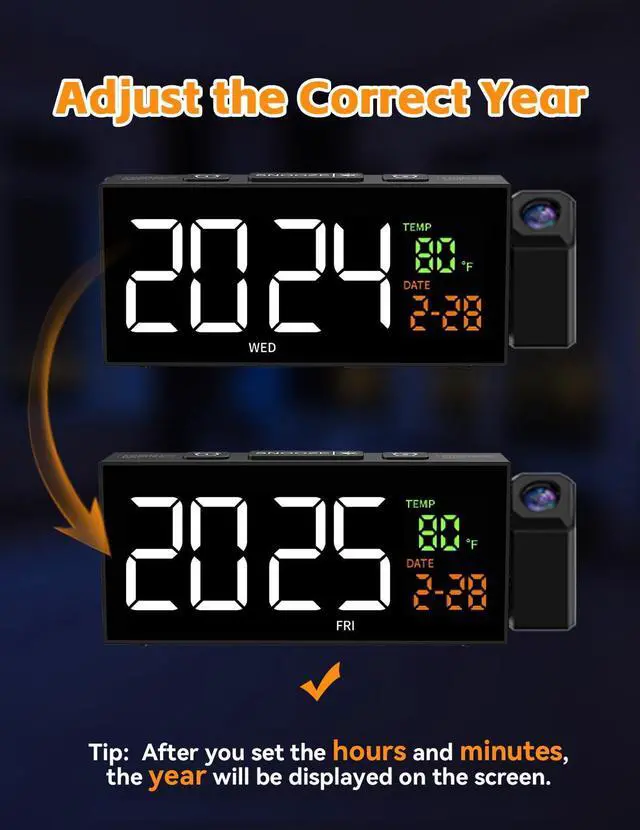
If you set the correct year and date, the day of the week will be accurate. Tip: After setting the hours and minutes, the year will be displayed on the screen.
How to set the date and time? (Upper Half)
Long press the [set] button, the "Hour" will blink
1.Press the [+] or [-] button to adjust the hour, press the [Set] button to save,
2.The "Minute" will blink. Press the [+] or [-] button to adjust the minute, press [Set] button to save.
How to set the date and time? (Lower Half)
3. The display will show "Year". Press the [+] or [-] button to adjust the year and press the [Set] button to save.
4. the "Date" will blink. Press the [+] or [-] button to adjust the date and press the [Set] button to save.
Time setting is done.
How to set the alarm? (Upper Half)
Long press the [Alarm] button, the "Hour" will blink
Press the [+] or [-] button to adjust the hour, press the [Alarm] button to save;
The "Minute" will blink. Press the [+] or [-] button to adjust the minute, press [Alarm] button to save
How to set the alarm? (Lower Half)
Then, the Alarm Modes will blink. Press the [+] or [-] button to adjust:
1-5: the alarm will ring from Monday to Friday
1-7: the alarm will ring from Monday to Sunday
6-7: the alarm will ring from Saturday to Sunday
Press the [Alarm] button to save.


How to set the day of the week?
If you set the correct year and date, the day of the week will be accurate. Tip: After setting the hours and minutes, the year will be displayed on the screen.
How to set the date and time? (Upper Half)
Long press the [set] button, the "Hour" will blink
1.Press the [+] or [-] button to adjust the hour, press the [Set] button to save,
2.The "Minute" will blink. Press the [+] or [-] button to adjust the minute, press [Set] button to save.
How to set the date and time? (Lower Half)
3. The display will show "Year". Press the [+] or [-] button to adjust the year and press the [Set] button to save.
4. the "Date" will blink. Press the [+] or [-] button to adjust the date and press the [Set] button to save.
Time setting is done.
How to set the alarm? (Upper Half)
Long press the [Alarm] button, the "Hour" will blink
Press the [+] or [-] button to adjust the hour, press the [Alarm] button to save;
The "Minute" will blink. Press the [+] or [-] button to adjust the minute, press [Alarm] button to save
How to set the alarm? (Lower Half)
Then, the Alarm Modes will blink. Press the [+] or [-] button to adjust:
1-5: the alarm will ring from Monday to Friday
1-7: the alarm will ring from Monday to Sunday
6-7: the alarm will ring from Saturday to Sunday
Press the [Alarm] button to save.


