Your Browsing History
Meet Your Seller
Visit EmpressTech Store
FOLLOW
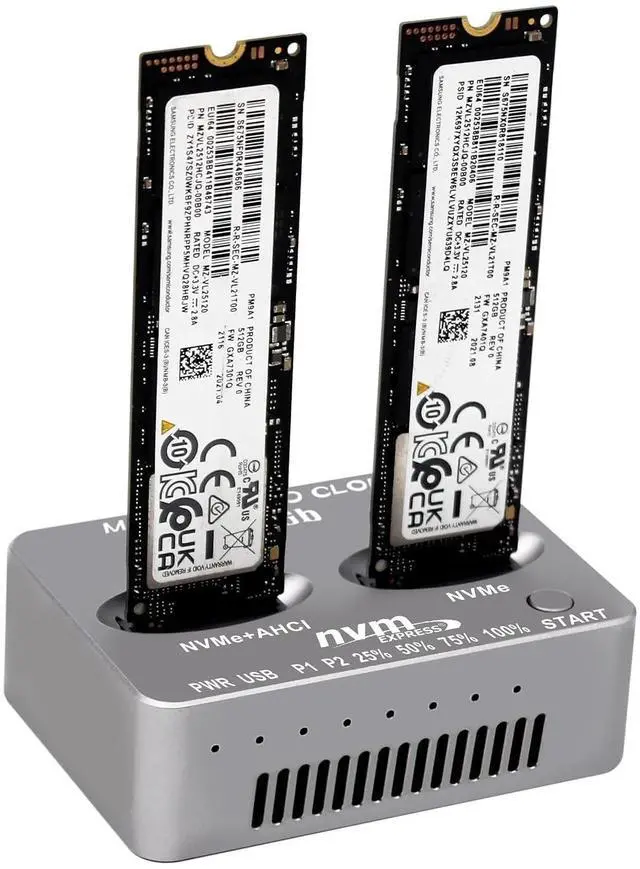
M2 NVMe Duplicator, Dual-Bay Offline Cloner, USB C to M.2 20Gbps Docking Station, M.2 PCIe AHCI SSD Reader for Both (M Key, B+M Key) NGFF SSD Enclosure (Need Extra AC/PD Power)
- Dual-Function M.2 Duplicator: M.2 Dual-Bay Duplicator can not only be used as general external SSD Reader/Writer, but also as an Offline M.2 PCIe Achi/NVMe Duplicator to clone data between Two SSDs by one-click without a computer; One Click Offline Cloner Operation: Steps: 1.Connect the AC/PD Power Adapter after source SSD (into left P1 bay) and Target SSD (into right P2 bay) Inserted, 2. Press power on button, P1 P2 indicators shows that dual SSD are recognized. 3. Press Start Button for about 5 seconds till all of the Percent Progress Indicators flash simultaneously, release the Button. 4. Then re-click the Button at once again, the percent process indicators flash sequentially, Clone will start 5. after all four progress indicators on, Clone is completed; Cooling Design for Stable Performance: Designed with aluminium Case and side ventilation cooling Fan cutouts which can make SSD cloning kit enhances airflow to mitigate heat buildup during prolonged cloning tasks; Important Operating Notes: 1. The Temperature of the entire Operating SSD may exceed 60 degrees C. Please do not touch the SSD. 2. It can NOT support Hot-Plugging. Please do not exchange the SSDs when connecting 3. Please make sure the capacity of source SSD is same or less than Target SSD 4. If Clone is interrupted, please clone again; Power Supply Requirement: It comes without AC/PD type C power supply, you must prepare extra power supply yourself; High-Speed USB C Connectivity: Features USB C to M.2 20Gbps D
+
+
Overview
Specs
Reviews
Any questions? Our AI beta will help you find out quickly.
Try me now
Product description Sintech M2 NVMe Duplicator, nVME Dual-Bay Offline Cloner M. 2 Dual-Bay Duplicator can not only be used as general external SSD Reader/Writer, but also as an Offline NVMe Duplicator to clone data between Two SSDs by one-click without a computer M. 2 Dual-Bay Duplicator is easily operated.
Step: 1. Connect the AC/PD type C Power Adapter after Source SSD (into Right Slot) and Target SSD ( into Left Slot) Inserted (Source SSD less than Target)
2. Press "Start" Button for about 3-5 seconds till all of the "Percent Progress Indicators" flash simultaneously, release the Botton.
3. Then re-click the Botton at once again, the percent process indicators flash sequentially, Clone will start 4. after all four progress indicators on, Clone is completed [Cooling Design for
Stable Performance]: Designed with aluminium Case and side ventilation cooling Fan cutouts which can make SSD cloning kit enhances airflow to mitigate heat buildup during prolonged cloning tasks.
Please Note:
1. The Temperature of the entire Operating SSD may exceed 60 ° C. Please do not touch the SSD.
2. It can NOT support "Hot-Plugging". Please don't exchange the SSDs when connecting
3. Please make sure the capacity of source SSD is less than Target SSD
4. If Clone is interrupted, please clone again Support One Clip Offline Cloner One Clip Offline Cloner is easily operated.
Steps: 1. Connect the AC/PD type C Power Adapter after source SSD (into left P1 bay) and Target SSD ( into right P2 bay) Inserted,
2. Press power on button, P1 P2 indicators shows that dual SSD are recognized.
3. Press "Start" Button for about 5 seconds till all of the "Percent Progress Indicators" flash simultaneously, release the Botton.
4. Then re-click the Botton at once again, the percent process indicators flash sequentially, Clone will start 5. after all four progress indicators on, Clone is completed [Cooling Design for
Stable Performance]: Designed with aluminium Case and side ventilation cooling Fan cutouts which can make SSD cloning kit enhances airflow to mitigate heat buildup during prolonged cloning tasks.
Fast Transfer Speeds: 20Gbps Sintech NVME to USB 3.0 Docking Station, M. 2 SSD to Type C Portable External E... Sintech nVME to USB Type C Adapter, USB 3.1 M-Key M. 2 (NGFF) SSD External Card... Sintech NVME to USB 3.0 Adapter Card, USB 3.1 Type C Gen 2 to M. 2 NVMe SSD Con... Sintech NVME to USB 3.0 Docking Station, M. 2 SATA SSD to USB 3.2 Type C Portabl... Sintech M. 2 NGFF 28Pin SSD Adapter, for Read SSD from MacBook 2013-2015 Year... Add to Cart Buying Options Add to Cart Buying Options Add to Cart Customer Reviews 3.6 out of 5 stars 14 4.0 out of 5 stars 84 Price $ 14.59 $14. 59 no data $ 16.09 $16. 09 no data $ 15.59 $15. 59 Interface USB 3.0 USB 3.1 Type C USB 3.0 / 3.1 USB 3.0 / 3.1 Mac 12+16pin SSD

Step: 1. Connect the AC/PD type C Power Adapter after Source SSD (into Right Slot) and Target SSD ( into Left Slot) Inserted (Source SSD less than Target)
2. Press "Start" Button for about 3-5 seconds till all of the "Percent Progress Indicators" flash simultaneously, release the Botton.
3. Then re-click the Botton at once again, the percent process indicators flash sequentially, Clone will start 4. after all four progress indicators on, Clone is completed [Cooling Design for
Stable Performance]: Designed with aluminium Case and side ventilation cooling Fan cutouts which can make SSD cloning kit enhances airflow to mitigate heat buildup during prolonged cloning tasks.
Please Note:
1. The Temperature of the entire Operating SSD may exceed 60 ° C. Please do not touch the SSD.
2. It can NOT support "Hot-Plugging". Please don't exchange the SSDs when connecting
3. Please make sure the capacity of source SSD is less than Target SSD
4. If Clone is interrupted, please clone again Support One Clip Offline Cloner One Clip Offline Cloner is easily operated.
Steps: 1. Connect the AC/PD type C Power Adapter after source SSD (into left P1 bay) and Target SSD ( into right P2 bay) Inserted,
2. Press power on button, P1 P2 indicators shows that dual SSD are recognized.
3. Press "Start" Button for about 5 seconds till all of the "Percent Progress Indicators" flash simultaneously, release the Botton.
4. Then re-click the Botton at once again, the percent process indicators flash sequentially, Clone will start 5. after all four progress indicators on, Clone is completed [Cooling Design for
Stable Performance]: Designed with aluminium Case and side ventilation cooling Fan cutouts which can make SSD cloning kit enhances airflow to mitigate heat buildup during prolonged cloning tasks.
Fast Transfer Speeds: 20Gbps Sintech NVME to USB 3.0 Docking Station, M. 2 SSD to Type C Portable External E... Sintech nVME to USB Type C Adapter, USB 3.1 M-Key M. 2 (NGFF) SSD External Card... Sintech NVME to USB 3.0 Adapter Card, USB 3.1 Type C Gen 2 to M. 2 NVMe SSD Con... Sintech NVME to USB 3.0 Docking Station, M. 2 SATA SSD to USB 3.2 Type C Portabl... Sintech M. 2 NGFF 28Pin SSD Adapter, for Read SSD from MacBook 2013-2015 Year... Add to Cart Buying Options Add to Cart Buying Options Add to Cart Customer Reviews 3.6 out of 5 stars 14 4.0 out of 5 stars 84 Price $ 14.59 $14. 59 no data $ 16.09 $16. 09 no data $ 15.59 $15. 59 Interface USB 3.0 USB 3.1 Type C USB 3.0 / 3.1 USB 3.0 / 3.1 Mac 12+16pin SSD
Warranty & Returns
Warranty, Returns, And Additional Information
Warranty
- Please contact the Seller directly for warranty information. Warranty information may also be found on the Manufacturer's website.
- CONTACT
Return Policies
- Return for refund within: 30 days
- Return for replacement within: 30 days
- This item is covered by EmpressTech Return Policy
Manufacturer Contact Info
- For a directory of all our manufacturers, please click below.
- Manufacturers Directory
LOADING...